Change avatar size
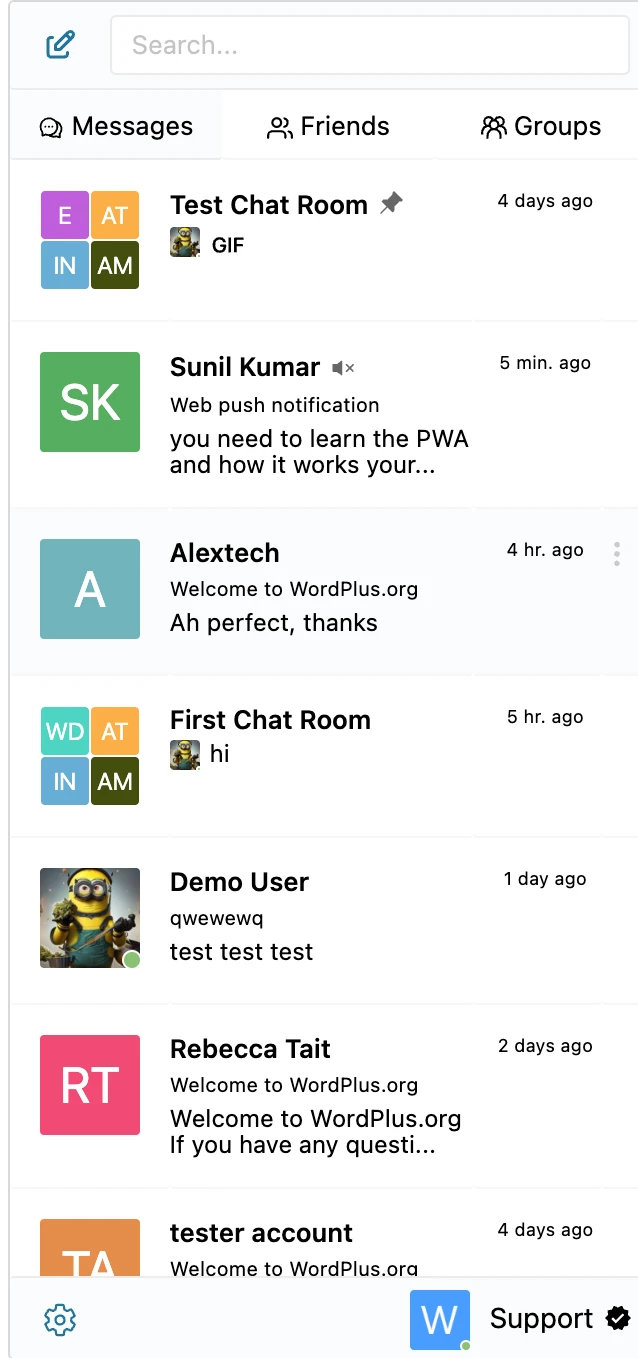
The Better Messages conversations list renders each conversation with an avatar on the left, 40px by default. Three variants can appear in that slot, and a size override has to cover all three:
| Element | When it appears |
|---|---|
.bm-avatar-img | a plain avatar image |
.bm-avatar-wrap | an avatar carrying a presence ring |
.bm-group-avatar | a group conversation — up to four tiles in a 2×2 grid |
All three sit inside .bm-thread-row__avatar, so one rule scales them together. The group grid is
built with repeat(2, 1fr) tracks, so its tiles resize on their own — they need no rule of their own.
Better Messages sets the avatar's width and height as an inline style, so the override needs
!important to win.
This snippet changes the avatar size. Its shape is a setting — go to
Better Messages → Settings → Appearance → Layout → Corners and move the Avatars slider.
It runs from 0% (a square) to 50% (a circle, the default) and writes the --bm-radius-avatar token.
No CSS needed.
Drop the CSS into your theme's stylesheet or the WordPress Customizer's Additional CSS.
To be able to implement this guide, you need somewhere to put custom CSS on your website. Any of these works:
- Appearance → Customize → Additional CSS in WordPress
- your child theme's
style.css - a code snippets plugin
Better Messages has no custom CSS field of its own — the one in the old Design tab was removed in 3.0, and CSS saved there was not carried over.
This raises the conversations-list avatar from 40px to 56px:
.bm-thread-row__avatar,
.bm-thread-row__avatar .bm-avatar-wrap,
.bm-thread-row__avatar .bm-avatar-img,
.bm-thread-row__avatar .bm-group-avatar {
    width: 56px !important;
    height: 56px !important;
}
Adjust the value to taste. Anything from 32px to 64px sits comfortably in the row. Past that the row grows to fit, so check the list still looks right at your chosen size.

See also#
- Customization — what can be changed without CSS