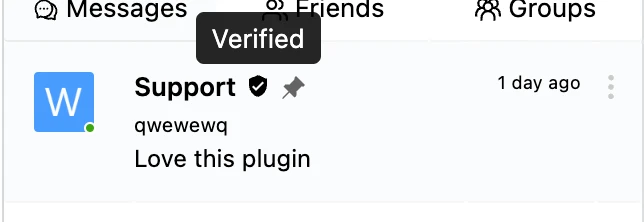
Replacing verified icon
Better Messages renders a small check badge next to the names of verified users (see Verified User Badges). The badge is rendered as an inline SVG inside a <span class="bm-name-verified"> element so it can be themed entirely from CSS — no PHP filter required.
This snippet replaces the default checkmark icon with a shield icon. The technique works for any custom SVG: hide the default <svg> child via display: none, then draw your own icon with a CSS ::before pseudo-element that uses a data-URL content. The same selectors apply across light and dark mode.
To be able to implement this guide, you need somewhere to put custom CSS on your website. Any of these works:
- Appearance → Customize → Additional CSS in WordPress
- your child theme's
style.css - a code snippets plugin
Better Messages has no custom CSS field of its own — the one in the old Design tab was removed in 3.0, and CSS saved there was not carried over.
span.bm-name-verified{
	height: 16px;
}
span.bm-name-verified svg{
	display: none;
}
span.bm-name-verified::before{
	content: url("data:image/svg+xml,%3Csvg stroke='currentColor' fill='currentColor' stroke-width='0' viewBox='0 0 24 24' height='16px' width='16px' xmlns='http://www.w3.org/2000/svg'%3E%3Cpath fill='none' d='M0 0h24v24H0z'%3E%3C/path%3E%3Cpath d='M12 1L3 5v6c0 5.55 3.84 10.74 9 12 5.16-1.26 9-6.45 9-12V5l-9-4zm-2 16l-4-4 1.41-1.41L10 14.17l6.59-6.59L18 9l-8 8z'%3E%3C/path%3E%3C/svg%3E");
}
The default badge is 16px square. Change the three 16px values together if you want a different
size — the height on the span keeps the row from shifting when the SVG is swapped out.