Customize the radius of the mobile chat button
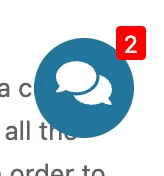
On mobile, Better Messages can show a floating chat button at the bottom of the screen that opens
the messenger when tapped. It is a 50×50px button, and its corner radius comes from the
--bm-radius-mini-chat-button token.
Change it from the settings#
No CSS needed. Go to Better Messages → Settings → Appearance → Mini widgets → Widget bar and move the Bar and tab corners slider. It runs from 0px (a square) to 30px, and defaults to 8px.
Two neighbouring controls are worth knowing about while you are there, both under Appearance → Mobile → Floating chat button:
- Floating chat button — the switch that shows the button at all (off by default)
- Side — left or right
- Distance from the bottom — the
--bm-mobile-button-bottomtoken, 20px by default
When you still need CSS#
That slider is shared: it also rounds the mini widget bar and its tabs. If you want the mobile button to differ from the rest of them, override the button on its own.
The button has the DOM id #bm-mini-mobile-open.
To be able to implement this guide, you need somewhere to put custom CSS on your website. Any of these works:
- Appearance → Customize → Additional CSS in WordPress
- your child theme's
style.css - a code snippets plugin
Better Messages has no custom CSS field of its own — the one in the old Design tab was removed in 3.0, and CSS saved there was not carried over.
#bm-mini-mobile-open {
    border-radius: 25px !important;
}
Use 0 for hard corners, 12px to 25px for a rounded square, or 50% for a full circle.
Example of rounded mobile chat button#

See also#
- Mini chat widgets — the widget bar this button belongs to
- Mobile-optimized chat — the rest of the mobile behavior