Per-thread "fake users" (participant personas)
To be able to implement this guide, you need to learn how to insert PHP snippets to your website.
You can find guide here: WP Beginner
Sometimes the WordPress user who actually receives a chat is not the identity the other side should see. Examples:
- A buyer messages an "Agent CPT" that isn't linked to a real WP user — the chat is routed to a generic fallback account, but the buyer should still see the agent's name and profile photo.
- A WooCommerce vendor's store-front persona should be shown to customers instead of the WP user behind the store.
- A single fallback account routes inquiries for several different agent CPTs at once — each thread needs to show its own persona, all in the same conversation list.
Better Messages exposes a per-thread participant override map for exactly this case. Same WP user, different identity in different threads — at the same time.
What it looks like#
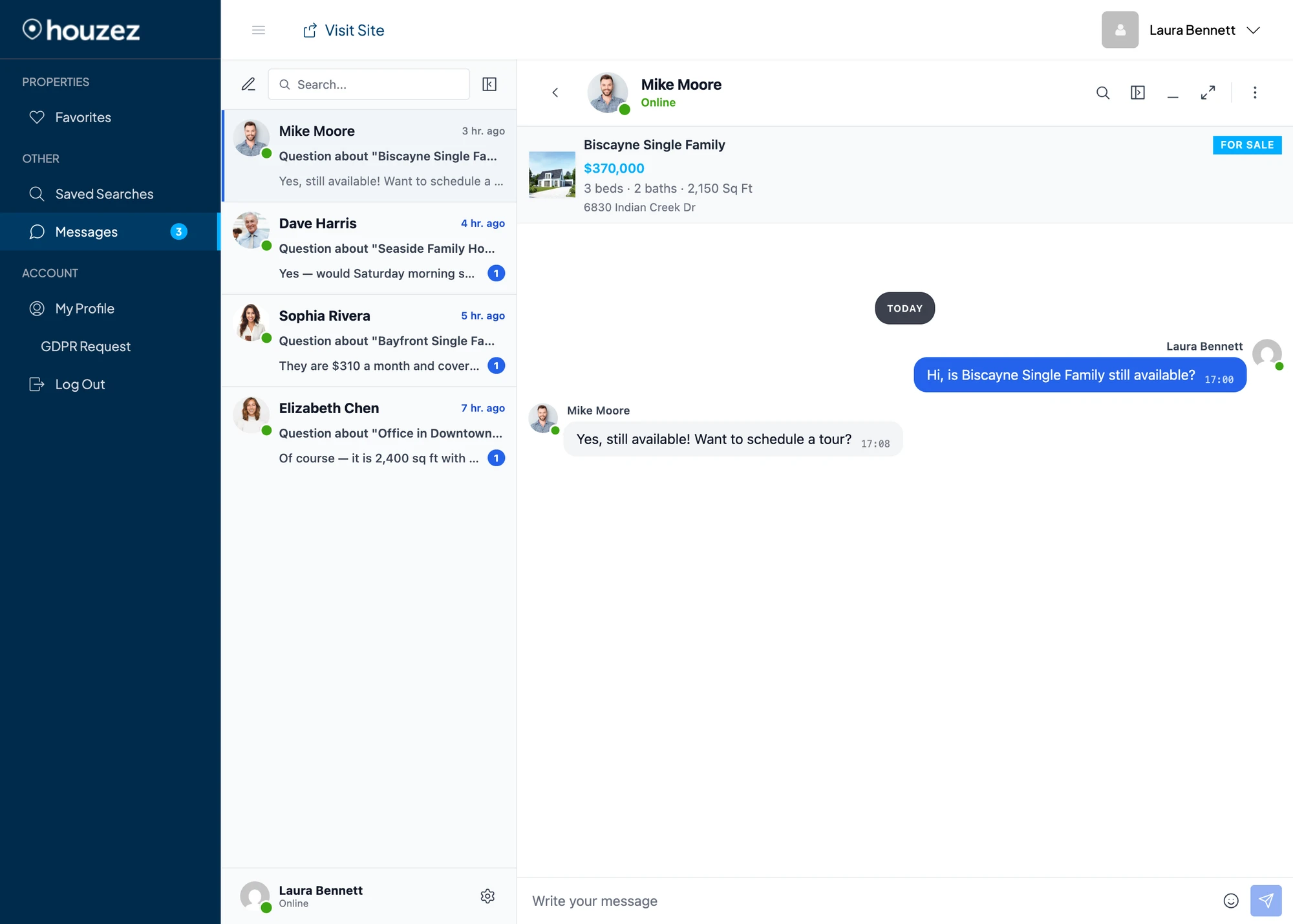
The buyer's view of two unrelated threads that are both routed to the same underlying WordPress account. Each thread shows its own persona — name, profile photo and clickable profile URL — both in the sidebar and in the message sender chips. The Houzez integration is used here as an example, but the pattern is reusable from any addon.
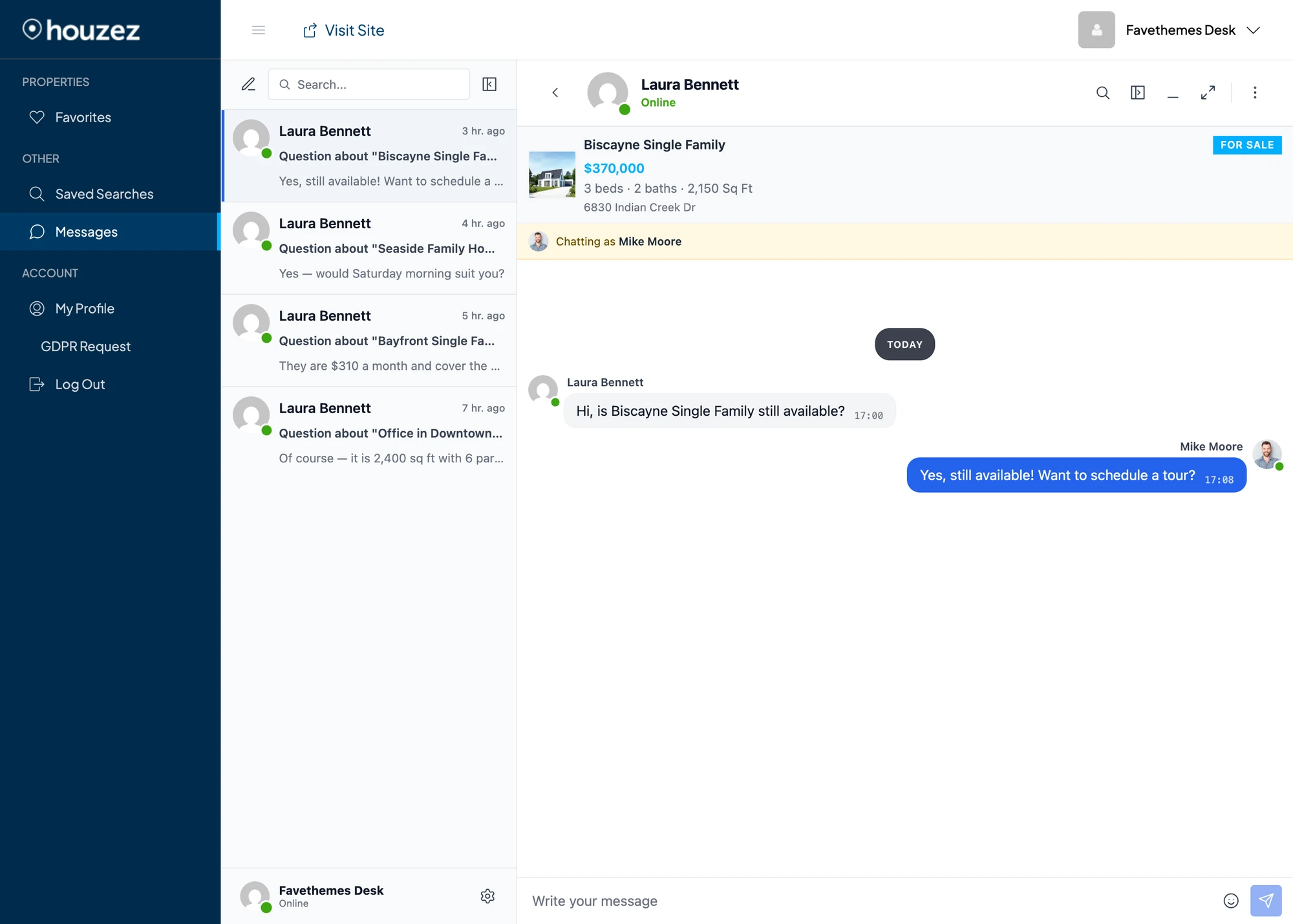
The agent side (the WordPress user the chats are actually routed to) sees the buyer's real identity in the conversation header, sees their own WordPress profile in their bottom-left widget (no leak into self-view), and gets a yellow "Chatting as Mike Moore" banner so they know which persona they are representing for this conversation:

How it works#
Add an optional participantOverrides map to the thread payload via the better_messages_rest_thread_item filter:
$thread_item['participantOverrides'] = array(
    (string) $user_id => array(
        'name'   => 'Display Name',           // optional
        'avatar' => 'https://…/photo.png',    // optional
        'url'    => 'https://…/profile/',     // optional
    ),
);
Keys are stringified user IDs (positive WP IDs and negative guest IDs both work). All fields are optional — omit any field and the participant's real record fills the gap.
The map travels with the thread payload across every transport — REST, AJAX polling and WebSocket relays all build their payloads through the same filter, so the override flows everywhere automatically. That holds as written for maps where every participant sees the same mask, like the personas on this page. If your map depends on who is looking, one extra rule applies — see Per-viewer override maps below.
On the frontend, every surface that renders a participant inside a thread (conversation header, sidebar item, message sender chip, reactions modal, mini-chat-head widget, call screen, info panel, toasts, etc.) merges the override on top of the real user record at render time. Surfaces that step outside the thread context — the current-user widget, mention picker, user search, "Add participant" modal, user profile popup — deliberately keep using the real record, so the override never leaks into self-view or non-thread contexts.
Recipe#
<?php
add_filter( 'better_messages_rest_thread_item', 'my_addon_persona_overrides', 10, 5 );

function my_addon_persona_overrides( $thread_item, $thread_id, $thread_type, $include_personal, $user_id ) {
    if ( $thread_type !== 'thread' ) {
        return $thread_item;
    }

    // 1) Decide which participant in this thread should wear a persona.
    //    Resolve it from your own data (CPT meta, vendor settings, etc.).
    $persona = my_addon_resolve_persona_for_thread( $thread_id );
    if ( ! $persona ) {
        return $thread_item;
    }

    // 2) Only override participants who are actually in this thread.
    $participants = isset( $thread_item['participants'] )
        ? array_map( 'intval', $thread_item['participants'] )
        : array();

    if ( ! in_array( $persona['user_id'], $participants, true ) ) {
        return $thread_item;
    }

    // 3) Emit the override.
    if ( ! isset( $thread_item['participantOverrides'] ) || ! is_array( $thread_item['participantOverrides'] ) ) {
        $thread_item['participantOverrides'] = array();
    }

    $thread_item['participantOverrides'][ (string) $persona['user_id'] ] = array(
        'name'   => $persona['name'],
        'avatar' => $persona['avatar'],
        'url'    => $persona['url'],
    );

    return $thread_item;
}
Three principles#
1. Snapshot the persona on first resolve#
Resolve once from your data sources, then cache the result in thread meta so subsequent renders are stable even if the upstream data drifts later:
$cached = Better_Messages()->functions->get_thread_meta( $thread_id, 'my_persona_user_id' );

if ( $cached ) {
    // use cached values
} else {
    // resolve fresh
    Better_Messages()->functions->update_thread_meta( $thread_id, 'my_persona_user_id', $resolved_user_id );
    // …same for any other persona fields you need (CPT post id, type, etc.)
}
This protects your buyers and agents from a confusing experience if a CPT title gets edited, a vendor changes their store name, or the linked WP account changes after the conversation already started.
2. Only override participants who are in the thread#
The participants array on the thread item is your source of truth. Don't add participantOverrides entries for user IDs that aren't part of the thread — they would never be rendered anyway, but you'd be putting noise into every payload (and in WebSocket pushes that fan out to many recipients).
3. Don't double-override#
If you also want the persona to apply to that user in non-thread contexts (user search, mention picker, "@" autocomplete) — meaning the user always appears as the persona, everywhere — additionally hook better_messages_rest_user_item and rewrite name / avatar / url there. The per-thread override and the global one compose cleanly.
Do not implement ad-hoc "global override based on last thread we saw" tricks. That's exactly the kind of fragile global-state pattern the per-thread mechanism replaces, and it breaks the moment the same user appears in two threads with different personas.
Per-viewer override maps#
The personas above are viewer-independent — every participant sees the same mask, so the map can safely ride on every payload. If your map must differ depending on the viewer (say, user A sees a participant under an alias while user B sees the real identity), you need to know that the filter runs in two kinds of builds:
- Per-recipient builds — everything a client fetches itself over REST or AJAX polling, plus targeted realtime events such as a participant being added to a thread. Here
$include_personalistrueand$user_idis the viewer the payload is built for. - Broadcast builds — the new-message realtime push and "thread info changed" events build the thread payload once, in the context of the user who triggered the event, with
$include_personal = false, and fan the same payload out to every recipient. On the receiving side the pushed thread is merged into the viewer's locally cached thread, and any key absent from the push keeps its cached value.
The rule that makes per-viewer maps consistent everywhere: emit viewer-dependent entries only when $include_personal is true, and leave the key untouched when it is false. Broadcast payloads then carry no override map at all, each client keeps the map that was built specifically for its viewer, and live pushes never leak one viewer's map to another:
function my_addon_viewer_dependent_overrides( $thread_item, $thread_id, $thread_type, $include_personal, $user_id ) {
    if ( ! $include_personal ) {
        return $thread_item;
    }

    // $user_id is the viewer this payload is built for — emit the map for them.
    // …

    return $thread_item;
}
Viewer-independent maps should not be gated this way — emitting them on broadcast builds too is what lets a brand-new thread render masked immediately on the receiving side. The same distinction applies to threadInfo: a banner whose content depends on the viewer belongs behind the $include_personal check.
For a complete worked example — avatars that depend on a per-viewer permission, switching live when it changes — see Permission-based avatars below.
Permission-based avatars (protected photos)#
A common membership / community requirement: some members' photos are protected — the avatar shown next to a conversation must be the real photo only for viewers the owner granted access to, a placeholder for everyone else, and it must switch live in both directions when the permission changes. The constraint that makes this a per-viewer problem: the protected photo URL must never be present in any payload delivered to a viewer without permission — not in REST responses, not in page data, not in realtime pushes, not in caches.
Three hooks compose into a complete solution.
Layer 1 — the global user record is always the placeholder#
better_messages_rest_user_item builds the user record used by everything that is not thread-scoped — including profile payloads that are cached and fanned out to many viewers on the WebSocket version. Setting the placeholder here unconditionally guarantees the protected URL can never enter a shared payload or cache:
add_filter( 'better_messages_rest_user_item', function ( $item, $user_id, $include_personal ) {
    if ( my_addon_is_protected( $user_id ) ) {
        $item['avatar'] = my_addon_placeholder_url();
    }

    return $item;
}, 20, 3 );
Layer 2 — the per-thread override carries the permission-checked photo#
In per-recipient builds ($include_personal === true) the $user_id argument is the viewer, so the filter can apply that viewer's permission. Two rules:
- Never touch the key in broadcast builds (
$include_personal === false) — exactly the per-viewer rule above. - Always set the key in per-recipient builds, including the "no permission" case. The deny entry is what overwrites a previously granted photo in the viewer's local cache when access is withdrawn — if you leave the key absent on deny, the old photo survives in the client cache and keeps rendering.
add_filter( 'better_messages_rest_thread_item', function ( $thread_item, $thread_id, $thread_type, $include_personal, $user_id ) {
    if ( ! $include_personal || (int) $user_id === 0 ) {
        return $thread_item;
    }

    $viewer_id    = (int) $user_id;
    $participants = isset( $thread_item['participants'] )
        ? array_map( 'intval', (array) $thread_item['participants'] )
        : array();

    foreach ( $participants as $participant_id ) {
        if ( $participant_id === $viewer_id ) continue;
        if ( ! my_addon_is_protected( $participant_id ) ) continue;

        if ( ! isset( $thread_item['participantOverrides'] ) || ! is_array( $thread_item['participantOverrides'] ) ) {
            $thread_item['participantOverrides'] = array();
        }

        $thread_item['participantOverrides'][ (string) $participant_id ] = array(
            'avatar' => my_addon_viewer_can_see( $viewer_id, $participant_id )
                ? my_addon_real_photo_url( $participant_id )
                : my_addon_placeholder_url(),
        );
    }

    return $thread_item;
}, 20, 5 );
Layer 3 — refresh the affected viewer when a permission changes#
Better_Messages()->functions->thread_updated_for_user( $thread_id, $viewer_id ) rebuilds the thread payload for that one viewer ($include_personal = true, $user_id = the viewer) and delivers it:
- WebSocket version — pushed to the viewer's open tabs immediately. The avatar swaps in place, no reload.
- Free (AJAX) version — the call also bumps the viewer's thread timestamp, so the change is picked up on the next polling cycle.
Call it for every thread the two members share whenever your grant / withdraw logic runs:
function my_addon_photo_permission_changed( $owner_id, $viewer_id ) {
    $thread_ids = Better_Messages()->functions->find_existing_threads( $owner_id, $viewer_id );

    foreach ( $thread_ids as $thread_id ) {
        Better_Messages()->functions->thread_updated_for_user( (int) $thread_id, (int) $viewer_id );
    }
}
find_existing_threads() returns the private 1:1 threads between two users. If protected members can also appear in group threads you track yourself, call thread_updated_for_user() with those thread IDs as well.
The pattern works on both the free and the WebSocket version. Every thread-scoped surface listed in How it works consumes the override. Surfaces outside a thread context (the Users tab, friends list, user search) render the Layer 1 placeholder — the protected photo is never shown there, by design.
What this guarantees#
- A viewer without permission receives the placeholder in every payload — initial page data, REST re-fetches, polling responses and realtime pushes. The protected URL is absent from all of them.
- Broadcast pushes (new message, thread info changed) carry no override map at all. Each client keeps the map that was built for its own viewer.
- Granting access swaps the avatar live in the conversation list, chat header, message sender chips, mini chats, call screens and modals. Withdrawing swaps it back the same way.
Optional: a "Chatting as X" banner#
If a thread is routed to a generic fallback account, you'll want to tell the receiver that the other side sees a different identity. Append HTML to $thread_item['threadInfo'] only when the viewer is on the persona side and is not the persona's primary linked user:
if ( $viewer_is_on_persona_side && $viewer_id !== $persona_primary_user_id ) {
    $banner = '<div class="my-addon-persona-banner">'
        . '<img src="' . esc_url( $persona['avatar'] ) . '" alt="" /> '
        . sprintf( esc_html__( 'Chatting as %s', 'my-addon' ), '<strong>' . esc_html( $persona['name'] ) . '</strong>' )
        . '</div>';

    $thread_item['threadInfo'] = ( $thread_item['threadInfo'] ?? '' ) . $banner;
}
threadInfo is rendered above the conversation pane and is per-viewer — the filter receives the viewer's $user_id, so a banner you set there is correctly scoped to the receiver who needs it.
Reference implementations#
Two integrations inside the plugin use this exact pattern and are the reference implementations:
addons/houzez.php— Houzez agent CPTs, including the case where the agent CPT has no linked WordPress user and the chat is silently routed to the property's post author.addons/realhomes.php— RealHomes agent and agency CPTs, same routing behavior, plus the agency case (an agency CPT routed to its post author, with the agency name and logo shown to the buyer).
Both share the same method names so the pattern is easy to copy:
thread_item()— the filter callbackresolve_thread_persona()— snapshots persona post id and type to thread metaresolve_thread_routed_user()— snapshots the actual routed user idapply_realtor_to_user_item()(andresolve_realtor_avatar_url()in Houzez) — build the override valuespersona_banner_html()— the "Chatting as X" banner
Testing checklist#
When adding a persona to a new integration:
- Open a thread that should have the persona — header, sidebar item and message sender chip all show the persona name, avatar, and clickable profile URL.
- The routed receiver opens their own dashboard — their bottom-left profile widget shows their real WordPress identity (the override does not leak into self-view).
- Open a second thread routed to the same WP user but with a different persona — both threads in the sidebar must show their own persona side-by-side. No "last-write-wins" effects.
- Send a message from each side over WebSocket — the inbound payload carries
thread.participantOverridesand the receiving UI updates without a refresh. - Trash the persona's source post (CPT, vendor, etc.) — the override is dropped silently and the thread falls back to the routed user's real identity.
- Reload the page — the override survives because it's snapshotted in thread meta and re-emitted on every fetch.
Related#
better_messages_rest_thread_item— the filter where you write the override.better_messages_rest_user_item— the global per-user filter. Use it in addition toparticipantOverrideswhen you want a persona to apply everywhere, not just inside one thread.