Voice and Video Messages Add-on for WordPress Chat
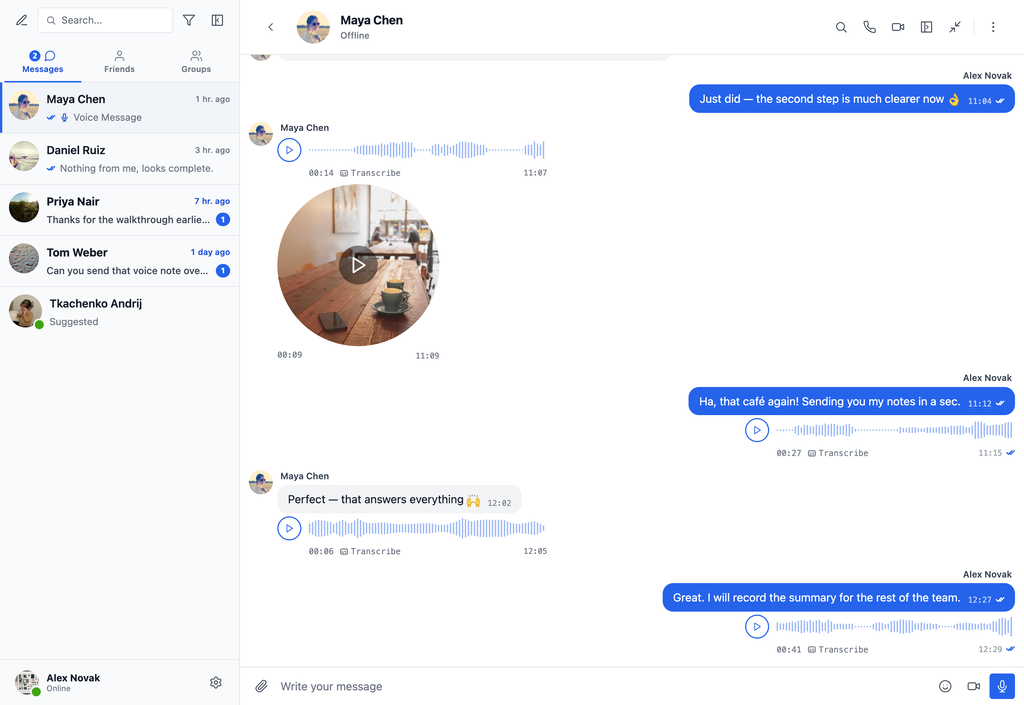
Voice and Video Messages is an addon for Better Messages that lets people record and send voice messages and short video messages in conversations.
Voice messages work on every Better Messages version the add-on supports. Video messages appear only when the site runs Better Messages 3.0 or newer — on earlier versions the add-on offers the microphone alone and nothing else changes.
How it works#
Voice messages#
A microphone button appears in the message input area. Users can press and hold (or click to toggle) to record a voice message, then send it like any other message. Recordings are captured as compact Opus audio and stored on your own hosting, so they take very little space. AI-powered transcription via Better Messages Cloud AI or OpenAI can automatically generate text transcripts.
Video messages#
While the message input is empty, a camera button sits next to the microphone. Pressing it opens a live preview above the composer, in whichever shape the site is configured to use, and starts recording as soon as the camera is ready — there is no separate start press. A progress ring fills around the rim toward the maximum duration, and recording stops on its own when the limit is reached.
Stopping turns the same circle into a replay preview with send and discard buttons, so the sender always sees the clip before it goes out. Camera and microphone can be picked from dropdowns on the recorder, and the choice is remembered for next time.
Received video messages play in place: click one to play or pause, watch the progress ring travel around its rim, and drag around that rim to scrub. If the conversation is scrolled away or switched, playback continues as audio in the player bar at the top of the messenger.
On phones#
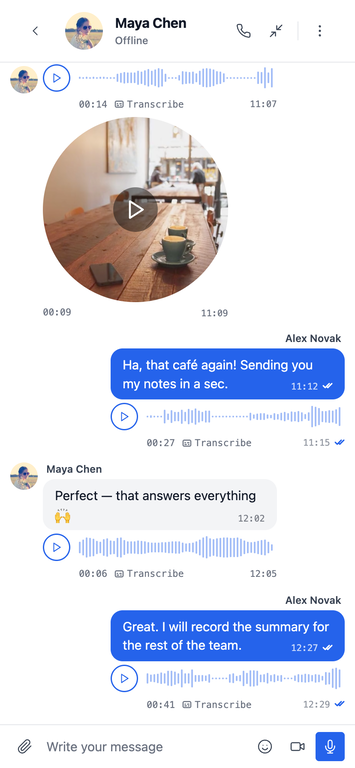
Both recorders work the same way on mobile, with the microphone and camera buttons in the same place in the composer.
Key capabilities#
- Record and send voice messages directly in conversations
- Record and send video messages, shown round or square to match your site
- Microphone and camera buttons in the message input area
- Compact Opus audio stored on your own server
- Configurable maximum recording duration, separately for voice and video
- Round or square shape for video messages
- Auto-deletion of voice and video messages after a specified number of days, configured independently
- Role-based restrictions, separately for voice and video
- AI-powered transcription of voice messages via Better Messages Cloud AI or OpenAI
- Playback controls, including scrubbing and a persistent player bar
- Works in all conversation types — private, group conversations and chat rooms
- Works on both the free and the WebSocket version
How to install#
Install the Voice and Video Messages addon through the WordPress plugins screen or upload the addon files to your /wp-content/plugins/ directory. Activate the addon through the Plugins screen.
Settings#
The add-on adds two settings tabs, one for each message type.
Voice Messages#
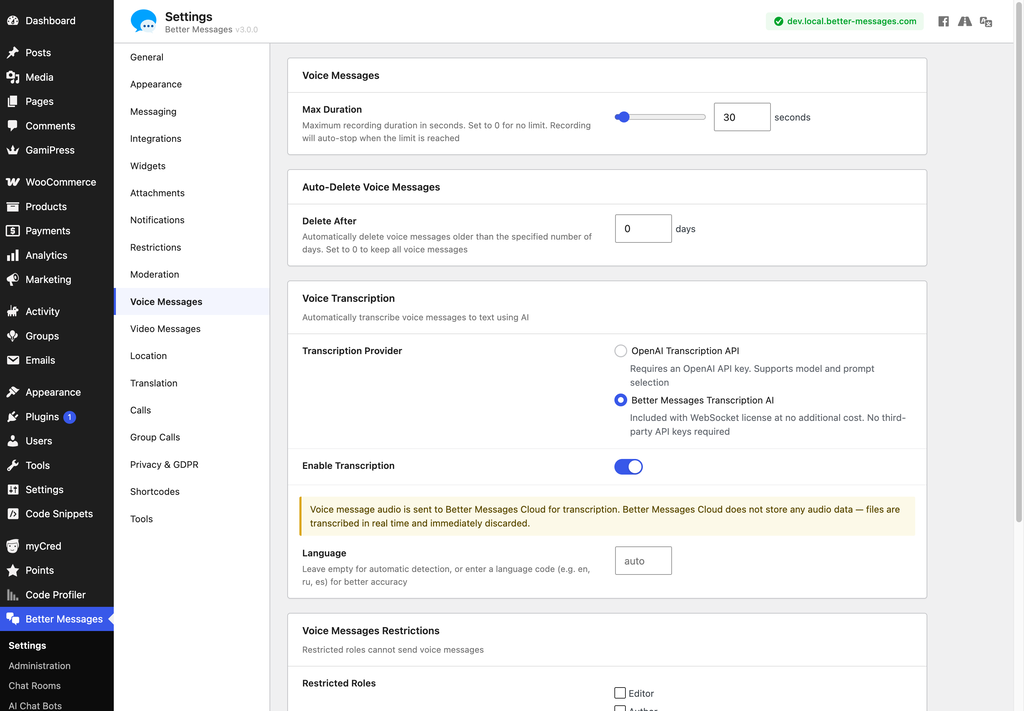
Configure at WP Admin → Better Messages → Settings → Voice Messages.
Max Duration#
Set the maximum recording duration in seconds. During recording, a timer displays the current and maximum time. The timer turns red when 10 seconds or less remain, and recording automatically stops when the limit is reached.
Auto-Delete Voice Messages#
Delete After — automatically delete voice messages after this many days. Set to 0 to disable auto-deletion. Deletion Mode then offers two:
- Remove completely — deletes the message from the conversation
- Replace with "Voice message expired" notice — removes the audio file but keeps the message, showing that notice in its place
Voice Messages Restrictions#
Restricted Roles — the roles that may not send voice messages. A restricted role does not see the microphone button in the message input area.
Voice Transcription#
AI-powered transcription turns a voice message into text. Two providers are available:
- Better Messages Transcription AI — Included with the WebSocket license at no additional cost. No third-party API keys required. Supports 99+ languages with automatic detection. See Better Messages Cloud AI for details.
- OpenAI Transcription API — Requires an OpenAI API key configured in Integrations → AI Services. Supports model and prompt selection.
Picking a provider is what makes transcription possible on the site. What happens with it is set by the two switches below it:
- Enable Transcription — puts a Transcribe button on voice messages, so anyone in the conversation can turn a recording into text when they want to read it instead of listening.
- Auto Transcription — transcribes every voice message the moment it is sent, without waiting for anyone to press anything. The bubble shows Transcribing… and then the text. Every recording goes to the transcription provider, so expect usage to rise with the number of voice messages sent.
AI chat bots read voice messages through this provider and do not need either switch — a bot is handed the transcript because it cannot listen. Each bot has its own Voice Input switch instead.
Video Messages#
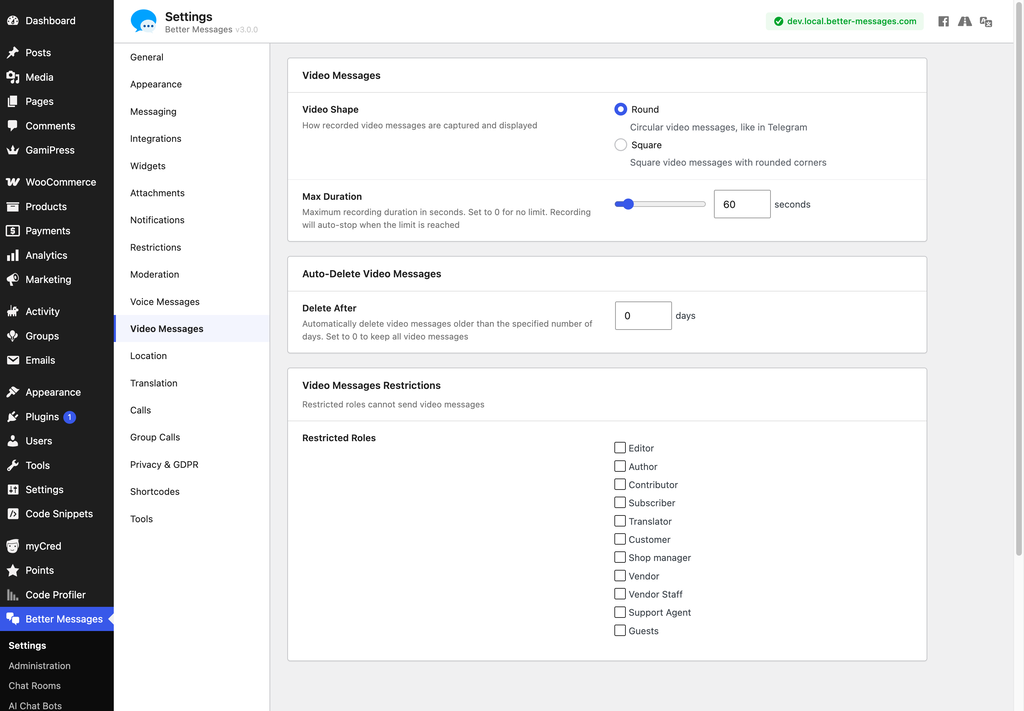
Configure at WP Admin → Better Messages → Settings → Video Messages. The tab appears on Better Messages 3.0 and newer.
Video Shape#
Choose how video messages are captured and displayed across the site:
- Round — circular video messages, like in Telegram
- Square — square video messages with rounded corners
The recorded file always keeps the camera's own aspect ratio. The shape is a presentation crop, so switching it changes how existing clips are displayed as well.
Max Duration#
Maximum recording duration in seconds, up to 600. Set to 0 for no limit. Recording stops automatically when the limit is reached.
Auto-Delete Video Messages#
Delete After — delete video messages after this many days, independently of the voice setting. Set to 0 to keep them all. Deletion Mode offers the same two:
- Remove completely — deletes the message from the conversation
- Replace with "Video message expired" notice — removes the video file but keeps the message
Video Messages Restrictions#
Restricted Roles — the roles that may not send video messages. A restricted role does not see the camera button. This is a separate list from the voice restrictions, so a role can be allowed one and not the other.
Troubleshooting#
Incorrect response MIME type error#
On some servers, you may see the following error when trying to record a voice message:
Error: TypeError: Failed to execute 'compile' on 'WebAssembly': Incorrect response MIME type. Expected 'application/wasm'.
There are two ways to fix this:
-
Configure your server to serve the WASM file at
https://yourdomain.com/wp-content/plugins/bp-better-messages-voice-messages/assets/js/encoder.wasmwith theContent-Type: application/wasmheader. -
Add this line to your website's
wp-config.phpfile:define('BETTER_MESSAGES_WASM_FALLBACK', true);
After applying either fix, voice message recording will work correctly.
The camera button never appears#
Check each of these in turn:
- The site runs Better Messages 3.0 or newer — video messages are unavailable on earlier versions
- The message input is empty, since the camera button shares its slot with the send button
- The current user's role is not ticked under Video Messages → Video Messages Restrictions → Restricted Roles
- The page is served over HTTPS, which browsers require before granting camera access
See also#
- Better Messages Cloud AI — transcription for voice messages, included with the WebSocket license
- Audio calls — live conversation, as opposed to recorded messages
- Auto-delete messages — site-wide retention, separate from the add-on's own expiry
- File sharing — attachments, camera capture and uploads
- Pricing — how the add-on relates to the free and WebSocket versions