Chat Rooms
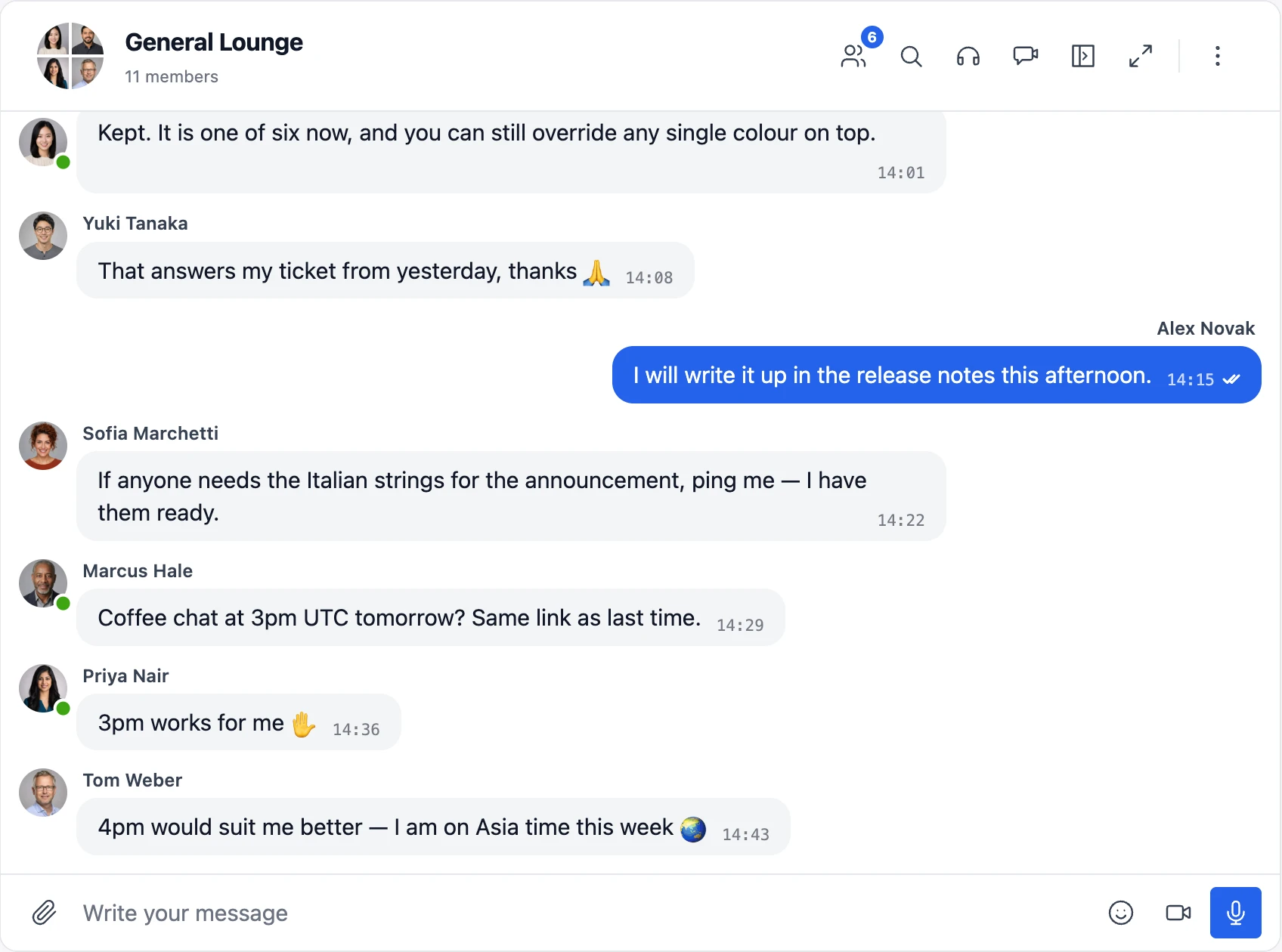
A chat room is a persistent, real-time group conversation that lives at a fixed URL on your site. Anyone with access opens the page and steps into the existing room with its full history, rather than starting a new thread. Members come and go. The room stays. It is the difference between a Slack channel and a one-off DM.
Chat rooms are the right shape for topic-based community discussion, live event lobbies, course cohorts, customer support drop-ins, team backrooms, alumni networks, fan communities, and anything else where the conversation needs to outlive any single member.
How it works#
Each chat room is a WordPress custom post type (bpbm-chat). You create it in WP Admin → Better Messages → Chat Rooms, configure who can read it and who can reply, and embed it on any page, post, or page-builder block with a single shortcode:
[better_messages_chat_room id="123"]
When a logged-in user visits that page they see the running conversation immediately. Messages they post appear instantly to everyone else viewing the same room (WebSocket version) or within the next polling cycle (free version). Guests can be allowed to read, allowed to participate, or kept out entirely — per room.
The room itself has no public URL — it always renders inside a page or post you control via the shortcode. Embed the same room on the homepage for guests, on a members-only page behind a membership plugin, on a course-cohort page, or inside a BuddyPress group — the conversation, participants, and history are shared across every embed.
Chat room types#
The first setting of every chat room selects how participation works:
Regular chat room — the classic mode. Users join the room and stay participants until they leave (or are removed), with unread counters, email and push notifications, auto-join, and auto-remove options. Membership is stored, so members see the room in their inbox and other participants see them in the list whether they are currently online or not.
Presence-based chat room — participants are only the users who currently have the room open. Closing the tab or navigating away removes them from the room within seconds, exactly like classic web chat rooms. Nothing is stored in the participants table:
- There is no Join button — access is controlled by the Can Read and Can Reply role columns in the Role Based Access panel
- Roles allowed to reply can always read, chat moderators and admins always have access
- The participants list, header count, and online users sidebar always show who is really in the room right now
- Message delivery statuses reflect the room presence — a message is marked as seen when other users are in the room
- No unread counters, no email or push notifications — the room exists only while you are looking at it
- Message history is still saved and shown to everyone who opens the room, and Automatic message cleanup works as usual
- Group video and audio calls are available to everyone allowed to reply
- Guests can participate when the bm-guest role is enabled in Can Reply
Join-related options (auto-join, auto-remove inactive participants, only-joined-can-read, inbox visibility, notifications) do not apply to presence-based rooms and are hidden in the editor.
Use presence-based rooms for live event lobbies, drop-in support rooms, "who is around right now" community hangouts — anywhere showing somebody as being in the room after they left would be misleading.
Presence-based chat rooms require the WebSocket version — live presence tracking is powered by the realtime server. Switching an existing room to presence-based removes all of its stored participants.
Key capabilities#
Access & visibility
- Two room types: regular with persistent membership, or presence-based where participants are only the users currently in the room (WebSocket version)
- Public, gated, or invite-only rooms — controlled per room via the Role Based Access panel
- Optional guest entry: unregistered visitors can read, reply, or both
- Per-role permissions for Can Join, Can Reply, and Auto Add
- Hide a room from the user's inbox if it should only appear at the embed location
- Close a room with one toggle to freeze it while keeping history visible
Conversation & presence
- No participant cap
- Online users sidebar showing who is currently in the room
- Typing, recording, and uploading indicators (WebSocket version)
- Read receipts, mentions, replies, edit/delete/forward
- Full text search across all messages in a room
- Pinned messages and pinned conversations
Media & content
- File sharing with resumable uploads and direct-link protection
- Emoji selector, sticker packs, GIPHY / Klipy GIFs
- Embedded link previews and oEmbed for YouTube, Vimeo, Spotify, SoundCloud, and 20+ services
- Markdown text formatting and inline code blocks
- Voice messages (separate add-on plugin)
- Voice and video calls inside the room, 1-on-1 or group up to 32 video / 50 audio participants (WebSocket version)
- Per-room Group video calls and Group audio calls toggles — disable group calls in specific rooms while keeping them enabled site-wide (WebSocket version)
Administration
- Dedicated React admin under WP Admin → Better Messages → Chat Rooms with search, duplicate, and per-room delete
- Per-room participant management with name / login / email search
- Per-room moderators — trusted members who kick, mute, and ban participants, reply while the room is closed, and optionally add new participants from the chat interface
- Auto-join users when they visit the embed page
- Auto-remove inactive participants on a configurable cadence (details below)
- Automatic message cleanup — wipe a room on a daily or weekly schedule, or cap it at the latest N messages (details below)
- Mass messaging from WP Admin (broadcast to one or many rooms)
- Per-room moderation that inherits the site-wide pipeline — Pre-Moderation, AI Content Moderation, Bad Words Filter, and user-reported messages all apply to chat rooms by default
Embedding & navigation
- A single shortcode
[better_messages_chat_room id="123"]to drop a room onto any page, post, or page-builder block - Mini Widget tab listing every room the visitor can reach — joined or not — available on every page of the site
- The same room can be embedded on more than one page — the conversation, participants, and history are shared
Admin management#
Chat rooms have a dedicated administration page at WP Admin → Better Messages → Chat Rooms where administrators can:
- Create, edit, and delete chat rooms
- Manage participants — add or remove users
- Search users by name, login, or email when adding participants

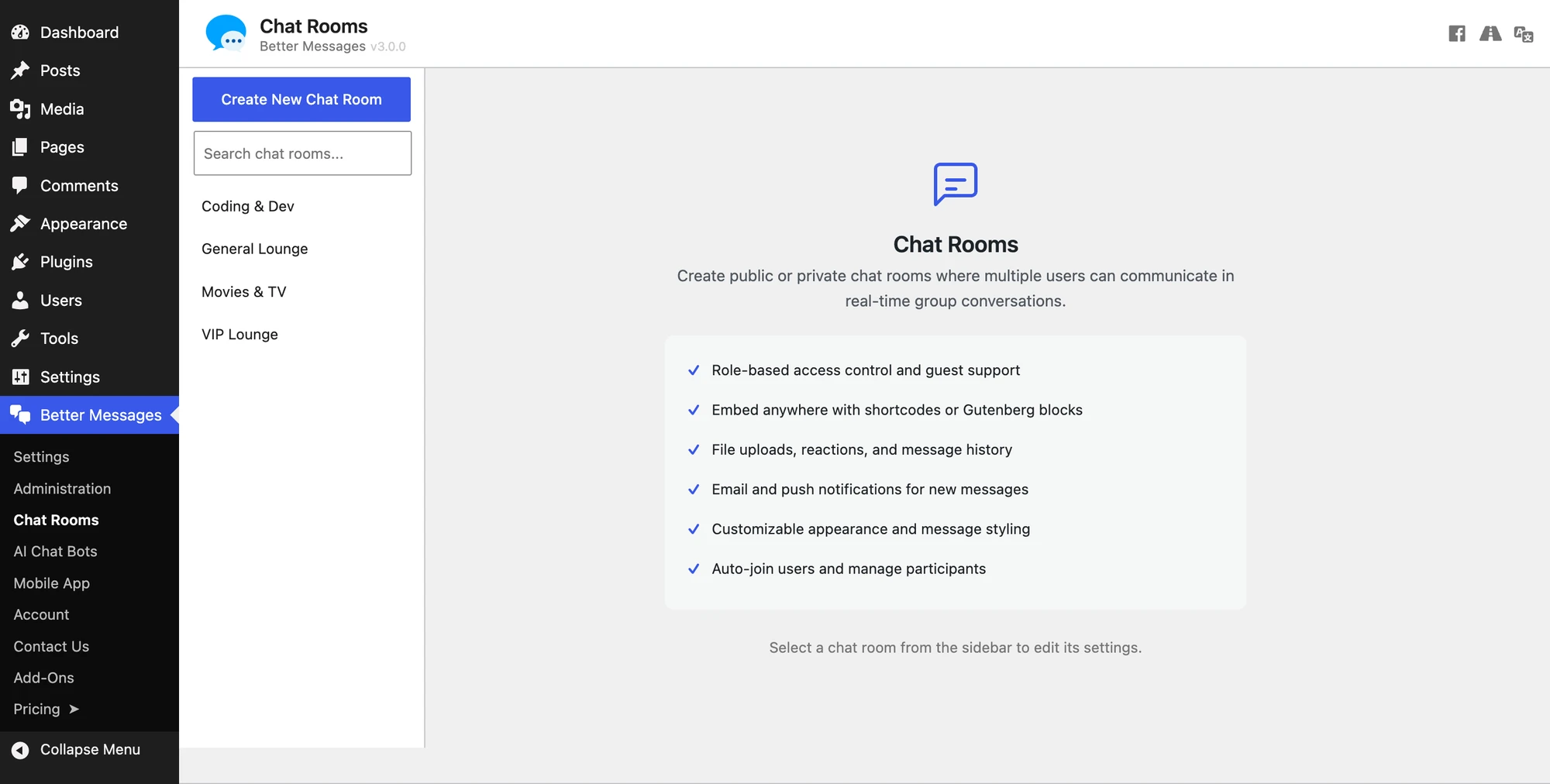
Selecting a room from the sidebar opens its editor with sections for General, Participants, Moderators, Actions, Chat Room Settings, Automatic Message Cleanup, Role Based Access, Appearance, Custom Texts, and a Danger Zone.
The Appearance section carries the two 3.0 design controls, each of which can follow the site or override it for this one room: Message design (Site default · Bubbles · Outlined · Classic) and Message side (Site default · Mine on the right · Mine on the left · All on one side). They replaced the old Messages styling: Default / Standard / Modern radio — see Modern design.

Moderators#
Every chat room can have its own moderators — regular members of your site who manage that one room without needing any WP Admin access. Assign them in the room editor: the Moderators section lists the current moderators, and the Add moderator search adds any registered user. Assigned moderators are automatically joined to the room, and the participants list marks them with a Moderator badge.
Inside their room, moderators can:
- Remove (kick) participants
- Mute or ban participants — temporarily or permanently, with the standard moderation dialogs
- Reply while the room is closed — when the Chat room is open toggle is off, moderators and site administrators can still post
- See the participants list and count even when the room hides them from regular members
- Add new participants — when the per-room Moderators can add participants setting is enabled, moderators get the Add new participants action in the chat header menu and the conversation information panel
Site administrators can always add participants to any regular chat room from the chat interface, regardless of the toggle. Promoting or demoting moderators stays with site administrators — from the room editor in WP Admin, or from the participants list in the chat.
Moderators are never removed by Auto-remove inactive participants or Auto exclude users — an appointed moderator stays in the room until an administrator removes them.
Presence-based rooms have no stored membership, so the Moderators can add participants option does not apply and is hidden for them, and there is no Kick participant action — there is no membership to remove. Moderators of a presence-based room keep their other powers: muting, banning, and replying while the room is closed. A muted user stays in the room and can keep reading but cannot write until the mute expires. A banned user loses access to the room until the ban expires. With the WebSocket version (3.0.13 or newer) this includes a browser or app that is already open: the server takes it out of the room straight away and lets it back only when the ban is lifted or expires. Restricted users are marked in the users list, so a moderator can see who is muted or banned and lift it again. Moderators themselves can be appointed for a presence-based room the same way as anywhere else — in the room editor, or from the users list in the chat.
Muting, banning and appointing moderators inside presence-based rooms requires Better Messages 2.15.26 or newer.
Invite-only rooms#
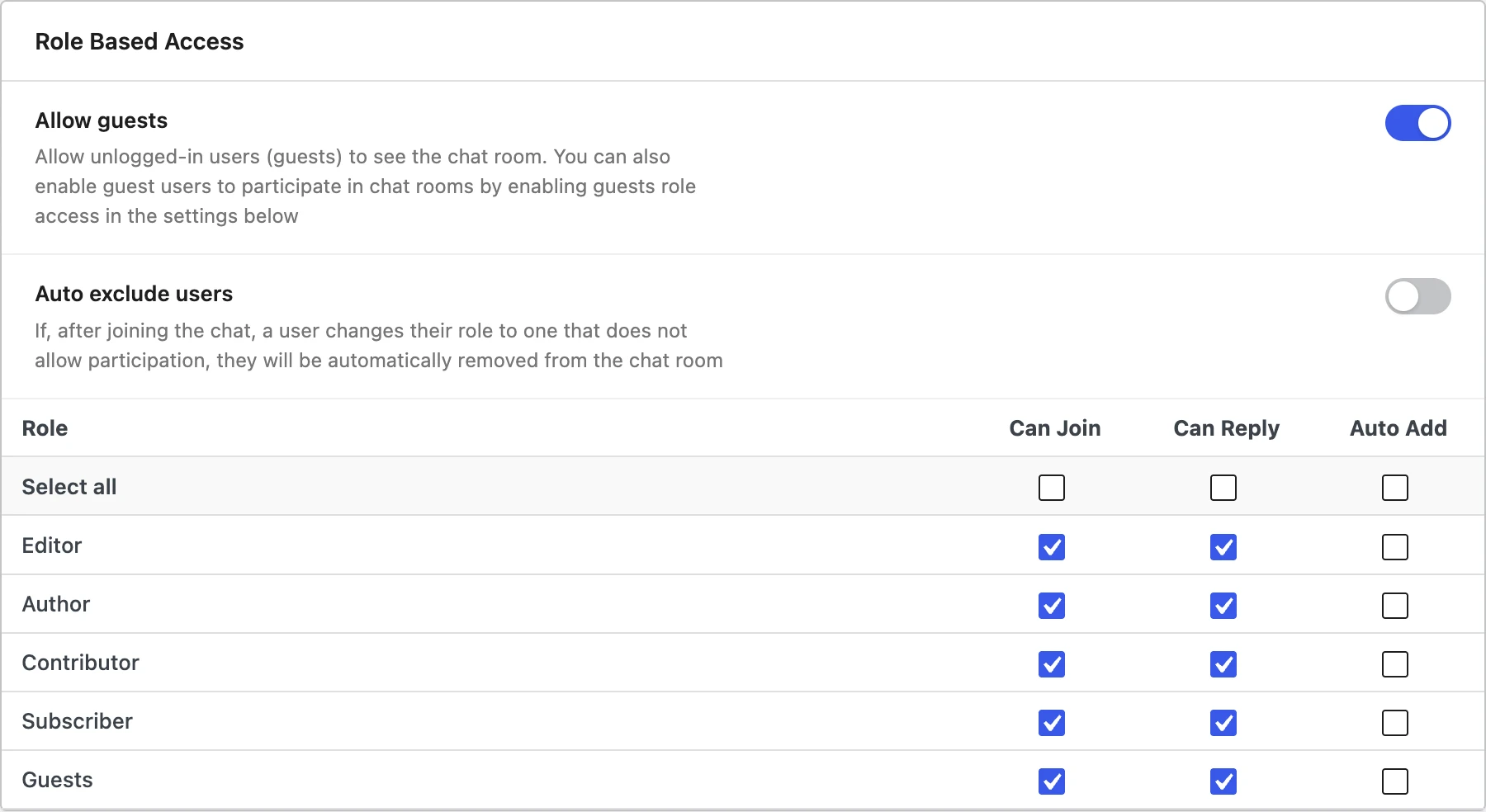
To run a room where members are added only by hand, leave every Can Join role unchecked in the Role Based Access panel and enable Moderators can add participants. Nobody can self-join — no Join button is shown — and the assigned moderators (and site administrators) build the participant list straight from the chat interface.
Keep Auto exclude users off in invite-only rooms (it is off by default) — that option removes participants whose role is not allowed to join, which in an invite-only room would be every hand-added member. Moderators themselves are always exempt.
Online users sidebar#
Chat rooms include an expandable/collapsible sidebar panel that shows currently online members. Enable it per room under WP Admin → Better Messages → Chat Rooms → Chat Room Settings by toggling Show online users list — a toggle button then appears in the chat header so users can show or hide the panel.
Once Show online users list is enabled, a second option appears:
- Open online users list by default — the sidebar opens automatically when a user enters the chat room on desktop, so everyone immediately sees who is in the room. On mobile the panel stays collapsed by default — it would cover the chat area on small screens — and the header toggle still opens it there.
The online users sidebar requires the WebSocket version — live presence data is only delivered over the realtime connection.
Participants list order#
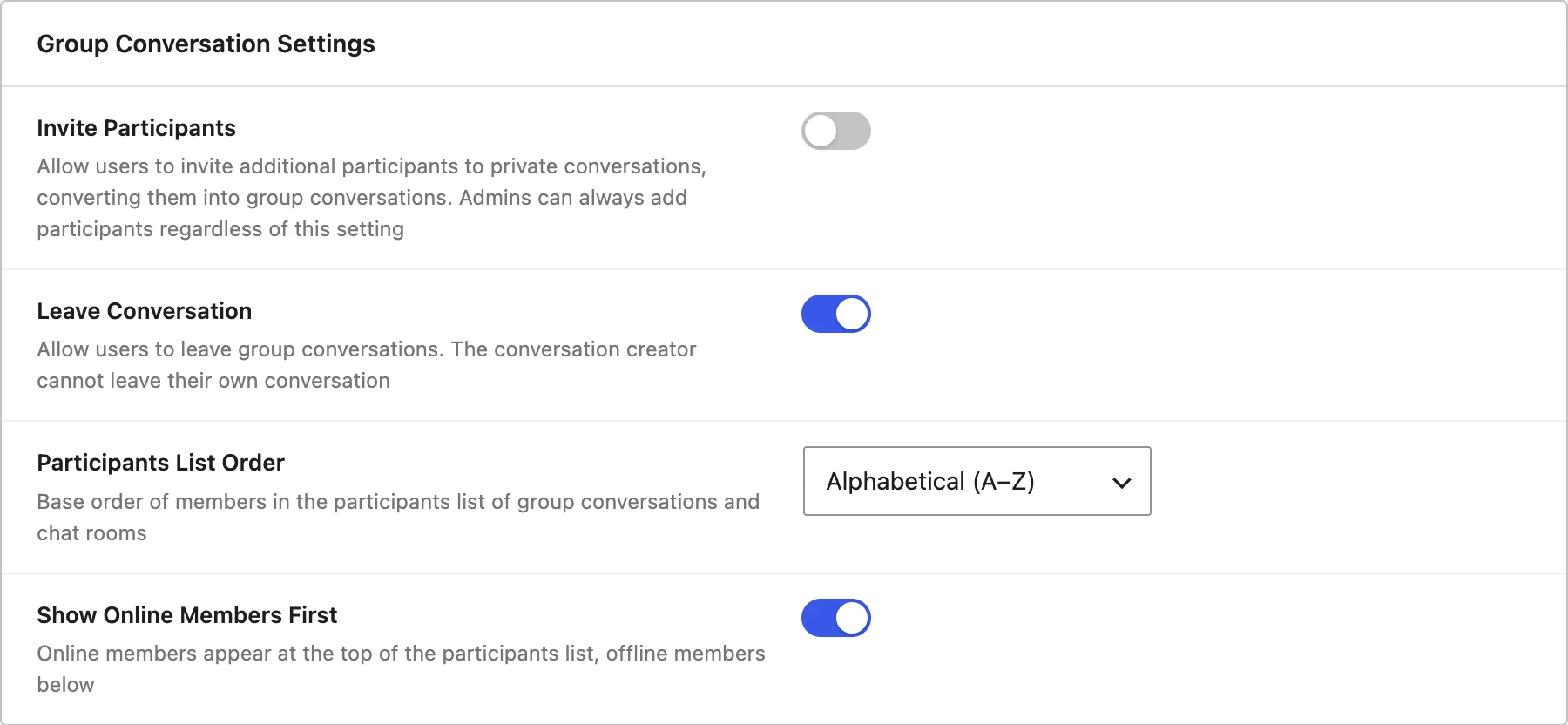
The participants list — in the conversation information panel and the online users sidebar — follows a site-wide order configured at WP Admin → Better Messages → Settings → Messaging → Group Conversation Settings:
- Join order — the default. Members appear in the order they joined the room.
- Alphabetical (A–Z) — members are sorted by display name. Guest users are sorted by their guest names right alongside registered members.

Sorting happens server-side against the plugin's user index, so the list stays fast even in rooms with tens of thousands of members. Lists built from live presence data — the online users sidebar, and the participants list of a presence-based room — arrive in the order users entered the room, so those are put in the configured order in the browser instead.
Applying the order to live presence lists requires Better Messages 2.15.26 or newer. Before that they always followed the order users joined.
A separate Show Online Members First toggle keeps currently online members pinned to the top of the list, with everyone else following in the chosen order below. It is enabled by default.
Show Online Members First requires the WebSocket version — live presence data is only delivered over the realtime connection. The base sort order works in both the free and WebSocket versions.

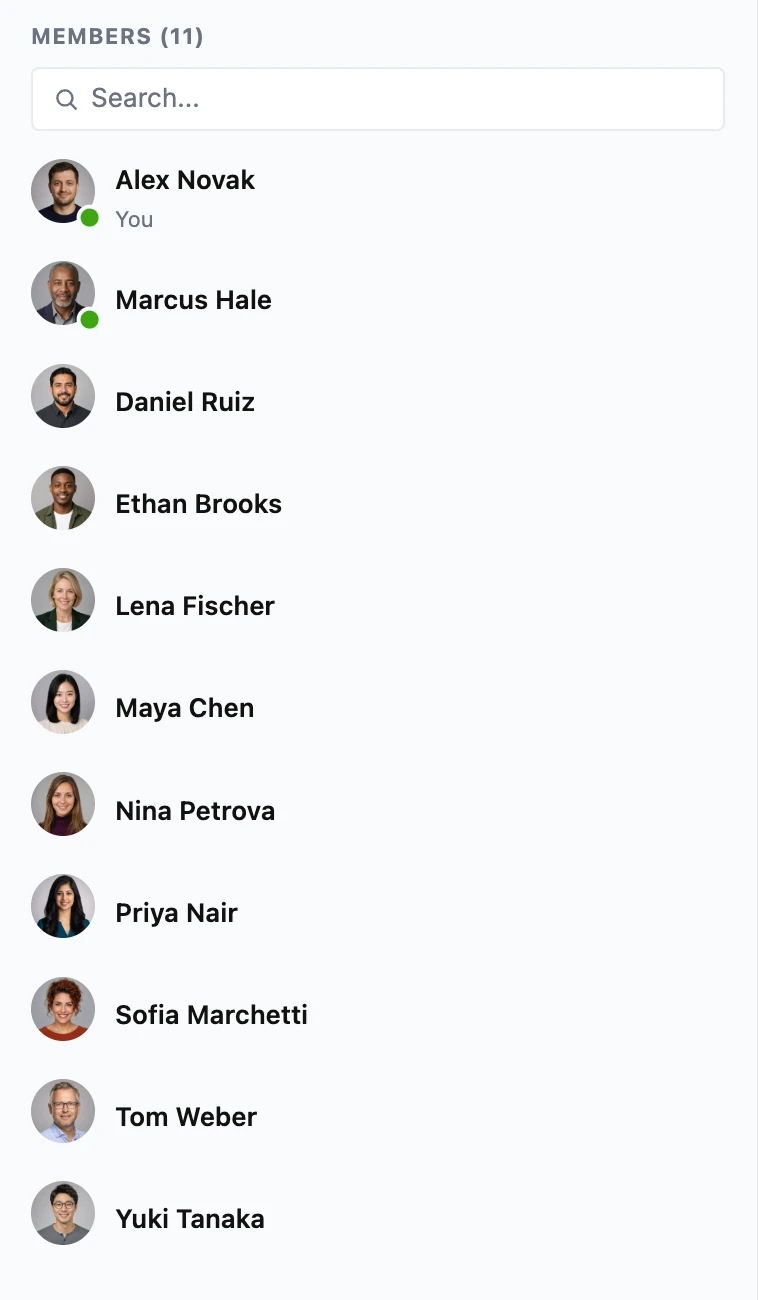
The same setting orders the participants list of group conversations. Private 1-on-1 conversations are not affected.
Auto-remove inactive participants#
Chat rooms can automatically prune participants who have stopped engaging, keeping participant lists, unread counts, and notification fan-out focused on people who actually use the room. The job runs on the existing five-minute cleaner cron — no extra schedule to configure.
Enable it per chat room under WP Admin → Better Messages → Chat Rooms → Chat Room Settings by toggling Auto-remove inactive users. Two more controls then appear:
- Inactivity threshold (days) — how many days of inactivity before a participant is removed. Default
30, minimum1. - Inactivity is measured by — pick one of three signals:
- User has not visited the site — uses the user's last authenticated request anywhere on the site. Catches abandoned accounts.
- User has not sent a message in this chat room — keys off messages posted in this thread only. Catches lurkers who are active site-wide but never participate here.
- User has not opened this chat room — keys off the user's last visit to this specific chat. Catches uninterested participants.
- Apply to roles — restrict cleanup to participants whose role matches one of the checked boxes. The list shows every editable WordPress role plus a synthetic Guests entry for unauthenticated visitors registered through the guest-chat flow. Leave everything unchecked to keep the original "remove anyone" behavior.
The most common case for Apply to roles is keeping auto-remove on but ticking only Guests — silent guest visitors get pruned and registered members are left alone.
Every participant gets a built-in grace period equal to the Inactivity threshold before they become eligible for removal. A user who was just added to a room — by clicking Join, by an admin invitation, or via Auto join users — will not be purged until they have been a member for at least that many days, even if their site-wide last activity is older than the threshold. This prevents brand-new joiners from being deleted on the very next cron run.
Removed users may rejoin if they meet the role requirements. If Auto join users is also enabled, an inactive user who later visits the page hosting the chat shortcode is auto-joined again automatically — that is the intended round trip: prune dormant, restore active.
AI chat bots are skipped automatically and never auto-removed.
Pin specific users#
To prevent specific users (admins, room owners, guests of honor) from ever being auto-removed, drop the following into your theme's functions.php or a custom plugin:
add_filter( 'better_messages_clean_inactive_chat_users_exclude_user_ids', function( $ids ) {
    return array( 1, 42, 7 );
} );
Tune the per-cron batch size#
By default the job removes up to 100 inactive participants per chat room per cron tick. To raise or lower that:
add_filter( 'better_messages_clean_inactive_chat_users_batch_size', function() {
    return 500;
} );
Setting the batch size to 0 disables the cleanup job entirely.
Automatic message cleanup#
Chat rooms can delete their own messages automatically — either wiping the room on a fixed schedule or capping it at a maximum number of messages. Use it for daily-reset public lobbies, support drop-ins that should start every morning empty, or high-traffic rooms that should never accumulate unbounded history. Works in both the free and WebSocket versions.
Enable it per chat room under WP Admin → Better Messages → Chat Rooms → Automatic Message Cleanup by picking a Cleanup mode:
- Off — the default. Nothing is ever deleted automatically.
- Clear all messages on a schedule — every message in the room is deleted once the scheduled moment passes:
- Cleanup frequency — Daily, or Weekly with a day-of-week picker
- Cleanup time — interpreted in the site timezone (Settings → General → Timezone)
- After each wipe a system notice — "Chat history was cleared automatically" — is posted in the room, so returning members understand why history is gone. The notice only appears when the wipe actually deleted something. A room with no new activity since the last wipe is left untouched.
- The editor shows Next cleanup and Last cleanup timestamps under the time field.
- Keep only the latest messages — a rolling cap. Set Maximum messages to keep. Whenever the room exceeds that number, the oldest messages are deleted until only the newest N remain. Trimming is silent — no system notice is posted.
Participants and room settings are never touched — only messages are deleted. Deletion is permanent, with no trash or undo, exactly like the manual Clear all messages button in the room's Danger Zone.
Like all Better Messages maintenance jobs, cleanup runs on the five-minute cleaner cron. "Daily at 03:00" means "the first cron tick after 03:00" — on a low-traffic site that can be a few minutes later, or whenever the first visitor arrives. If exact timing matters, wire a real OS cron to wp-cron.php.
Missed schedules collapse into a single wipe. If the site is offline for three days, the room is wiped once on the next cron run — not three times.
Large rooms are wiped in batches — up to 2,000 messages per cron tick by default — and resume on the next tick, so even a room with tens of thousands of messages cleans itself without timing out. Two filters tune the throughput:
add_filter( 'better_messages_auto_cleanup_max_batches', function() {
    return 40;
} );

add_filter( 'better_messages_auto_cleanup_batch_size', function() {
    return 200;
} );
Developers can react to every automatic cleanup via an action that receives the thread ID, chat room ID, mode (schedule or limit), and the number of deleted messages:
add_action( 'better_messages_chat_room_auto_cleanup', function( $thread_id, $chat_id, $mode, $deleted ) {
    error_log( "Chat room {$chat_id} cleanup ({$mode}) removed {$deleted} messages" );
}, 10, 4 );
Looking for site-wide, age-based retention instead ("delete everything older than 90 days")? That is a separate global setting — see Auto-delete old messages.
How to enable#
Chat rooms are managed through WP Admin → Better Messages → Chat Rooms.
Creating a chat room:
- Click Create New Chat Room in the left sidebar and give it a name
- Pick the room type — Regular or Presence-based — in Chat Room Settings
- In Role Based Access, tick the roles that may Can Join and Can Reply
- Optionally enable guest access for non-registered visitors with the bm-guest role
- Click Save in the bar that appears once there are unsaved changes
Embedding a chat room: Use the shortcode on any page or post:
[better_messages_chat_room id="123"]
Replace 123 with the actual chat room post ID.
Mini widget access#
When the Chat Rooms mini widget is enabled under Better Messages → Settings → Widgets → Chat Rooms, every page on your site gets a bottom-bar or floating-bubble tab listing every room the current user can reach. Each row carries a JOINED badge or a JOIN button, plus the member and online counts, so the tab doubles as a directory of rooms they have not entered yet — not only the ones they are already in.

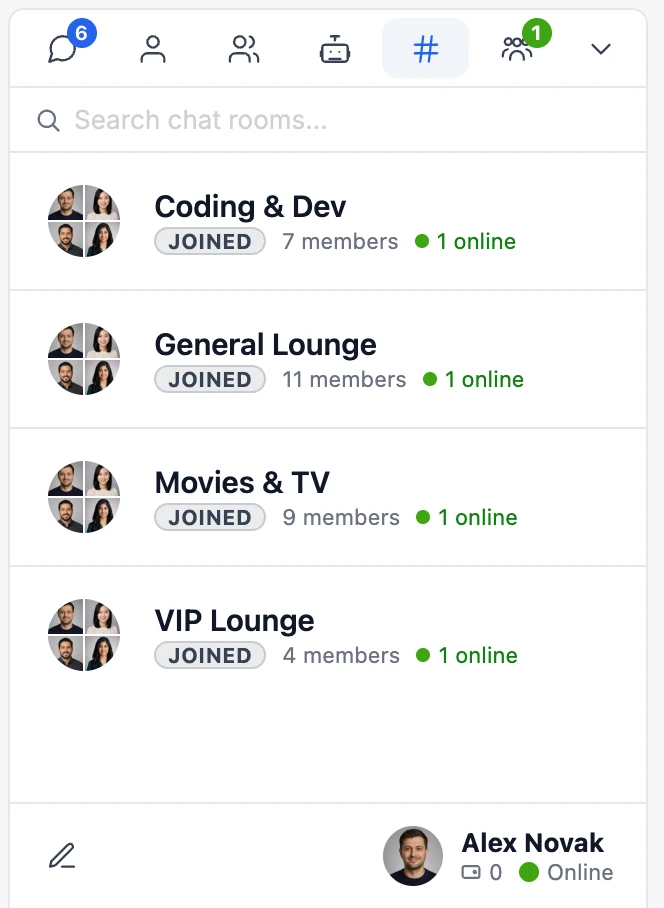
The room a visitor currently has open is highlighted in the rooms list, so it stays obvious which of several rooms they are reading. This matters most for presence-based rooms, which never appear in the conversations list at all.
On a site built around rooms rather than private messages, drag Chat Rooms to the first position of the tab order under Settings → Appearance → Mini widgets → Widgets on the bar and the messenger opens on the rooms list instead of the conversations list — the side panel and the mobile tab bar each keep their own order.
Both require Better Messages 2.15.26 or newer.
In the messenger, Private Message on a room's participant, or on one of their messages, takes the member out of the room and into the private conversation. To keep the room open, switch on Private messages from a conversation under Settings → Appearance → Mini widgets, and the private conversation opens in a mini chat instead.
Requires the WebSocket version and Better Messages 3.0.9 or newer.
A room guests cannot join is left out of their list. To show it to them anyway, switch on Show to guests in the room's Role Based Access section, where it is offered while Allow guests is off: the row says LOG IN where a joinable room says JOIN, and clicking it asks them to log in with the room's Not Authorized Message, while the room itself stays closed. It suits a site with one room open to guests and the rest kept for members.
Requires Better Messages 3.0.12 or newer.
Switching off Chat room is open in the room's Chat Room Settings closes it. Nobody can join it or write in it, apart from its moderators and site administrators, and it leaves the rooms list, members' lists included. To keep it listed, switch on Keep in the Chat Rooms list, offered below the Closed Message while the room is closed. The row then says CLOSED for everyone who would see the room open, it cannot be joined from there, and opening it shows the room with its Closed Message where the message field would be.
Requires Better Messages 3.0.12 or newer.
See also#
- Group conversations — multi-user threads that are not tied to a fixed page
- Auto-delete old messages — site-wide age-based retention for all conversations
- AI Chat Bots — drop an AI participant into any chat room
- Pre-moderation, AI Content Moderation, and Bad Words Filter — automated moderation that applies to chat rooms
- Report messages — let participants flag content for admin review
- Role-based access — the same role system that gates chat-room entry
- Guest access — let unregistered visitors participate in public rooms
- Export transcripts — download a room's full history as text, a web page or a spreadsheet
- Mini widgets — surface chat rooms across every page of your site
- Video calls, Audio calls, and Group video chat — start a call directly inside a chat room (WebSocket version)