better_messages_live_chat_button
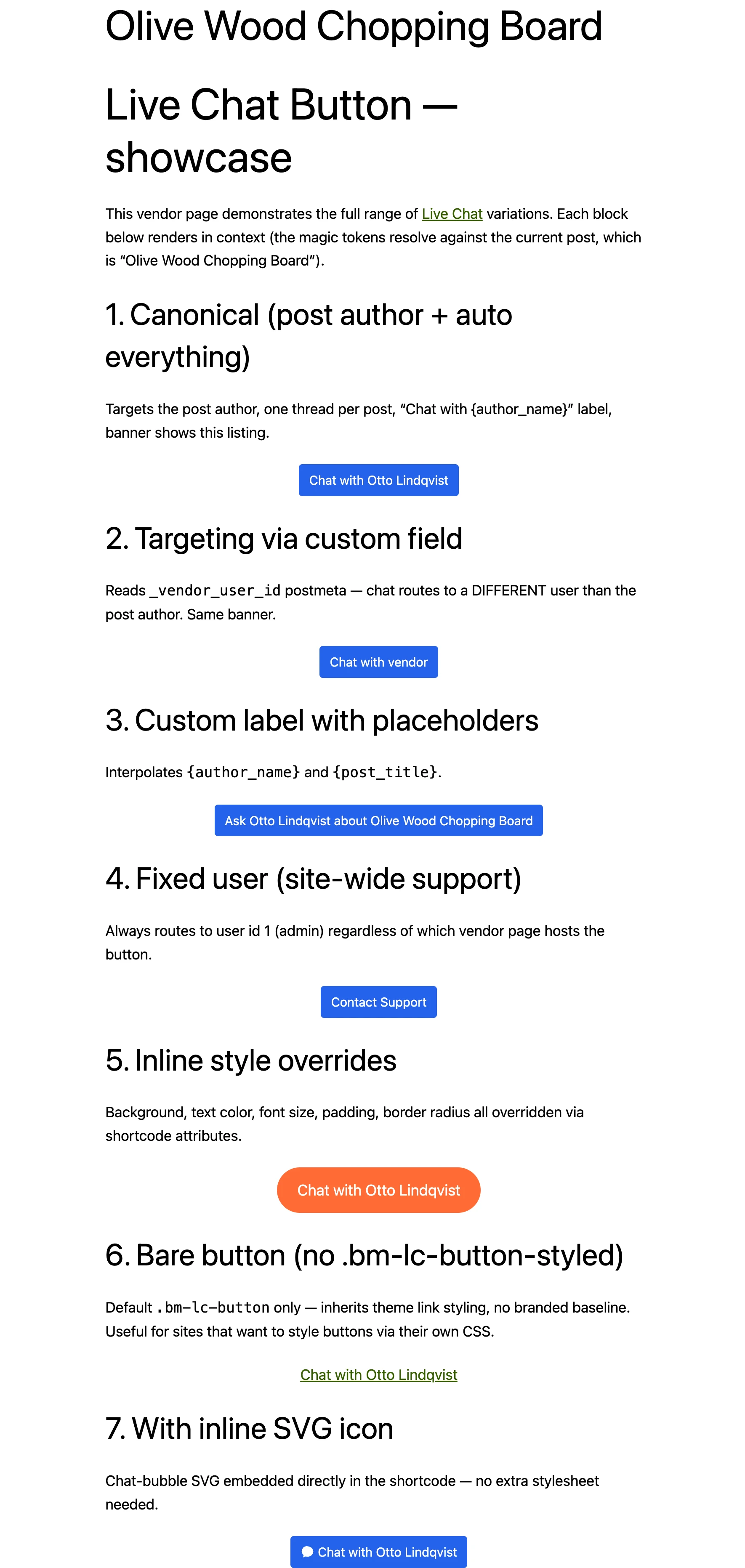
Universal Live Chat Button. Drop it into any post, page, custom post type, page builder, or theme template — the shortcode resolves who the chat targets, what label it shows, and which thread to open automatically, based on the current page.
The same shortcode works for: post-author chat, marketplace vendor chat (user stored in postmeta), site-wide support inbox, AI bot launcher. No PHP required — configure it visually in the Shortcode Builder or hand-write the attributes with magic tokens like post_author and {author_name}.
This shortcode supersedes better_messages_pm_button and better_messages_mini_chat_button.

Quick start#
The simplest use — drop it into any post body, and it targets that post's author:
[better_messages_live_chat_button]
The recommended version uses magic tokens so a single shortcode works for every post:
[better_messages_live_chat_button user_id="post_author" unique_tag="auto" object_id="auto" text="auto" class="bm-lc-button-styled"]
What this resolves to, automatically, on each post:
user_id="post_author"→ chats with the post's authorunique_tag="auto"→ one thread per post (e.g.vendor-42)object_id="auto"→ attaches the post as a thread information bannertext="auto"→ label becomesChat with {author_name}(resolved per post)class="bm-lc-button-styled"→ branded baseline styling out of the box
Paste it into a custom post type single template, a Gutenberg shortcode block, or an Elementor shortcode widget — same result.
Shortcode Builder#
The easiest way to configure the button. Open WP Admin → Better Messages → Settings → Shortcodes and use the visual builder.
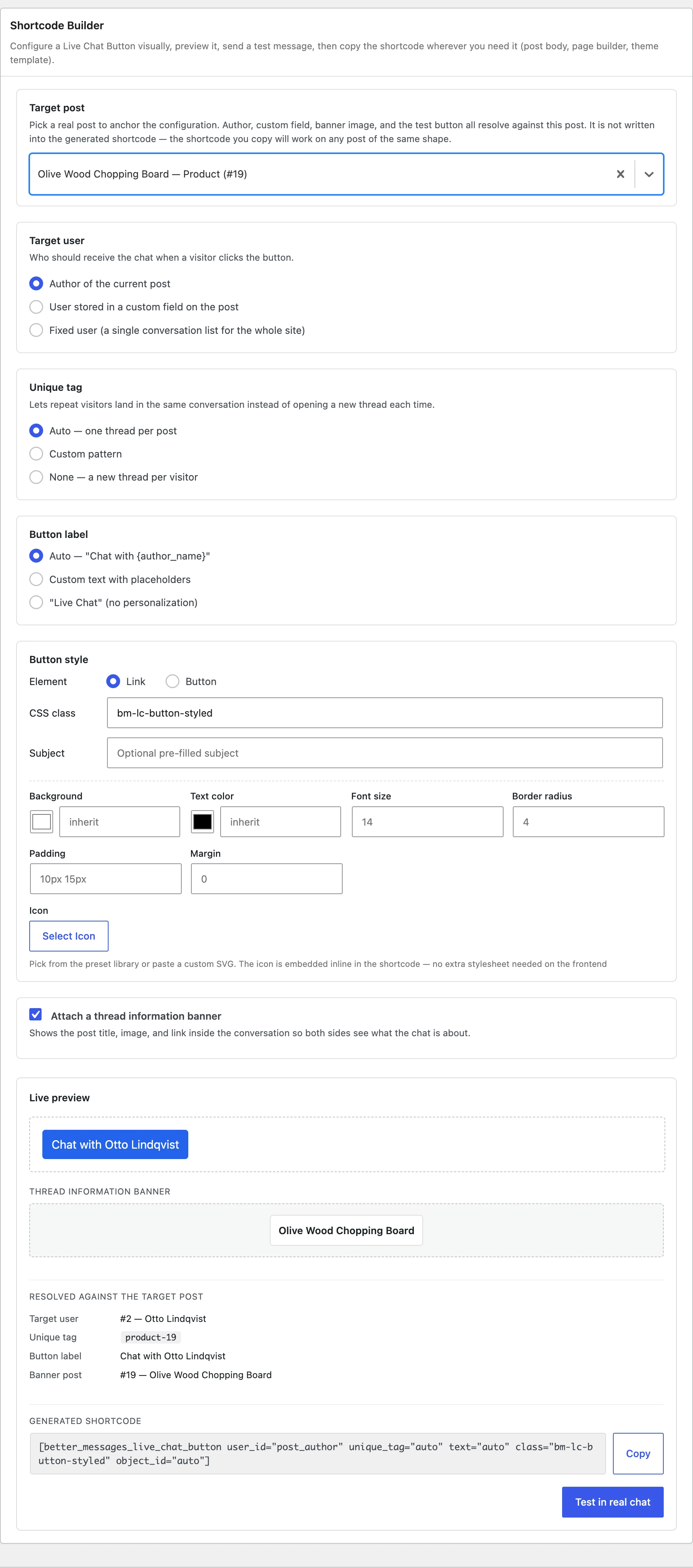
The builder lets you:
- Pick a target post to anchor the configuration. Author, custom field, banner image, and the test button all resolve against this post. The selected post is never written into the generated shortcode — the result works on every post of the same shape.
- Choose how the target user is resolved:
- Author of the current post (most common)
- User id stored in a postmeta field on the post (vendor / agent / owner pattern)
- A fixed user (single site-wide support inbox)
- Tune visual styling (background, text color, font size, padding, margin, border radius) without writing CSS
- Pick an icon from the preset library or paste a custom SVG — embedded inline so no extra stylesheet is needed on the frontend
- Preview live in an iframe that loads inside the active theme (so the button looks exactly like it will on the frontend, with theme fonts, colors, and CSS)
- Test in real chat — opens the actual conversation in a new tab so you can send a test message before publishing
- Copy the resulting shortcode and paste it wherever you need it
Attributes#
Targeting#
| Attribute | Accepted values | What it does |
|---|---|---|
user_id | post_author | Chats with the current post's author. |
user_id | postmeta:KEY | Reads a numeric user id from the named postmeta key. Use this for marketplace vendor / agent / owner patterns. Example: user_id="postmeta:_vendor_user_id". |
user_id | a positive integer | Hard-coded user id. Used for site-wide support inboxes or specific staff users. |
user_id | a negative integer | Targets an AI chat bot. Bot id is shown in WP Admin → Better Messages → AI Chat Bots → edit bot → Bot User ID. |
user_id | omitted | Falls back to the current post's author (same as post_author). |
unique_tag | auto | One thread per post — auto-generated as {post_type}-{post_id} (e.g. vendor-42). |
unique_tag | template with {post_id} / {post_type} / {author_id} | Custom pattern. Example: unique_tag="product-{post_id}". |
unique_tag | any other string | Used as-is. The same string from different visitors opens the same thread (paired with the same target). |
unique_tag | omitted | A new thread is opened each time. |
object_id | auto | Attaches the current post as a thread information banner inside the conversation. |
object_id | a positive integer | Attaches a specific post id as the banner. |
Label & subject#
| Attribute | Accepted values | What it does |
|---|---|---|
text | auto | Default label — Chat with {author_name} when a post is in context, otherwise Live Chat. |
text | template with placeholders | Resolved against the current post — see Placeholders. Example: text="Ask {author_name} about {post_title}". |
text | any string | Used as-is. |
text | omitted | Renders Live Chat. |
subject | any string (placeholders supported) | Pre-fills the conversation subject if a new thread is created. Ignored when an existing thread is reused. |
Visual style#
The shortcode emits a real style="" attribute composed of safe CSS values (filtered through WordPress's safecss_filter_attr). No additional stylesheet needed.
| Attribute | Example | Effect |
|---|---|---|
class | bm-lc-button-styled | Extra CSS class on the button. The shipped bm-lc-button-styled class gives a branded baseline (background, padding, hover state) using your site's --main-bm-color. Add multiple classes space-separated. |
bg_color | #0073aa / rgb(0,115,170) | Background color. |
text_color | #fff | Text color. |
font_size | 16px | Font size. |
padding | 10px 15px | Padding shorthand. |
margin | 0 | Margin shorthand. |
border_radius | 4px or 999px | Border radius. Use a large value for a pill button. |
icon | an <svg>...</svg> string | Inline SVG icon shown before the label. Sanitized at render time — scripts, event handlers, and javascript: URLs are stripped. |
type | link (default) or button | Which HTML element to render. |
target | e.g. _blank | HTML target attribute on the rendered link. |
alt | any string | HTML title attribute on the rendered element. |
The bm-lc-button-styled class is enabled by default in the Shortcode Builder. The raw [better_messages_live_chat_button] shortcode (no class) renders an unstyled element — useful for sites that style the button themselves via CSS.
Placeholders#
Tokens wrapped in curly braces are interpolated against the current post:
| Placeholder | Resolves to |
|---|---|
{post_id} | Numeric ID of the current post. |
{post_title} | Post title. |
{post_type} | Post type slug. |
{author_id} | Numeric ID of the post author. |
{author_name} | Display name of the post author. |
Available in text, subject, and the custom-pattern form of unique_tag. When the shortcode runs outside of a post context (archives, sidebars, 404 pages), placeholders collapse to safe defaults — for example text="auto" falls back to Live Chat instead of producing Chat with .
Thread information banner#
When object_id is set, the chosen post becomes a banner inside the conversation — both participants see the post's title, thumbnail, and link at the top of the thread. The banner persists on every transport (REST, AJAX polling, WebSocket relays) and is written once when the thread is created (no overwrites).
Use it with object_id="auto" so the current post automatically becomes the context. Particularly useful for marketplace / directory / job board patterns where chats should clearly reference what they're about.
The banner is rendered with a built-in template by default. Sites that ship dedicated BM integrations (WooCommerce, WP Job Manager, Houzez) provide their own banner content via the better_messages_rest_thread_item filter and continue to win over the generic builder. For your own custom banner HTML, hook better_messages_thread_info_banner_html.
Examples#
Post-author chat on every blog post#
[better_messages_live_chat_button user_id="post_author" unique_tag="auto" object_id="auto" text="auto" class="bm-lc-button-styled"]
Drop this once into your single-post template (or use a content-injection plugin). Each post automatically gets a button that chats with its author, opens a per-post thread, and shows the post as a banner.
Marketplace vendor button (user id stored in postmeta)#
[better_messages_live_chat_button user_id="postmeta:_vendor_user_id" unique_tag="auto" object_id="auto" text="Chat with vendor" class="bm-lc-button-styled"]
Reads the vendor's WP user id from the _vendor_user_id postmeta key on the current listing. Works with any vendor / agent / owner postmeta field — change the key to match what your plugin or theme uses.
Site-wide support inbox#
[better_messages_live_chat_button user_id="1" unique_tag="support" text="Contact Support" class="bm-lc-button-styled"]
All visitors land in the same thread with admin user id 1. Add it to the site footer or a contact page.
Pill-shaped orange button with custom inline styles#
[better_messages_live_chat_button user_id="post_author" unique_tag="auto" object_id="auto" text="auto" class="bm-lc-button-styled" bg_color="#ff6b35" text_color="#ffffff" font_size="18px" padding="14px 24px" border_radius="999px"]
Inline style attributes override the bm-lc-button-styled defaults — no custom CSS required.
Button with an inline SVG icon#
[better_messages_live_chat_button user_id="post_author" unique_tag="auto" object_id="auto" text="auto" class="bm-lc-button-styled" icon='<svg viewBox="0 0 24 24" width="18" height="18" fill="currentColor"><path d="M12 2C6.48 2 2 6.04 2 11c0 2.69 1.32 5.1 3.43 6.76L4 22l4.39-1.96c1.13.32 2.34.5 3.61.5 5.52 0 10-4.04 10-9s-4.48-9-10-9z"/></svg>']
The icon is embedded directly in the shortcode — no separate icon font (Dashicons, Font Awesome) needed on the frontend. Use the Shortcode Builder's icon picker for a visual library, or paste any SVG.
AI chat bot launcher#
[better_messages_live_chat_button user_id="-3" text="Chat with our AI"]
Replace -3 with the negative bot ID from WP Admin → Better Messages → AI Chat Bots. Clicking starts a conversation with the bot.
PHP helper for theme templates#
Theme authors can call the same handler directly without writing do_shortcode():
<?php
echo better_messages_live_chat_button( array(
    'user_id'    => 'post_author',
    'unique_tag' => 'auto',
    'object_id'  => 'auto',
    'text'       => 'auto',
    'class'      => 'bm-lc-button-styled',
) );
?>
Same attributes, same behavior — just easier to embed inside a template file.
Frequently asked questions#
How does it know which user to chat with?#
By looking at user_id. The recommended value is post_author (chats with the post's author). Alternatives are postmeta:KEY (reads a numeric user id from the named postmeta), a hard-coded numeric id (site-wide), or a negative id (AI bot). When omitted, defaults to the current post's author.
What is unique_tag for?#
It groups visitors into the same thread when they target the same context. unique_tag="auto" produces one thread per post (good for "Chat with this vendor about this listing"). A static value like support produces one thread per visitor to a fixed inbox. Omitting it opens a fresh thread every time.
Does the same shortcode work for guests and logged-in users?#
Yes. Logged-in users open the chat directly. Guests see the guest authorization modal when Guest Chat is enabled. If it's disabled, they're redirected to the WordPress login page. The shortcode is identical either way.
What's the thread information banner?#
A header inside the conversation showing a post's title, thumbnail, and link. Set object_id="auto" and the current post becomes the banner — particularly useful for marketplace, directory, and job board sites where chats should clearly reference what they're about.
Can I target an AI bot?#
Yes. Set user_id to the bot's negative user ID (from the bot's settings page). Clicking opens a conversation with the bot.
Can I style it like my theme's primary button?#
Three options:
- Use the Shortcode Builder's color / size / padding controls — emits inline
style="..."attributes. - Pass your theme's button class via
class="btn btn-primary". - Drop the
bm-lc-button-styledclass entirely (raw[better_messages_live_chat_button]) and write your own CSS for.bm-lc-button.
Where do I configure all this without touching shortcodes?#
WP Admin → Better Messages → Settings → Shortcodes → Shortcode Builder. Visual form, live preview, test button. Copy the resulting shortcode.
See also#
- better_messages_pm_button — legacy alternative
- better_messages_mini_chat_button — legacy alternative
- better_messages_audio_call_button — voice call button
- better_messages_video_call_button — video call button
- AI chat bots — feature that this shortcode can launch