Integrate Better Messages with your website
To be able to implement this guide, you need to learn how to insert PHP snippets to your website.
You can find guide here: WP Beginner
Better Messages has built-in integrations for many plugins. When your site runs on a plugin of your own, a custom theme or a plugin with no built-in integration, the same building blocks those integrations use are open to your code. This guide goes through each of them and ends with recipes for the usual kinds of sites:
- Community and social networks — a Message button on member profiles, a chat for each group
- Dating — messages only between members who matched
- Marketplaces — buyers write to the vendor about a product or an order
- Directories, catalogs and real estate — visitors contact the owner of a listing
- Job boards — candidates and employers talk about a job or an application
- Courses and memberships — students write to the instructor, each course has a group chat
- Bookings, services and events — a conversation for each booking, a chat for each event
- Support — one inbox for everyone, an AI bot that answers first
The screenshots come from a small marketplace plugin written for this guide, running on WooCommerce with a standard theme. Its full code is at the end of the page. BuddyPress is not needed for anything here.
The building blocks#
| Building block | What members get | What your code uses |
|---|---|---|
| Where the inbox lives | Messages inside your own pages and dashboards | [better_messages], bp_better_messages_page |
| Message buttons | A button on a profile, listing, product or job | better_messages_live_chat_button() |
| What the conversation is about | A card at the top of the conversation | object_id, better_messages_rest_thread_item |
| Names and pictures | Your names, avatars and profile links | bp_better_messages_display_name, better_messages_rest_user_item |
| Rules | Who can write to whom | better_messages_before_new_thread, better_messages_can_send_message |
| Unread counts | A badge on your menu item | [better_messages_unread_counter] |
| Conversations your site starts | Chats that open from an order, a match or a booking | get_unique_conversation_id(), new_message() |
| Group conversations | A chat for each group, course or event | create_new_conversation(), add_participant_to_thread() |
| Events | Your code runs on every message | better_messages_message_sent |
| AI | A bot that answers about the page it was opened from | a bot as the recipient, better_messages_ai_bot_instruction |
| Outside WordPress | Apps and services that send messages | JavaScript functions, REST API |
Before you start#
Where the code goes. Put it in a plugin of your own, or in its own file inside the plugin you already have, as the example on this page does. For a few lines on one site, the functions.php of a child theme or the Code Snippets plugin work too.
Load after Better Messages. Register your hooks once Better Messages is loaded, and do nothing when it is not active:
<?php
add_action( 'plugins_loaded', 'my_plugin_better_messages_init', 30 );

function my_plugin_better_messages_init() {
    if ( ! function_exists( 'Better_Messages' ) ) {
        return;
    }

    // add_action() and add_filter() calls from the sections below
}
User ids. A WordPress user has a positive id. Guests and AI chat bots take part with negative ids, and 0 means nobody. Code that can meet any participant should check $user_id !== 0 instead of $user_id > 0, and should not pass a negative id to WordPress functions like get_userdata(). Better_Messages()->functions->get_current_user_id() returns the id of the current guest as well. Checks of your own, like "is this user a vendor", can stay positive only, as in the example.
Version. The PHP button function, object_id and the generic context card need Better Messages 2.15.9 or newer.
Where the inbox lives#
By default the inbox is on the page chosen in WP Admin → Better Messages → Settings → General (Messages location). It can also be shown inside any page of your own, like the Messages tab of a dashboard or of a profile:
<?php
// In the template of your Messages tab
echo Better_Messages()->functions->get_page();
The [better_messages] shortcode does the same in a page, a block or a page builder widget.
Then tell Better Messages where messages live for each user, so the links in email notifications, the unread counter and the buttons lead there. The filter gets the id of the user the link is for, so vendors, members and customers can each have their own place:
<?php
add_filter( 'bp_better_messages_page', 'my_plugin_messages_page', 10, 2 );

function my_plugin_messages_page( $url, $user_id ) {
    if ( my_plugin_is_vendor( $user_id ) ) {
        return my_plugin_dashboard_url( 'messages' );
    }

    return $url;
}
my_plugin_is_vendor() and my_plugin_dashboard_url() stand for the functions of your plugin. Returning $url unchanged keeps the default place for everyone else.

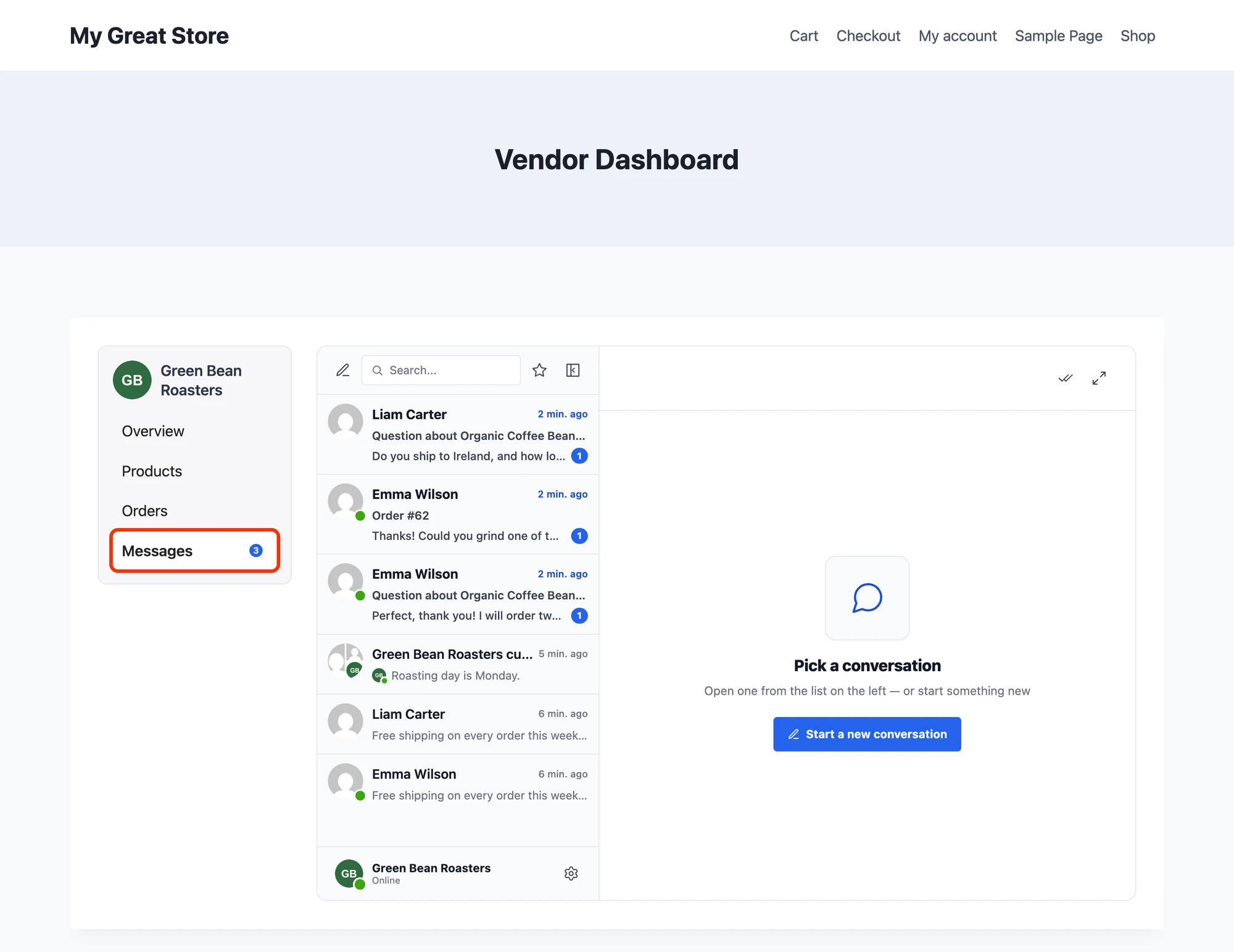
To add tabs inside the messenger itself, see Custom tabs.
Message buttons#
One function prints a button that opens a conversation with someone. It works for every kind of page, and what changes is who the button writes to and which conversation it opens:
<?php
echo better_messages_live_chat_button( [
    'user_id'    => $owner_id,                        // who receives the message
    'unique_tag' => 'my_plugin_listing_' . $post_id,  // one conversation per listing
    'object_id'  => $post_id,                         // the listing as a card in the conversation
    'subject'    => 'Question about ' . get_the_title( $post_id ),
    'text'       => 'Contact the owner',
    'class'      => 'bm-lc-button-styled',
] );
The same button is the [better_messages_live_chat_button] shortcode, with the same attributes. WP Admin → Better Messages → Settings → Shortcodes has a visual builder for it, and the shortcode page lists every attribute, including the styling ones.
A button on a person#
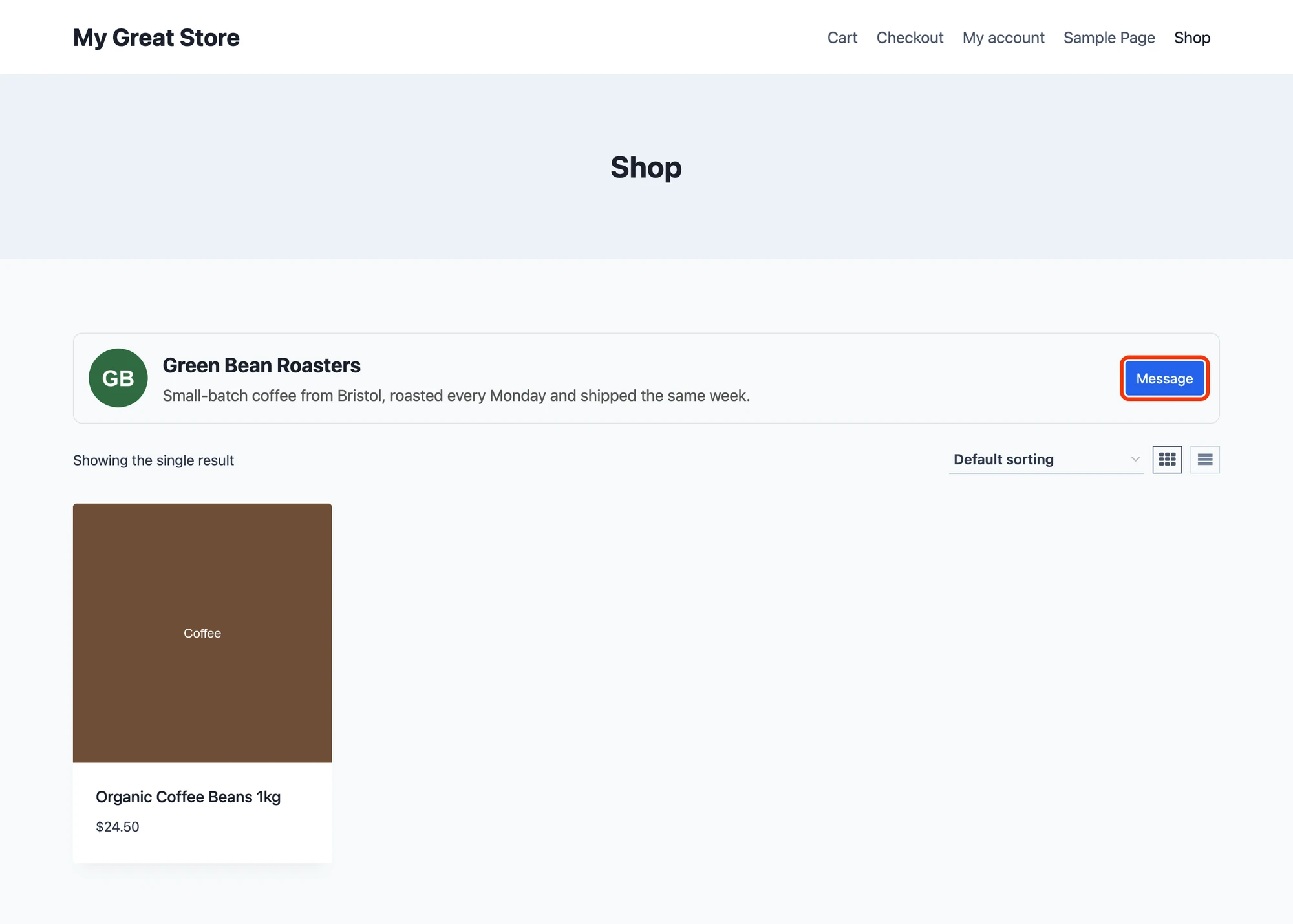
Profiles, member directories, dating cards, store pages, instructor pages: the button writes to that person and has no unique_tag. It opens the one private conversation between the visitor and that person, and creates it the first time.
<?php
echo better_messages_live_chat_button( [
    'user_id' => $profile_user_id,
    'text'    => 'Message',
    'class'   => 'bm-lc-button-styled',
] );

A button on a thing#
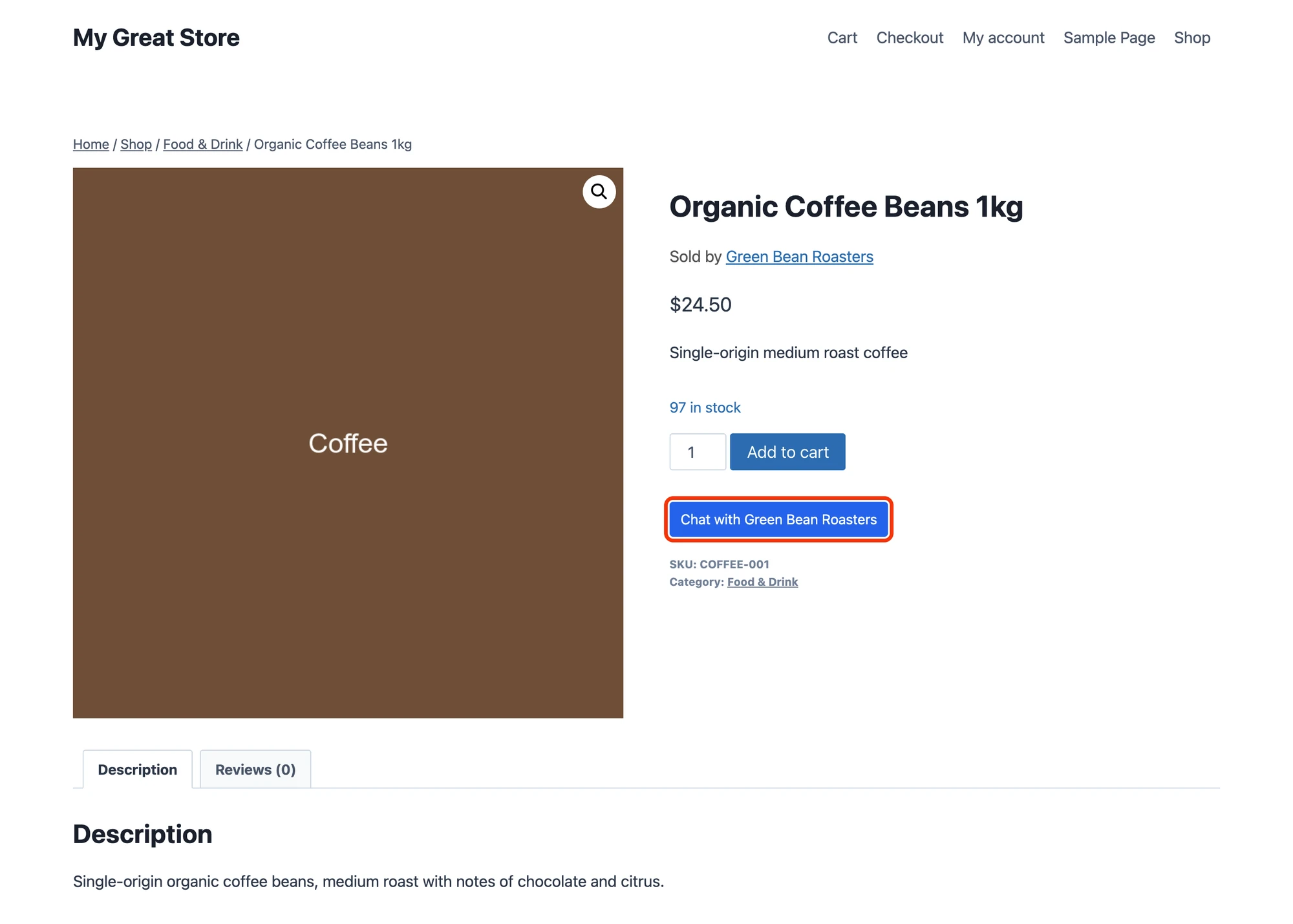
Listings, products, jobs, courses, properties: give the button a unique_tag made from the id of the thing. Each visitor then gets their own conversation with the owner about each thing, separate from their private conversation and from the conversations about other things, and the button opens that same conversation again on every later visit.

When the owner is stored on the post, the shortcode needs no PHP at all:
[better_messages_live_chat_button user_id="post_author" unique_tag="auto" object_id="auto" text="auto" class="bm-lc-button-styled"]

[better_messages_live_chat_button user_id="postmeta:_listing_owner" unique_tag="auto" object_id="auto" text="Contact the owner" class="bm-lc-button-styled"]
post_author writes to the author of the current post, postmeta:KEY reads the user id from a custom field, unique_tag="auto" makes one conversation per post and object_id="auto" shows the post as a card.
Leave the button out when the visitor is the owner, so nobody sees a button that writes to themselves. The example checks $vendor_id === get_current_user_id() before printing it.
What the conversation is about#
With object_id, the post the button was on becomes a card at the top of the conversation, with its picture, title and link. Both sides see it, so the owner knows at once which listing the question is about.

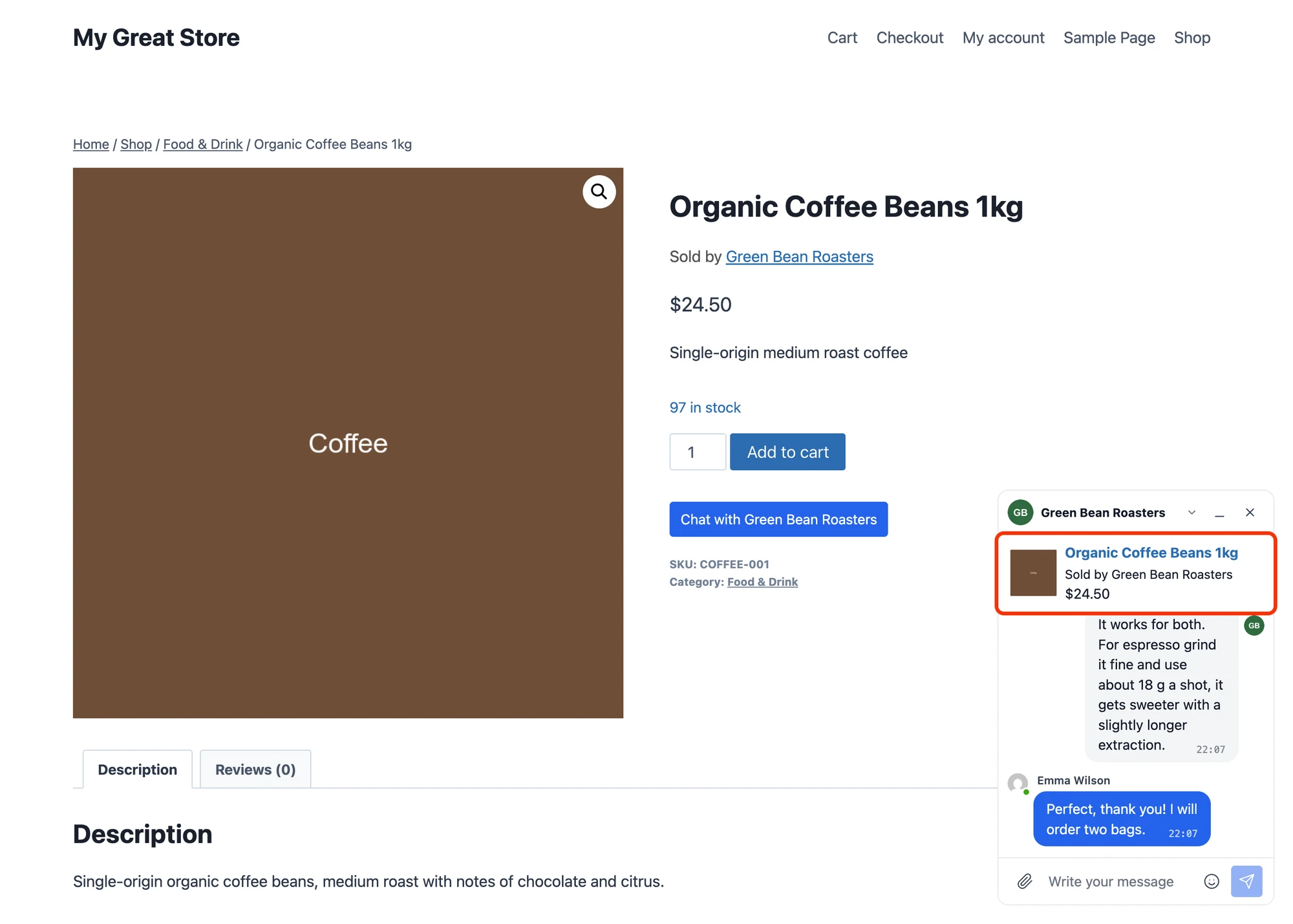
Add details to the card. The better_messages_thread_info_banner_html filter gets the card and the post, so you can add a price, an address, a date or a status. The example adds the store and the price of a product, using the classes of the built-in cards:
<?php
add_filter( 'better_messages_thread_info_banner_html', 'my_plugin_product_card', 10, 3 );

function my_plugin_product_card( $html, $post, $thread_id ) {
    if ( $post->post_type !== 'product' ) {
        return $html;
    }

    $product = wc_get_product( $post->ID );

    if ( ! $product ) {
        return $html;
    }

    $url   = get_permalink( $post );
    $image = wp_get_attachment_image_url( $product->get_image_id(), 'thumbnail' );

    $card = '<div class="bm-product-info">';

    if ( $image ) {
        $card .= '<div class="bm-product-image"><a href="' . esc_url( $url ) . '" target="_blank"><img src="' . esc_url( $image ) . '" alt="" /></a></div>';
    }

    $card .= '<div class="bm-product-details">';
    $card .= '<div class="bm-product-title"><a href="' . esc_url( $url ) . '" target="_blank">' . esc_html( $product->get_name() ) . '</a></div>';
    $card .= '<div class="bm-product-subtitle">' . esc_html( 'Sold by ' . my_plugin_store_name( $post->post_author ) ) . '</div>';
    $card .= '<div class="bm-product-price">' . wp_kses_post( $product->get_price_html() ) . '</div>';
    $card .= '</div></div>';

    return $card;
}
A card for something that is not a post. Orders, bookings, applications and matches often live in tables of their own. Give their conversations a unique_tag that carries the id, and build the card in the better_messages_rest_thread_item filter. Better Messages stores the tag as <your tag>|<user ids>|, so the part before the first | is yours:
<?php
// The order a conversation is about, or false
function my_plugin_thread_order( $thread_id ) {
    $unique_tag = (string) Better_Messages()->functions->get_thread_meta( $thread_id, 'unique_tag' );
    $key        = strtok( $unique_tag, '|' );

    if ( ! $key || strpos( $key, 'my_plugin_order_' ) !== 0 ) {
        return false;
    }

    return wc_get_order( (int) substr( $key, strlen( 'my_plugin_order_' ) ) );
}

add_filter( 'better_messages_rest_thread_item', 'my_plugin_order_card', 10, 5 );

function my_plugin_order_card( $thread_item, $thread_id, $thread_type, $include_personal, $user_id ) {
    if ( $thread_type !== 'thread' || ! empty( $thread_item['threadInfo'] ) ) {
        return $thread_item;
    }

    $order = my_plugin_thread_order( $thread_id );

    if ( ! $order ) {
        return $thread_item;
    }

    $thread_item['threadInfo'] = '<div class="bm-product-info"><div class="bm-product-details">'
        . '<div class="bm-product-title">' . esc_html( 'Order #' . $order->get_order_number() ) . '</div>'
        . '<div class="bm-product-subtitle">' . esc_html( wc_get_order_status_name( $order->get_status() ) . ' · ' . wc_format_datetime( $order->get_date_created() ) ) . '</div>'
        . '<div class="bm-product-price">' . wp_kses_post( $order->get_formatted_order_total() ) . '</div>'
        . '</div></div>';

    return $thread_item;
}
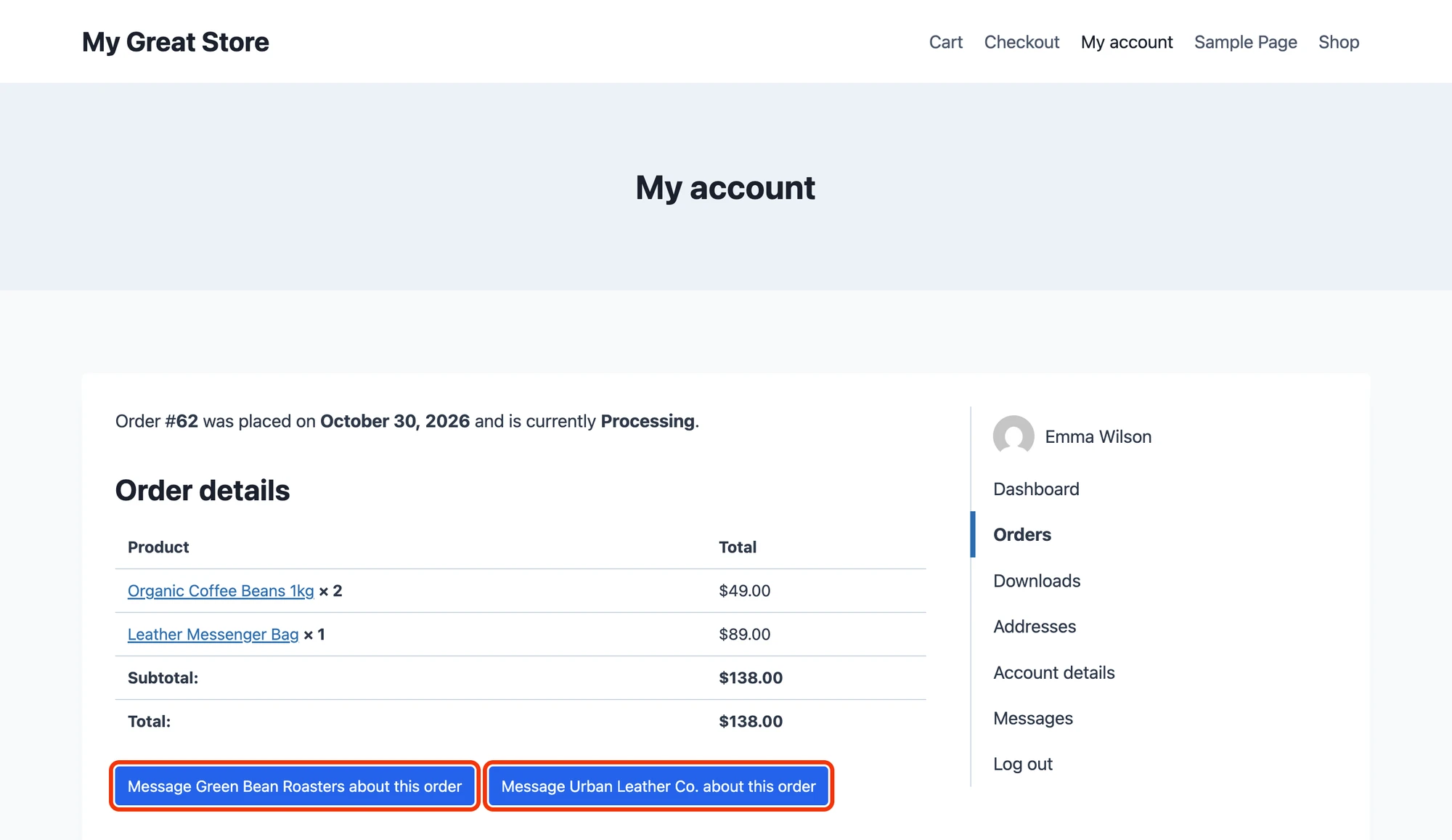
The button that opens this conversation sits on the order page, one for each vendor of the order:

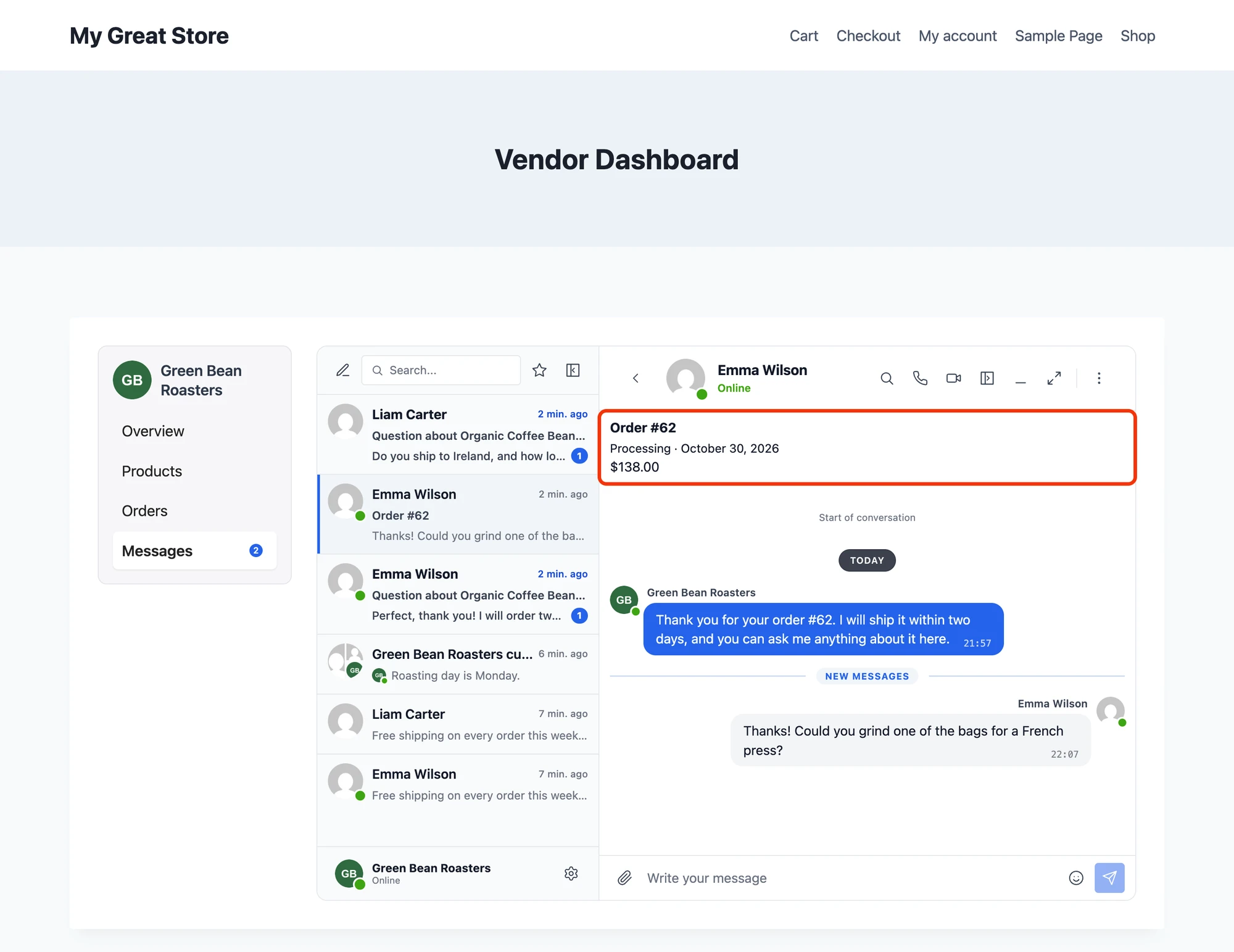
And the vendor sees the order at the top of the conversation in their dashboard:

Names and pictures#
Better Messages shows the WordPress display name and avatar of each user. When your site knows people by another name, like the name of a store, a dating nickname or a company, change it in two places:
bp_better_messages_display_namechanges the name everywhere, including email and push notificationsbetter_messages_rest_user_itemchanges the avatar and the profile link in the messenger
<?php
add_filter( 'bp_better_messages_display_name', 'my_plugin_store_name_in_chat', 10, 2 );

function my_plugin_store_name_in_chat( $name, $user_id ) {
    return my_plugin_is_vendor( $user_id ) ? my_plugin_store_name( $user_id ) : $name;
}

add_filter( 'better_messages_rest_user_item', 'my_plugin_store_identity', 20, 3 );

function my_plugin_store_identity( $item, $user_id, $include_personal ) {
    if ( ! my_plugin_is_vendor( $user_id ) ) {
        return $item;
    }

    $item['avatar'] = my_plugin_store_logo_url( $user_id );
    $item['url']    = my_plugin_store_url( $user_id );

    return $item;
}
The screenshots show the result: the vendor appears as Green Bean Roasters with the logo of the store in the conversation list, the header and next to each message.
When one account has to appear under a different identity in each conversation, for example a fallback account answering for several agents, use Per-thread personas instead.
Rules: who can write to whom#
Many rules need no code. Role restrictions, reply limits and members choosing who may write to them are in WP Admin → Better Messages → Settings → Restrictions (Role-based access), and messages can cost points with myCred and GamiPress.
Rules that depend on your data take two hooks, one for new conversations and one for replies in existing ones. Refuse a message only when writing really has no point, and say what to do instead. Someone who is away still gets messages and answers later, so a status like "on holiday" belongs next to the name, not in a rule.
The example has one rule of each kind. A vendor can start conversations only with people who ordered from them, so stores cannot cold-message the members of the site, while anyone can still write to a store first:
<?php
// New conversations, from buttons, the messenger and your own code
add_action( 'better_messages_before_new_thread', 'my_plugin_vendors_write_to_customers', 10, 2 );

function my_plugin_vendors_write_to_customers( &$args, &$errors ) {
    $user_id = Better_Messages()->functions->get_current_user_id();

    if ( ! my_plugin_is_vendor( $user_id ) ) {
        return;
    }

    $customer_ids = my_plugin_vendor_customer_ids( $user_id );

    foreach ( (array) $args['recipients'] as $recipient_id ) {
        if ( ! in_array( (int) $recipient_id, $customer_ids, true ) ) {
            $errors['my_plugin_not_a_customer'] = 'You can start conversations with customers who ordered from your store. Anyone else can still write to you first.';
        }
    }
}
And the conversation about an order closes with the order. Once it is completed, cancelled or refunded, nobody can reply there any more, and the buyer is pointed to the store for anything new:
<?php
// Replies in conversations that already exist
add_filter( 'better_messages_can_send_message', 'my_plugin_closed_order_reply', 10, 3 );

function my_plugin_closed_order_reply( $allowed, $user_id, $thread_id ) {
    global $bp_better_messages_restrict_send_message;

    if ( ! $allowed ) {
        return $allowed;
    }

    // The order of the conversation, from its unique tag, as in the order card above
    $order = my_plugin_thread_order( $thread_id );

    if ( ! $order || ! $order->has_status( [ 'completed', 'cancelled', 'refunded' ] ) ) {
        return $allowed;
    }

    if ( my_plugin_is_vendor( $user_id ) ) {
        $reason = 'Order #' . $order->get_order_number() . ' is closed.';
    } else {
        $reason = 'Order #' . $order->get_order_number() . ' is closed. For anything new, use the Message button on the store page.';
    }

    $bp_better_messages_restrict_send_message['my_plugin_order_closed'] = $reason;

    return false;
}
The text you put in $errors is shown when someone tries to start a conversation, and the one in $bp_better_messages_restrict_send_message replaces the reply box. The filter runs for each person separately, so the buyer and the vendor can each get the text that fits them:

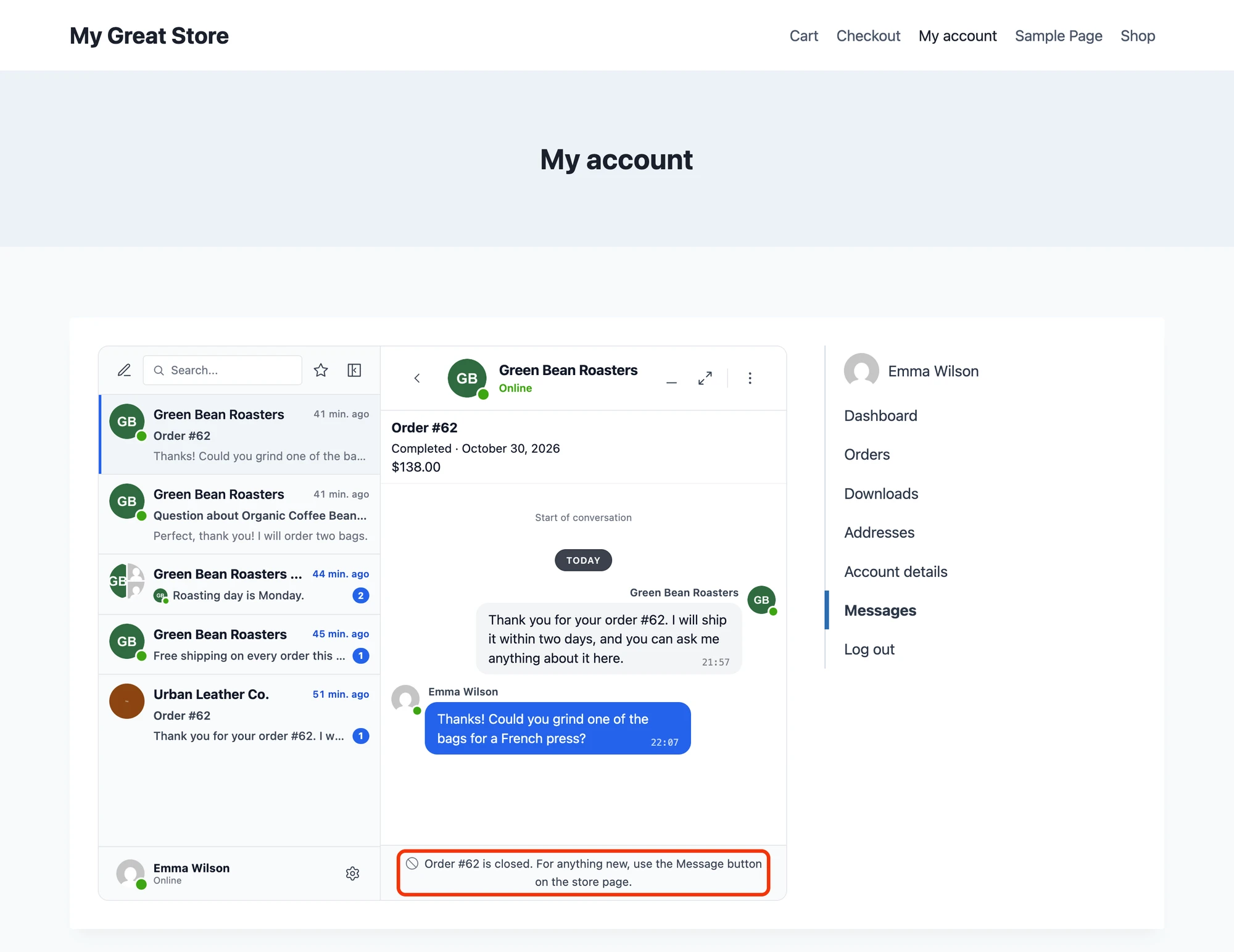
The product conversation and the private conversation with the store stay open, so the buyer can always reach the vendor.
Unread counts in your menu#
[better_messages_unread_counter] prints the number of unread conversations and keeps it current. Put it next to the menu item that leads to your inbox, as the Messages tab of the example does:
<?php
$label = 'Messages ' . do_shortcode( '[better_messages_unread_counter hide_when_no_messages="1"]' );
hide_when_no_messages="1" hides the badge at zero. In PHP, Better_Messages()->functions->get_user_unread_count( $user_id ) returns the number of unread messages of a user, and a badge of your own can follow the count in the browser:
wp.hooks.addAction( 'better_messages_update_unread', 'my_plugin', function( unread ) {
    document.querySelectorAll( '.my-plugin-messages-badge' ).forEach( function( badge ) {
        badge.textContent = unread > 0 ? unread : '';
    } );
} );
Conversations your site starts#
Buttons start conversations when a visitor clicks. Your code can start them too, when something happens on your site: an order is paid, two members match, a booking is confirmed, a candidate applies.
<?php
// The conversation of these two people about this order, created the first time
$thread_id = Better_Messages()->functions->get_unique_conversation_id(
    [ $buyer_id, $vendor_id ],
    'my_plugin_order_' . $order_id,
    'Order #' . $order_id
);

// A message in it, sent as the vendor
Better_Messages()->functions->new_message( [
    'sender_id'  => $vendor_id,
    'thread_id'  => $thread_id,
    'content'    => 'Thank you for your order. I will ship it within two days, and you can ask me anything about it here.',
    'return'     => 'message_id',
    'error_type' => 'wp_error',
] );

// A link that opens it, for an email or a notice of your own
$url = Better_Messages()->functions->get_user_messages_url( $buyer_id, $thread_id );
get_unique_conversation_id() and a button with the same unique_tag lead to the same conversation, so a chat your code opened for an order is the one the order button opens later. That is how the greeting in the order screenshot above got there.
| Function | Use it for |
|---|---|
get_unique_conversation_id() | One conversation per set of people and per thing: an order, a booking, an application |
get_private_conversation_id() | The private conversation of two people, created when they have none |
create_new_conversation() | A new conversation every time, with any number of people |
new_message() | A message from a user into a conversation, or a new conversation with its first message |
get_user_messages_url() | The link that opens the inbox, or one conversation in it |
create_conversation_link() | A link that starts a conversation with a user, with an optional subject and message |
These functions also work outside a request of a signed-in user, for example in a WP-Cron job or in the Action Scheduler of WooCommerce, which is where a message to many people belongs. To write to many people privately, loop over them:
<?php
foreach ( $buyer_ids as $buyer_id ) {
    $result = Better_Messages()->functions->get_private_conversation_id( $buyer_id, $vendor_id );

    if ( ! empty( $result['thread_id'] ) ) {
        Better_Messages()->functions->new_message( [
            'sender_id'  => $vendor_id,
            'thread_id'  => $result['thread_id'],
            'content'    => $text,
            'return'     => 'message_id',
            'error_type' => 'wp_error',
        ] );
    }
}
Group conversations#
A group conversation has more than two people, and everyone in it sees each other and every message. It suits the groups of a community, the students of a course, the guests of an event or the customers of a store who should meet each other. Create it once, save its id with your group, and keep its members in step with yours:
<?php
function my_plugin_group_chat_id( $group_id ) {
    $thread_id = (int) get_post_meta( $group_id, 'my_plugin_chat_id', true );

    if ( ! $thread_id ) {
        $thread_id = Better_Messages()->functions->create_new_conversation(
            [ my_plugin_group_owner( $group_id ) ],
            get_the_title( $group_id )
        );

        update_post_meta( $group_id, 'my_plugin_chat_id', $thread_id );
    }

    return $thread_id;
}

// From the hooks of your plugin: someone joined or left the group
function my_plugin_member_joined( $group_id, $user_id ) {
    Better_Messages()->functions->add_participant_to_thread( my_plugin_group_chat_id( $group_id ), $user_id );
}

function my_plugin_member_left( $group_id, $user_id ) {
    Better_Messages()->functions->remove_participant_from_thread( my_plugin_group_chat_id( $group_id ), $user_id );
}
Adding someone who is already in the conversation does nothing, so the join hook can run more than once. Members find the group in their inbox like any conversation, and [better_messages_single_conversation thread_id="..."] shows it on its own, for example on the page of the group (shortcode).
For a public room that anyone allowed can join and leave, with no membership of your own to follow, use Chat rooms instead.
Reacting to messages#
better_messages_message_sent runs after every message is saved. Use it to keep your own data up to date, to notify people through a notification system of your own or to send the message on to another service:
<?php
add_action( 'better_messages_message_sent', 'my_plugin_track_vendor_reply' );

function my_plugin_track_vendor_reply( $message ) {
    $sender_id = (int) $message->sender_id;

    // For example, to show "Usually answers within an hour" on the store page
    if ( my_plugin_is_vendor( $sender_id ) ) {
        update_user_meta( $sender_id, 'my_plugin_last_reply', time() );
    }
}
$message->thread_id, $message->recipients and $message->message hold the conversation, the people in it and the text. The actions reference has the other events: a conversation created, a participant added or removed, a message deleted, a conversation read.
AI chat bots that know the page#
AI chat bots take part in conversations like members, with a negative user id shown in WP Admin → Better Messages → AI Chat Bots → edit bot → Bot User ID. Any button can open a conversation with a bot instead of a person:
[better_messages_live_chat_button user_id="-3" unique_tag="auto" object_id="auto" text="Ask AI about this listing" class="bm-lc-button-styled"]
With unique_tag and object_id, each visitor gets one conversation with the bot about each listing, and the conversation remembers which listing it was opened from. The better_messages_ai_bot_instruction filter can then give the bot the details of that listing every time it answers, so it answers about the right page without the visitor having to explain:
<?php
add_filter( 'better_messages_ai_bot_instruction', 'my_plugin_bot_knows_the_page', 10, 5 );

function my_plugin_bot_knows_the_page( $instruction, $bot_id, $user_id, $thread_id, $message_id ) {
    $post_id = (int) Better_Messages()->functions->get_thread_meta( $thread_id, 'context_post_id' );
    $post    = $post_id ? get_post( $post_id ) : null;

    if ( ! $post || $post->post_status !== 'publish' ) {
        return $instruction;
    }

    $about  = "\n\nThe member opened this chat from the page below. Answer questions about it from these details, and say so when they do not cover the question.";
    $about .= "\nTitle: " . get_the_title( $post );
    $about .= "\nLink: " . get_permalink( $post );
    $about .= "\n" . wp_strip_all_tags( strip_shortcodes( $post->post_content ) );

    if ( function_exists( 'wc_get_product' ) && $product = wc_get_product( $post->ID ) ) {
        $about .= "\nPrice: " . $product->get_price() . ' ' . get_woocommerce_currency();
        $about .= "\nIn stock: " . ( $product->is_in_stock() ? 'yes' : 'no' );
    }

    return $instruction . $about;
}
Add the fields that matter on your site in the same way: the address and size of a property, the salary of a job, the dates of a course. Send only what visitors may see, as the bot can repeat anything in its instruction. A bot can also join a group conversation and answer when someone mentions it.
Build the integration with an AI coding assistant#
This guide and the references it links are published as plain text for AI coding assistants like Claude Code, Cursor or ChatGPT:
- llms.txt — the map of the documentation
- llms-full.txt — the whole documentation in one file
- llms-hooks-full.txt — every PHP and JavaScript hook and function
- llms-rest-api-full.txt — every REST endpoint
Give your assistant the links and a description of your site. A prompt to start from:
I am adding Better Messages, a WordPress messaging plugin, to my site.
Read https://www.better-messages.com/docs/development/guides/custom-integration/
and the references https://www.better-messages.com/llms-hooks-full.txt and
https://www.better-messages.com/llms-rest-api-full.txt.

My site: <what kind of site it is, which plugin or theme it runs on, where people
and listings are stored, for example "vendors are users with the vendor role,
products are WooCommerce products, the vendor is the post author">.

I want: <for example "a Message button on store pages, one conversation per
product with the product card, the inbox in a Messages tab of my vendor
dashboard, and vendors shown with the name of their store">.

Rules:
- Use only the functions, hooks and shortcodes from those references.
- Register the hooks on plugins_loaded at priority 30 and do nothing when
  function_exists( 'Better_Messages' ) is false.
- Negative user ids are guests or AI bots. Never pass them to WordPress user functions.
- Put everything in one file of my plugin and tell me where each part shows on the site.
While it builds, an assistant connected over MCP can also send messages and read conversations on a test site through the WordPress Abilities of Better Messages, an experimental feature for administrators.
From JavaScript and from outside WordPress#
In the browser, on any page where Better Messages is loaded:
// Open the private conversation with a user, created the first time
BetterMessages.openChatWithUser( 42 );
The JavaScript functions and JavaScript actions references have the rest, like opening the full screen messenger or following new messages.
From another app or service, use the REST API with a WordPress application password of the user who sends. This starts a conversation from a shipping system, as the vendor:
curl -X POST https://example.com/wp-json/better-messages/v1/thread/new \
  -u 'vendor-login:xxxx xxxx xxxx xxxx xxxx xxxx' \
  -H 'Content-Type: application/json' \
  -d '{"recipients":[42],"subject":"Your order has shipped","message":"Your coffee is on its way, the tracking number is GB-20481."}'
Start new conversation always creates a new one. Get or create private thread finds the existing private conversation, and Send message writes into it. To pass messages the other way, send them from the better_messages_message_sent action with wp_remote_post().
Recipes#
Each recipe combines the building blocks above. Check the built-in integrations first, as many plugins of these kinds already have one.
Community and social networks#
- Message button on member profiles and in the member directory — a button on a person with the id of the member.
- The inbox as a tab of the profile —
get_page()in the tab, andbp_better_messages_pagereturning the URL of that tab for each user (where the inbox lives). - Names, avatars and profile links from your profiles — names and pictures.
- A chat for each group — group conversations, with members added and removed from the hooks of your groups.
Dating#
- Message button on profile cards — a button on a person.
- Messages only after a match — the rule hooks with your own check:
<?php
add_action( 'better_messages_before_new_thread', 'my_dating_only_matches', 10, 2 );

function my_dating_only_matches( &$args, &$errors ) {
    $user_id = Better_Messages()->functions->get_current_user_id();

    foreach ( (array) $args['recipients'] as $recipient_id ) {
        if ( ! my_dating_is_match( $user_id, (int) $recipient_id ) ) {
            $errors['my_dating_no_match'] = 'You can write to a member once you both liked each other.';
        }
    }
}
- Open the conversation when they match —
get_private_conversation_id( $member_a, $member_b )from your match hook, and a link fromget_user_messages_url()in your "It is a match" notice. - Paid messages and moderation — myCred and GamiPress charge for messages, and AI moderation takes a description of your site so flirting is not flagged.
Marketplaces#
The example on this page: a button on products and store pages, product and order cards, vendors shown as their store, the inbox in the vendor dashboard, a greeting when an order is paid, vendors who write first only to their customers and order conversations that close with the order. For WooCommerce, leave the Product Page Button of the built-in WooCommerce integration off (Settings → Integrations → WooCommerce). It writes to the support user of the store, not to the vendor.
Directories, catalogs and real estate#
- Contact the owner of a listing — the shortcode with
user_id="postmeta:KEY"oruser_id="post_author",unique_tag="auto"andobject_id="auto", no PHP needed (a button on a thing). - The address, price or size on the card —
better_messages_thread_info_banner_html(what the conversation is about). - Listings of agents who have no account of their own — Per-thread personas.
Job boards#
- Ask the employer about a job — a button on a thing on the job.
- A conversation for each application —
get_unique_conversation_id( [ $candidate_id, $employer_id ], 'my_jobs_application_' . $application_id )when the candidate applies, and a card with the job and the status of the application frombetter_messages_rest_thread_item. - Employers write only to candidates who applied — the rule hooks.
Courses and memberships#
- Ask the instructor —
user_id="post_author"on the course page. - A group chat for each course — group conversations, with students added on enrolment and removed when it ends.
- Messages only for members of a plan — the rule hooks with the check of your membership plugin.
Bookings, services and events#
- A conversation for each booking —
get_unique_conversation_id( [ $client_id, $provider_id ], 'my_bookings_' . $booking_id )when the booking is confirmed, with the date and time on the card. - A chat for the guests of an event — group conversations, with guests added when they register.
Support#
- One inbox for everyone —
user_idset to the id of your support user: each visitor gets their own conversation with that user. With guest access on, visitors can write without an account. - An AI bot that answers first — a button with the id of a bot, and the bot knows the page it was opened from.
Testing checklist#
Go through these as different people before you ship:
- Signed out. The button asks the visitor to sign in, or starts a guest conversation when guest access is on.
- The owner on their own page. No button that writes to themselves.
- Two visitors, one listing. Each gets their own conversation with the owner.
- The same visitor, two listings. Two conversations, each with its own card.
- Links in email notifications. They open the place you set with
bp_better_messages_pagefor that user. - A guest or an AI bot in a conversation. Your filters do nothing wrong with a negative user id.
- A refused message. The text of your rule is what people see.
The complete example#
The marketplace plugin of the screenshots keeps its Better Messages code in one file. It calls a few functions of the marketplace itself (my_marketplace_is_vendor(), my_marketplace_get_vendor_id(), my_marketplace_store_name(), my_marketplace_store_logo_url(), my_marketplace_store_url(), my_marketplace_vendor_customer_ids(), my_marketplace_dashboard_url()) and two hooks of its own (my_marketplace_store_header, my_marketplace_dashboard_tabs). Replace them with the functions and hooks of your plugin.
better-messages.php
<?php
/**
 * Better Messages integration of My Marketplace.
 */

defined( 'ABSPATH' ) || exit;

add_action( 'plugins_loaded', 'my_marketplace_bm_init', 30 );

function my_marketplace_bm_init() {
    if ( ! function_exists( 'Better_Messages' ) ) {
        return;
    }

    // Contact buttons and what the conversation is about
    add_action( 'my_marketplace_store_header', 'my_marketplace_bm_store_button' );
    add_action( 'woocommerce_single_product_summary', 'my_marketplace_bm_product_button', 35 );
    add_filter( 'better_messages_thread_info_banner_html', 'my_marketplace_bm_product_card', 10, 3 );
    add_action( 'woocommerce_order_details_after_order_table', 'my_marketplace_bm_order_buttons' );
    add_filter( 'better_messages_rest_thread_item', 'my_marketplace_bm_order_card', 10, 5 );

    // Vendors appear as their store
    add_filter( 'bp_better_messages_display_name', 'my_marketplace_bm_store_name', 10, 2 );
    add_filter( 'better_messages_rest_user_item', 'my_marketplace_bm_store_identity', 20, 3 );

    // Messages inside the vendor dashboard
    add_filter( 'my_marketplace_dashboard_tabs', 'my_marketplace_bm_dashboard_tab' );
    add_action( 'my_marketplace_dashboard_tab_messages', 'my_marketplace_bm_dashboard_inbox' );
    add_filter( 'bp_better_messages_page', 'my_marketplace_bm_messages_page', 10, 2 );

    // Conversations started by the marketplace
    add_action( 'woocommerce_order_status_processing', 'my_marketplace_bm_order_greeting' );

    // Rules of the marketplace
    add_action( 'better_messages_before_new_thread', 'my_marketplace_bm_vendors_write_to_customers', 10, 2 );
    add_filter( 'better_messages_can_send_message', 'my_marketplace_bm_closed_order_reply', 10, 3 );

    // Events
    add_action( 'better_messages_message_sent', 'my_marketplace_bm_track_vendor_reply' );
}

function my_marketplace_bm_store_button( $vendor_id ) {
    if ( (int) $vendor_id === get_current_user_id() ) {
        return;
    }

    echo better_messages_live_chat_button( [
        'user_id' => $vendor_id,
        'text'    => __( 'Message', 'my-marketplace' ),
        'class'   => 'bm-lc-button-styled',
    ] );
}

function my_marketplace_bm_product_button() {
    $product_id = get_the_ID();
    $vendor_id  = my_marketplace_get_vendor_id( $product_id );

    // No button for visitors of a product without a vendor, or for the vendor on their own product
    if ( ! $vendor_id || $vendor_id === get_current_user_id() ) {
        return;
    }

    echo better_messages_live_chat_button( [
        'user_id'    => $vendor_id,
        'unique_tag' => 'my_marketplace_product_' . $product_id,
        'object_id'  => $product_id,
        'subject'    => sprintf( __( 'Question about %s', 'my-marketplace' ), get_the_title( $product_id ) ),
        'text'       => sprintf( __( 'Chat with %s', 'my-marketplace' ), my_marketplace_store_name( $vendor_id ) ),
        'class'      => 'bm-lc-button-styled',
    ] );
}

function my_marketplace_bm_product_card( $html, $post, $thread_id ) {
    if ( $post->post_type !== 'product' ) {
        return $html;
    }

    $product   = wc_get_product( $post->ID );
    $vendor_id = my_marketplace_get_vendor_id( $post->ID );

    if ( ! $product || ! $vendor_id ) {
        return $html;
    }

    $url   = get_permalink( $post );
    $image = wp_get_attachment_image_url( $product->get_image_id(), 'thumbnail' );

    $card = '<div class="bm-product-info">';

    if ( $image ) {
        $card .= '<div class="bm-product-image"><a href="' . esc_url( $url ) . '" target="_blank"><img src="' . esc_url( $image ) . '" alt="' . esc_attr( $product->get_name() ) . '" /></a></div>';
    }

    $card .= '<div class="bm-product-details">';
    $card .= '<div class="bm-product-title"><a href="' . esc_url( $url ) . '" target="_blank">' . esc_html( $product->get_name() ) . '</a></div>';
    $card .= '<div class="bm-product-subtitle">' . esc_html( sprintf( __( 'Sold by %s', 'my-marketplace' ), my_marketplace_store_name( $vendor_id ) ) ) . '</div>';
    $card .= '<div class="bm-product-price">' . wp_kses_post( $product->get_price_html() ) . '</div>';
    $card .= '</div></div>';

    return $card;
}

function my_marketplace_bm_order_vendors( $order ) {
    $vendors = [];

    foreach ( $order->get_items() as $item ) {
        $vendor_id = my_marketplace_get_vendor_id( $item->get_product_id() );

        if ( $vendor_id ) {
            $vendors[ $vendor_id ] = $vendor_id;
        }
    }

    return array_values( $vendors );
}

function my_marketplace_bm_order_buttons( $order ) {
    if ( (int) $order->get_customer_id() !== get_current_user_id() ) {
        return;
    }

    foreach ( my_marketplace_bm_order_vendors( $order ) as $vendor_id ) {
        echo better_messages_live_chat_button( [
            'user_id'    => $vendor_id,
            'unique_tag' => 'my_marketplace_order_' . $order->get_id(),
            'subject'    => sprintf( __( 'Order #%s', 'my-marketplace' ), $order->get_order_number() ),
            'text'       => sprintf( __( 'Message %s about this order', 'my-marketplace' ), my_marketplace_store_name( $vendor_id ) ),
            'class'      => 'bm-lc-button-styled',
        ] );
    }
}

function my_marketplace_bm_thread_order( $thread_id ) {
    // The unique tag is stored as "<your key>|<user ids>|"
    $unique_tag = (string) Better_Messages()->functions->get_thread_meta( $thread_id, 'unique_tag' );
    $key        = strtok( $unique_tag, '|' );

    if ( ! $key || strpos( $key, 'my_marketplace_order_' ) !== 0 ) {
        return false;
    }

    return wc_get_order( (int) substr( $key, strlen( 'my_marketplace_order_' ) ) );
}

function my_marketplace_bm_order_card( $thread_item, $thread_id, $thread_type, $include_personal, $user_id ) {
    if ( $thread_type !== 'thread' || ! empty( $thread_item['threadInfo'] ) ) {
        return $thread_item;
    }

    $order = my_marketplace_bm_thread_order( $thread_id );

    if ( ! $order ) {
        return $thread_item;
    }

    $thread_item['threadInfo'] = '<div class="bm-product-info"><div class="bm-product-details">'
        . '<div class="bm-product-title">' . esc_html( sprintf( __( 'Order #%s', 'my-marketplace' ), $order->get_order_number() ) ) . '</div>'
        . '<div class="bm-product-subtitle">' . esc_html( wc_get_order_status_name( $order->get_status() ) . ' · ' . wc_format_datetime( $order->get_date_created() ) ) . '</div>'
        . '<div class="bm-product-price">' . wp_kses_post( $order->get_formatted_order_total() ) . '</div>'
        . '</div></div>';

    return $thread_item;
}

function my_marketplace_bm_store_name( $name, $user_id ) {
    return my_marketplace_is_vendor( $user_id ) ? my_marketplace_store_name( $user_id ) : $name;
}

function my_marketplace_bm_store_identity( $item, $user_id, $include_personal ) {
    if ( ! my_marketplace_is_vendor( $user_id ) ) {
        return $item;
    }

    $logo = my_marketplace_store_logo_url( $user_id );

    if ( $logo ) {
        $item['avatar'] = $logo;
    }

    $item['url'] = my_marketplace_store_url( $user_id );

    return $item;
}

function my_marketplace_bm_dashboard_tab( $tabs ) {
    $tabs['messages'] = __( 'Messages', 'my-marketplace' ) . ' ' . do_shortcode( '[better_messages_unread_counter hide_when_no_messages="1"]' );

    return $tabs;
}

function my_marketplace_bm_dashboard_inbox() {
    echo Better_Messages()->functions->get_page();
}

function my_marketplace_bm_messages_page( $url, $user_id ) {
    if ( my_marketplace_is_vendor( $user_id ) ) {
        return my_marketplace_dashboard_url( 'messages' );
    }

    return $url;
}

function my_marketplace_bm_order_greeting( $order_id ) {
    $order = wc_get_order( $order_id );

    // A guest checkout has no account to write to
    if ( ! $order || ! $order->get_customer_id() || $order->get_meta( '_my_marketplace_bm_greeted' ) ) {
        return;
    }

    foreach ( my_marketplace_bm_order_vendors( $order ) as $vendor_id ) {
        $thread_id = Better_Messages()->functions->get_unique_conversation_id(
            [ (int) $order->get_customer_id(), $vendor_id ],
            'my_marketplace_order_' . $order->get_id(),
            sprintf( __( 'Order #%s', 'my-marketplace' ), $order->get_order_number() )
        );

        if ( ! $thread_id ) {
            continue;
        }

        Better_Messages()->functions->new_message( [
            'sender_id'  => $vendor_id,
            'thread_id'  => $thread_id,
            'content'    => sprintf( __( 'Thank you for your order #%s. I will ship it within two days, and you can ask me anything about it here.', 'my-marketplace' ), $order->get_order_number() ),
            'return'     => 'message_id',
            'error_type' => 'wp_error',
        ] );
    }

    $order->update_meta_data( '_my_marketplace_bm_greeted', 1 );
    $order->save();
}

function my_marketplace_bm_vendors_write_to_customers( &$args, &$errors ) {
    $user_id = Better_Messages()->functions->get_current_user_id();

    // Anyone can write to a vendor, a vendor starts conversations only with their own customers
    if ( ! my_marketplace_is_vendor( $user_id ) ) {
        return;
    }

    $customer_ids = my_marketplace_vendor_customer_ids( $user_id );

    foreach ( (array) $args['recipients'] as $recipient_id ) {
        if ( ! in_array( (int) $recipient_id, $customer_ids, true ) ) {
            $errors['my_marketplace_not_a_customer'] = __( 'You can start conversations with customers who ordered from your store. Anyone else can still write to you first.', 'my-marketplace' );
        }
    }
}

function my_marketplace_bm_closed_order_reply( $allowed, $user_id, $thread_id ) {
    global $bp_better_messages_restrict_send_message;

    if ( ! $allowed ) {
        return $allowed;
    }

    $order = my_marketplace_bm_thread_order( $thread_id );

    if ( ! $order || ! $order->has_status( [ 'completed', 'cancelled', 'refunded' ] ) ) {
        return $allowed;
    }

    if ( my_marketplace_is_vendor( $user_id ) ) {
        $reason = sprintf( __( 'Order #%s is closed.', 'my-marketplace' ), $order->get_order_number() );
    } else {
        $reason = sprintf( __( 'Order #%s is closed. For anything new, use the Message button on the store page.', 'my-marketplace' ), $order->get_order_number() );
    }

    $bp_better_messages_restrict_send_message['my_marketplace_order_closed'] = $reason;

    return false;
}

function my_marketplace_bm_track_vendor_reply( $message ) {
    $sender_id = (int) $message->sender_id;

    if ( my_marketplace_is_vendor( $sender_id ) ) {
        update_user_meta( $sender_id, 'my_marketplace_last_reply', time() );
    }
}
The built-in integrations are written the same way, so the files under addons/ in the Better Messages plugin folder, like addons/multi-vendor-x.php, are further examples to read.
Frequently asked questions#
Do I need BuddyPress?#
No. Everything on this page works on any WordPress site. BuddyPress, BuddyBoss and the other community plugins only matter when you want their profiles, friends or groups, and each has a built-in integration.
Does a button create a new conversation on every click?#
No. A button without unique_tag opens the existing private conversation between the two people. A button with unique_tag opens the conversation of those two people for that tag. Both create the conversation only the first time.
Can several people share one conversation through a button?#
Not through a button: a button always opens a conversation between the visitor and the recipient, and two visitors never share one. For a conversation of many people, use group conversations or a chat room.
Does it work in the free version?#
Yes. The WebSocket version delivers messages in real time and adds features like calls, but every building block on this page works in the free version too.
Where is the full list of hooks and functions?#
In the PHP functions, PHP actions, PHP filters and JavaScript references, and the REST API reference.
See also#
better_messages_live_chat_buttonshortcode — every attribute of the button- Custom messages location — the inbox on a page of your own
- Per-thread personas — one account under a different identity in each conversation
- Custom tabs — your own tabs inside the messenger
- AI chat bots — setting up bots and their providers
- AI & MCP integration — AI assistants working with your messages