JavaScript Filters Reference
JavaScript hooks use the WordPress Hooks API (wp.hooks). Add your code to a custom JavaScript file enqueued after Better Messages.
This page lists all JavaScript filter hooks available in the Better Messages plugin frontend. Filters allow you to modify data, customize UI elements, and control client-side behavior.
UI Elements#
better_messages_header_element#
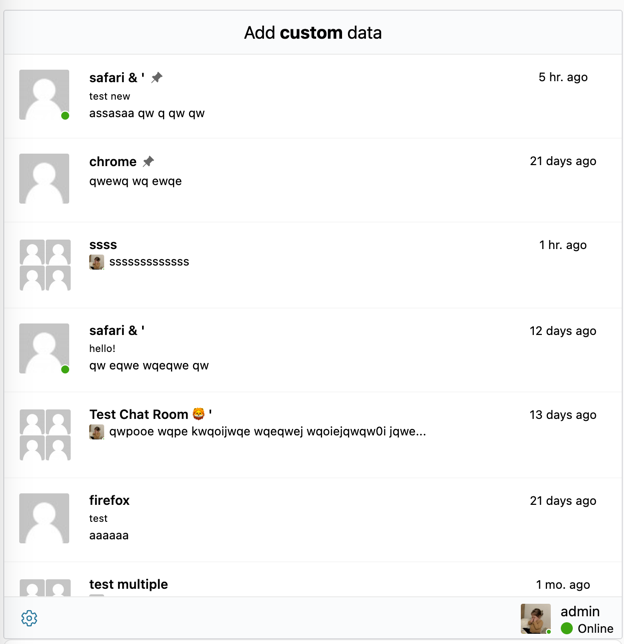
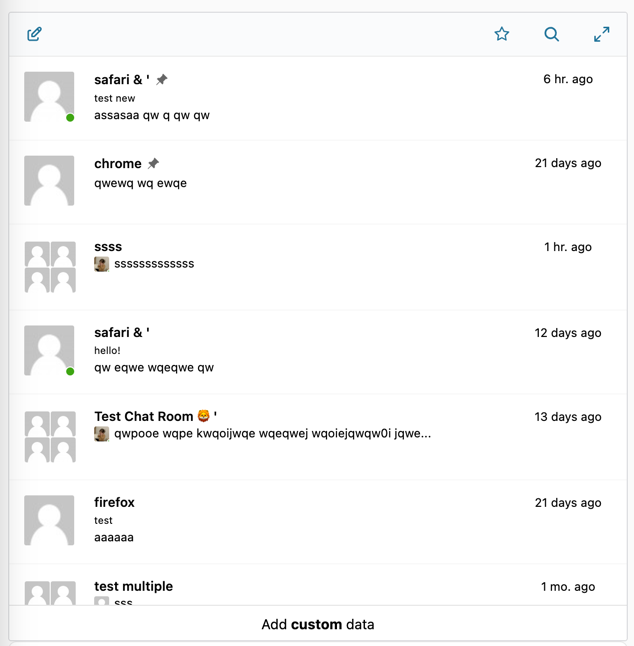
Replaces or modifies the header element at the top of the threads list page. Return an HTML string or React JSX element. The page parameter identifies which page is rendering (currently 'index'), and mobileView indicates if the mobile layout is active.
Parameters:
header(JSX.Element) — Default IndexHeader componentpage(string) — Page identifier ('index')mobileView(boolean) — Whether mobile view is active
Returns: JSX.Element|string — React component or HTML string
wp.hooks.addFilter('better_messages_header_element', 'my_plugin', function(header, page, mobileView) {
    if (mobileView) {
        return '<div class="custom-header">Messages</div>';
    }
    return header;
});
better_messages_footer_element#
Replaces or modifies the footer element at the bottom of the threads list page. Return an HTML string or React JSX element. Works the same as the header element filter with page and mobileView parameters.
Parameters:
footer(JSX.Element) — Default ChatFooter componentpage(string) — Page identifier ('index')mobileView(boolean) — Whether mobile view is active
Returns: JSX.Element|string
wp.hooks.addFilter('better_messages_footer_element', 'my_plugin', function(footer, page, mobileView) {
    if (page === 'index') {
        return '<div class="my-custom-footer">Add <strong>custom</strong> content</div>';
    }
    return footer;
});
better_messages_thread_header_actions#
Filters the complete list of action buttons in the conversation header — the right-side area with the call buttons, minimize/maximize controls and the "More" menu. The filter receives every built-in button as an array item with a stable key, so custom buttons can be inserted at any position, and built-in buttons can be reordered, removed, or replaced.
This is the supported way to customize the conversation header. Do not insert your own DOM node into .thread-actions — that container is rendered by React and re-created whenever the header re-renders, so a manually inserted element is repositioned or removed.
The same filter also runs for mini chats; use the isMiniChat argument to tell the surfaces apart.
Parameters:
actions(array) — The built-in header actions for the current conversation statethread(object) — Thread objectanotherUser(object|false) — Other user in a one-to-one conversation, orfalseisMiniChat(boolean) — Whether the actions are being rendered in a mini chat header
Returns: array
Built-in action keys (each present only when the corresponding button applies to the current conversation and state):
| Surface | Keys, in default order |
|---|---|
| Conversation header | online-users (chat rooms, WebSocket version), audio-call, video-call, group-audio-call, group-video-call, minimize (to mini chat), maximize, unmaximize (restore from maximized), more (the ⋯ dropdown) |
| Mini chat, open | video-call, audio-call, group-audio-call, group-video-call, minimize, close |
| Mini chat, collapsed | open, close |
Properties of each action: key (string, required — must be unique), icon (string of SVG HTML, or a React node), tooltip (string, optional), classes (string, optional extra CSS classes), onClick (function, optional), onAuxClick (function, optional, middle-click). Built-in actions additionally carry builtIn: true, and the more item carries a pre-rendered element instead of an icon — pass it through unchanged unless you intend to remove it.
Adding a custom button before the window controls:
wp.hooks.addFilter('better_messages_thread_header_actions', 'my_plugin', function(actions, thread, anotherUser, isMiniChat) {
    var anchor = actions.findIndex(function(action) {
        return ['minimize', 'maximize', 'unmaximize', 'more', 'close'].indexOf(action.key) !== -1;
    });

    var item = {
        key: 'safety-menu',
        tooltip: 'Safety options',
        classes: 'my-safety-menu',
        icon: '<svg xmlns="http://www.w3.org/2000/svg" viewBox="0 0 24 24" width="24" height="24" fill="currentColor"><circle cx="12" cy="5" r="2"/><circle cx="12" cy="12" r="2"/><circle cx="12" cy="19" r="2"/></svg>',
        onClick: function(event) {
            openMySafetyMenu(thread.thread_id, event.currentTarget);
        }
    };

    if (anchor === -1) {
        actions.push(item);
    } else {
        actions.splice(anchor, 0, item);
    }

    return actions;
});
Removing built-in buttons:
wp.hooks.addFilter('better_messages_thread_header_actions', 'my_plugin', function(actions) {
    return actions.filter(function(action) {
        return action.key !== 'video-call' && action.key !== 'audio-call';
    });
});
Replacing the behavior of a built-in button while keeping its position and icon:
wp.hooks.addFilter('better_messages_thread_header_actions', 'my_plugin', function(actions, thread) {
    var index = actions.findIndex(function(action) { return action.key === 'video-call'; });

    if (index !== -1) {
        actions[index] = Object.assign({}, actions[index], {
            onClick: function() {
                openMyCallFlow(thread.thread_id);
            }
        });
    }

    return actions;
});
Custom actions inherit the styling of the built-in header buttons — sizing, hover state and theme color are applied automatically, and your classes are added alongside bm-thread-header-action for further styling. Each button carries a data-action-key attribute matching its key, which is a stable anchor for a dropdown positioned against it.
Actions without a key, or without both an icon and an element, are skipped, and duplicate keys keep only the first occurrence. If your callback throws or returns something that is not an array, the error is logged to the browser console and the header falls back to the built-in actions rather than breaking.
To add an entry to the existing "More" dropdown instead of a standalone button, use better_messages_thread_context_menu.
better_messages_messages_list_before#
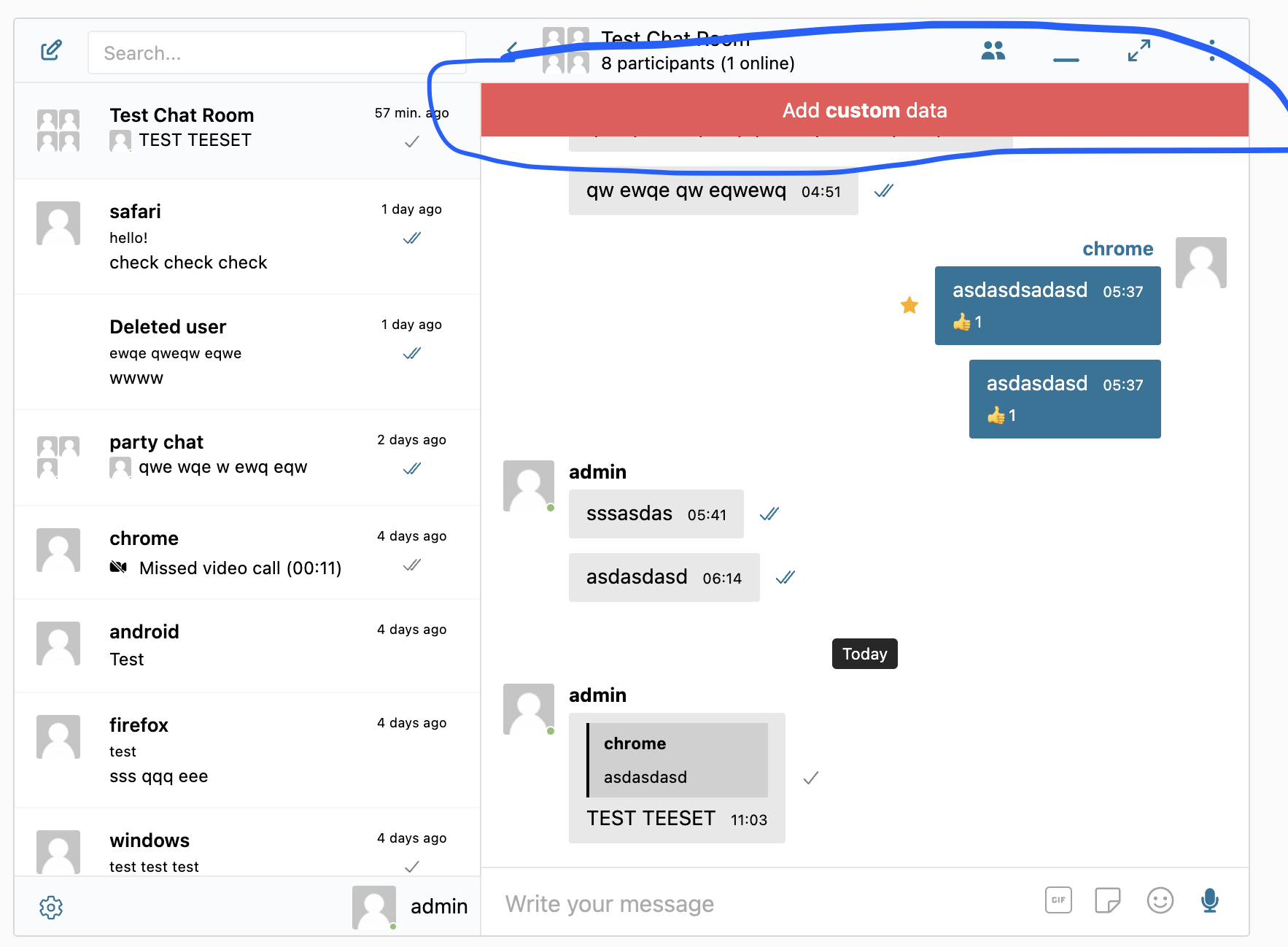
Adds HTML content above the messages list, before the message history begins. The HTML is parsed and rendered as React elements. Return an empty string to show nothing. Useful for thread-specific announcements, encryption status banners, or custom info boxes.
Parameters:
content(string) — Default empty stringthread(object) — Thread object
Returns: string — HTML string
wp.hooks.addFilter('better_messages_messages_list_before', 'my_plugin', function(content, thread) {
    if (thread.type === 'group') {
        return '<div class="group-notice">Welcome to the group chat!</div>';
    }
    return content;
});
better_messages_send_button_after#
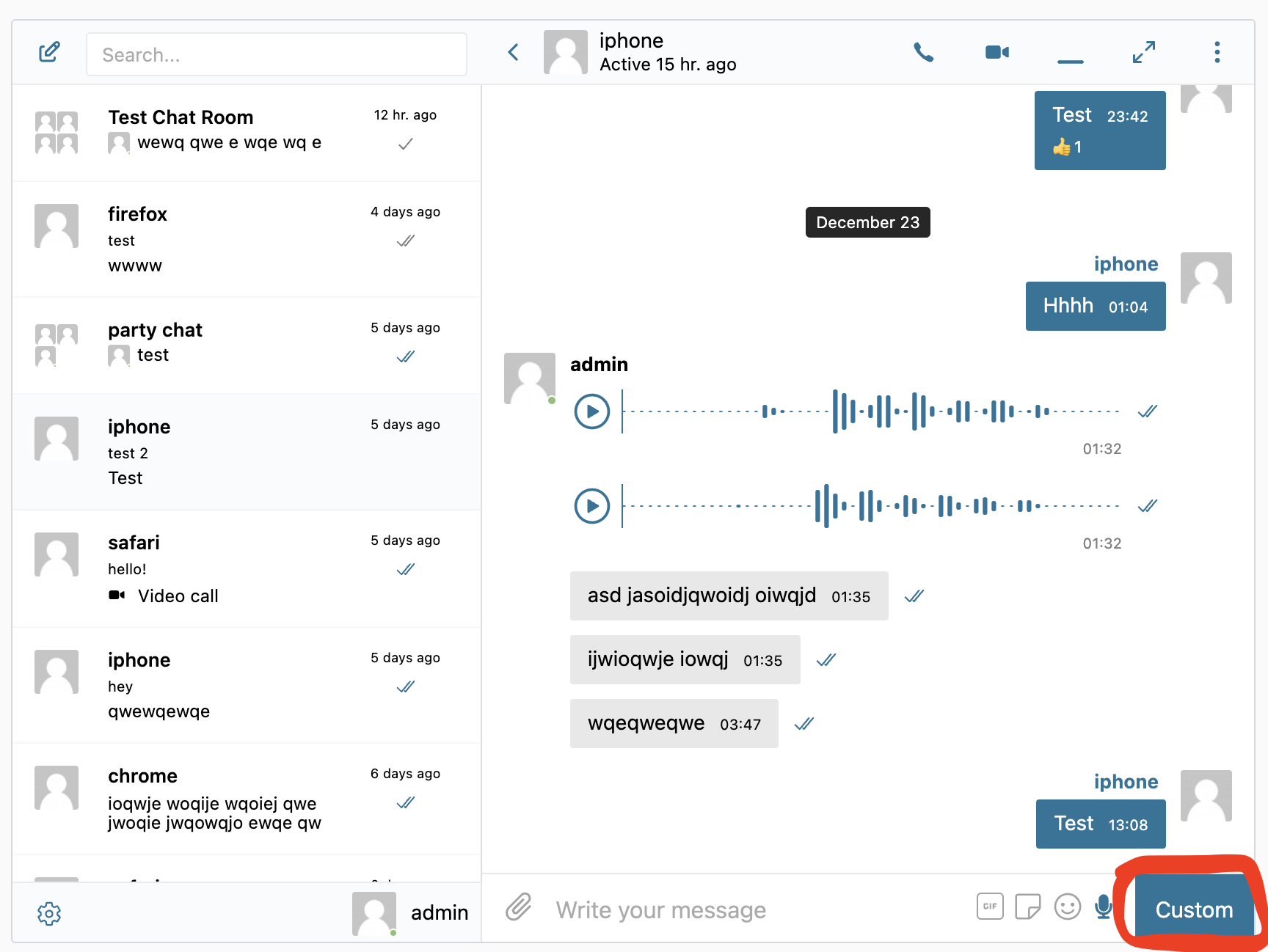
Adds HTML content after the send button in the reply form area. The HTML is rendered inline with the send button. Useful for adding custom action buttons, emoji shortcuts, or addon-specific controls next to the message composer.
Parameters:
content(string) — Default empty stringthread(object) — Thread object
Returns: string — HTML string
wp.hooks.addFilter('better_messages_send_button_after', 'my_plugin', function(content, thread) {
    return '<button class="my-custom-btn" onclick="myAction()">+</button>';
});
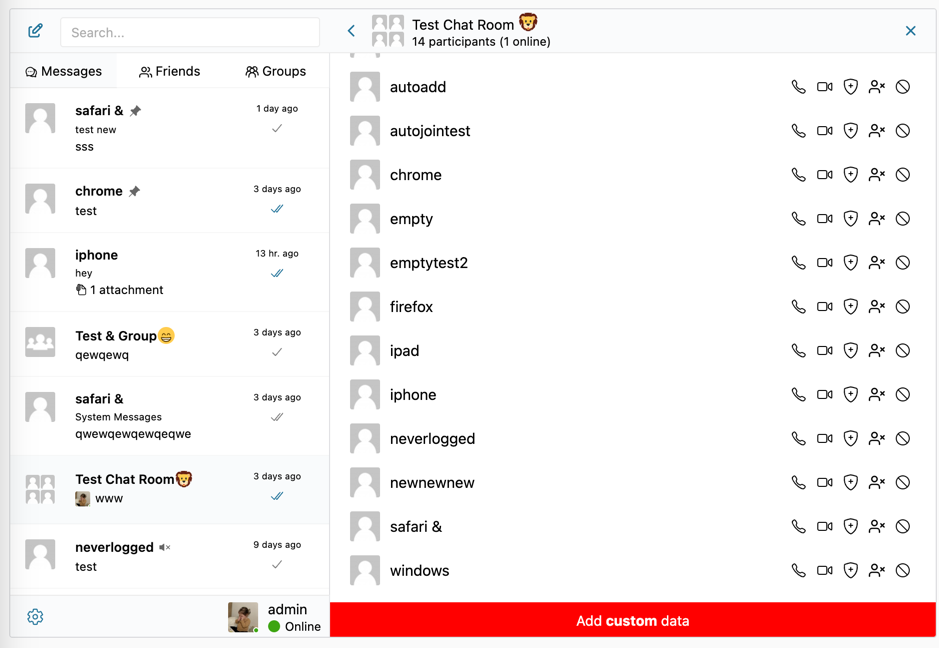
better_messages_participants_list_after#
Adds HTML content after the participants list in thread information panel.
Parameters:
content(string) — Default empty stringthread(object) — Thread object
Returns: string — HTML string
wp.hooks.addFilter('better_messages_participants_list_after', 'my_plugin', function(html, thread) {
    html += '<div class="my-custom-html">Add <strong>custom</strong> data</div>';
    return html;
});
better_messages_user_settings_after#
Adds custom settings sections after the user settings options.
Parameters:
elements(array) — Default empty array
Returns: array — Array of React elements
Guest Authentication Screen#
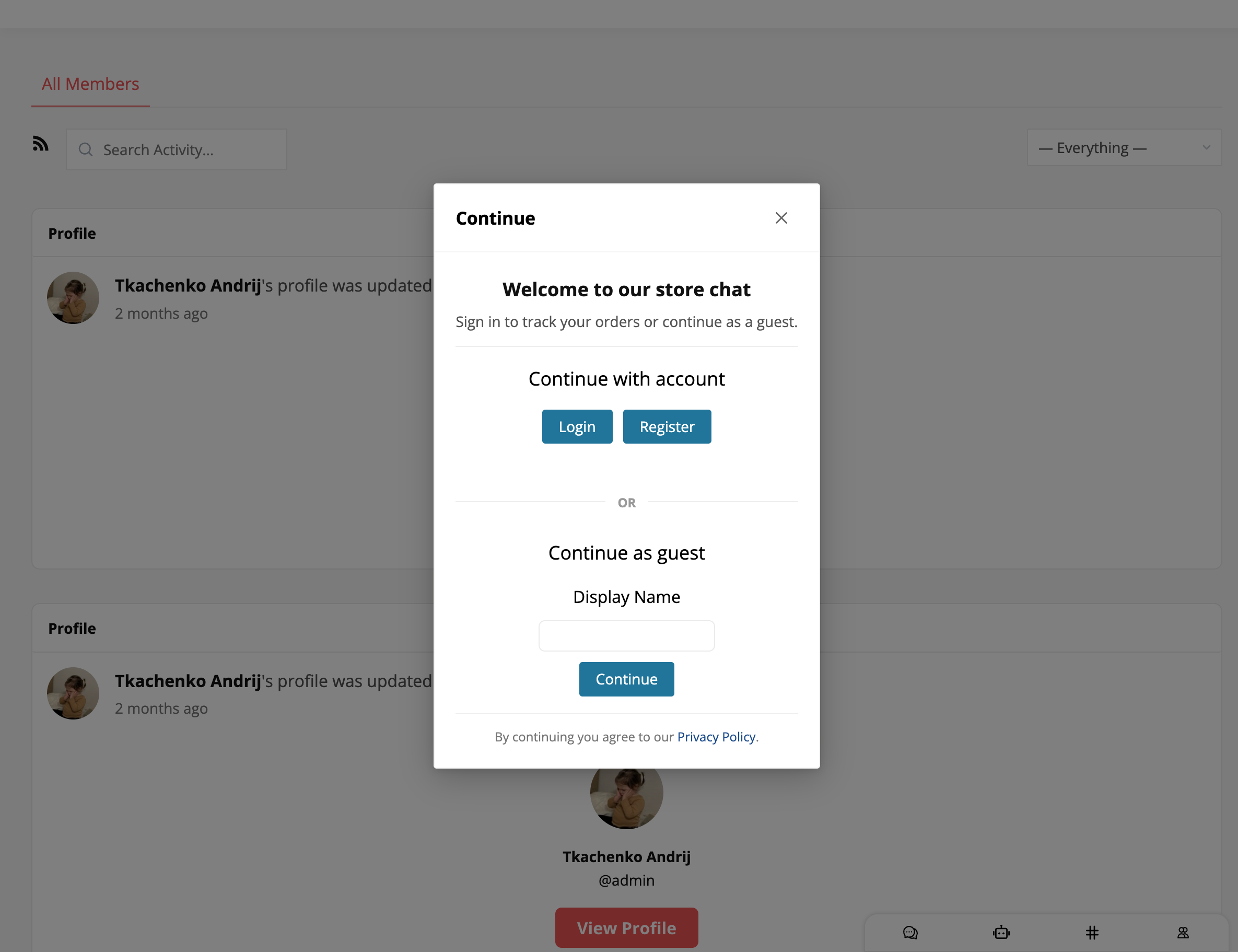
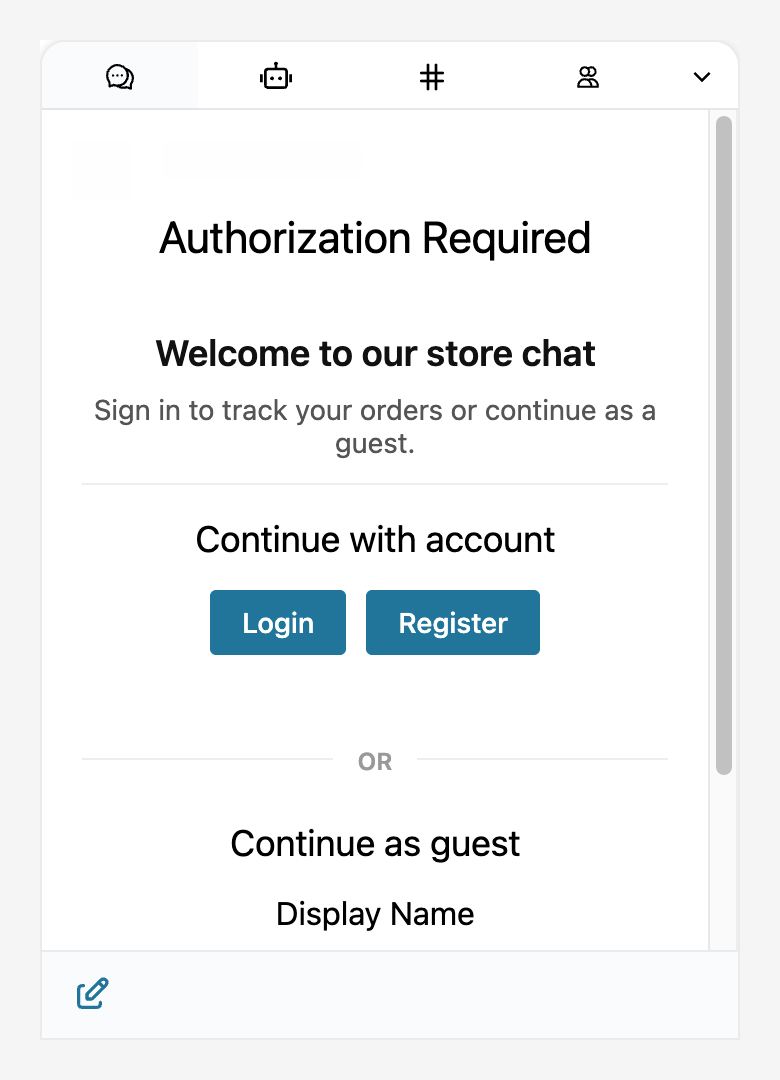
The guest authentication screen appears when a visitor without a WordPress account or guest record tries to start a conversation. By default it shows two stacked sections — Continue with account (Login / Register) and Continue as guest (display-name form). It is rendered in three places:
- Modal popup — when a guest clicks a chat button (live chat, mini-widget "Start a new conversation", chat-room "Join", user / AI bot list item)
- Mini-widget banner — inside the floating mini-widget when a guest opens it
- Full messages page wall — on the main
/messages/page (or wherever the messages app is embedded)
The filters below let you inject arbitrary HTML at three positions inside the screen without overriding the component. They fire in all three locations automatically because the underlying AuthScreen component is shared. Each filter receives the current HTML output (empty string by default) and an args object describing which sections are visible. Concatenate your HTML to the input and return the new string; return the input unchanged for no injection. Filters from multiple plugins compose naturally because each receives the previous filter's output.
The filters work with both the free and WebSocket builds. The injected HTML is rendered into the screen verbatim, so you can include images, links, lists, or any markup. Style your injected content with CSS that targets your custom classes.
The same filters fire inside the mini-widget banner and the full messages page wall:
better_messages_auth_required_top#
Injects content above the "Continue with account" and "Continue as guest" sections. Useful for a welcome message, marketing intro, or context about who the visitor is about to chat with.
Parameters:
output(string) — Empty by default; concatenate to it (output + '<div>…</div>') to compose with content from other filtersargs(object) —{ showLogin: boolean, showGuestSubHeader: boolean, forceGuest: boolean }
Returns: string — HTML string to inject (return the input unchanged for no injection)
wp.hooks.addFilter('better_messages_auth_required_top', 'my_plugin', function (output, args) {
    return output + '<div class="my-pre-chat-intro">' +
        '<h3>Welcome to our store chat</h3>' +
        '<p>Sign in to track your orders or continue as a guest.</p>' +
    '</div>';
});
better_messages_auth_required_between#
Injects content between the "Continue with account" section and the "Continue as guest" section. Useful for a divider, a "— OR —" label, or contextual help that should sit between the two auth choices.
Parameters:
output(string)args(object) —{ showLogin: boolean, showGuestSubHeader: boolean, forceGuest: boolean }
Returns: string
wp.hooks.addFilter('better_messages_auth_required_between', 'my_plugin', function (output) {
    return output + '<div class="my-auth-divider"><span>or</span></div>';
});
better_messages_auth_required_bottom#
Injects content below the "Continue as guest" section. Useful for legal disclosures, links to your privacy policy, support contacts, or any closing text the visitor should see before chatting.
Parameters:
output(string)args(object) —{ showLogin: boolean, showGuestSubHeader: boolean, forceGuest: boolean }
Returns: string
wp.hooks.addFilter('better_messages_auth_required_bottom', 'my_plugin', function (output) {
    return output + '<p class="my-auth-footnote">' +
        'By continuing you agree to our <a href="/privacy">Privacy Policy</a>.' +
    '</p>';
});
Layout tips#
The default modal stacks the login section above the guest section vertically. If you want them side-by-side (and your custom content full-width above), use CSS Grid on the modal wrapper:
.bm-modal-window.bm-modal-guest-settings-panel .bm-auth-required-modal {
    display: grid;
    grid-template-columns: 1fr 1fr;
    gap: 16px;
    align-items: start;
}
.bm-modal-window.bm-modal-guest-settings-panel .bm-pre-chat-intro,
.bm-modal-window.bm-modal-guest-settings-panel .my-auth-footnote { grid-column: 1 / -1; }
.bm-modal-window.bm-modal-guest-settings-panel .bm-guest-login { grid-column: 1; }
.bm-modal-window.bm-modal-guest-settings-panel .bm-guest-form { grid-column: 2; }
.bm-modal-window.bm-modal-guest-settings-panel .bm-guest-login-actions { display: flex; flex-direction: column; gap: 8px; }
.bm-modal-window.bm-modal-guest-settings-panel .bm-modal-window-content { overflow-y: auto; }
Replace .bm-pre-chat-intro and .my-auth-footnote with whatever root class names your injected HTML uses.
Message Styling & Context Menu#
better_messages_single_message_class#
Adds custom CSS classes to individual message elements in the message list. The message object contains all message properties (sender_id, thread_id, content, etc.) so you can conditionally style messages based on sender, content, or metadata.
Parameters:
className(string) — Current CSS classesmessage(object) — Message object
Returns: string
wp.hooks.addFilter('better_messages_single_message_class', 'my_plugin', function(className, message) {
    if (message.sender_id === 1) {
        className += ' admin-message';
    }
    return className;
});
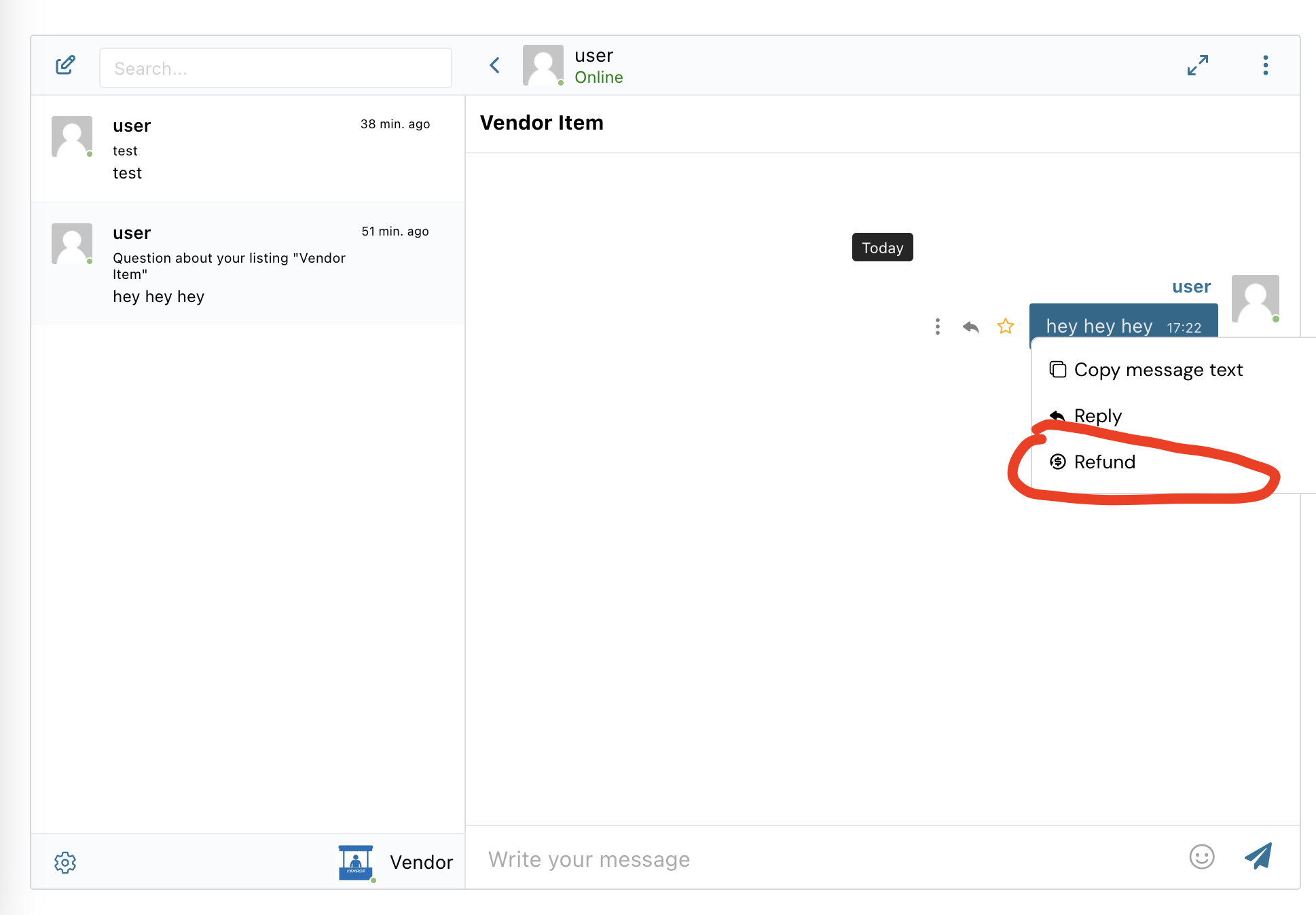
better_messages_single_message_context_menu#
Modifies the context menu items shown when right-clicking or long-pressing a message. Each menu item should have key, label, icon (SVG string), and action (callback function) properties. You can add, remove, or reorder items in the array.
Parameters:
items(array) — Array of MessageContextMenuItem objectsmessage(object) — Message objectthread(object) — Thread object
Returns: array
Available properties for menu items: key (string, required for React), label (string), icon (string, SVG HTML), action (function, callback on click).
wp.hooks.addFilter('better_messages_single_message_context_menu', 'my_plugin', function(items, message, thread) {
    items.push({
        key: 'context-report-item',
        icon: '<svg xmlns="http://www.w3.org/2000/svg" viewBox="0 0 24 24" width="24" height="24"><path d="M12 2C6.48 2 2 6.48 2 12s4.48 10 10 10 10-4.48 10-10S17.52 2 12 2zm1 15h-2v-2h2v2zm0-4h-2V7h2v6z"/></svg>',
        label: 'Report',
        action: function() {
            alert('Reported message #' + message.message_id);
        }
    });
    return items;
});
better_messages_video_preload_attribute#
Controls the preload attribute for video players in messages.
Parameters:
preload(string) — Default'auto'
Returns: string — 'none', 'metadata', or 'auto'
wp.hooks.addFilter('better_messages_video_preload_attribute', 'my_plugin', function() {
    return 'metadata'; // Save bandwidth
});
Thread Styling & Context Menu#
better_messages_single_thread_class#
Adds custom CSS classes to individual thread items in the threads list sidebar. The thread object contains all thread properties (thread_id, type, subject, unread_count, etc.) so you can conditionally style threads based on state or metadata.
Parameters:
className(string) — Current CSS classesthread(object) — Thread object
Returns: string
wp.hooks.addFilter('better_messages_single_thread_class', 'my_plugin', function(className, thread) {
    if (thread.pinned) {
        className += ' pinned-thread';
    }
    return className;
});
better_messages_thread_context_menu#
Modifies the context menu actions shown when right-clicking or long-pressing a thread in the threads list. Each action should have key, label, tooltip, icon, classes, showInThread, showInList, onClick, and optionally onAuxClick properties.
Parameters:
actions(array) — Array of ThreadAction objectsthread(object) — Thread objectanotherUser(object|false) — Other user in PM, orfalseisMiniChat(boolean) — Whether in mini chat mode
Returns: array
Available properties for actions: key (string, required for React), label (string), tooltip (string), icon (string, SVG HTML), classes (string, CSS classes), showInThread (bool), showInList (bool), onClick (function), onAuxClick (function, middle-click).
wp.hooks.addFilter('better_messages_thread_context_menu', 'my_plugin', function(buttons, thread, anotherUser, isMiniChat) {
    buttons.push({
        key: 'custom-action',
        showInThread: true,
        showInList: true,
        tooltip: 'Archive this conversation',
        label: 'Archive',
        icon: '<svg xmlns="http://www.w3.org/2000/svg" viewBox="0 0 24 24" width="24" height="24"><path d="M20.54 5.23l-1.39-1.68C18.88 3.21 18.47 3 18 3H6c-.47 0-.88.21-1.16.55L3.46 5.23C3.17 5.57 3 6.02 3 6.5V19c0 1.1.9 2 2 2h14c1.1 0 2-.9 2-2V6.5c0-.48-.17-.93-.46-1.27zM12 17.5L6.5 12H10v-2h4v2h3.5L12 17.5z"/></svg>',
        classes: 'bm-archive-action',
        onClick: function() {
            alert('Archive thread #' + thread.thread_id);
        }
    });
    return buttons;
});
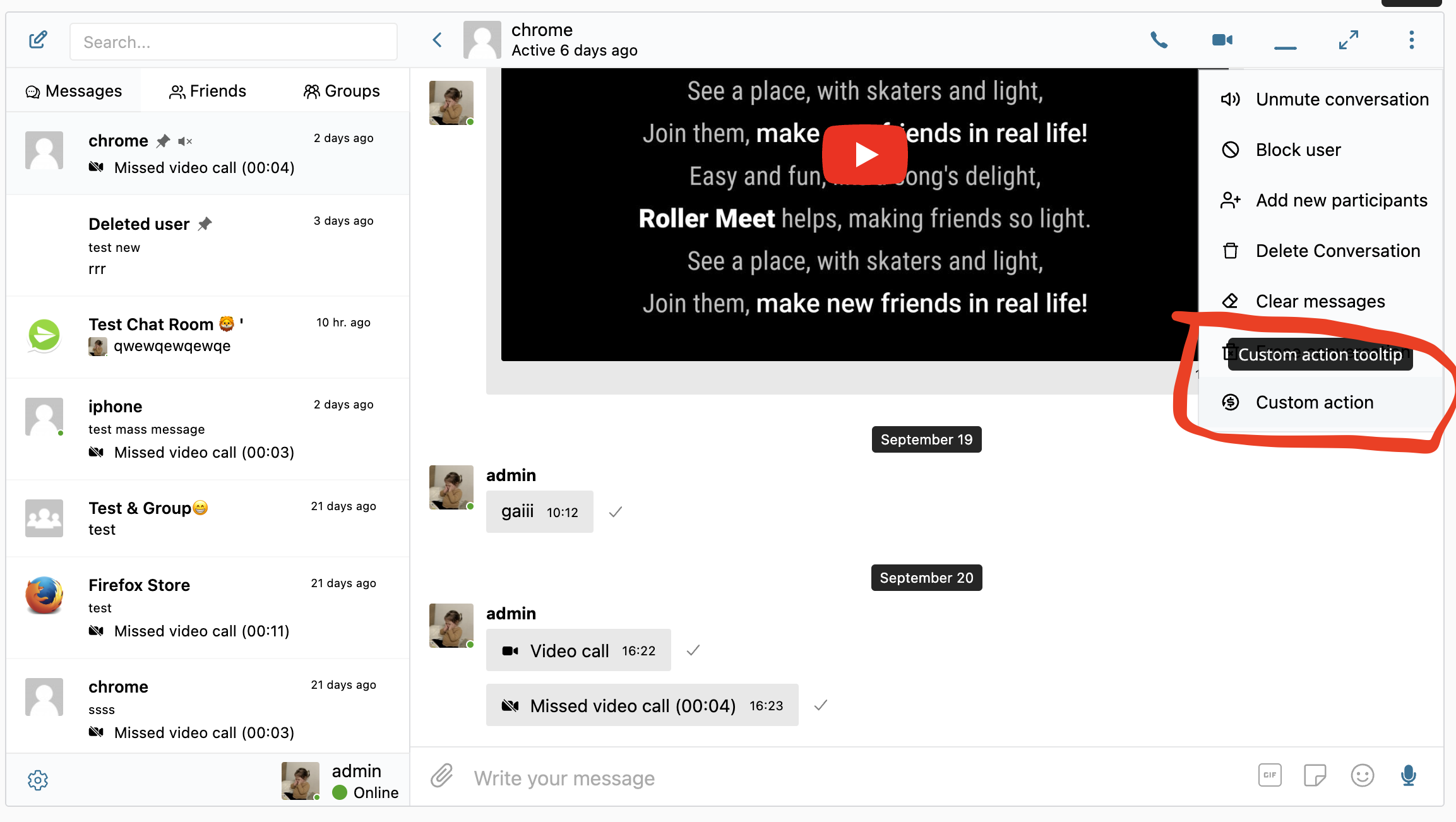
To add a standalone button to the conversation header instead of an entry in this menu, use better_messages_thread_header_actions.
better_messages_threads_list_selector#
Filters the database query selector for the threads list.
Parameters:
selector(object) — Default:{ isDeleted: 0, isHidden: 0, adminAccess: { $exists: false } }
Returns: object
wp.hooks.addFilter('better_messages_threads_list_selector', 'my_plugin', function(selector) {
    // Only show group threads
    selector.type = 'group';
    return selector;
});
User Elements#
better_messages_avatar_class#
Adds custom CSS classes to user avatar elements throughout the UI. The default includes 'avatar bbpm-avatar' and an 'online' class when the user is online. The user object provides user data for conditional styling.
Parameters:
className(string) — Default'avatar bbpm-avatar'+ online statususer(object) — User object
Returns: string
wp.hooks.addFilter('better_messages_avatar_class', 'my_plugin', function(className, user) {
    if (user.verified) {
        className += ' verified-avatar';
    }
    return className;
});
better_messages_avatar_attributes#
Adds custom HTML attributes to avatar elements.
Parameters:
attributes(object) — Default empty objectuser(object) — User object
Returns: object
wp.hooks.addFilter('better_messages_avatar_attributes', 'my_plugin', function(attrs, user) {
    attrs['data-role'] = user.role || 'member';
    return attrs;
});
better_messages_before_avatar_click#
Intercepts avatar click events before the default profile navigation occurs. Return true to prevent the default behavior and handle the click yourself (e.g., open a custom profile modal). Return false to allow normal navigation.
Parameters:
prevented(boolean) — Defaultfalseuser_id(number) — User ID
Returns: boolean
wp.hooks.addFilter('better_messages_before_avatar_click', 'my_plugin', function(prevented, userId) {
    // Open custom profile modal instead of navigating
    openProfileModal(userId);
    return true; // Prevent default navigation
});
better_messages_username_class#
Adds custom CSS classes to username elements.
Parameters:
className(string) — Default'user bm-user'user(object) — User object
Returns: string
wp.hooks.addFilter('better_messages_username_class', 'my_plugin', function(classes, user) {
    classes += ' notranslate';
    return classes;
});
better_messages_username_attributes#
Adds custom HTML attributes to username elements.
Parameters:
attributes(object) — Default empty objectuser(object) — User object
Returns: object
better_messages_before_username_click#
Intercepts username click events before the default profile navigation occurs. Return true to prevent the default behavior and handle the click yourself. Return false to allow normal navigation to the user's profile.
Parameters:
prevented(boolean) — Defaultfalseuser_id(number) — User ID
Returns: boolean
wp.hooks.addFilter('better_messages_before_username_click', 'my_plugin', function(prevented, userId) {
    openProfileModal(userId);
    return true;
});
Message Sending#
better_messages_before_message_sent#
Prevents message sending or performs custom validation before a message is sent. Return true to block the message from being sent (the user stays in the composer). Return false to allow sending to proceed normally.
Parameters:
prevented(boolean) — DefaultfalsethreadId(number) — Thread IDthread(object) — Thread object
Returns: boolean — true to prevent, false to allow
wp.hooks.addFilter('better_messages_before_message_sent', 'my_plugin', function(prevented, threadId, thread) {
    if (!confirm('Are you sure you want to send this message?')) {
        return true; // Prevent sending
    }
    return false;
});
API & Network#
better_messages_api_request_config#
Modifies the axios request configuration before any Better Messages REST API call is made. The config object includes URL, headers, data, and method. Use this to add custom headers, modify URLs, or inject authentication tokens for external auth systems.
Parameters:
config(object) — Axios request config (URL, headers, data, etc.)
Returns: object
wp.hooks.addFilter('better_messages_api_request_config', 'my_plugin', function(config) {
    config.headers['X-Custom-Header'] = 'my-value';
    return config;
});
better_messages_api_response#
Filters API responses before they are processed by the application. Receives the full axios response object including status, data, and headers. Use this to transform response data, handle custom headers, or log API interactions.
Parameters:
response(object) — Axios response object
Returns: object
wp.hooks.addFilter('better_messages_api_response', 'my_plugin', function(response) {
    // Transform or log response data
    console.log('API response:', response.config.url, response.status);
    return response;
});
better_messages_unhandled_api_error#
Handles unhandled API errors. Return a new config to retry, or false to reject.
Parameters:
retry(boolean) — Defaultfalseresponse(object) — Error responseconfig(object) — Original request config
Returns: object|false
wp.hooks.addFilter('better_messages_unhandled_api_error', 'my_plugin', function(retry, response, config) {
    if (response.status === 401) {
        // Redirect to login
        window.location.href = '/login';
    }
    return false;
});
Navigation#
better_messages_navigate_url#
Intercepts URL navigation when opening conversations. Return true if you handle navigation yourself.
Parameters:
handled(boolean) — Defaultfalseurl(string) — Target URL
Returns: boolean
wp.hooks.addFilter('better_messages_navigate_url', 'my_plugin', function(handled, url) {
    // Use SPA router instead of full page reload
    myRouter.push(url);
    return true;
});
File Uploads#
better_messages_uploader_enabled#
Controls whether file drag-and-drop and paste upload functionality is enabled globally. Return false to completely disable file uploads in the UI. When disabled, the upload button and drag-drop zones are removed.
Parameters:
enabled(boolean) — Defaulttrue
Returns: boolean
wp.hooks.addFilter('better_messages_uploader_enabled', 'my_plugin', function() {
    return false; // Disable file uploads
});
better_messages_open_uploader_modal#
Controls whether the file uploader modal opens.
Parameters:
open(boolean) — DefaulttruebuttonRef(HTMLElement|null) — Upload button reference
Returns: boolean
Calls#
better_messages_call_show_notification#
This functionality is available only with the WebSocket version.
Controls whether to show the incoming call notification.
Parameters:
show(boolean) — Defaulttruemessage(object) — Incoming call data
Returns: boolean
wp.hooks.addFilter('better_messages_call_show_notification', 'my_plugin', function(show, message) {
    // Suppress notification for specific threads
    if (message.thread_id === 123) return false;
    return show;
});
better_messages_call_show_incoming_screen#
This functionality is available only with the WebSocket version.
Controls whether to show the incoming call screen.
Parameters:
show(boolean) — Defaulttruedata(object) — Incoming call data
Returns: boolean
better_messages_call_answer_force#
This functionality is available only with the WebSocket version.
Indicates whether a call was answered by an external system (e.g., VoIP).
Parameters:
answered(boolean) — DefaultfalsemessageId(number) — Call message IDthreadId(number) — Thread ID
Returns: boolean
better_messages_call_create_not_allowed#
Controls whether to show error when call creation is denied.
Parameters:
showError(boolean) — Defaulttruethread_id(number) — Thread IDtype(string) —'audio'or'video'
Returns: boolean
better_messages_call_join_not_allowed#
Controls whether to show error when joining a call is denied.
Parameters:
showError(boolean) — Defaulttruethread_id(number) — Thread IDtype(string) —'audio'or'video'
Returns: boolean
better_messages_outgoing_call_not_allowed#
Controls whether to show error when starting an outgoing call is denied.
Parameters:
showError(boolean) — Defaulttrueuser_id(number) — Recipient user IDthread_id(number) — Thread IDtype(string) —'audio'or'video'
Returns: boolean
better_messages_group_video_call_items#
This functionality is available only with the WebSocket version.
Filters the map of participants displayed in group video calls.
Parameters:
items(Map) — Map of participant identity to GroupVideoParticipantDatathread(object) — Thread object
Returns: Map
Miscellaneous#
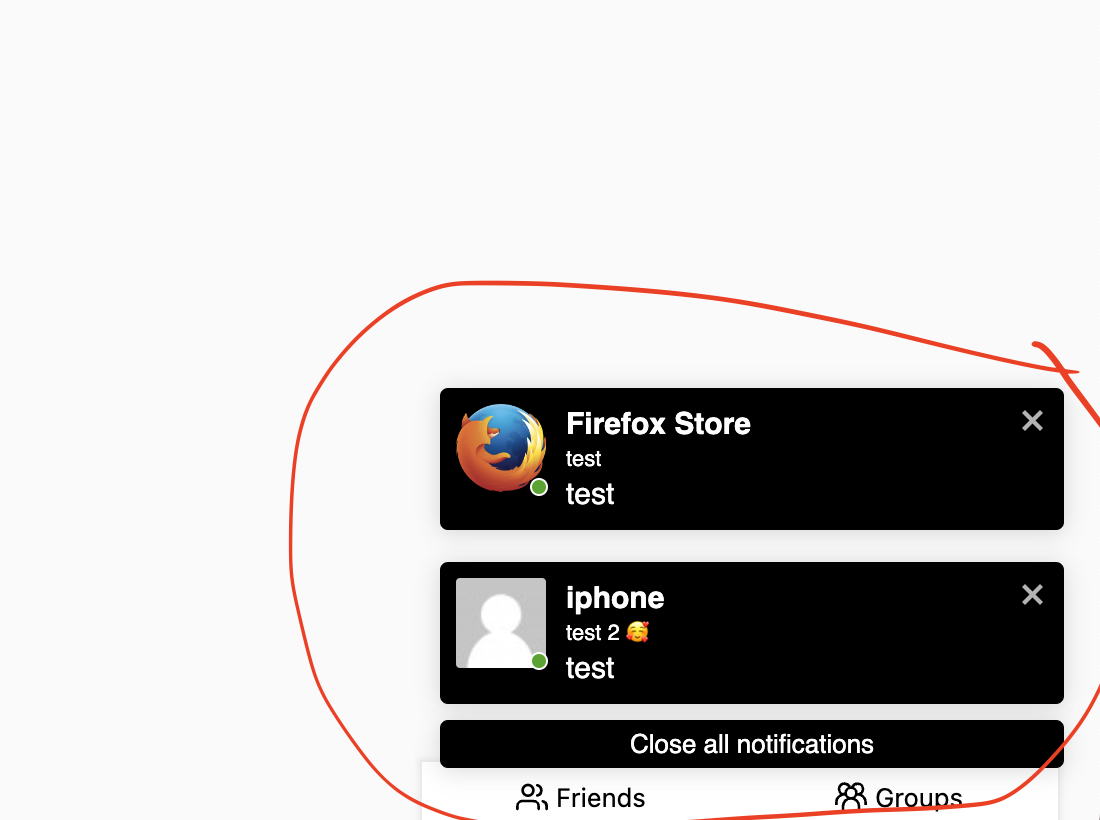
better_messages_max_toasts_limit#
Limits the maximum number of toast notifications (on-site popups for new messages) displayed at the same time. Return null for unlimited toasts, or a number to cap them. Older toasts are removed when the limit is exceeded.
Parameters:
limit(null|number) — Defaultnull(no limit)
Returns: null|number
wp.hooks.addFilter('better_messages_max_toasts_limit', 'my_plugin', function() {
    return 3; // Max 3 toasts
});
better_messages_emoji_important#
Controls whether the !important flag is applied to emoji CSS styles. Default is true to ensure emojis render correctly regardless of theme CSS. Return false if emoji styles conflict with your theme and you want to manage emoji sizing yourself.
Parameters:
useImportant(boolean) — Defaulttrue
Returns: boolean
wp.hooks.addFilter('better_messages_emoji_important', 'my_plugin', function() {
    return false; // Remove !important from emoji styles
});
better_messages_no_sleep_enable#
Controls whether screen lock prevention activates during calls.
Parameters:
enable(boolean) — Defaulttrue
Returns: boolean
better_messages_no_sleep_disable#
Controls whether screen lock prevention deactivates after calls.
Parameters:
disable(boolean) — Defaulttrue
Returns: boolean