Custom Tabs
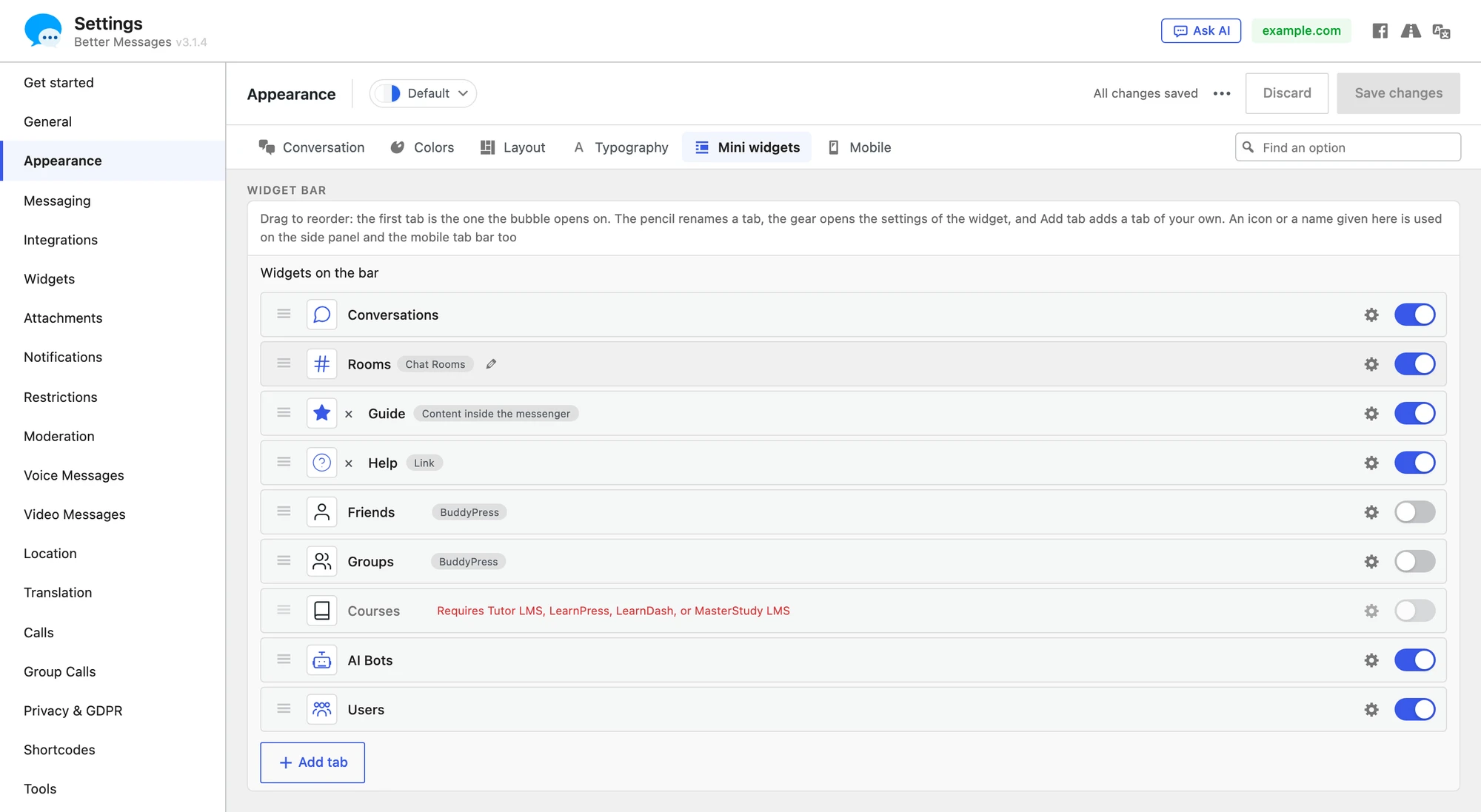
The messenger has three navigation bars: the mini widgets bar in the corner of every page, the side panel beside the conversations list, and the tab bar at the bottom of the screen on phones. Next to the built-in tabs (Conversations, Friends, Groups, Courses, AI Bots, Chat Rooms, Users) you can add tabs of your own, and give the built-in tabs names of your own.
A custom tab can do one of three things when it is clicked:
| Kind | What it does |
|---|---|
| Go to a link | Opens an address, in the same window or a new one. Good for a page that is better on its own: a store, a help centre |
| Show a page inside the messenger | Shows a page in a frame inside the messenger, with the messenger and its tabs around it |
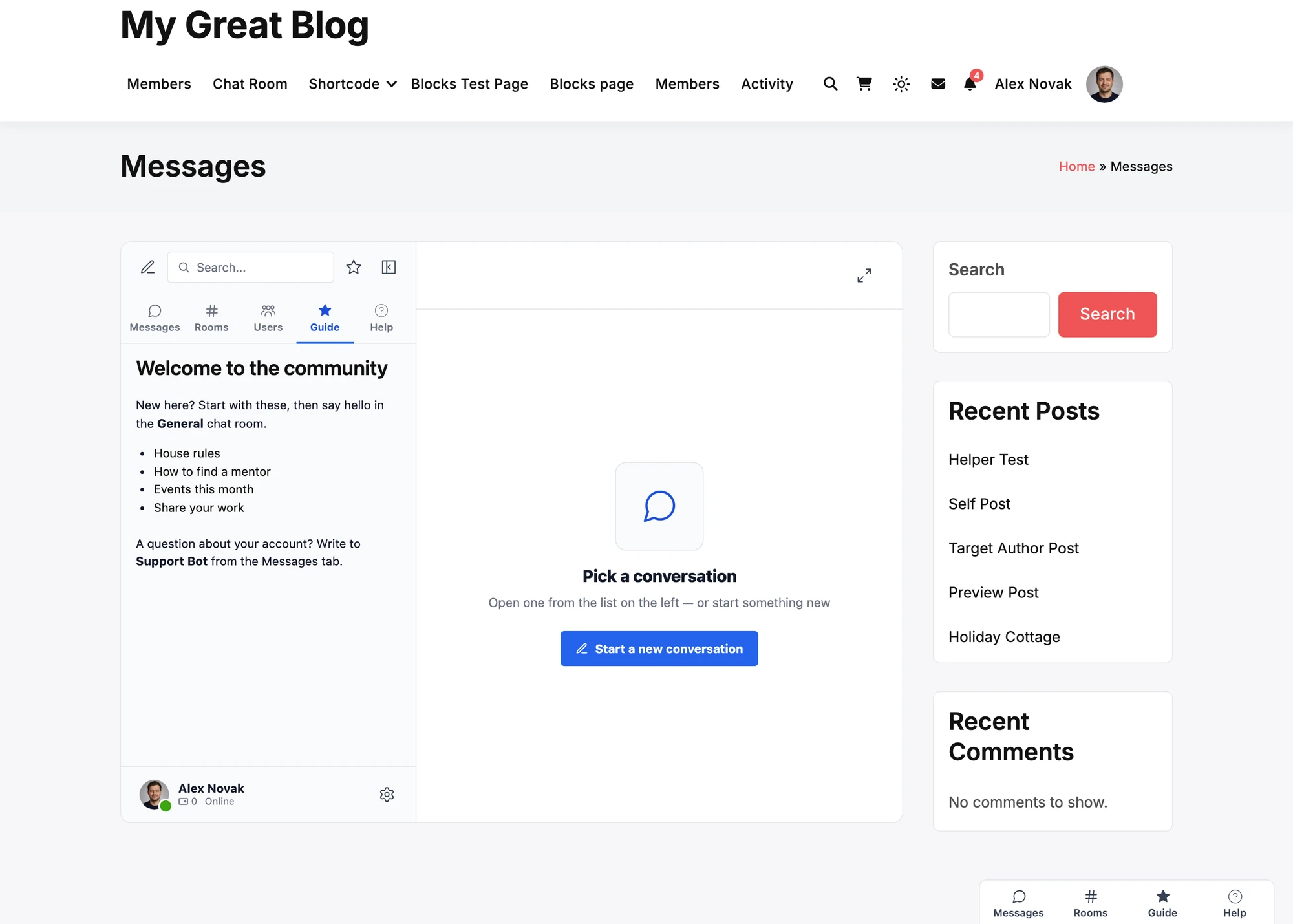
| Show content inside the messenger | Shows text, HTML and shortcodes you write, rendered by your site for the member viewing it |
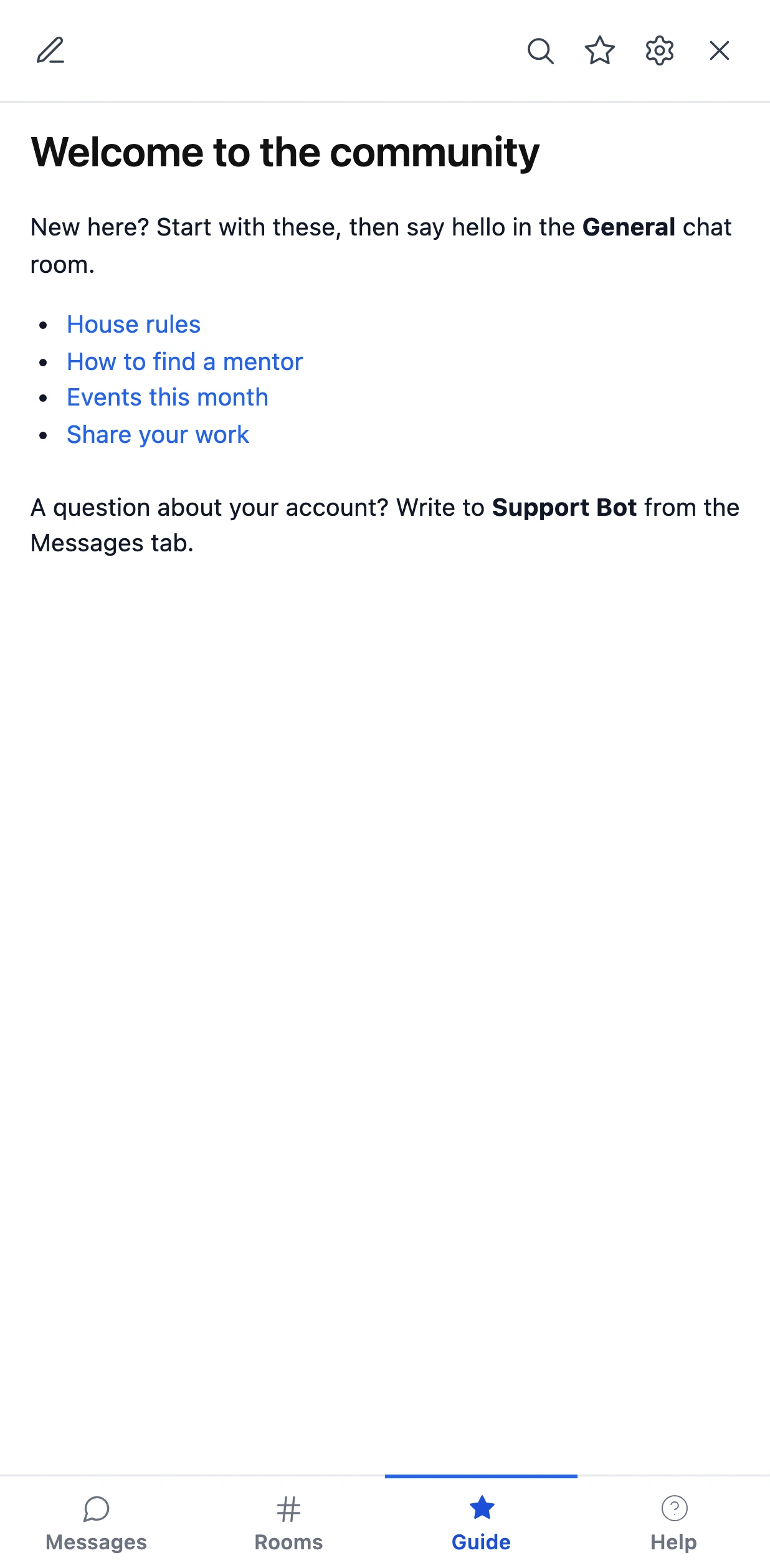
The content kind is what makes a tab feel like part of the messenger. A course catalogue
([tutor_course]), a member's account page ([pmpro_account]) or a few links and a notice show
inside the messenger without your theme's header and footer around them, and each member sees
their own: their own account, the courses open to them.

Available since Better Messages 3.1.5, in the free version and the WebSocket version.
Adding a tab#
- Go to WP Admin → Better Messages → Settings → Appearance.
- Open the bar you want the tab on: Mini widgets (the list Widgets on the bar), Layout (Widgets on the side panel) or Mobile (Tabs on the bar).
- Click Add tab under the list.
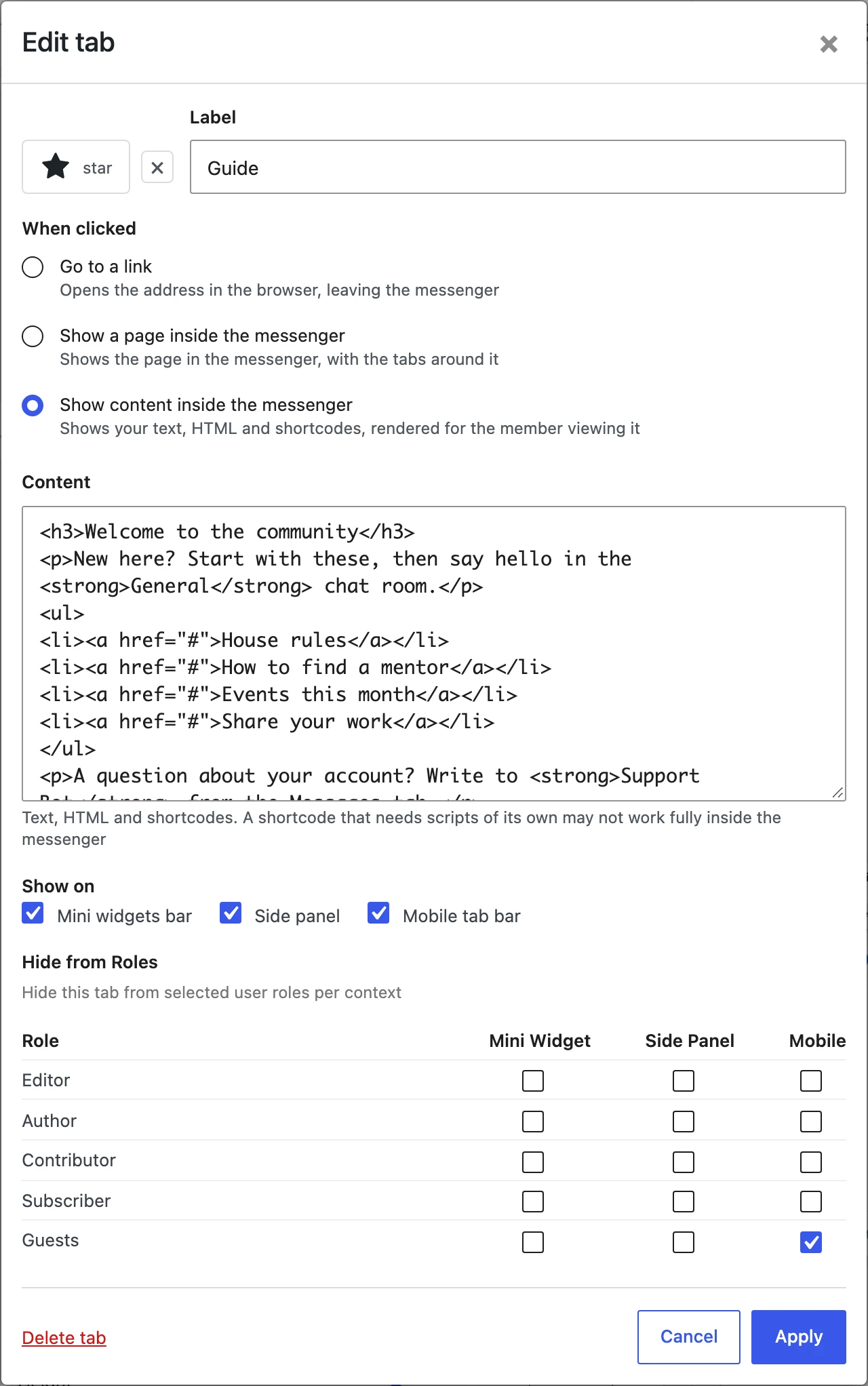
- Fill in the tab and click Add tab in the dialog.
- Click Save changes at the top of the page.
The preview beside the settings shows the tab as soon as you add it, before anything is saved.

| Field | What it does |
|---|---|
| Icon | The icon on the tab, from the same picker as the built-in tabs: a preset icon or your own SVG. Without one the tab shows a link, a globe or a page icon, by its kind |
| Label | The name of the tab, shown with the icon, or as a tooltip when the bar shows icons only |
| When clicked | Go to a link, Show a page inside the messenger or Show content inside the messenger |
| Address | For a link or a page. An address on your own site can be relative, like /courses/ |
| Open in a new window | For a link |
| Content | For content: text, HTML and shortcodes |
| Show on | The bars the tab is on. The bar you clicked Add tab under is ticked to begin with |
| Hide from Roles | Per bar, the roles that do not get the tab. Guests stands for visitors chatting as guests |

A new tab is added at the end of each bar. Drag it to where you want it, on each bar separately, like any other tab. You can add up to 10 tabs.
Every custom tab is listed on all three bars, with the same switch as the built-in tabs: turn it on or off for each bar there, without opening the dialog. To change a tab, or to delete it, click the gear on its row.
A tab that shows content#
Content is rendered by your site when a member opens the tab, and again each time they come back to it, so it is always current and always theirs. It is never part of the page itself, so a member whose role the tab is hidden from cannot read it in the page source either.
Most shortcodes work as they do on a page. A shortcode that needs scripts of its own, a slider or a form that loads its scripts only on the pages it knows it is on, may show without them inside the messenger. If that happens, use Show a page inside the messenger with the page that holds the shortcode instead.
Links inside the content open in the whole window, as anywhere on your site.
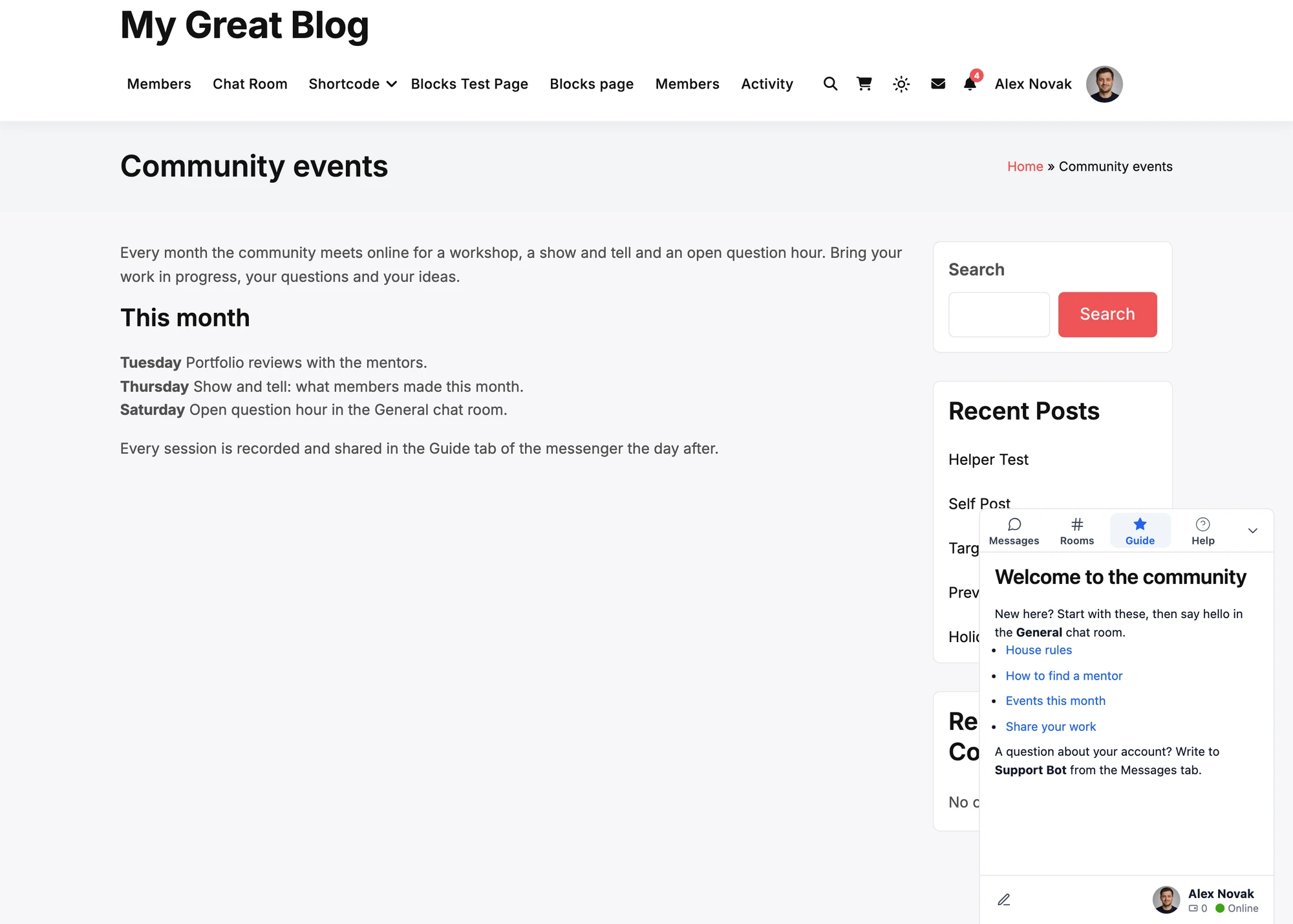
The same tab on the mini widgets bar, over a regular page of the site, and on the tab bar of a phone:


A tab that shows a page#
A page of your own site opens its links in the whole window, so a click on a course or a product inside the tab goes to that page, leaving the messenger. The page keeps its header and footer, as the frame shows the whole page.
A page of another site shows only if that site allows being shown inside other sites. Many do not, and the tab then stays empty. Use Go to a link for those.
Renaming the built-in tabs#
Point at a built-in tab in the bar lists and a pencil shows beside its name. Click it, type the new name and press Enter. The new name is used on all three bars, and the old one is shown beside it in the list, so you always know which tab it is. Clear the field to go back to the stock name.
The icon of a built-in tab is changed in the same list, by clicking the icon.
Who sees which tab#
- A custom tab shows to everyone who can use the messenger, guests included, unless you hide it from their role under Hide from Roles.
- A tab hidden from a role on a bar is not part of the page for that member at all.
- The messenger never opens on a link tab. When a link tab is first on a bar, the messenger opens on the next tab, and Remember the last tab never remembers it.
- In the mobile app, a link tab opens in the browser, so the app keeps its own screen.
Translating the labels#
The labels of custom tabs and the new names of built-in tabs are registered with WPML (String Translation, context Better Messages) and Polylang (Strings translations, group Better Messages) when you save. Translate them there, and each visitor sees them in their language.
For developers#
Two filters change the tabs from code:
better_messages_navigation_tabs, in JavaScript, receives every tab of a bar, the built-in ones included, and can add, remove, reorder and rename them, or add a tab that draws a panel of its own.better_messages_custom_tabs, in PHP, adds tabs on the server, for the members who should have them.
The developer guide walks through both with examples.
Frequently asked questions#
Can a tab show my course catalogue?#
Yes. Add a tab that shows content, with the catalogue shortcode of your LMS: [tutor_course] for
Tutor LMS, [ld_course_list] for LearnDash. A member opens a course from it in the whole window.
If your LMS has no catalogue shortcode, show its course archive page with Show a page inside the
messenger instead.
Can a tab show a member's account page?#
Yes, the same way: [pmpro_account] for Paid Memberships Pro, [woocommerce_my_account] for
WooCommerce, or the shortcode of your membership plugin.
Why is my page tab empty?#
The page is on another site that does not allow being shown inside other sites. Make the tab a link instead.
Can I remove a built-in tab?#
Yes: switch it off on the bar in the same list. The Conversations tab of the side panel and the mobile tab bar cannot be switched off, as it is the messenger itself. A developer can still leave it out with the JavaScript filter.
See also#
- Mini widgets — the bar in the corner, its widgets and its order
- Mobile-optimized layout — the tab bar on phones
- Modern design — the side panel and its layout
- Custom tabs developer guide — filters and examples