MasterStudy LMS Student & Instructor Messaging Plugin
Better Messages adds a modern real-time messenger to MasterStudy LMS sites. The integration takes over the MasterStudy account Messages tab, adds a Message Instructor button on every course, auto-manages Course Group Chats, and adds Send Message buttons on both the public instructor and student profiles. MasterStudy's built-in chat can be hidden with one toggle so members see only Better Messages.
What Better Messages adds to MasterStudy LMS
Once MasterStudy LMS is detected and the integration is enabled under Better Messages → Settings → Integrations → LMS:
- Message Instructor button on every MasterStudy course page next to the enrol/buy button.
- Send Message button on the MasterStudy public instructor profile and the public student profile.
- Course Group Chat — auto-created per course, with the instructor and every enrolled student auto-joined.
- Messages tab inside the MasterStudy LMS account sidebar (
/account/messages/) embedding the full Better Messages inbox. - Disable MasterStudy Messages toggle — hide the native MasterStudy Messages tab and the native Send message buttons.
- Use the MasterStudy account as the primary messages location — every internal Messages link routes here.
Message Instructor button on course pages
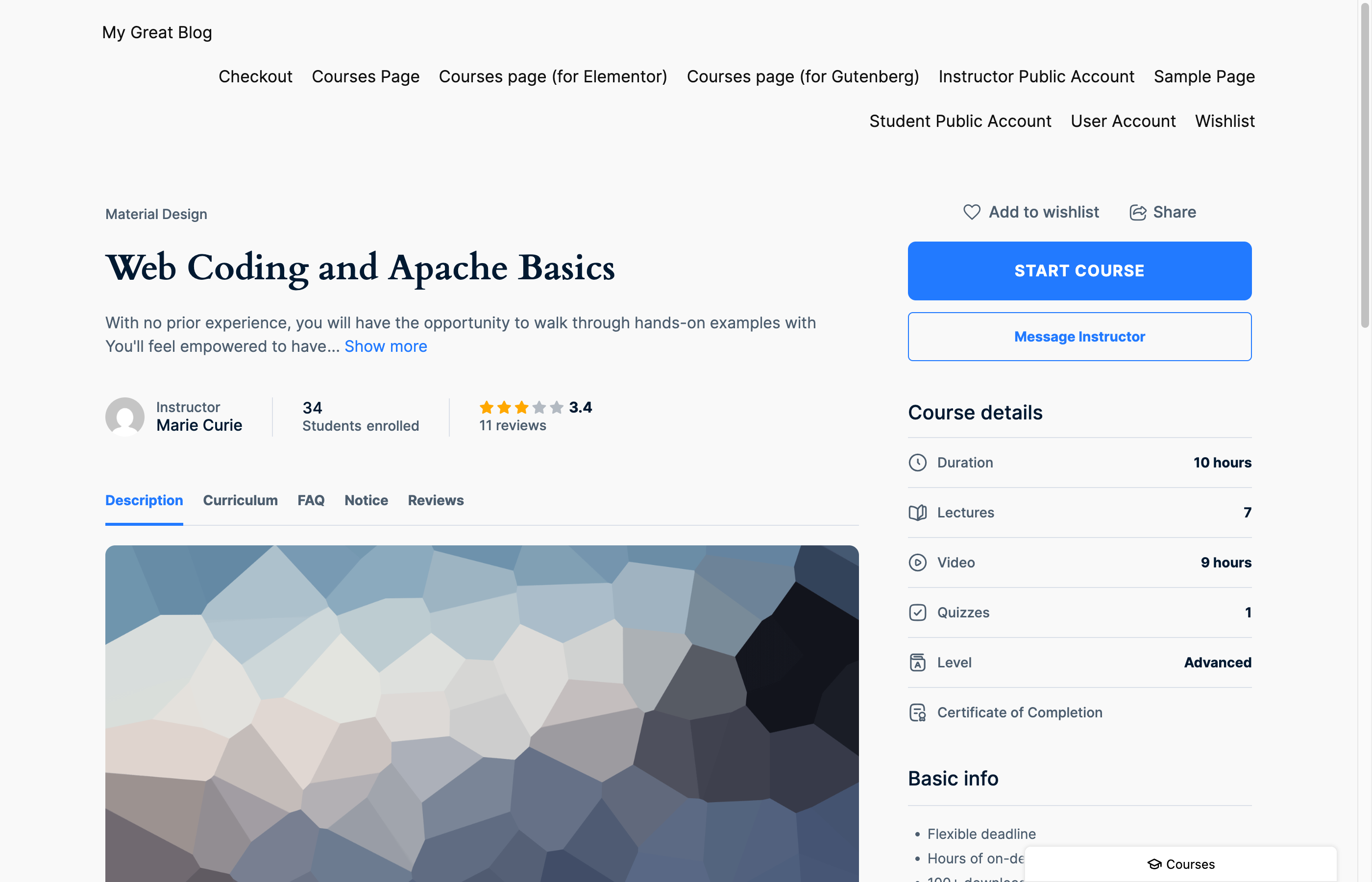
Sits next to MasterStudy's enrol/buy button so the student can ask before they enrol. Hidden for the instructor on their own course. For custom layouts, use the shortcode:
[better_messages_masterstudy_course_button]
[better_messages_masterstudy_course_button course_id="123"]
[better_messages_masterstudy_course_button text="Ask the instructor"]
Course Group Chat — auto-managed enrollment
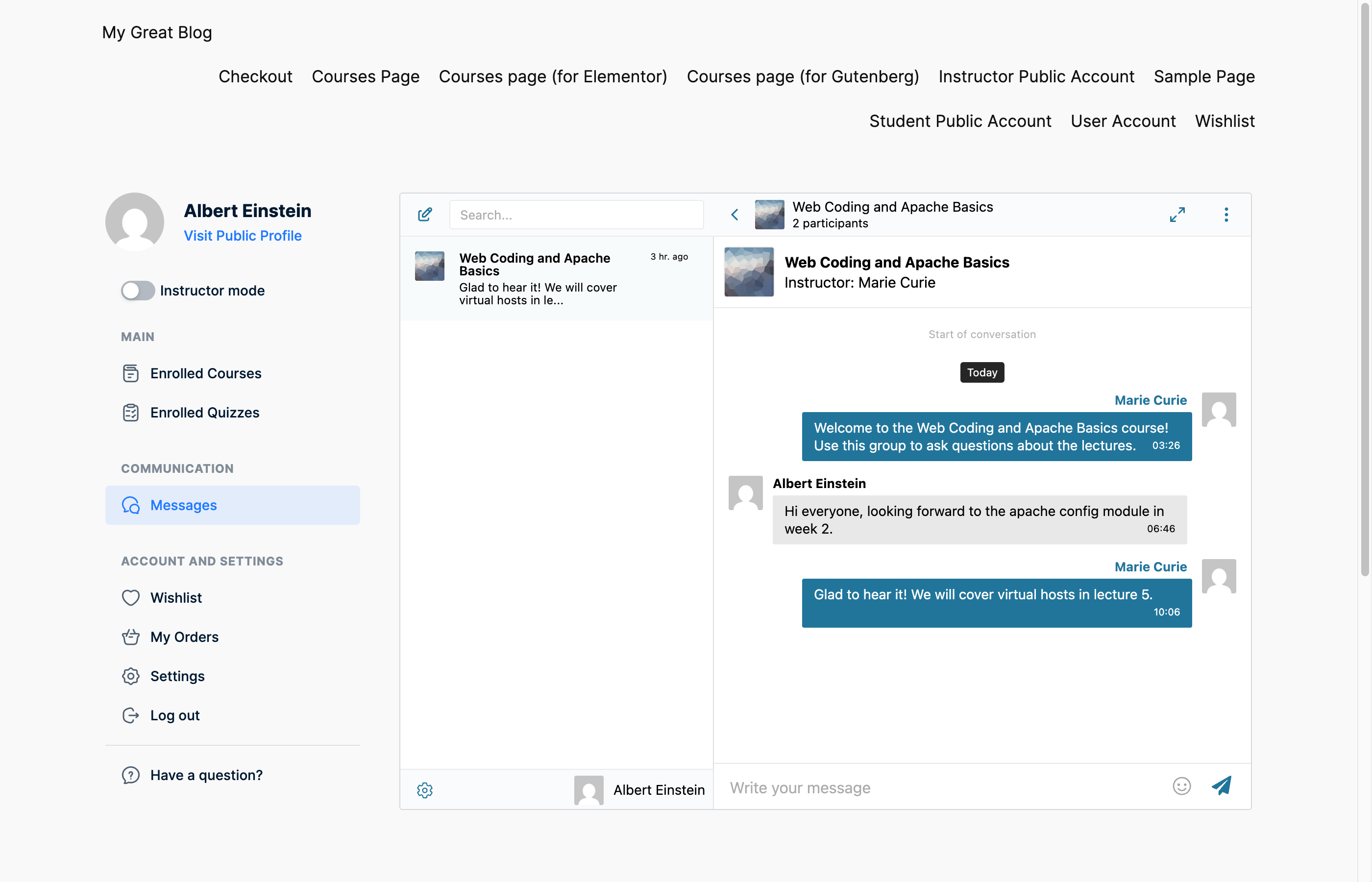
When Course Group Chat is enabled, opening a course creates a group conversation. Students are added on enrollment, removed when their enrollment is deleted. The course info card (thumbnail, title, instructor) appears above the conversation and on private DMs opened from the Message Instructor button.
Messages tab in the MasterStudy account
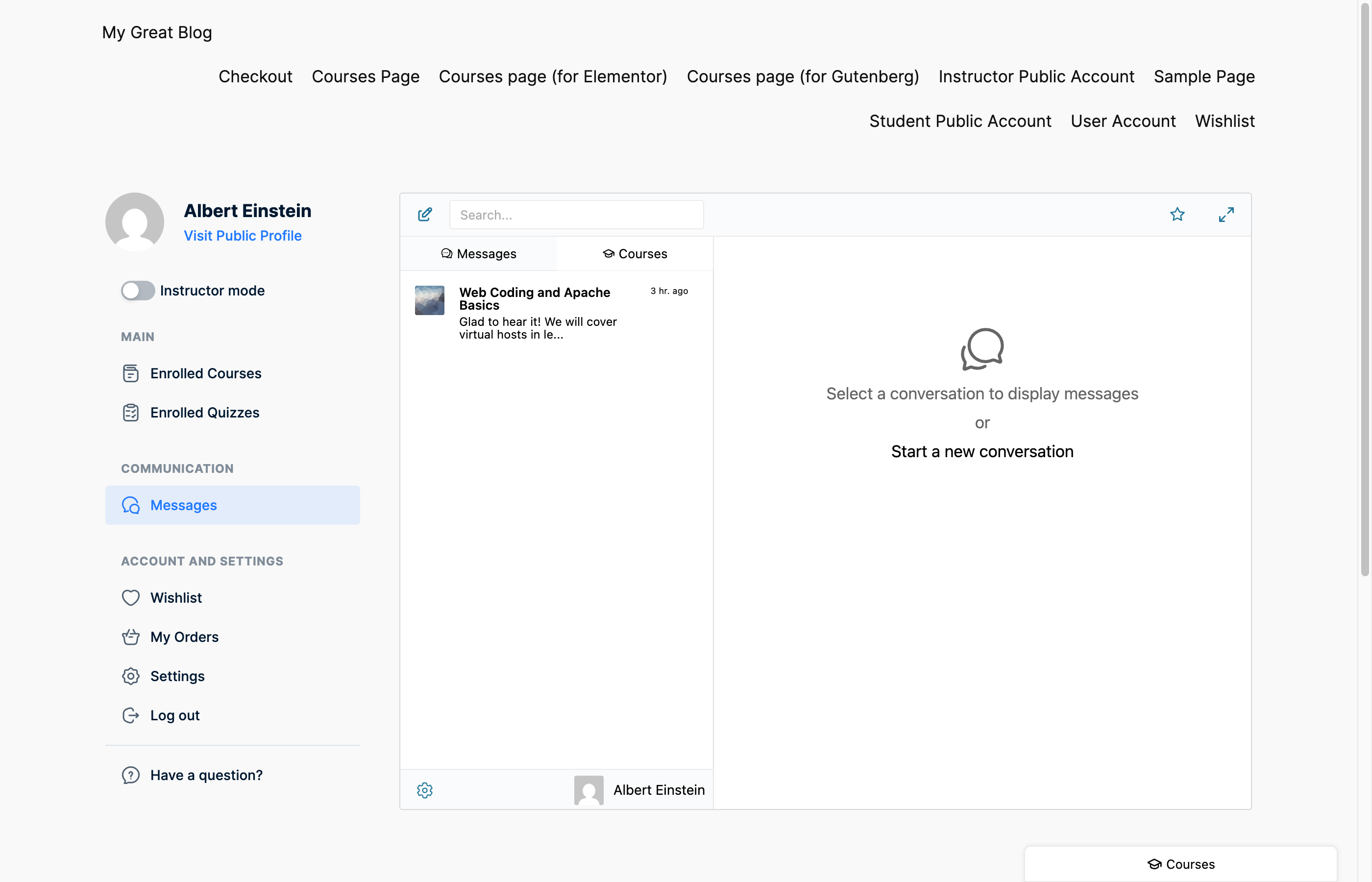
Embeds the full Better Messages inbox inside the MasterStudy account sidebar. Combined with Messages Location → Show in MasterStudy LMS Account, every internal Messages link routes here.
Replacing the native MasterStudy Messages
With Disable MasterStudy Messages toggled on, MasterStudy's built-in Messages entry in the account sidebar and the Send message buttons on the public instructor and student profiles are hidden so visitors only see Better Messages. The native page is still reachable at /account/chat/ for anyone who has it bookmarked, but nothing in the UI links to it.
Shared LMS settings
Three toggles under Better Messages → Settings → Integrations → LMS → Shared Course Settings apply across every LMS integration: Course Info Card, Email Notifications, and Push Notifications (WebSocket version). Changing any propagates across LearnDash, LearnPress, Tutor LMS, MasterStudy LMS, and FluentCommunity Courses.
Installing Better Messages on a MasterStudy LMS site
- Install Better Messages from WordPress.org and activate it.
- Open WP Admin → Better Messages → Settings → Integrations → LMS → MasterStudy LMS Integration.
- Toggle on the features you want: Message Instructor Button, Course Group Chat, Messages Account Tab, Send Message Button on Instructor Profile, Send Message Button on Student Profile, Disable MasterStudy Messages.
Free vs WebSocket version for MasterStudy LMS sites
| Feature | Free version | WebSocket version |
|---|---|---|
| Message Instructor button on course page | yes | yes |
| Auto-managed Course Group Chat | yes | yes |
| Messages Account Tab inside MasterStudy | yes | yes |
| Send Message buttons on instructor / student profiles | yes | yes |
| Disable native MasterStudy Messages | yes | yes |
| Courses widget on the Mini Widgets bar | yes | yes |
| Real-time delivery | polling | instant |
| One-on-one voice and video calls inside course threads | — | yes |
| Group voice and video calls (cohort office hours, study sessions) | — | yes |
| Web push notifications for new messages | — | yes |
| Push notifications for course messages | — | yes |
| Read receipts | — | yes |
| End-to-end encryption (optional per thread) | — | yes |
For MasterStudy LMS academies running paid cohorts, the WebSocket version's group calls turn the course chat into a live office-hours room — students drop in for a question, the instructor jumps on a group video call, then drops back to async chat. The MasterStudy account becomes a full learning hub instead of a course library plus a separate Zoom link.
Frequently asked questions
Can I keep MasterStudy Messages and Better Messages side by side?
Yes — the Disable MasterStudy Messages toggle is optional. Keep it off to show both, on to show only Better Messages. Most sites pick one to avoid confusing students with two Messages tabs.
What happens when a student's MasterStudy enrollment is cancelled?
MasterStudy fires its standard enrollment hooks; Better Messages listens and removes the student from the Course Group Chat. Their previous messages stay in history.
Does it work with MasterStudy Pro?
Yes — Better Messages reads MasterStudy's core hooks, which Pro features extend rather than replace. WooCommerce-based enrollments, subscriptions, and certificates are all compatible.
Can the native MasterStudy chat history be migrated?
Not automatically — the two messengers store data differently. For sites with active history in the native chat, run both side by side for a transition period, then enable Disable MasterStudy Messages when students have moved over.
Does it work alongside other LMS plugins?
Yes — sites running MasterStudy alongside LearnDash, LearnPress, or Tutor LMS see all course chats together in the Courses widget. Each integration loads independently.
See also
- MasterStudy LMS integration documentation — full setup reference
- WordPress LMS chat plugin — comparing every LMS integration
- LearnDash student messaging plugin
- LearnPress student messaging plugin
- Tutor LMS student messaging plugin