Motors Car Dealer Chat: Real-Time Buyer ↔ Dealer Messaging
The Motors plugin from Stylemix turns WordPress into a car-dealer / vehicle-classifieds platform — the most-installed automotive listing plugin on the WordPress ecosystem. Motors ships with Message Us and Make an Offer Price buttons that email the dealer; what it does not ship with is a real-time chat that keeps the conversation on-site, with persistent history, file attachments, and the option to escalate to a call. Better Messages adds that layer: a Live Chat button on every car listing, a LIVE CHAT pill on every inventory list card, a Live Chat row on the dealer profile, and a MESSAGES tab inside the dealer dashboard.
What Better Messages adds to Motors
Once Better Messages is installed and the Motors integration is enabled under Better Messages → Settings → Integrations → Directories:
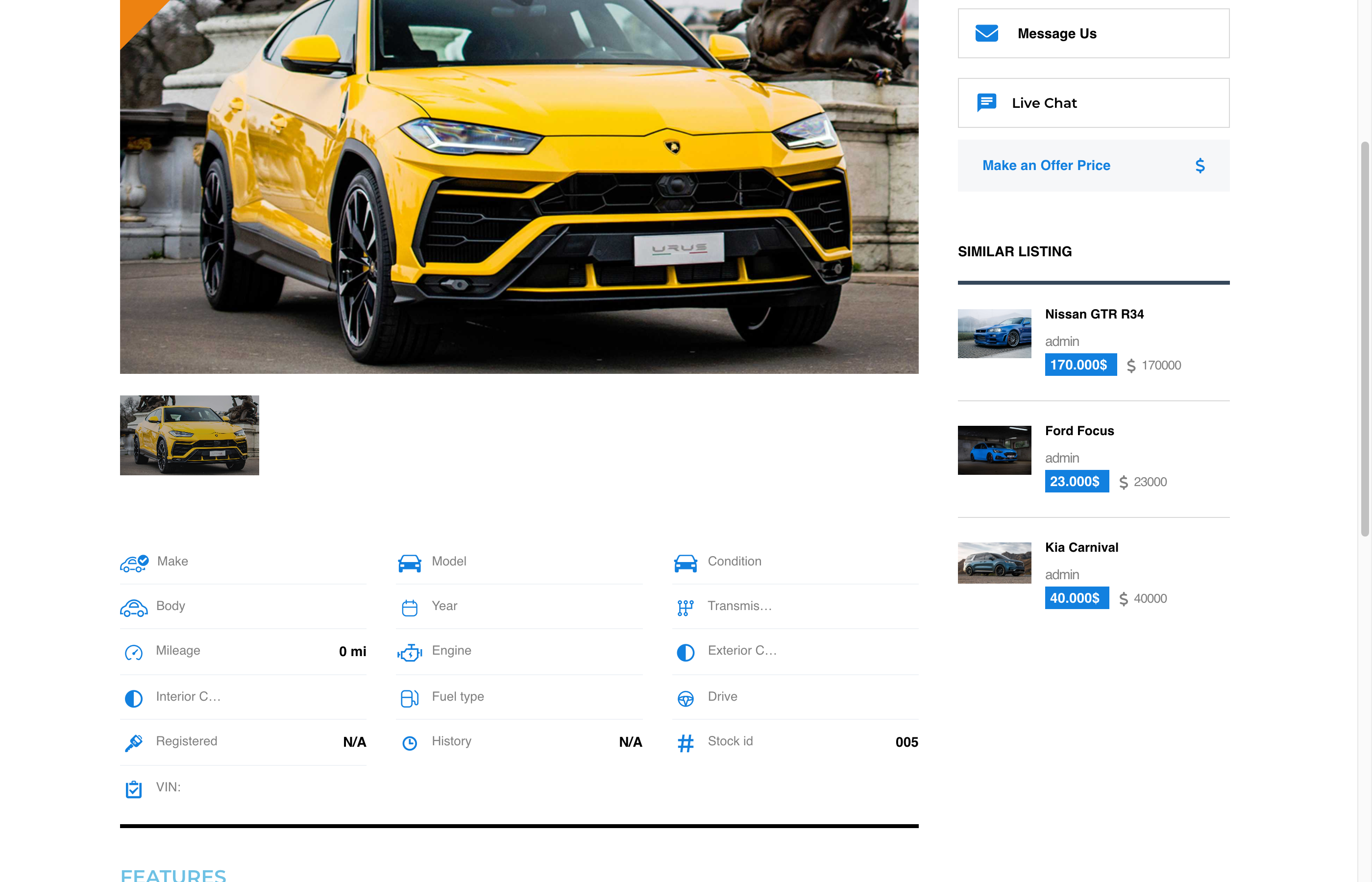
- Live Chat button on the single car listing page alongside Motors' Message Us / Make an Offer Price buttons.
- LIVE CHAT pill on each inventory list card inline with Schedule Test Drive / Add to Compare / Quote by Phone / Trade-In / Share This.
- Live Chat row on the dealer profile Contact Info card.
- MESSAGES tab inside the dealer dashboard at
/author/<username>/?page=better-messages. - Listing info card inside the conversation — car image, title, price.
- Motors author profile links — clicking the dealer's name in a conversation opens their Motors profile, not the WordPress one.
- Motors theme accent inheritance — the Live Chat buttons inherit the theme's accent and text colors automatically.
LIVE CHAT pill on inventory cards
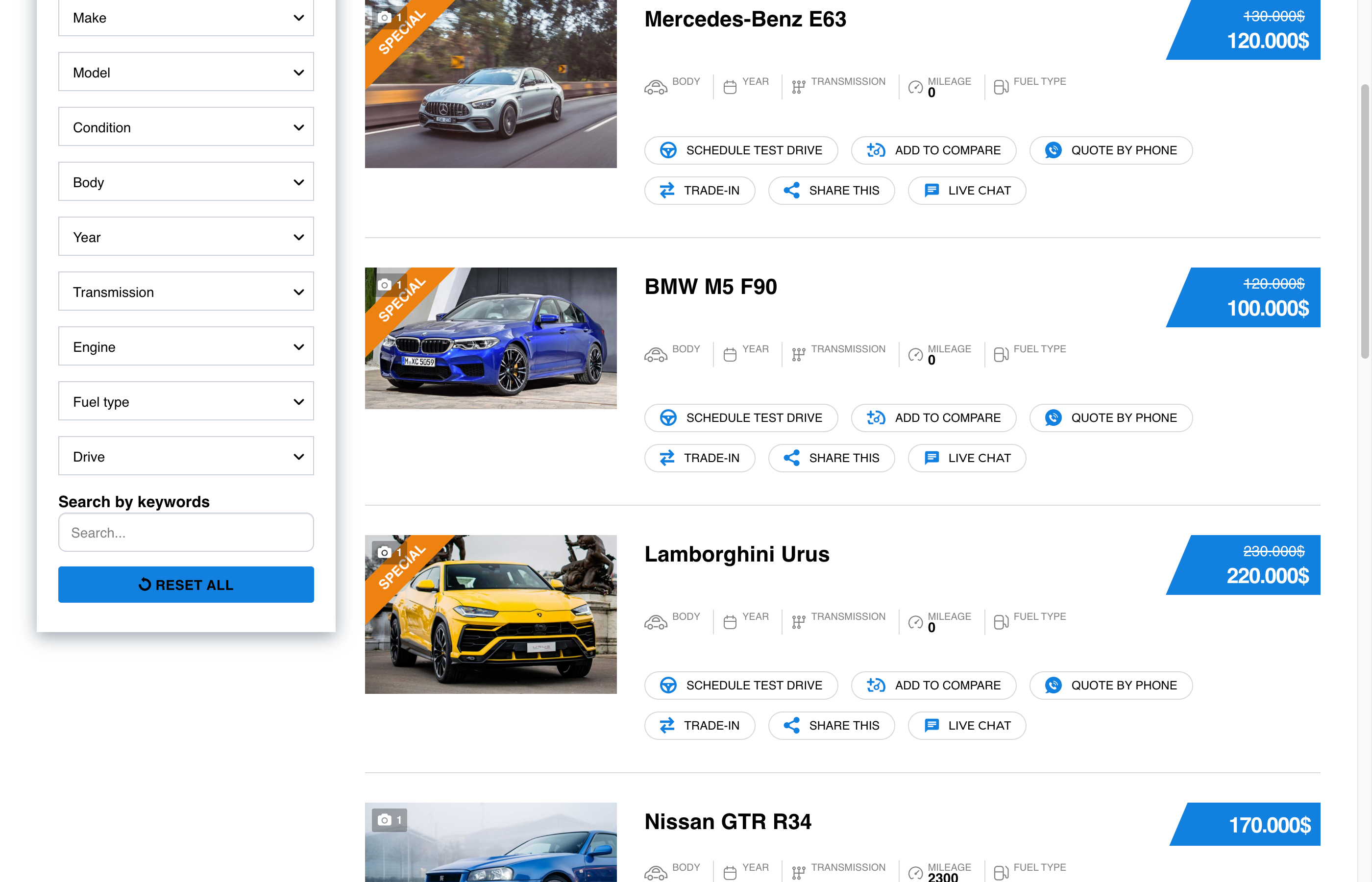
Buyers do not have to open each car to start a chat — the pill is on every inventory card, inline with the native Motors actions.
Live Chat row on the dealer profile
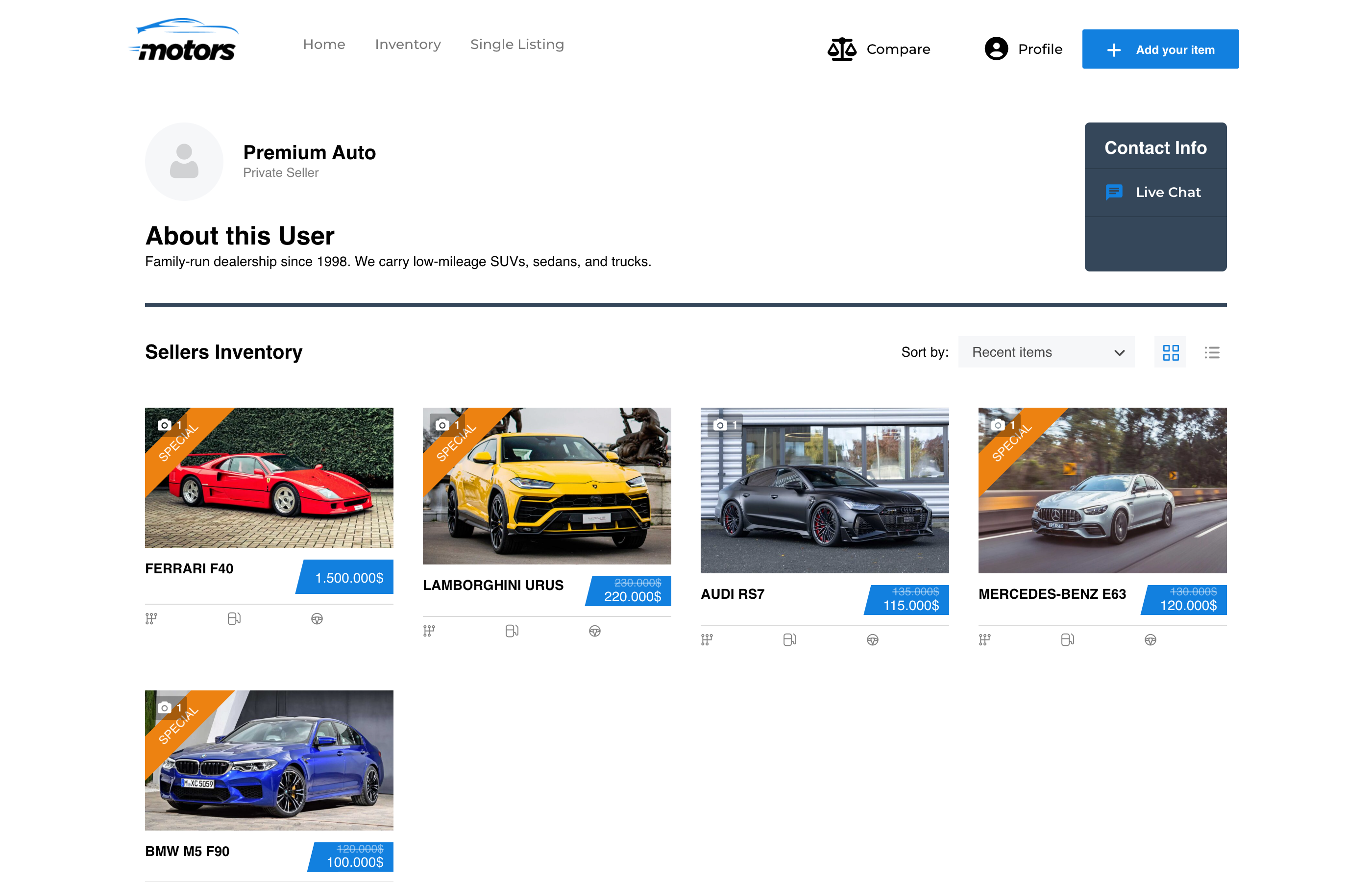
Adds a Live Chat row to the dealer / private-seller Contact Info card. Hidden when the dealer has no published listings.
MESSAGES tab inside the dealer dashboard
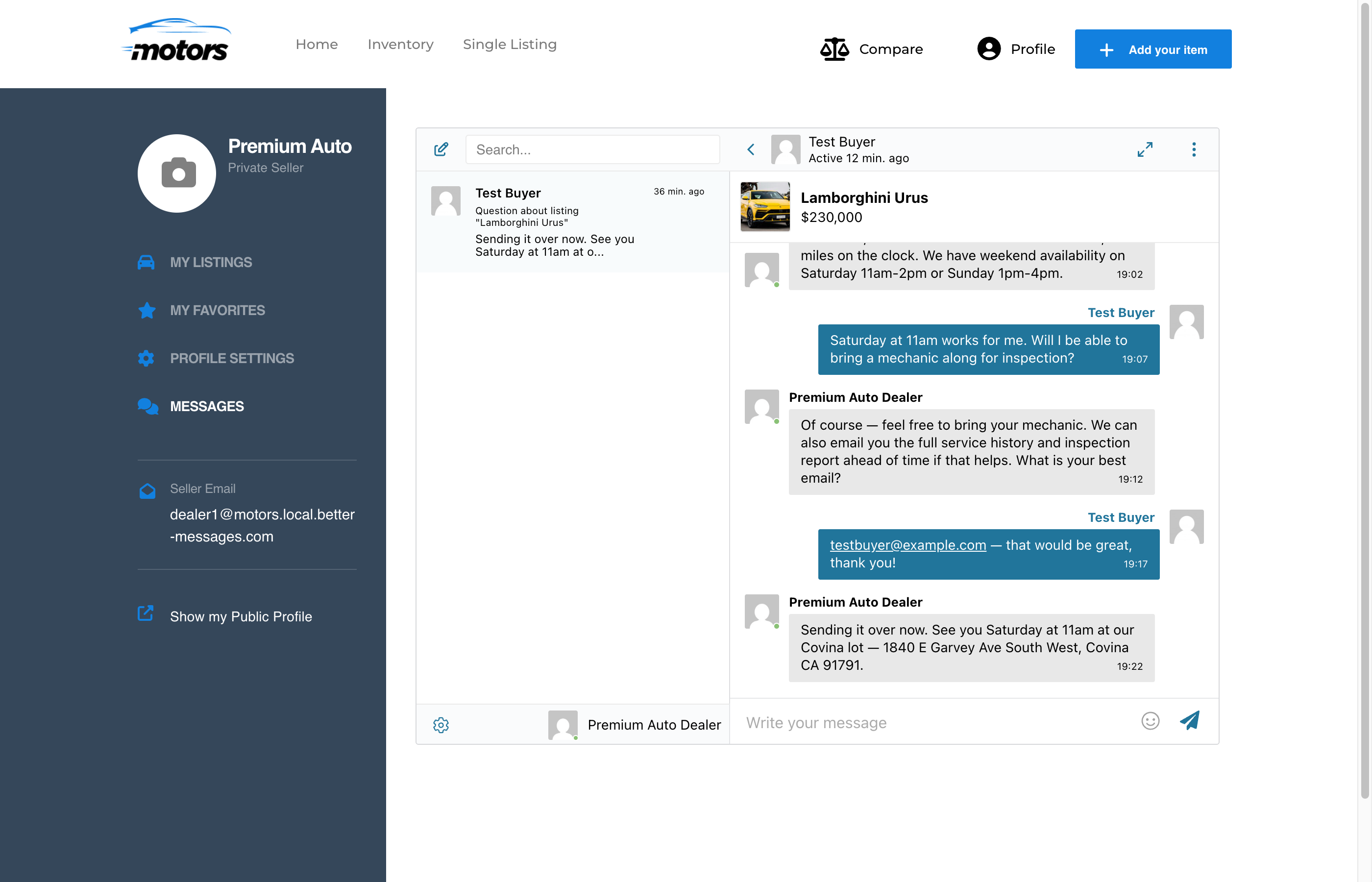
Dealers stay inside the Motors dashboard to read and reply to buyer inquiries. Combined with Messages Location → Show in Motors Dealer Dashboard, every internal Messages link in Better Messages routes to this tab.
Multi-listing support
If you run the Motors Multi-Listing add-on with extra vehicle types (motorcycles, boats, trucks, RVs, etc.), every placement above works for those listings automatically — no extra configuration needed.
Installing Better Messages on a Motors site
- Install Better Messages from WordPress.org and activate it.
- Make sure Motors is active. Stylemix's Motors Starter Theme (or any of their commercial Motors themes) is recommended for the polished out-of-the-box layout the screenshots above use.
- Open WP Admin → Better Messages → Settings → Integrations → Directories → Motors Integration.
- Toggle Enable Motors Integration and the individual placement toggles you want.
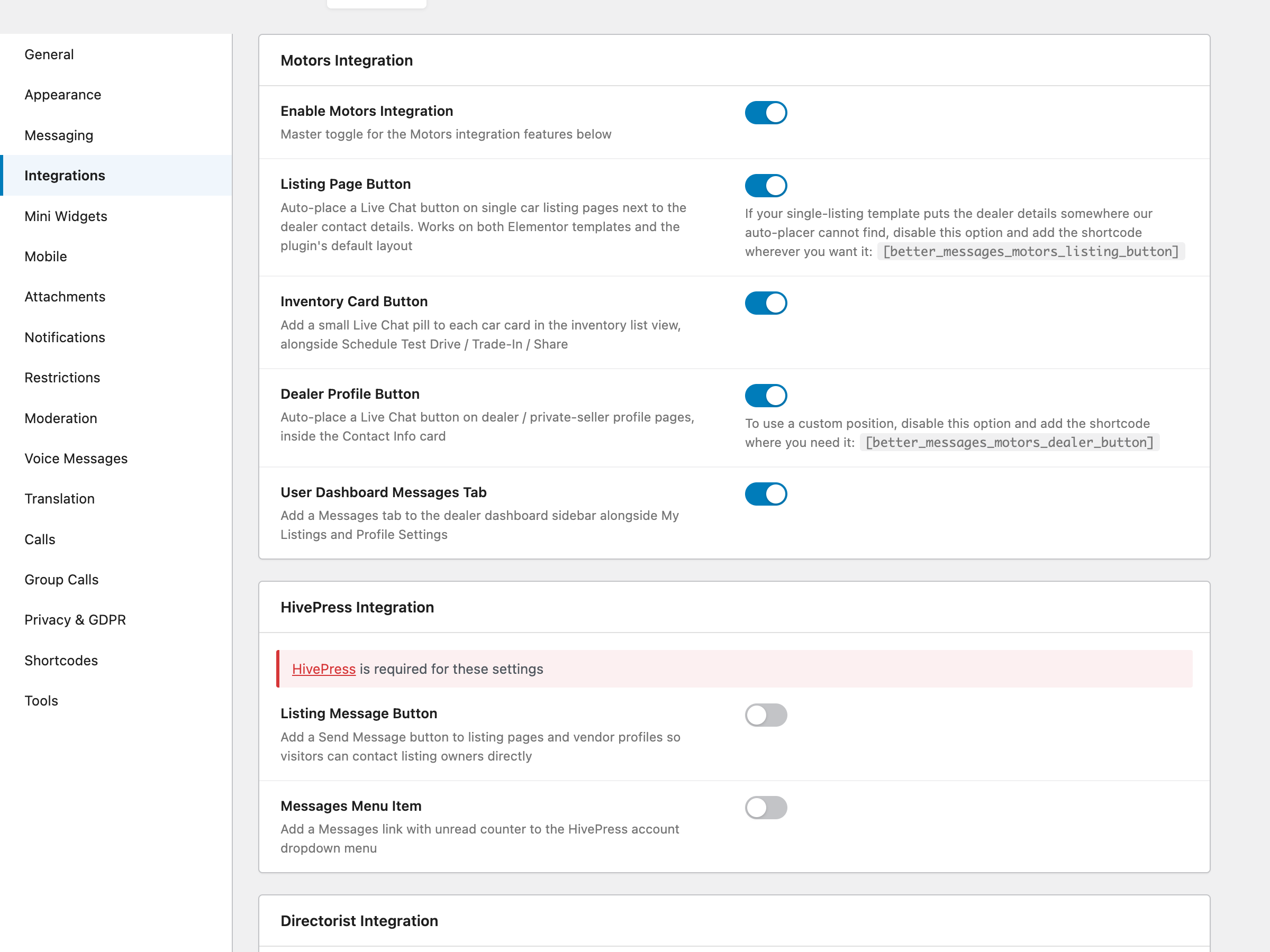
For custom Elementor templates, sidebar widgets, or theme overrides, place buttons manually:
[better_messages_motors_listing_button]
[better_messages_motors_dealer_button]
Free vs WebSocket version for Motors sites
| Feature | Free version | WebSocket version |
|---|---|---|
| Live Chat button on listing, inventory cards, dealer profile | yes | yes |
| MESSAGES tab inside the dealer dashboard | yes | yes |
| Listing info card inside the conversation | yes | yes |
| Motors author profile links and theme accent | yes | yes |
| Multi-listing add-on support | yes | yes |
| Real-time delivery | polling | instant |
| Mini-widget popup chat (buyer stays on the car listing) | — | yes |
| One-on-one voice and video calls inside the thread | — | yes |
| Group voice and video calls (e.g. buyer + multiple dealership reps) | — | yes |
| Web push notifications for new messages | — | yes |
| Read receipts | — | yes |
| End-to-end encryption (optional) | — | yes |
For car dealerships running paid Motors listings, the WebSocket version's web push and instant delivery are the difference between a hot lead that converts the same day and a lead that goes cold while the dealer waits for an email notification. The mini-widget popup keeps the buyer on the car page they were considering instead of redirecting them to a separate messages page.
Frequently asked questions
Does it work with all Motors theme variants (Cars, Motorcycles, Boats…)?
Yes — Better Messages works with the standard Motors plugin regardless of which Stylemix theme you use. The Live Chat buttons inherit the active theme's accent colors automatically.
Does it work with the Motors Multi-Listing add-on?
Yes — every placement (listing, inventory card, dealer profile, dashboard) works for motorcycles, boats, trucks, RVs, and any custom vehicle type the Multi-Listing add-on registers.
Can buyers chat without registering?
Optional. With Guest Chat enabled, an unregistered buyer can start a thread by typing a name and email.
What happens when a car listing is unpublished?
The Live Chat button is hidden when the listing is not published. Existing threads remain readable on both sides.
Can I move the LIVE CHAT pill to a different position on inventory cards?
The pill is rendered inline with Motors' standard inventory-card action row. Position is controlled by the order of the Motors action hooks; a custom filter can reorder if needed. For more drastic layout changes, disable the auto-injection toggle and place the button manually via shortcode.
See also
- Motors integration documentation — full setup reference
- Classified Listing chat — for general classifieds sites
- Directorist chat — for directory sites
- HivePress listing chat — for HivePress marketplaces