GamiPress + Better Messages: Charge Points to Send a Message
GamiPress turns WordPress into a points / achievements engine — used by community sites, paid-membership programs, and gamified marketplaces. Better Messages integrates with GamiPress so you can charge points for messaging actions: per-message, per-new-thread, per-call, per-role, and per-conversation-type. The user's current point balance can be displayed inline in the messenger, with a configurable URL where they can manage or top up their points.
Why charge points to message
A few common scenarios where pay-to-message is the right model:
- Premium directories — visitors get free profile views but pay a small amount to send a message to a listing owner (anti-spam + revenue).
- Coaching platforms — clients spend points per message to a coach, with different rates for one-off DMs vs scheduled sessions.
- Paid communities — points are awarded for engagement (posts, comments) and spent on messaging the popular members.
- Marketplaces — buyers spend points to message vendors, with the point top-up being a separate monetization channel.
What you can charge for
Better Messages exposes three charge types and three categories:
Charge types
- New message
- New thread
- Call (one-on-one and group)
Categories
- Private threads (one-on-one)
- Groups (group conversations)
- Chat rooms (chat-room messages)
These combine: you can set "10 points per message in private threads, 0 points in groups, 5 points to start a new thread, 50 points per call" — and adjust each line per WordPress user role.
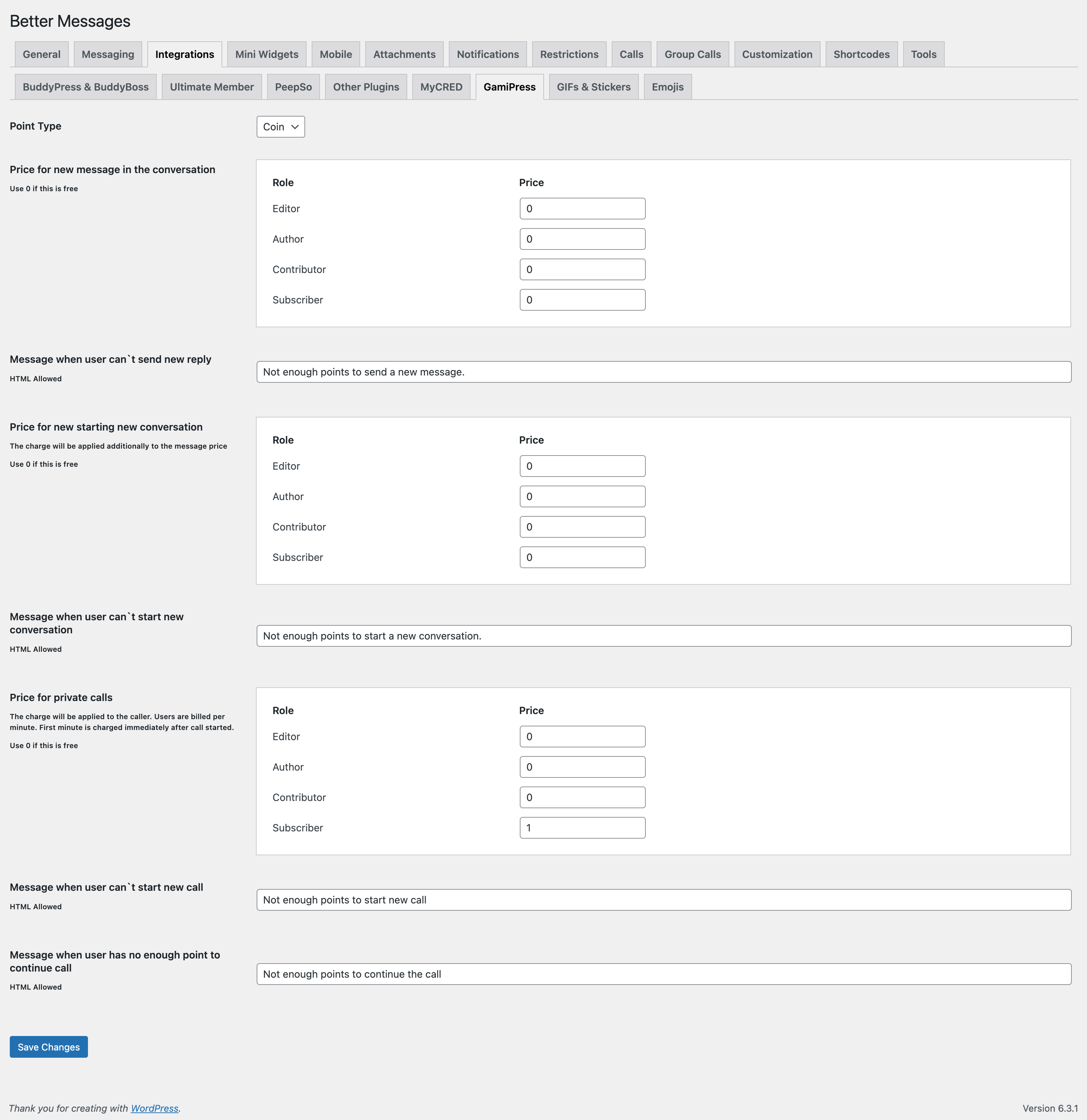
Per-role pricing
The most common shape: paying members get a discount or zero rate, free members get charged. Configure pricing per WordPress role for messages, new threads, and calls separately.
Balance display
The user's current point balance can be shown in the messenger in up to six places:
- Chat header
- Threads list (top)
- Threads list (bottom)
- User menu
- User menu popup
- Reply form area
Pick the placements that match your UX — most sites use Chat header + Reply form area.
Balance URL
A configurable external URL where users top up their points (a WooCommerce product, a custom page, a Stripe checkout). The balance display links to that URL so a user who hits zero can refill without leaving the messenger.
AI bot charging
If you also run the Better Messages AI add-on, GamiPress can charge points for AI bot responses. Configure per-bot in the AI Bots settings — a useful guard against runaway AI costs on a public site.
Installing Better Messages with GamiPress
- Install GamiPress and configure at least one point type.
- Install Better Messages from WordPress.org and activate it.
- Open WP Admin → Better Messages → Settings → Integrations → Points Systems.
- Select GamiPress as the provider, pick the point type to charge against, and configure charge types / categories / per-role pricing.
Frequently asked questions
Does this work with MyCred too?
Yes — Better Messages has a unified Points System with a provider abstraction. GamiPress and MyCred share the same UI; pick whichever is your existing points stack. See MyCred pay-to-message for the MyCred variant.
What happens when a user runs out of points?
The send action is blocked with a friendly error linking to your configured Balance URL. The user tops up and can send.
Can I charge for receiving as well as sending?
The default model charges senders. For receive-side charges (e.g. an instructor earns points when students message them), the relevant code path is open via filters — set a custom logic in your theme's functions.php.
Will free messages still work?
Set a 0-point rate for the relevant role / category and messages are free for that scope. The integration is opt-in per charge type.
Does it count messages that fail to send (validation errors)?
No — points are only charged when the message actually goes through. A blocked / moderated message does not consume points.
See also
- GamiPress integration documentation — full setup reference
- MyCred pay-to-message — same feature on the MyCred points engine
- AI chat bots — for pairing AI charging with GamiPress