PeepSo Messaging Plugin: Real-Time Chat for PeepSo Communities
Originally published when Better Messages added its initial PeepSo integration in v1.9.9.150 (mid-2021). This post has been kept up to date as the integration matured — PeepSo Groups messaging, the audio / video call buttons on PeepSo profiles, and the PeepSo Block Theme dark-mode mirror were all added in later releases.
Better Messages adds a WordPress-native real-time messenger to PeepSo sites, hooking into every PeepSo surface: the header navigation, every user profile, the members directory, the friends list, and PeepSo Groups. If you are using PeepSo Core: Chat, deactivate it after installing Better Messages to avoid a double-messenger conflict.
This post covers what changes on a PeepSo site once Better Messages is installed, how the PeepSo Friends and PeepSo Groups integrations work, and what the difference is between the free and WebSocket versions.
What changes on a PeepSo site
When PeepSo is detected, Better Messages turns on every PeepSo-specific touch-point automatically:
- The Messages icon in the PeepSo notification dock is replaced with the Better Messages icon, carrying a live unread badge that updates in real time.
- Every user profile gets a Send Message button next to Follow / Friend, plus optional Audio Call and Video Call buttons on the WebSocket version.
- Every row in the members directory and the friends list gets a Send Message icon.
- The Better Messages interface uses PeepSo avatars and profile links — clicking a name takes the user to the PeepSo profile, not the WordPress one.
- PeepSo Friends drives the Friends widget inside the messenger and the recipient search.
- PeepSo Groups can drive auto-managed group chats that sync members with the PeepSo group.
- PeepSo VIP verified badges are carried into the messenger.
- PeepSo Block Theme dark mode is mirrored automatically.

Send Message + Audio / Video Call buttons on PeepSo profiles
Each PeepSo user profile gets a Send Message button in the action area. With the WebSocket version, two extra one-click buttons can be enabled: Audio Call and Video Call. Each is an independent toggle in Better Messages → Settings → Integrations → PeepSo, so a community can offer one, both, or neither.

The call buttons start the call directly — no thread needs to exist first. With Only Friends Mode enabled, non-friends do not see the call buttons.
PeepSo Friends and PeepSo Groups widgets
The Friends and Groups widgets inside the messenger are populated directly from PeepSo:
- Friends widget — every PeepSo friend the user has, with quick-start chat from the widget.
- Groups widget — every PeepSo group the user belongs to, with the option to open a group chat per group.
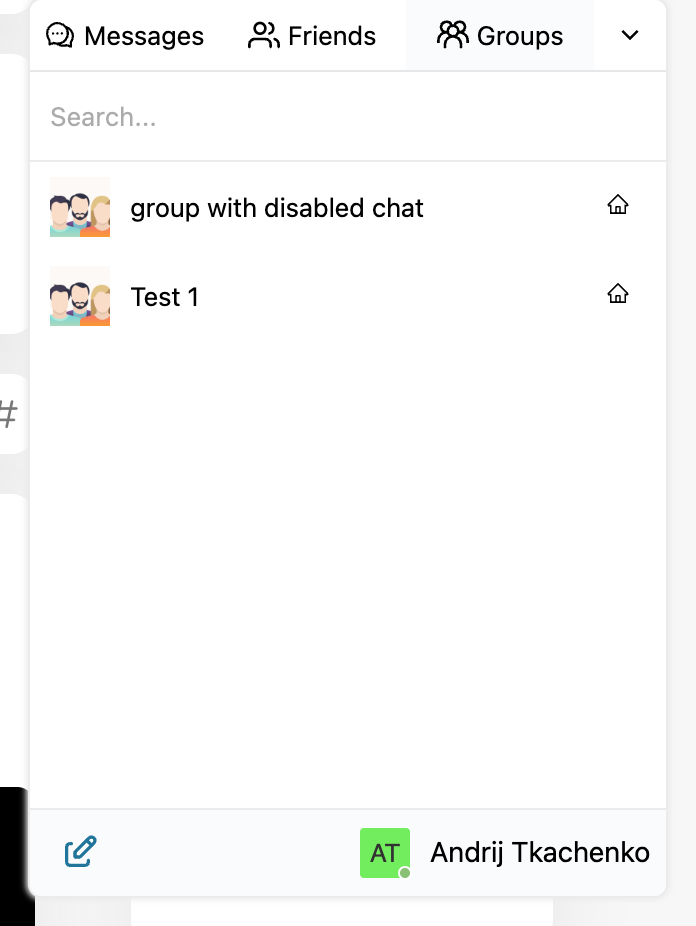
Each group chat is fully managed: members are added when they join the PeepSo group, removed when they leave. File uploads, email notifications, and push notifications can be toggled per integration. Group owners can disable the chat at any time.
Settings reference
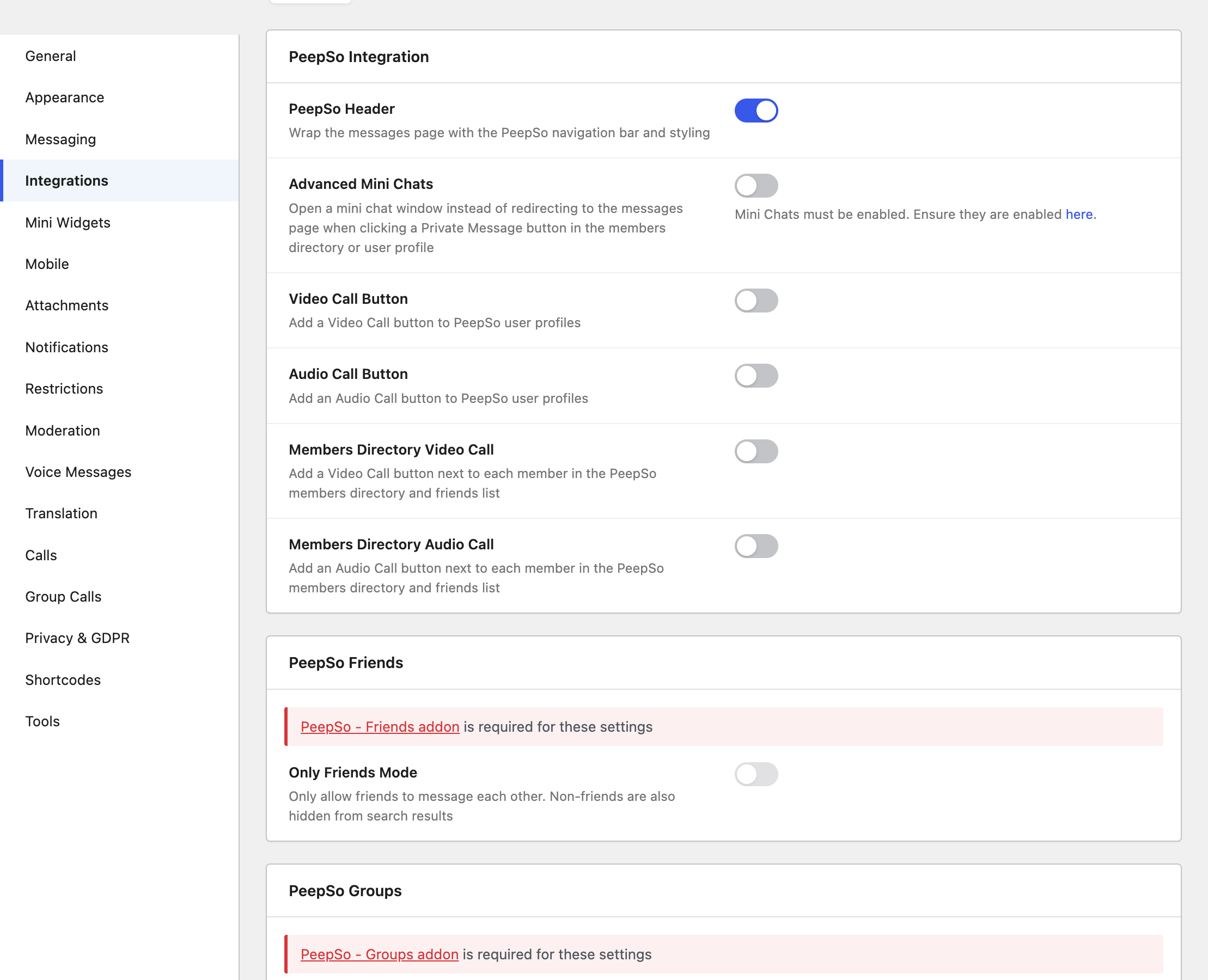
All PeepSo-specific options live under Better Messages → Settings → Integrations → PeepSo.
| Setting | What it does |
|---|---|
| PeepSo Header | Wraps the Better Messages page in PeepSo's navbar and styling |
| Advanced Mini Chats | Opens a mini chat window instead of redirecting to the Messages page when a Private Message button is clicked. Requires the WebSocket version |
| Video Call Button | Adds a Video Call button to PeepSo user profiles (WebSocket) |
| Audio Call Button | Adds an Audio Call button to PeepSo user profiles (WebSocket) |
| Only Friends Mode | Restricts messaging to friends only; hides non-friends from search |
| Group Messages | Enables group chats for PeepSo Groups |
Installing Better Messages on PeepSo
- Install Better Messages from WordPress.org and activate it.
- If PeepSo Core: Chat is still active, deactivate it — it conflicts with Better Messages.
- Create the WordPress page where the messages page will live (or reuse one).
- Open Better Messages → Settings → General and set Messages Location to that page.
- Open Better Messages → Settings → Integrations → PeepSo to fine-tune the integration.
Free vs WebSocket version for PeepSo communities
| Feature | Free version | WebSocket version |
|---|---|---|
| PeepSo header, profile, members-directory integration | yes | yes |
| PeepSo Friends and PeepSo Groups widgets | yes | yes |
| Auto-managed PeepSo group chats | yes | yes |
| Real-time delivery | polling | instant |
| Advanced Mini Chats (mini chat window from profile / directory) | — | yes |
| One-on-one audio and video call buttons on profiles | — | yes |
| Group audio and video calls inside any thread | — | yes |
| Web push notifications for new messages | — | yes |
| Live unread counter in the header dock | polling | instant |
On PeepSo sites with active video / audio call use cases, the WebSocket version essentially turns the community into a Zoom-style platform without sending members off-site — the call buttons live on every profile and start a call in one click.
Frequently asked questions
Does Better Messages replace PeepSo Core: Chat?
Yes. The PeepSo Core: Chat add-on should be deactivated when Better Messages is installed — the two messengers conflict. PeepSo's underlying message data is preserved.
Will the PeepSo header icon still work?
Yes — the icon stays in the same PeepSo notification dock, with the same styling, but now opens the Better Messages inbox. Members do not need to learn a new location.
Can I keep the PeepSo dark mode look on the messenger?
Yes — Better Messages mirrors PeepSo Block Theme dark mode automatically. When PeepSo flips into dark mode (system-driven or user-toggled), the messenger does too.
Does it work with PeepSo Pages / VIP?
Yes — Verified badges from PeepSo VIP carry into the messenger interface, so the verified icon shows next to user names inside threads as well as on the profile.
Can I restrict messaging to friends only?
Yes — toggle Only Friends Mode in Settings → Integrations → PeepSo. With this on, non-friends are hidden from the recipient search and cannot start a conversation.
See also
- PeepSo integration documentation — full setup reference
- BuddyPress messaging plugin — for sites considering the BuddyPress alternative
- BuddyBoss messaging plugin — for BuddyBoss Platform sites
- Group conversations — how group chats work
- Real-time messaging — what changes with the WebSocket version