Where files are kept
Every file members send in Better Messages, from photos and documents to voice and video messages, is kept in one of these places:
- This server, in your WordPress uploads folder. This is the default, and it needs no setup.
- A cloud storage: Cloudflare R2, Bunny.net, or Amazon S3 and any other storage with an S3 API.
You choose the place for each kind of file, so photos and videos can go to a cloud storage while documents stay on your server. Everything is set up in Better Messages → Settings → Attachments, under Storage and File Groups.
Cloud storage works in the free version and in the WebSocket version, from Better Messages 3.1.

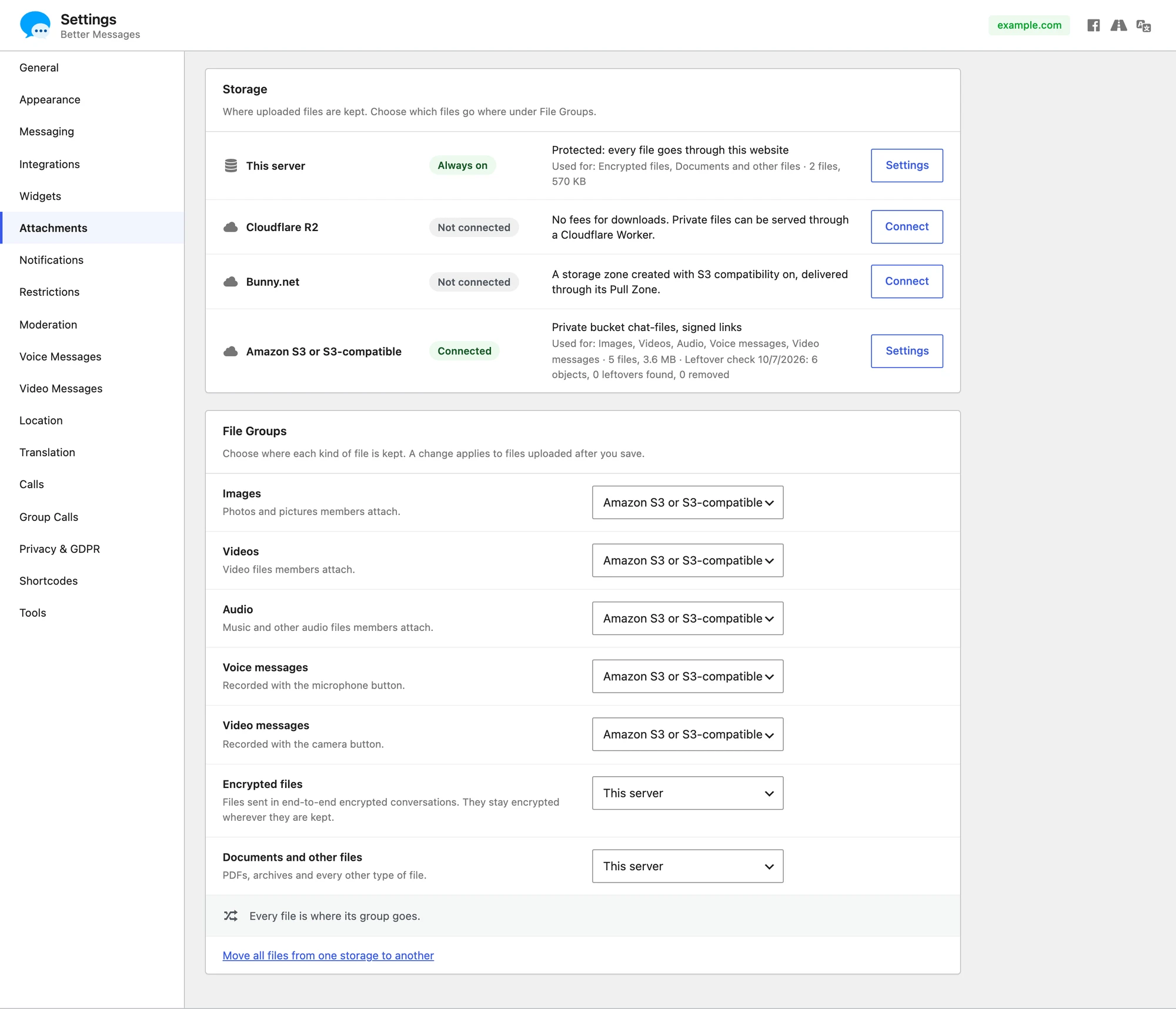
This server#
Files are kept in your uploads folder, in wp-content/uploads/bp-better-messages. Click Settings on the This server line to choose who can open them:
- With File Protection Proxy on, every file goes through your website, which checks that the person asking is a member of the conversation. Direct links to the files are blocked. File Serving Method decides how your server sends a file: PHP readfile works everywhere but is slow, while X-Sendfile (Apache, LiteSpeed), X-Accel-Redirect (Nginx) and X-LiteSpeed-Location hand the file to the web server and cost almost no PHP work. Test checks the method on your server.
- With it off, anyone who has a file's link can open it. Links contain a long random part, so nobody can guess them.
Cloud storage#
A cloud storage takes the files, and the work of sending them, off your server. Files open from it, and browsers and the mobile app can upload straight to it.
| Storage | Good to know | Guide |
|---|---|---|
| Cloudflare R2 | No fees for downloads. Members-only files can open from your own domain through a Cloudflare Worker | Cloudflare R2 |
| Bunny.net | Files open from Bunny's CDN through a Pull Zone. Needs a storage zone created with S3 compatibility on | Bunny.net |
| Amazon S3 | The original S3, in any AWS region | Amazon S3 |
| Backblaze B2 | Public files can open from your own domain through Cloudflare, which B2 does not bill downloads for | Backblaze B2 |
| DigitalOcean Spaces | Public files can open from your own subdomain through the Spaces CDN | DigitalOcean Spaces |
| Wasabi | Every file is billed for at least 90 days, even if it is deleted sooner | Wasabi |
| Any other S3-compatible storage | Scaleway, Hetzner Object Storage, OVHcloud, a server you run yourself such as MinIO, and others, with the endpoint and region they give you | Other S3-compatible |
Amazon S3, Backblaze B2, DigitalOcean Spaces, Wasabi and the others all connect through the Amazon S3 or S3-compatible line. One storage of each kind can be connected at a time.
Who can open files#
You choose this for each cloud storage when you connect it:
- Members of the conversation only (the default). Each member gets links that your website signs for them, valid for one to one and a half days and renewed automatically. Without such a link nobody can open or list the files, so keep the bucket private.
- Anyone with the link (public URL). Files open straight from the bucket or its CDN, without asking your website. Use it only for files that are not private, in a bucket of their own.
Uploads straight to the storage#
With Upload straight to the bucket on, the default, a member's browser or the mobile app sends each file straight to the storage, using a link your website signs for that one file. Files never pass through your server and are in the storage the moment they are sent. The bucket has to allow uploads from your site with a CORS rule, which Configure CORS saves for you on Cloudflare R2 and on S3-compatible storages. Bunny.net needs no rule. When the bucket refuses, files go through your server instead, so sending never fails, and the storage's line says Needs attention.
The same CORS rule lets members open files in end-to-end encrypted conversations, because the messenger downloads those itself to decrypt them. With encryption on, Test Connection checks this too. Each guide says what to set for its provider.
File Groups#
Under File Groups, choose where each kind of file goes:
| Group | What it holds |
|---|---|
| Images | Photos and pictures members attach |
| Videos | Video files members attach |
| Audio | Music and other audio files members attach |
| Voice messages | Recorded with the microphone button |
| Video messages | Recorded with the camera button |
| Encrypted files | Files sent in end-to-end encrypted conversations. They stay encrypted wherever they are kept |
| Documents and other files | PDFs, archives and every other type of file |
A change applies to files uploaded after you save. Files you already have stay where they are until you move them.
Moving files you already have#
Files keep opening while they move, and the old copies are deleted a day or two after each file moves, once devices have the new links.
- After changing File Groups, the section says how many files are not where their group goes. Click Move Them.
- To move everything from one place to another, click Move all files from one storage to another under File Groups, choose From and To, then Start Moving. You can pause, resume or stop it.
- To move single files, select them in the Files library and choose Move to.
Moves run in the background, so you can leave the page while they run.
The Files library#
Better Messages → Administration → Files lists every file members have sent, on your server and in every storage.

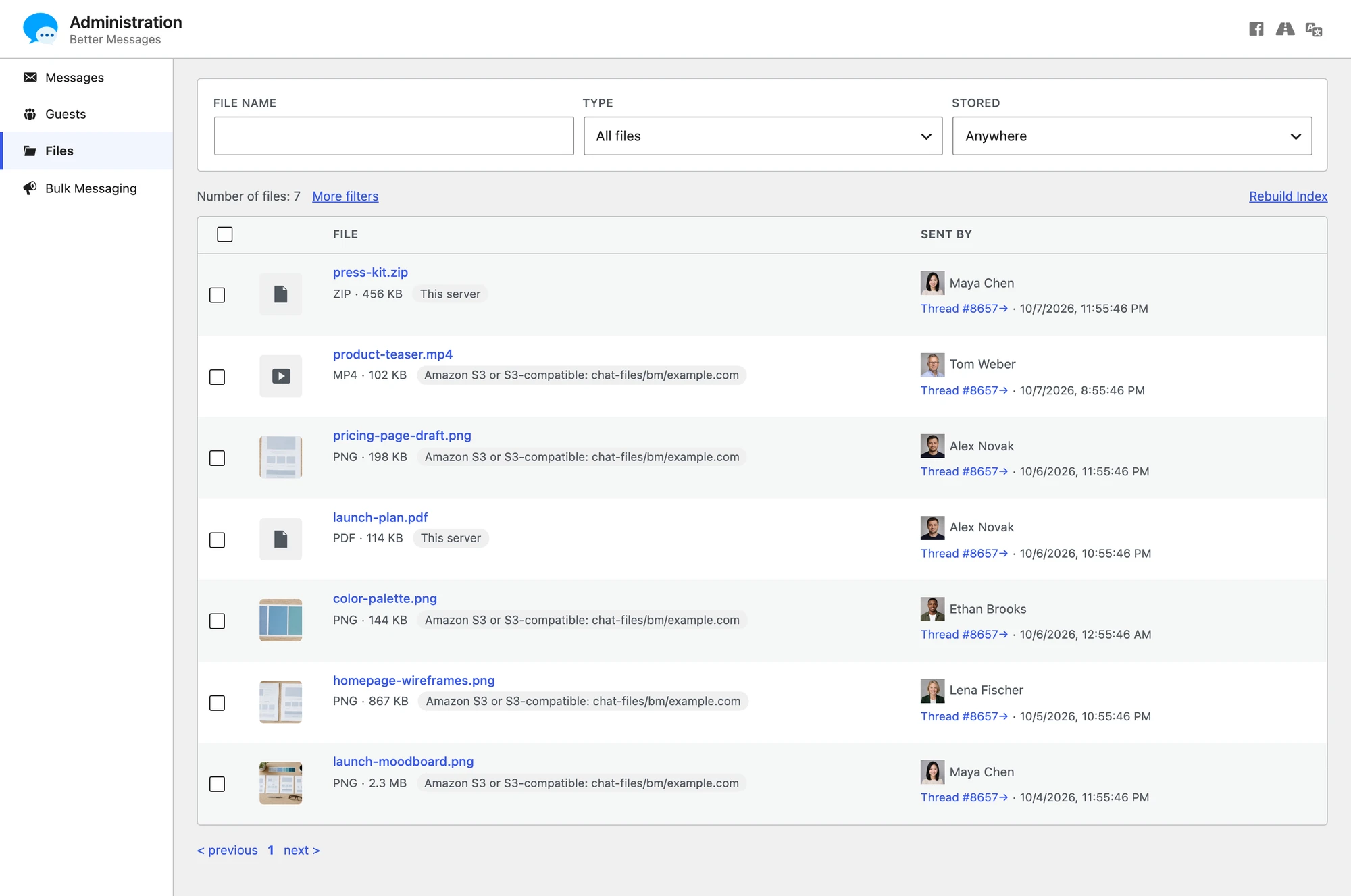
- Filter by type, where a file is stored, its state (moving, failed or pending deletion), who sent it, the conversation and dates, or search the file name. The filters stay in the page address, so a filtered list can be bookmarked or shared with another admin.
- Open or download any file. Encrypted files show a lock, because only the browsers of the members can decrypt them.
- Delete files. A deleted file disappears from its message, and a message left with nothing in it is deleted too.
- Retry files whose move or delete failed, and Move to another storage.
Everyone who can open Administration can view, delete and retry files. Moving files and Rebuild Index are for site administrators.
When a file is deleted#
A file deleted in Better Messages, by a member, by an administrator or by a cleanup such as attachment retention, is marked Pending deletion in the Files library, and a background job deletes it from the storage within a few minutes. The file leaves the list once the storage confirms it is gone. If the storage refuses, the job tries again a minute later, then at longer gaps up to once a day, until it succeeds.
A file that was forwarded stays until the last message that carries it is deleted.
Once a week, Better Messages also checks each cloud storage's folder for files that no message knows any more, such as files left after a database backup was restored. It looks only at files more than a week old, and deletes one only if it is still unknown at the next week's check. The storage's line shows when the last check ran and what it found. Files kept at the top of a bucket, outside any folder, are never checked.
Copies of your site#
A staging site or any other copy of your site carries the same storage settings and the same list of files. Deleting a message on the copy would delete the real site's file from the storage, so Better Messages tells the two apart.
Each site writes a small file named .wordplus-site.json into its storage folder, with its address. When a site finds another address in it, it writes nothing to that storage and deletes nothing from it, new files stay on this server, the storage's line says Paused, and the Attachments page asks:

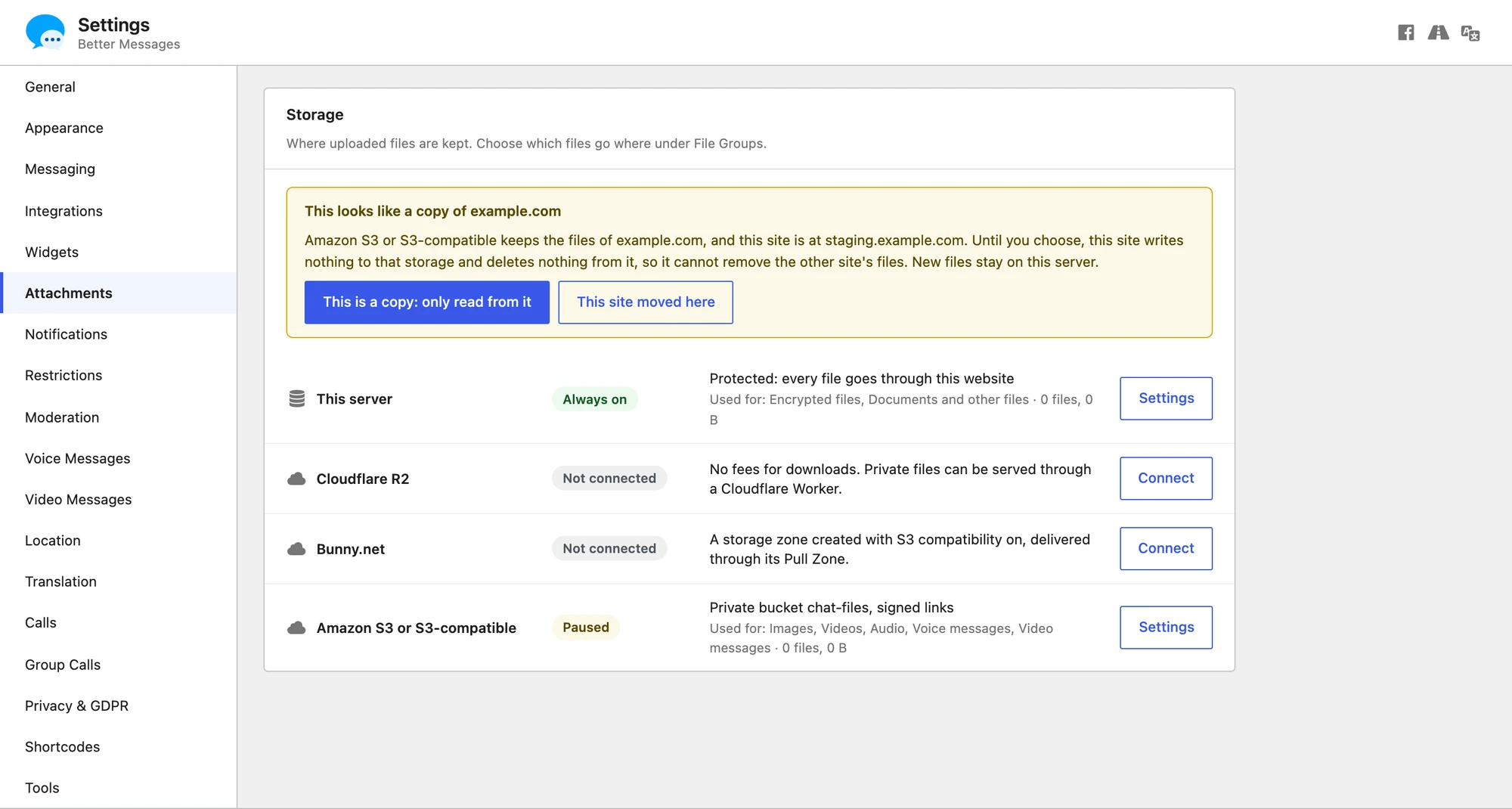
- This is a copy: only read from it. Files already in the storage keep opening on this site, nothing is written to it or deleted from it again, and new files stay on this server.
- This site moved here. The storage takes the new address and works as before. Choose this only if the old address is no longer used.
Give each site its own folder. A new storage gets one named after the site, such as wordplus/example.com, and Better Messages keeps its files in a better-messages folder inside it. When two sites share a folder, each still deletes only its own files, but the weekly check for leftover files is off there.
On a multisite network, deleting a subsite also deletes its files from its cloud storage.
Keeping keys out of the database#
The keys can be set in wp-config.php instead of the settings. The connection panel then shows those fields as set in wp-config.php.
| Storage | Constants |
|---|---|
| Cloudflare R2 | WORDPLUS_R2_ACCESS_KEY, WORDPLUS_R2_SECRET_KEY, WORDPLUS_R2_WORKER_SECRET |
| Bunny.net | WORDPLUS_BUNNY_SECRET_KEY, WORDPLUS_BUNNY_TOKEN_KEY, WORDPLUS_BUNNY_API_KEY |
| Amazon S3 or S3-compatible | WORDPLUS_S3_ACCESS_KEY, WORDPLUS_S3_SECRET_KEY |