AI Chat Bots for WordPress Private Messaging: OpenAI, Claude, Gemini
Building a WordPress site with AI chat bots is now a one-day project, not a six-month one. The hard parts — model selection, API key management, streaming responses, conversation context, system prompts — are commoditized across providers (OpenAI, Anthropic Claude, Google Gemini). What is still missing is the WordPress-native messenger layer that puts the bot in front of your members where conversations already happen, in the same UI as private DMs and group chats. Better Messages closes that gap: configure an OpenAI / Claude / Gemini bot once, and it shows up as a regular user inside the messenger, with streamed responses, custom personality, and the same UX members already use for human DMs.
How AI bots work in Better Messages
AI bots are first-class participants in the messenger:
- They appear as regular users — same avatar, same display name, same DM row in the inbox.
- They respond when messaged — 1:1 with a bot opens a thread; sending a message generates a response.
- They respond when mentioned in groups — add a bot to a group chat, then call it with
@botname. - Responses stream in real time — the bot's reply appears word-by-word as it generates (WebSocket version).
- They show a typing indicator while thinking (WebSocket version).
- They are excluded from end-to-end encrypted threads automatically — server-side AI cannot decrypt E2E content.
Three providers, choose per bot
Each bot has its own provider and model — mix and match across bots:
- OpenAI — GPT-4, GPT-4 Turbo, o-series reasoning models, GPT-5 (when released). Best for image generation, file search (knowledge-base over uploaded files), and the broadest model selection.
- Anthropic (Claude) — Claude 3.5 / 4.x family. Best for long-context tasks, careful reasoning, and tone-of-voice matching.
- Google Gemini — Gemini 1.5 / 2.x. Best price-per-token at the time of writing, plus native image generation.
Set the global API keys once at Better Messages → Settings → Integrations, then create individual bots that target the provider and model you want. A site can run a Claude-backed "support bot" alongside a Gemini-backed "translation bot" alongside an OpenAI-backed "knowledge-base bot" — all from the same messenger.
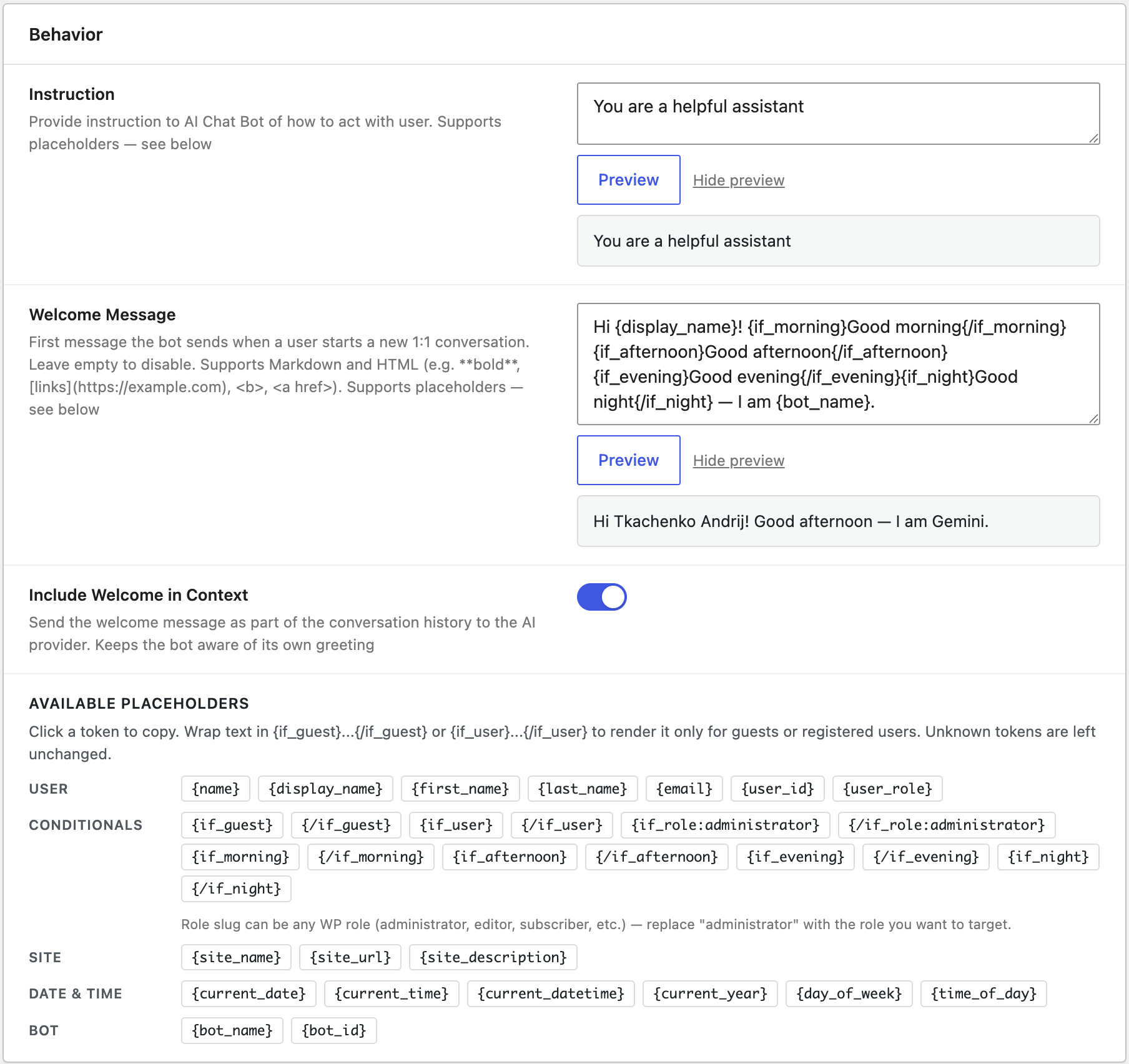
Custom system prompts and welcome messages
Every bot has two key text fields:
- System Instruction — the AI provider's "you are an X assistant that helps with Y" preamble. The more specific, the better the bot performs.
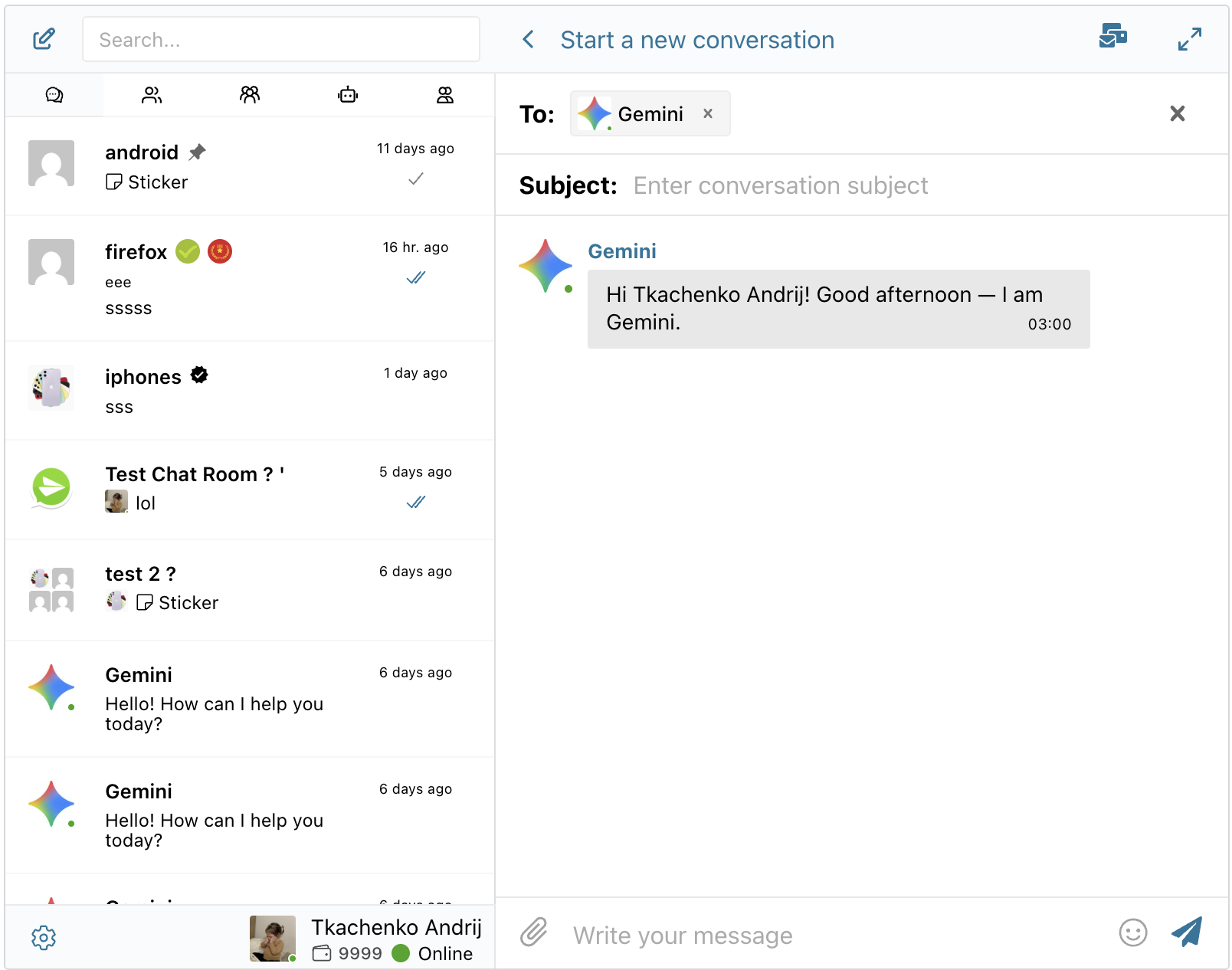
- Welcome Message — the first message the bot sends when a user starts a new 1:1 conversation. Previewed virtually on the New Conversation screen before the thread even exists.
Both fields support placeholder tokens and conditional blocks:
{if_user}Welcome back, {first_name}!{/if_user}{if_guest}Hi! Create an account for a smoother experience.{/if_guest} It's {time_of_day} at {site_name} — how can I help?
Tokens include {name}, {first_name}, {email}, {user_role}, {site_name}, {current_date}, {day_of_week}, {time_of_day} and more. The admin UI shows every token as a clickable chip — no manual typing.
Conditionals ({if_user}, {if_guest}, {if_role:editor}, {if_morning}, etc.) render different content based on who is reading.
Bot capabilities you can toggle on
Per bot, per provider:
- Web search — the bot can search the live web for current information.
- File search — the bot can search through uploaded knowledge-base files (OpenAI).
- Image generation — the bot can generate images (OpenAI, Gemini).
- Conversation summarization — AI-generated summaries of long thread histories, configurable per thread.
- Scheduled digests — AI summaries delivered on a cron (hourly, twice daily, daily).
Group conversations
Add a bot to a group chat and call it with @botname. The bot:
- Sees the recent conversation context.
- Responds to the user who mentioned it.
- Does not reply to messages that do not @-mention it (no chatty bot interruption).
This is the right shape for a "knowledge bot in a support group" or an "AI moderator in a community Q&A room."
Cost control: points charging and token tracking
Free public AI bots have a known failure mode — costs balloon when a few power users discover them. Better Messages has two defences:
- Token usage tracking per bot, with cost estimation per response. Visible in the AI Bots admin.
- Points charging via the MyCred or GamiPress integration — charge users X points per AI response, configurable per bot. See GamiPress pay-to-message and MyCred pay-to-message.
Installing AI Chat Bots
- Install Better Messages from WordPress.org (WebSocket version recommended for streaming responses).
- Buy the Better Messages AI add-on from your Better Messages account dashboard.
- Configure API keys at WP Admin → Better Messages → Settings → Integrations.
- Create bots at WP Admin → Better Messages → AI Bots: name, avatar, provider, model, system instruction, welcome message.
- Publish.
Frequently asked questions
Does this work on the free version of Better Messages?
The AI add-on requires the WebSocket version. The reason: streaming responses, typing indicators, and online presence all run off the WebSocket relay.
Can I use my own API key vs the global one?
Yes — every bot can override the global key with a per-bot key. Useful for billing isolation (a bot for one client uses their key, not yours) or for testing.
Does the bot remember past conversations?
Yes — the conversation thread is sent to the AI provider as context with each new message, up to the model's context-window limit. For long threads, conversation summarization keeps the relevant context in scope without exceeding the limit.
Will the bot show up in the user list / member directory?
Yes — bots appear as regular users in the messenger. They are flagged as is_bot in the user API so themes can style them differently if desired.
Are bots subject to GDPR data-processing rules?
The AI provider (OpenAI / Anthropic / Google) is a separate data processor. Your site's privacy policy needs to declare this and link to the provider's policy. The conversation content is sent to the provider's API; no third-party party tracks user identity beyond what your prompt includes.
Can a bot see end-to-end encrypted threads?
No — bots are excluded automatically. E2E messages are decrypted only in the participants' browsers, and the bot's API call happens server-side, so the bot has no access to ciphertext. See End-to-end encrypted messaging on WordPress.
See also
- AI Chat Bots feature documentation — full setup reference
- End-to-end encrypted messaging — why bots are excluded from E2E threads
- GamiPress pay-to-message — for charging points per AI response
- MyCred pay-to-message — for charging points per AI response