Online Course Academy Chat for WordPress: Cohort Conversations and Office Hours
The economics of an online course academy depend on completion rates, and completion rates depend on whether the student feels like part of a cohort or alone in front of a video. The single feature that consistently lifts completion: a chat layer where students talk to each other and to the instructor, inside the course UI, with the instructor doing periodic office hours over video. Better Messages adds that layer to any WordPress academy on LearnDash, LearnPress, Tutor LMS, MasterStudy LMS, or FluentCommunity Courses — and it works the same way regardless of which LMS plugin you picked.
The academy stack
| Layer | Plugin |
|---|---|
| Course delivery | LearnDash, LearnPress, Tutor LMS, MasterStudy LMS, or FluentCommunity Courses |
| Community (optional) | BuddyBoss Platform or FluentCommunity Spaces |
| Membership / billing | MemberPress, Paid Memberships Pro, WooCommerce |
| Course chat | Better Messages |
Better Messages auto-detects the LMS plugin and wires the chat in without per-course setup. The same plugin handles every academy.
What students see
A Course Chat button next to "Continue Course"
On every course page, a Course Chat or Message Instructor button (depending on the LMS) sits next to the native course actions. Students who hit a question in lesson 4 ping the cohort and the instructor without leaving the lesson page.
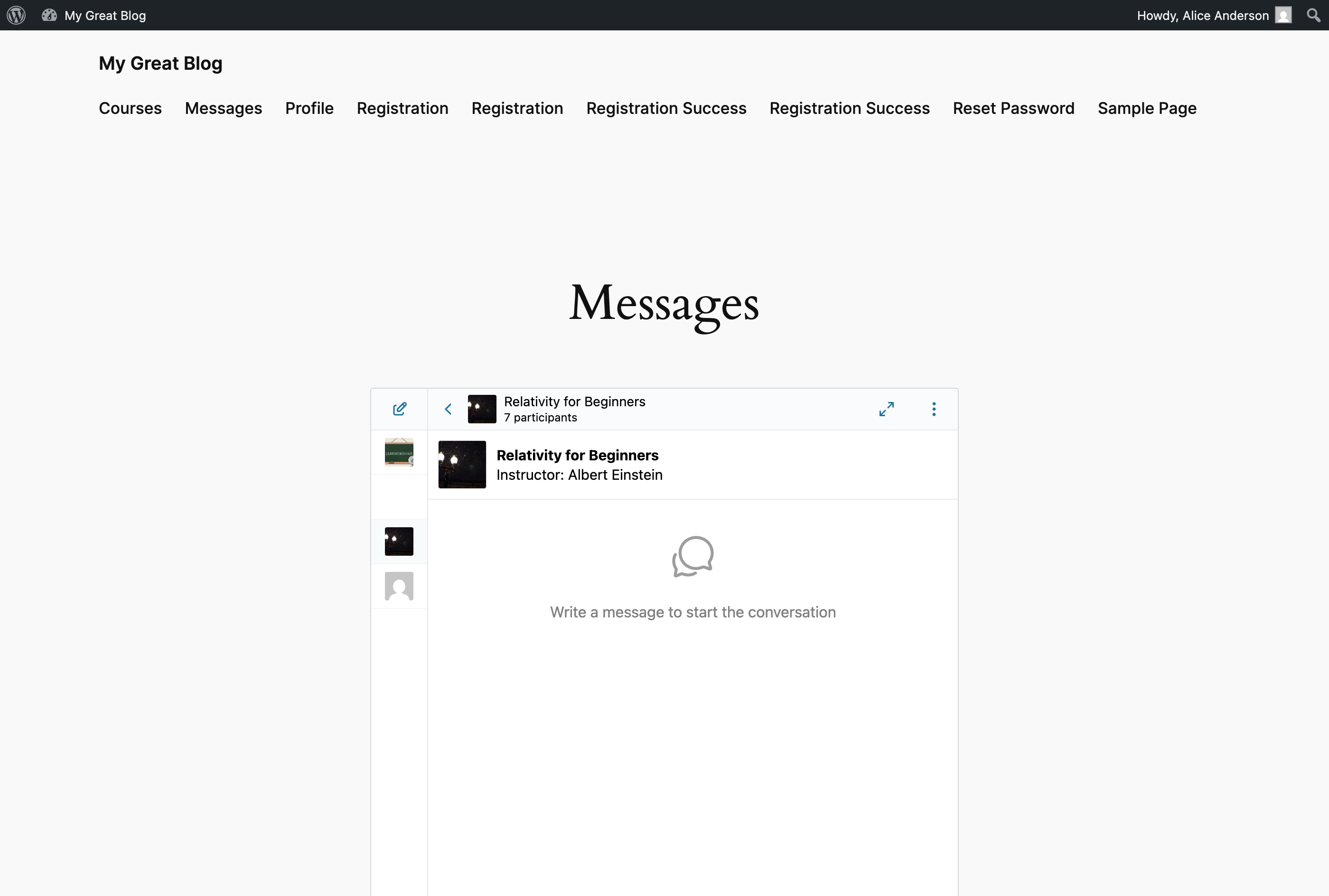
A course group chat that mirrors enrollment
Each course auto-creates a group chat. When a student enrolls, they are added; when their access is revoked or the course ends, they are removed. The instructor is auto-joined as the chat instructor. The chat carries the course image, title, and instructor name in the header so students always know which course they are in.
A Courses widget in the messenger
The dedicated Courses widget lists every course the student is currently enrolled in, separate from any social Groups widget so the academy chats and the friend chats do not mix.
A native mobile app
Students live on their phones; the mobile app delivers course messages with push notifications, including instructor announcements in the cohort chat.
What instructors see
- Inbox with each student's DM thread plus every cohort chat they teach
- Group voice / video call button inside each cohort chat — for office hours, the instructor opens a call inside the chat, students drop in
- AI Chat Bot option — for academies running multiple parallel cohorts, an AI bot configured with the course content can answer FAQ questions, freeing instructor time for the real questions
- Mobile app to reply on the go
Cohort-only chats vs course-wide chats
Two patterns work, depending on whether the course is cohort-based or self-paced:
Cohort-based (the 8-week program model)
Each cohort gets a separate group chat. New cohort starts, new chat. Students who finished the cohort have read access to history but new posts route to the active cohort.
Best implemented with LearnDash Groups or BuddyBoss Groups for the cohort layer. Better Messages auto-creates a group chat for each LearnDash Group cohort.
Self-paced (the always-on model)
The course has one chat that all enrolled students join, with new students coming in continuously. The chat carries multiple cohorts at once; the instructor responds to whichever students are active that week.
Best implemented with the LMS plugin's standard course chat (no Groups layer). Better Messages creates one chat per course.
Office hours over group video calls
The defining moment in an academy week: the instructor goes live for office hours. Two ways with Better Messages:
- Scheduled office hours inside the cohort chat — instructor starts a group video call inside the chat at the announced time, students join with one tap. The chat continues as the call happens (Q&A in text, the call answers the headline questions live).
- Drop-in office hours — instructor stays available in the cohort chat for a 2-hour window, students DM or ping the chat with questions, instructor jumps on a 1:1 video call as needed.
Both work without leaving the messenger.
Free vs WebSocket version for course academies
| Feature | Free version | WebSocket version |
|---|---|---|
| Course chat on every course page | yes | yes |
| Auto-managed enrollment sync | yes | yes |
| Courses widget across all LMS plugins | yes | yes |
| Cohort group chats | yes | yes |
| Real-time delivery | polling | instant |
| Group video call inside the cohort chat (office hours) | — | yes |
| One-on-one video call with the instructor | — | yes |
| Web push notifications for instructor announcements | — | yes |
| AI Chat Bot for FAQ automation | — | yes |
| Mobile app for students and instructors | yes | yes |
For paid course academies, the WebSocket version's group office hours and AI bots are the difference between a cohort that finishes and a cohort that ghosts. Office hours over a built-in group call (no Zoom link to chase) is the single most reliable engagement lever in the academy playbook.
Frequently asked questions
Will it work with our specific LMS plugin?
LearnDash, LearnPress, Tutor LMS, MasterStudy LMS, and FluentCommunity Courses all have first-class integrations. If you run a different LMS, the standard chat-room shortcode still works — you just lose the auto-enrollment-sync that the LMS integrations provide.
Can different course tiers see different chat features?
Yes — combine LMS-level enrollment with WordPress role-based access. Free courses get text-only chat; paid courses unlock the cohort group chat and office-hours calls.
How does this compare to running Discord for the academy?
On-site chat keeps the conversation tied to the student's course enrollment — they lose access when their enrollment ends, no Discord moderator needs to manually kick churned students. The conversation is also yours: searchable by your admin, archived inside the WordPress database, owned by you. Discord scales better for very large free communities; on-site chat fits paid academies under ~5,000 students.
Will instructor announcements reach students who have the site closed?
With the WebSocket version, yes — web push notifications and (for mobile-app users) native push notifications. Without it, students see the announcement next time they open the messenger.
Can we have a free preview chat for prospective students?
Yes — create a public chat room with guest access enabled for prospective students to chat with course alumni, then the per-course gated chats unlock on enrollment. See WordPress guest chat and How to add a chat room to WordPress.
Will the AI Chat Bot have access to our course content?
The AI bot has whatever you put in its system prompt and (with file-search enabled on the OpenAI provider) whatever knowledge-base files you upload. Many academies upload a stripped-down "FAQ document" plus key course concepts so the bot can answer common questions. See AI chat bots.
See also
- WordPress LMS chat plugin — comparing every LMS integration
- LearnDash student messaging plugin
- LearnPress student messaging plugin
- Tutor LMS student messaging plugin
- MasterStudy LMS student messaging plugin
- WordPress coaching business chat — for academies that lean coaching
- AI chat bots — for FAQ automation
- WordPress video call plugin — group office-hours calls