Pay-to-Message via MyCred / GamiPress
Better Messages integrates with the two leading WordPress point systems — MyCred and GamiPress — to charge users points for sending messages, starting new conversations, or placing voice/video calls. Pricing is per-role, so free-tier members might pay more (or be blocked) while paid-tier members message for free. Useful for monetized communities, paid expert advice platforms, and gamified engagement.
What it adds#
- Charge points per message sent
- Charge points per new conversation started
- Charge points per call minute of voice/video call duration
- Per-role pricing — different rates for free / pro / admin
- Per-conversation-type charging — private threads, groups, and chat rooms can be priced independently
- Inline balance display in the messenger — up to six placements
- Custom error messages when a user's balance is insufficient
- Works identically with MyCred or GamiPress (pick whichever you already use)
- Real-time balance check — message blocked before send if balance is too low
How it works#
When a user submits a message, Better Messages queries the user's point balance from MyCred or GamiPress (whichever is configured). If the role's configured cost is less than or equal to the balance, the message sends and the cost is deducted via the charge_for_message action. If not, the send is rejected and the configured Insufficient Balance Message is shown.
| Action | Outcome |
|---|---|
| User sends message in existing thread | "New Message Pricing" deducted. Message sends |
| User starts a new conversation | "New Conversation Pricing" deducted. Thread cost applies in addition to the per-message cost |
| User places a voice or video call | "Private Call Pricing" deducts per minute of confirmed call traffic. First minute charged at start |
| User's balance drops below one more minute mid-call | Call ends gracefully with the configured Insufficient Balance During Call message. No charge taken for the partial minute |
| User has insufficient balance to start a message | Send blocked. User sees the configured error |
| Admin sends a message | Bypassed by default if admin's role has 0 cost configured |
Per-role pricing means a "Subscriber" role might pay 10 points per message while a "Premium" role pays 0 — implementing a paid-messaging upsell directly in the chat UX.
Same UI on both providers#
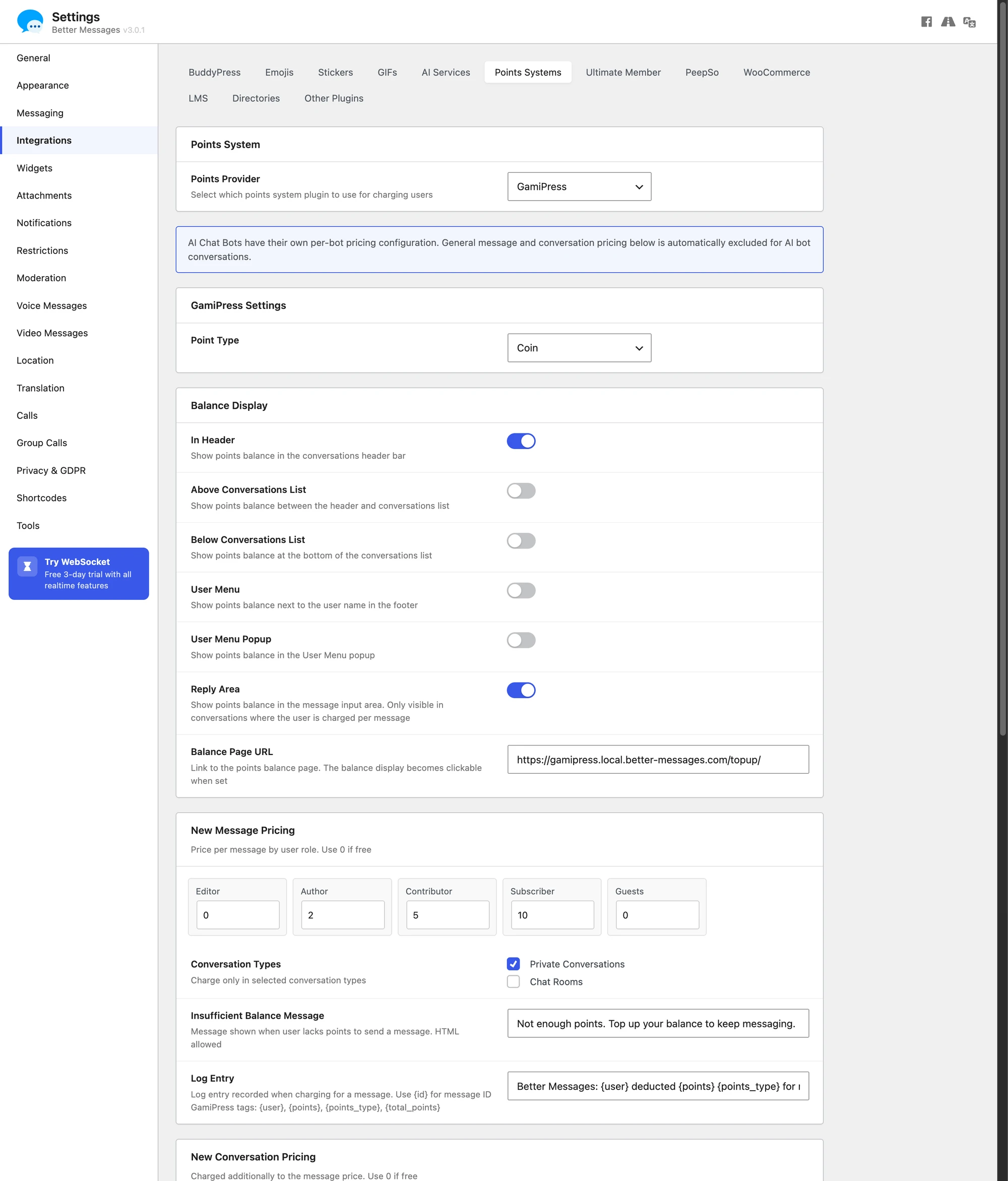
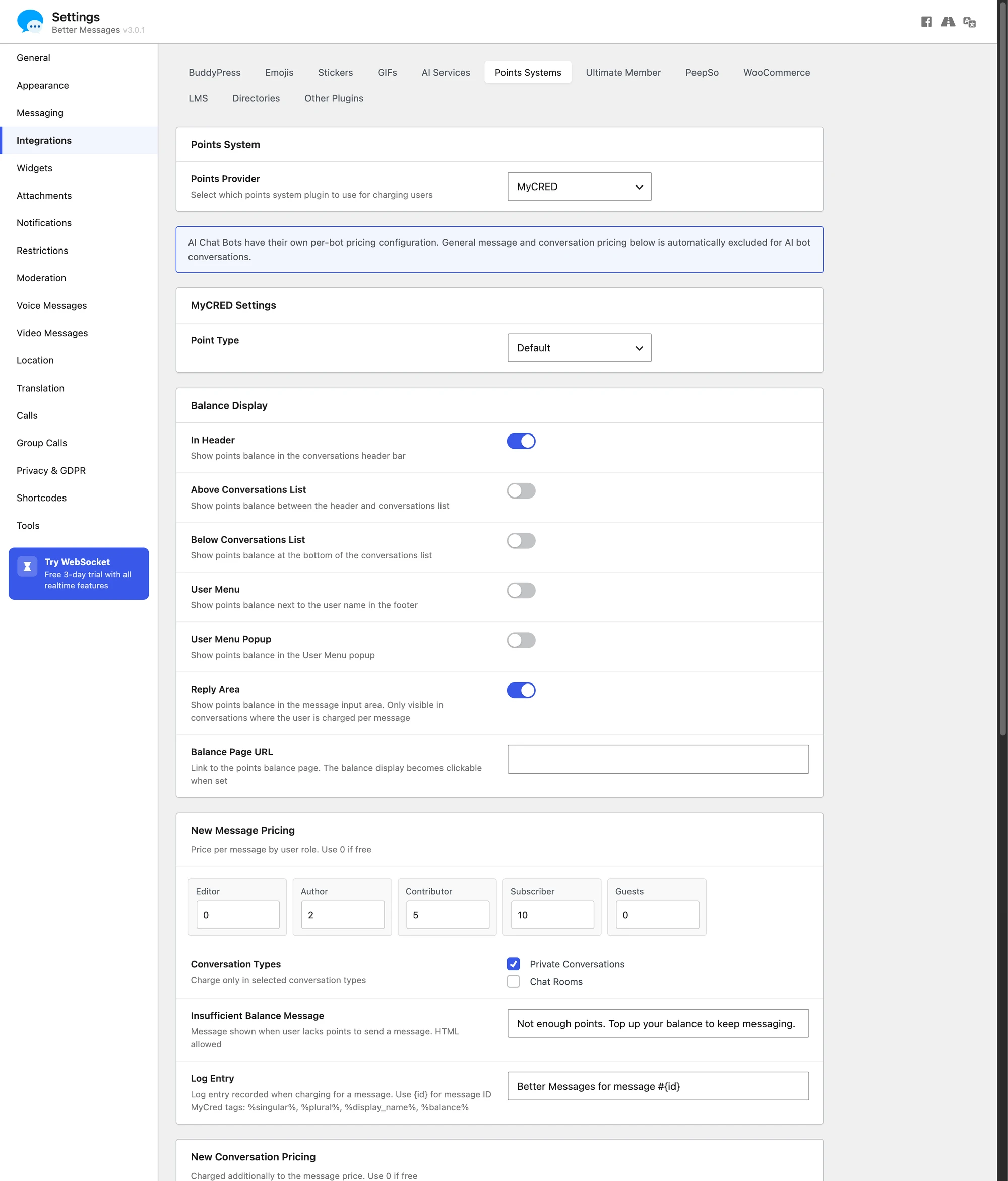
GamiPress and MyCred share a single Points System UI in Better Messages → Settings → Integrations → Points Systems. Switching providers swaps the per-role pricing tables, log entry tags, and balance integration — the structure of the settings panel stays identical.

Per-call billing#
Voice and video calls are priced separately under Private Call Pricing. The rate is per call minute (not per call), with the first minute charged immediately when the call connects. If the caller can't afford one minute up front, the call is blocked with the Cannot Start Call Message.

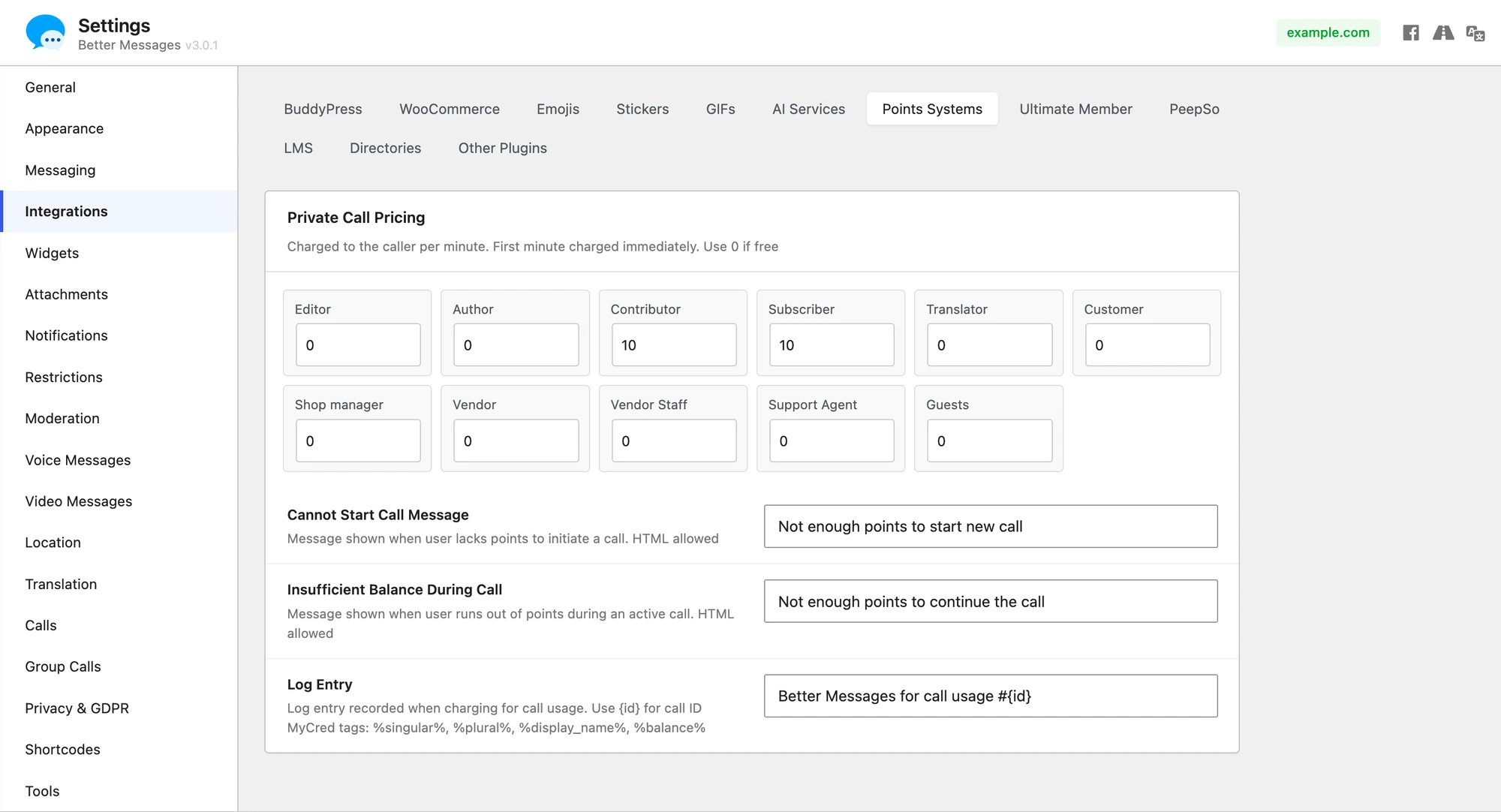
Per-call billing requires the WebSocket version — voice and video calls are not available in the free (AJAX) version.
The name is literal: this prices one-on-one calls only. Group calls are not charged, however long they run — the charging hooks fire from the one-on-one call add-on and nothing equivalent runs in the group one. To monetize group sessions, gate the room or conversation by role and sell access to that role instead.
Balance display in the messenger#
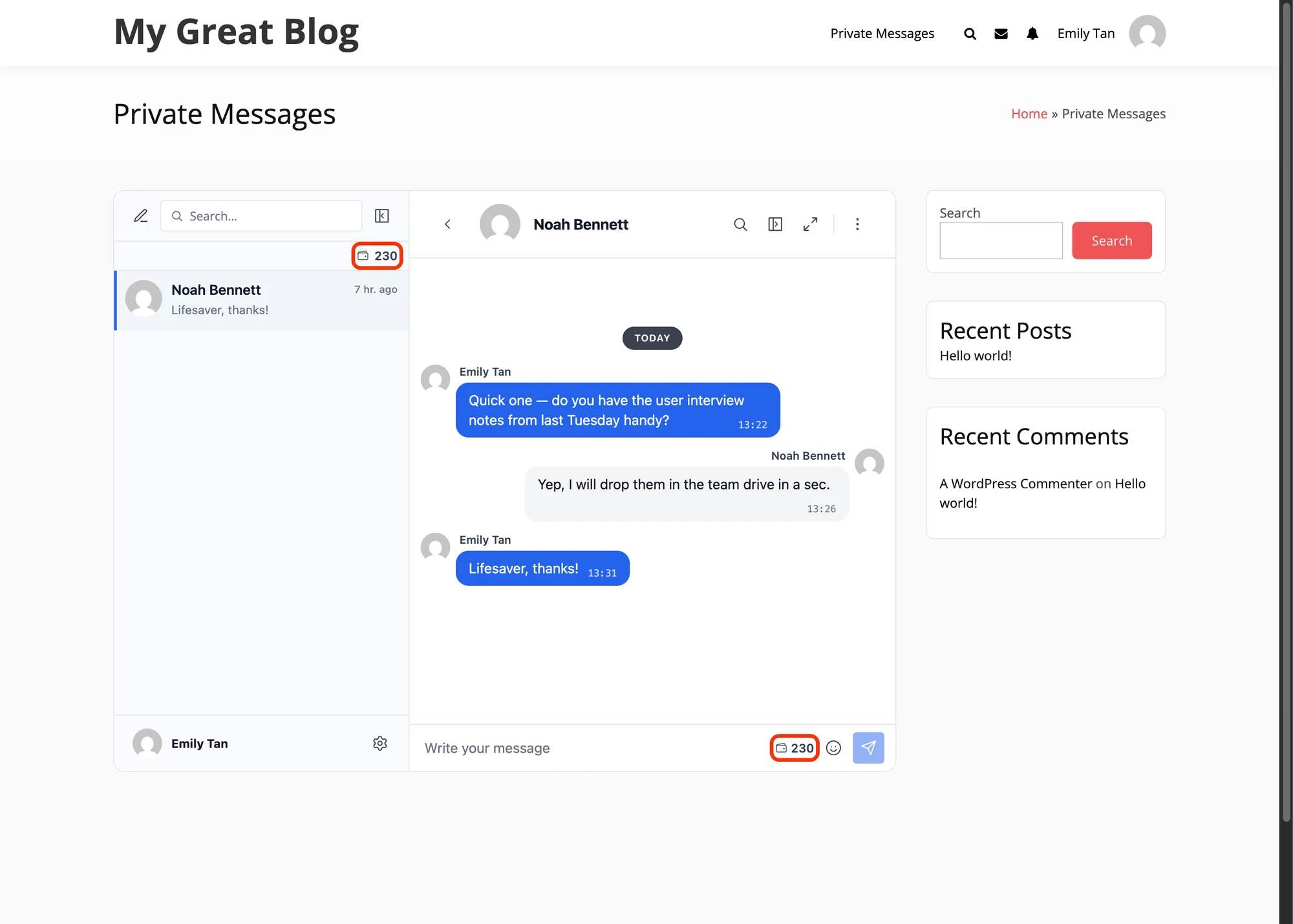
The user's current balance can be shown inline inside the messenger in up to six placements (toggled in the Balance Display section): in the conversations header, above or below the conversations list, in the user menu and its popup, and inside the reply form. Each placement is an independent toggle and the balance number links to a configurable Balance Page URL (typically a WooCommerce points-top-up product or a custom checkout).

When to use it#
| Use case | Pattern |
|---|---|
| Expert consultation platform | Charge users to message verified experts. Experts message free |
| Fan / creator community | Fans pay to DM the creator. Creator replies free |
| Premium content gating | Pay to start a conversation about a paid resource |
| Engagement gamification | Cost is symbolic (1 point) — users earn points via activity, spend on messaging |
| Limit messaging on free tier | Free users get N messages/day from earned points. Paid users unlimited |
How to enable#
Navigate to WP Admin → Better Messages → Settings → Integrations → Points Systems and select either MyCred or GamiPress as the Points Provider.
- Point Type — which point type (from your points engine) to charge against
- New Message Pricing — per-role cost to send a message
- New Conversation Pricing — per-role cost to start a new conversation
- Private Call Pricing — per-role cost per minute of voice or video call (WebSocket version)
- Conversation Types — which contexts the charge applies to: Private Conversations, Chat Rooms, and a group-chat entry named after whichever community plugin is active (BuddyPress Group Chats, PeepSo Group Chats, Ultimate Member Group Chats or FluentCommunity Group Chats)
- Insufficient Balance Message — custom text shown when a user lacks points
- Balance Display — six toggles to surface the balance pill inside the messenger
- Balance Page URL — where the balance pill links to (top-up product or checkout)
The MyCred or GamiPress integration only appears when the respective plugin is installed and active. AI Chat Bots have their own per-bot pricing — general message/conversation pricing is automatically excluded for AI bot conversations.
Frequently asked questions#
Can users see their current point balance inside the messenger?#
Yes — balance display is built into Better Messages with up to six placements (Chat header, threads list top, threads list bottom, user menu, user menu popup, reply form area). Toggle them under Balance Display and set the Balance Page URL to a checkout or top-up product to make the balance pill clickable.
How is per-call billing handled mid-call?#
The first minute is charged at call start (the check_call_balance filter blocks the call if the caller can't afford that minute). Then charge_call_usage runs once per confirmed minute. If the balance drops below one more minute, the call ends gracefully with the Insufficient Balance During Call message — no charge is taken for the partial minute that would have pushed the balance negative.
Does the cost apply to AI bot replies?#
No. The cost applies to the user's outgoing message, not the bot's reply. Users pay to ASK. The AI's response is free of point-cost. AI Chat Bots additionally have their own per-bot pricing configuration that overrides the general per-message rate inside AI bot conversations.
Can group conversations have different costs from private threads?#
Yes. The Conversation Types checkbox set under each charge type (New Message / New Conversation) lets you enable charging only in selected contexts — Private Conversations, Chat Rooms, and the group-chat entry for whichever community plugin you run. A typical monetized-DM configuration ticks only Private Conversations, so group chatter stays free.
Will the point cost prevent guest messaging?#
Guests don't have point accounts, so they aren't charged — the per-role grid includes a separate Guests row that you can set independently (typically 0 to allow them, or block them via the role-based access settings).
See also#
- GamiPress integration page — provider-specific integration reference
- MyCred integration page — provider-specific integration reference
- Build a monetized DM platform — full vertical walk-through with per-message + per-call + balance-display setup
- GamiPress pay-to-message blog post
- MyCred pay-to-message blog post
- Role-based access — per-role permission setup
- AI Chat Bots — per-bot AI-reply pricing