Links That Open the App
Three addresses on your site open the app on a phone that has it, and the messenger on the web everywhere else:
| Address | Opens |
|---|---|
https://example.com/bm/open/messages | The conversations of whoever is signed in |
https://example.com/bm/open/conversation/123 | The conversation with id 123 |
https://example.com/bm/open/user/45 | The private conversation with the member whose user id is 45, started if there is none yet |
Use them wherever you want a tap to land in the app: in emails and newsletters, on buttons of profile pages, in QR codes, in posts. The email notifications of Better Messages keep their usual links to the messenger on the website.
What a member sees#
- On a phone with the app. The tap opens the app at that screen. When the app was closed, it starts there. When the member is not signed in yet, the app opens the screen right after the sign-in.
- On a phone without the app, or on a computer. The address leads to the messenger on the website, at the same conversation or member. A visitor goes through the login page of the site first and comes back to it. On a site with guest chat, a visitor reaches the guest messenger.
- A link to the member who taps it, or to a member who does not exist, opens the conversations.
On iPhone, a link opens the app when it is tapped in another app: in Mail, in Messages, on a page of another site. Typed into the address bar of Safari, it stays in Safari. That is how iOS treats links into apps.
What makes it work#
A phone opens a link in an app only when the site confirms that the app belongs to it. The site does this with two files at the root of the domain, which Better Messages serves from your Mobile App setup. You upload nothing.
| File | Says |
|---|---|
/.well-known/apple-app-site-association | The App IDs of your iOS builds (the Team ID and the Bundle ID of the Development and Distribution app) may open /bm/open/ links and sign in on the site |
/.well-known/assetlinks.json | The packages of your Android builds, signed with your keys, may open links of the site |
Only /bm/open/ is claimed. Every other address of your site keeps opening in the browser.
What the files need:
- iOS: the Team ID and the App ID of each build type on the iOS tab, with the Associated Domains capability enabled on the App ID. The site learns the Bundle ID of an App ID from the readiness check of a build, so the file names an App ID once you opened Create New Build for it at least once.
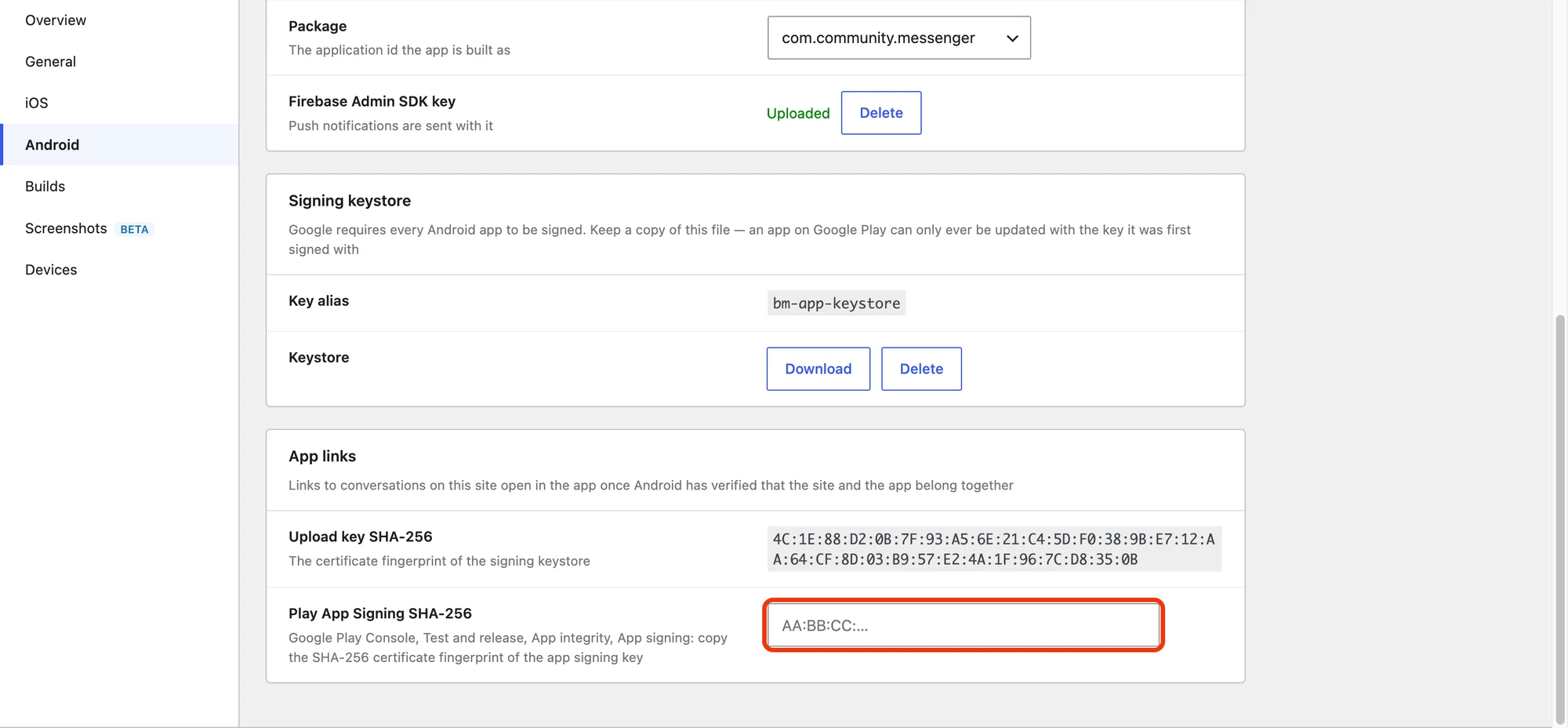
- Android: the Package of each build type and the signing keystore on the Android tab, and for an app on Google Play the Play App Signing SHA-256, below.
When another plugin already serves one of these files through WordPress, for example for its own app, Better Messages adds its entries to that file instead of replacing it.
Play App Signing SHA-256#
Google Play signs the app it delivers with its own key, not with your upload key. Android checks the app against the file with that key, so the site needs its fingerprint too.
- Open the Google Play Console and your app.
- Go to Test and release → App integrity → App signing.
- Copy the SHA-256 certificate fingerprint of the App signing key certificate.
- Paste it into Better Messages → Mobile App → Android → App links → Play App Signing SHA-256 and save.
Upload key SHA-256 above it shows the fingerprint of the keystore Better Messages signs the builds with. It needs nothing from you.

Check that the site serves the files#
The Create New Build summary has an App links row. The site fetches its own file for that platform, the way Apple and Google will, and says what it found:
| The row says | Meaning |
|---|---|
| names this app | Everything is in place |
| The Team ID and the App IDs are needed, or on Android The signing keystore and the Firebase app are needed | The file cannot name the app yet. Fill in what the row names |
| redirects to another address | Apple and Google do not follow redirects. The web server sends the address elsewhere, often to www or to the login page |
| answers 404 instead of the app links file of this site | The web server answers the address itself and never passes it to WordPress |
| is served, but not with this app in it | Another file is there, usually a static file left by another tool |
The row never stops a build. An app whose file is not served still works: its links open in the browser, and website sign-in returns to the app over the app's own address.
When the web server answers the address itself#
Some hosts answer /.well-known/ from a folder on the disk, where the renewal of the SSL certificate
of the site keeps its files, and never pass it to WordPress. Ask the host to pass these two addresses to WordPress, and remove
any file with the same name from the .well-known folder. On nginx:
location = /.well-known/apple-app-site-association { try_files $uri /index.php?$args; }
location = /.well-known/assetlinks.json { try_files $uri /index.php?$args; }
On Apache the rules WordPress writes in .htaccess already pass them, unless a file of that name
exists or another rule blocks .well-known.
A site in a folder#
The files must be at the root of the domain. WordPress installed in a folder, such as
https://example.com/community/, cannot answer there, so whatever answers at
https://example.com/ has to serve them. The links of such a site are
https://example.com/community/bm/open/…, and the app claims that folder. The two files look like
this, with your Team ID, Bundle IDs, packages and fingerprints:
{
  "applinks": {
    "details": [
      {
        "appIDs": ["ABCDE12345.com.example.messenger", "ABCDE12345.com.example.messenger.dev"],
        "components": [{ "/": "/community/bm/open/*" }]
      }
    ]
  },
  "webcredentials": {
    "apps": ["ABCDE12345.com.example.messenger", "ABCDE12345.com.example.messenger.dev"]
  }
}
[
  {
    "relation": ["delegate_permission/common.handle_all_urls"],
    "target": {
      "namespace": "android_app",
      "package_name": "com.example.messenger",
      "sha256_cert_fingerprints": ["UPLOAD:KEY:SHA256", "PLAY:SIGNING:SHA256"]
    }
  }
]
When it starts to work#
- Build the app again with Better Messages 3.2 or newer. The address of your site, and on
Android the claim on
/bm/open/, are written into the app when it is built. Until members update, links can open in the browser instead of the app. - iOS reads the file through a server of Apple, which keeps a copy for a while, so a change to the file can take hours to reach phones. A phone checks again when the app is installed or updated.
- Android checks the file when the app is installed or updated. An app installed before the file was right keeps opening links in the browser until it is updated or installed again.
For developers#
| Hook | Type | What it does |
|---|---|---|
better_messages_mobile_app_open_url | filter | Where a /bm/open/ address leads in the browser. Gets the address, the type (messages, conversation or user) and the id |
better_messages_mobile_app_apple_association | filter | The content of apple-app-site-association |
better_messages_mobile_app_asset_links | filter | The statements of assetlinks.json |
add_filter( "better_messages_mobile_app_open_url", function( $url, $type, $id ) {
    if ( $type === "messages" && ! is_user_logged_in() ) {
        return home_url( "/get-the-app/" );
    }

    return $url;
}, 10, 3 );
The addresses send headers that keep them out of page caches. The association files are cached for five minutes.