Delete Account in the Mobile App
The App Store and Google Play require an app that lets people sign up to let them delete their account inside the app too. The mobile app that Better Messages builds for your site has a Delete Account button in its settings for this, on every site, with or without BuddyPress.
The button is in the app only. The web messenger has no Delete Account button.
What a member sees#
At the bottom of the settings of the app, under Logout and Reload application, the member finds Delete Account (or Request Account Deletion, see the setting). It opens a screen that says what happens before anything does:
- Your profile: the account on the site, with the name, photo and settings
- Your messages: deleted in every conversation, or kept in the conversations of the others as sent by a deleted user, as the site is set up
- Your files: the photos, videos and files the member sent
- Your devices: the phone in hand and every other device signed in to the account are signed out
To go on, the member types DELETE (the word in the language of the app) and presses the red Delete My Account. The button shows that it is working until the site answers. When the site refuses, the screen shows the reason and nothing is deleted.

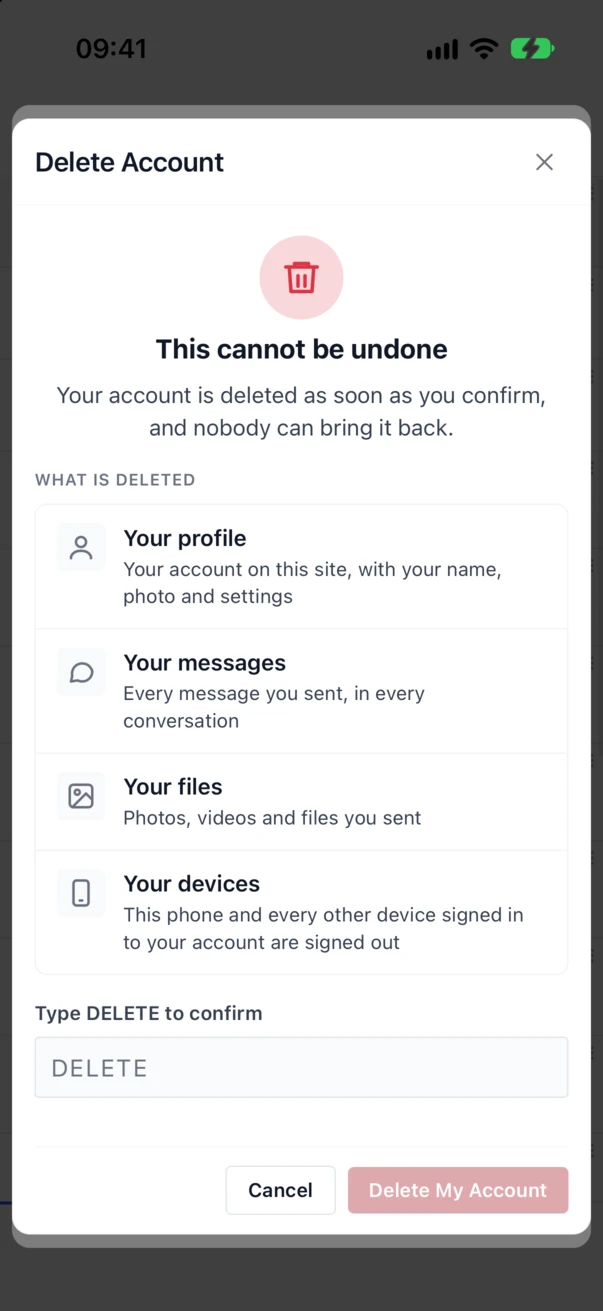
Once the account is deleted, the app signs out and the login screen says that the account was deleted.
The setting#
Better Messages → Mobile App → General → Accounts → Account deletion chooses what the button does:
| Choice | What happens |
|---|---|
| Delete at once (the default) | The account is deleted as soon as the member confirms |
| Send a request to the administrator | The site records a request to erase the personal data of the member and emails the administrator, who deletes the account |
| Off | The app shows no Delete Account button |

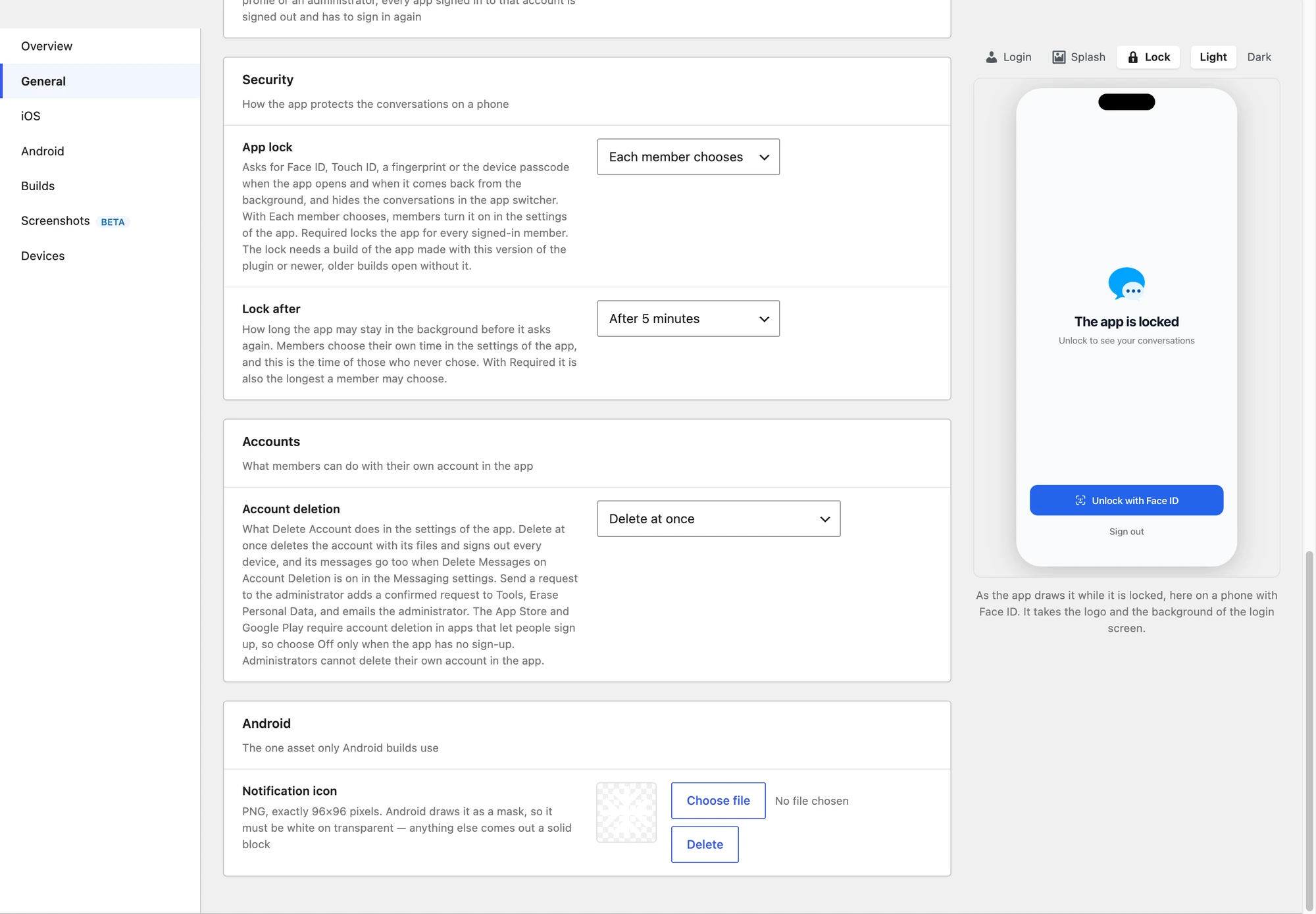
The App Store and Google Play require account deletion in apps that let people sign up. The login screen of the app shows a Register link whenever Anyone can register is on in Settings → General → Membership, so choose Off only for a site where nobody can sign up.
Who cannot delete their account in the app#
- Administrators and network administrators (super admins). They delete accounts in Users in the WordPress dashboard. The confirm screen tells them so and offers no button.
- Members a filter refuses. A developer can refuse a member with the
better_messages_mobile_app_can_delete_accountfilter (see For developers), for example while the member has an open order. - With Send a request to the administrator, a member whose account has no email address. The request is made for an email address, so the screen asks the member to contact the administrator instead.
What is removed with Delete at once#
The account is deleted the way WordPress deletes a user when the administrator chooses to delete their content rather than attribute it to someone else. With BuddyPress active, it is deleted the way BuddyPress deletes an account from its own Delete Account page.
| Removed | The WordPress account, its profile and settings, and with BuddyPress its BuddyPress data |
| Removed | The files the member sent in messages, and any other media and posts the member is the author of |
| Removed | Every device signed in to the account in the app, so no push notification reaches them any more, and the web push subscriptions of the member |
| Removed | The member in the user lists and search of the messenger |
| Depends | The messages of the member. They are replaced with a deleted message mark in every conversation when Settings → Messaging → Miscellaneous → Delete Messages on Account Deletion is on. This runs in the background a few moments after the deletion. When it is off (the default), the messages stay and show as sent by Deleted User |
| Kept | The conversations themselves, and the messages and files of the other participants |
On a multisite network the account is deleted from the whole network, as BuddyPress does.
Send a request to the administrator#
With this choice the button reads Request Account Deletion and the screen ends with Send Request. The site then:
- adds a request to Tools → Erase Personal Data, already confirmed, since the member is signed in to the app and nothing more needs confirming by email
- sends the administrator the email WordPress sends when a member confirms a request
The app then shows the date of the request in place of the button and never sends a second one while that request is open.
To fulfil it, the administrator opens Tools → Erase Personal Data, runs Erase personal data on the request, and then deletes the account in Users. Erasing the personal data anonymises the messages of the member. Their files are deleted too when Settings → Privacy & GDPR → Delete attachments on data erasure is on.
BuddyPress#
BuddyPress has a switch of its own, Settings → BuddyPress → Options → Account Deletion ("Allow registered members to delete their own accounts"). When it is off, the app shows no Delete Account button whatever the Better Messages setting says, and the Account deletion row in the Mobile App settings says so.
Before 3.2 the app opened the BuddyPress Delete Account page in the browser, and only on BuddyPress sites. Since 3.2 the app has its own screen on every site, BuddyPress sites included.
The App Store rule#
App Store Review Guideline 5.1.1(v) says that an app which supports account creation must also let people start the deletion of their account from within the app. Deactivating or disabling an account is not enough. Both Delete at once and Send a request to the administrator meet it. If your site handles the request through a process that takes time, say so in the notes for the App Review team when you submit the app.
The Google Play rule#
Google Play asks the same of apps that let people create an account, and asks for one thing more: a web address where people can ask for their account to be deleted without the app, for someone who already removed it. You give it in the Play Console, in Policy and programs → App content → Data safety, under the questions about account deletion.
The web messenger has no Delete Account button, so that address is a page of your site that:
- names your app and your site, as Google Play asks
- explains how to delete an account in the app: Settings, then Delete Account at the bottom
- offers a way to ask for deletion without the app, for example a contact form, or the email address of the site
- says which data is deleted and which is kept, and for how long, using the table above
For developers#
| Hook | Type | What it does |
|---|---|---|
better_messages_mobile_app_account_deletion | filter | The choice in use: delete, request or off |
better_messages_mobile_app_can_delete_account | filter | true to allow, or a WP_Error whose message the app shows. Gets the WP_User and the choice in use |
better_messages_mobile_app_account_deleted | action | After the account is deleted. Gets the user id and the WP_User as it was |
better_messages_mobile_app_account_deletion_requested | action | After a request is sent. Gets the user id and the id of the request |
add_filter( 'better_messages_mobile_app_can_delete_account', function( $allowed, $user, $mode ) {
    if ( $mode === 'delete' && function_exists( 'wc_get_orders' ) && wc_get_orders( array( 'customer_id' => $user->ID, 'status' => array( 'processing', 'on-hold' ), 'limit' => 1 ) ) ) {
        return new WP_Error( 'open_orders', 'Your account can be deleted once your open orders are complete.' );
    }

    return $allowed;
}, 10, 3 );
The app talks to the REST route better-messages/v1/app/accountDeletion, which answers only a
device signed in to the app: GET tells the app the choice and whether the member may go on, and
POST with confirm set to true and mode set to the choice the member saw does it. A mode
that no longer matches the setting is refused, so a change on the site while the screen is open
never turns a request into a deletion.