Progressify PWA: Push Notifications for Better Messages
Progressify turns a WordPress site into a Progressive Web App — installable to the home screen, capable of offline-aware browsing, and able to send web push notifications even on iOS Safari (where standard web push has long been limited). Better Messages auto-detects Progressify and routes private-message push notifications through it, so members who installed your PWA see new-message notifications the same way they see any other PWA notification.
What the Progressify integration does#
When Progressify is detected and configured:
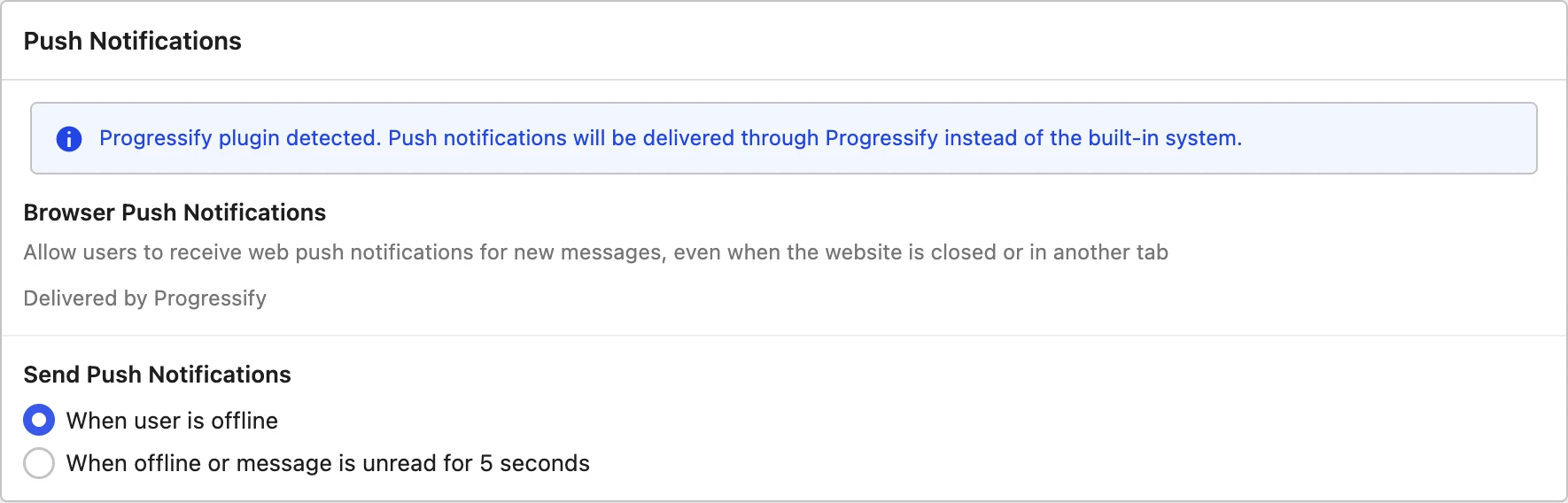
- Better Messages auto-enables Progressify push notifications — visible under Better Messages → Settings → Notifications.
- Per-message pushes are dispatched to PWA-installed users when a new private message arrives in a thread they participate in.
- Subscription routing uses Progressify's own subscription store — no separate setup, no separate database.
- iOS PWA push works — Progressify uses the modern Web Push protocol that iOS Safari now supports (when the site is installed as a PWA).

Requires the WebSocket version#
The Progressify integration runs on the WebSocket version of Better Messages. The reason: the WebSocket relay is what dispatches per-thread events, and Progressify pushes are fired off that fan-out.
Installation
- Install Progressify and configure your PWA settings (manifest, icons, theme color, install prompt, push notifications).
- Install Better Messages from WordPress.org (with the WebSocket license) and activate it.
- Open Better Messages → Settings → Notifications → Push Notifications. With Progressify active, a banner there reads "Progressify plugin detected. Push notifications will be delivered through Progressify instead of the built-in system."
That is the entire setup. There is nothing to configure — the banner is confirmation, not a settings section, and there is no separate config in Progressify either.
Bottom-menu overlap fix#
If you use Progressify's bottom navigation menu, it can overlap the Better Messages reply area on mobile. Add this CSS in WP Admin → Appearance → Customize → Additional CSS (or via the better_messages_css_customizations filter):
body.bm-mobile .bm-wrap-main,
body.bm-mobile .bm-chat-wrap,
body.bm-mobile .bm-single-thread-wrap,
body.bm-mobile .bm-wrap-group {
    bottom: 58px !important;
}
If you applied this fix on 2.x, the old rule targeted .bp-messages-* with a .bp-messages-mobile companion class. In 3.0 the wrappers are prefixed bm-, and the full-screen marker bm-mobile sits on <html> and <body> rather than on the wrapper — hence the body-scoped selector above. The old rule does nothing and can be removed.
Frequently asked questions#
Does this work on iOS?#
Yes — Progressify uses Apple's modern Web Push protocol (iOS 16.4+). When a user installs the PWA to their home screen and grants push permission, they receive Better Messages notifications natively.
What about users who have not installed the PWA?#
They do not receive Progressify push notifications — push is opt-in via PWA install. Better Messages falls back to email notifications and the in-site unread badge for non-installed users. For broader web push coverage, combine with OneSignal (the two coexist).
Will the integration conflict with Progressify's own post-notification pushes?#
No — Progressify's standard new-post notifications and Better Messages' new-message notifications are dispatched separately to the same subscriber list. A user who subscribed via Progressify gets both kinds of notifications.
Does this work alongside OneSignal?#
Not together. Better Messages picks one push backend and uses only that one, in the order OneSignal, Progressify, BuddyBoss, FluentNotify, built-in. With both plugins active, OneSignal wins and Progressify is not used for Better Messages notifications at all — so if Progressify's PWA and iOS coverage is what you are after, it needs to be the one without OneSignal beside it. The Notifications tab names whichever is in charge.
Can I customise the push notification body?#
Better Messages dispatches a default body of "New message from [sender]" with a deep link back to the thread. The body is filterable in PHP for custom branding or content.
See also#
- Progressify integration documentation — full setup reference
- OneSignal push notifications for Better Messages — for sites using OneSignal instead
- Real-time messaging — what the WebSocket version unlocks