WordPress Chat Rooms Website: Build a Live Chat Community From Scratch

The classic chat-rooms website — a list of topic rooms across the homepage, a public lobby for guests, a few private rooms behind a login, people drifting between them all evening — is one of the oldest layouts on the web. IRC servers, AIM rooms, and the small Java-applet chats of the early 2000s all hit the same shape. WordPress can host that site today with a single plugin and no external chat service.
This guide is for builders whose site's primary feature is chat rooms — a destination where the rooms themselves are the product, not a forum with a chat tab or a course with a discussion area. If you instead want to drop one chat room into an existing site, follow the shorter add a chat room tutorial — this post is its architectural sibling.
The chat-rooms website stack#
A chat-rooms-first site is light by design — one plugin doing the chat work and a theme that gets out of the way.
| Layer | Role |
|---|---|
| WordPress | Identity (accounts, roles), pages, navigation, theme |
| Better Messages | Chat rooms (bpbm-chat custom post type), access control, message delivery, moderation, calls |
| Optional: WebSocket version | Instant delivery, presence and typing indicators, group voice and video calls |
| Optional: membership plugin | Paywall on private rooms (Paid Memberships Pro, MemberPress, WooCommerce Memberships) |
| Optional: AI moderation | Auto-flag harmful content across 23 categories |
Everything lives in your WordPress database — messages, files, guest sessions, moderation rules — with no third-party chat vendor.
Site architecture: three tiers of rooms#
A chat-rooms website typically layers three tiers: public lobby rooms (open to everyone including guests, the front door of the site, one per major topic), member rooms (logged-in users with a specific role — quieter, more on-topic), and private rooms (invite-only or paid, the reason members sign up).
A chat room is a WordPress custom post type (bpbm-chat), but it has no public URL of its own — it always renders inside a regular WordPress page or post via shortcode. The standard pattern is one WordPress page per visible room: the page is what your menu links to, and [better_messages_chat_room id="123"] lives in the page content. You categorize, organize, and link to the pages — never to the rooms directly.
Creating rooms in WP-admin#
Every chat room is created from WP Admin → Better Messages → Chat Rooms → Add New. Give it a name, write an optional topic description, then scroll to the Chat Room Settings panel below the editor to set access rules.

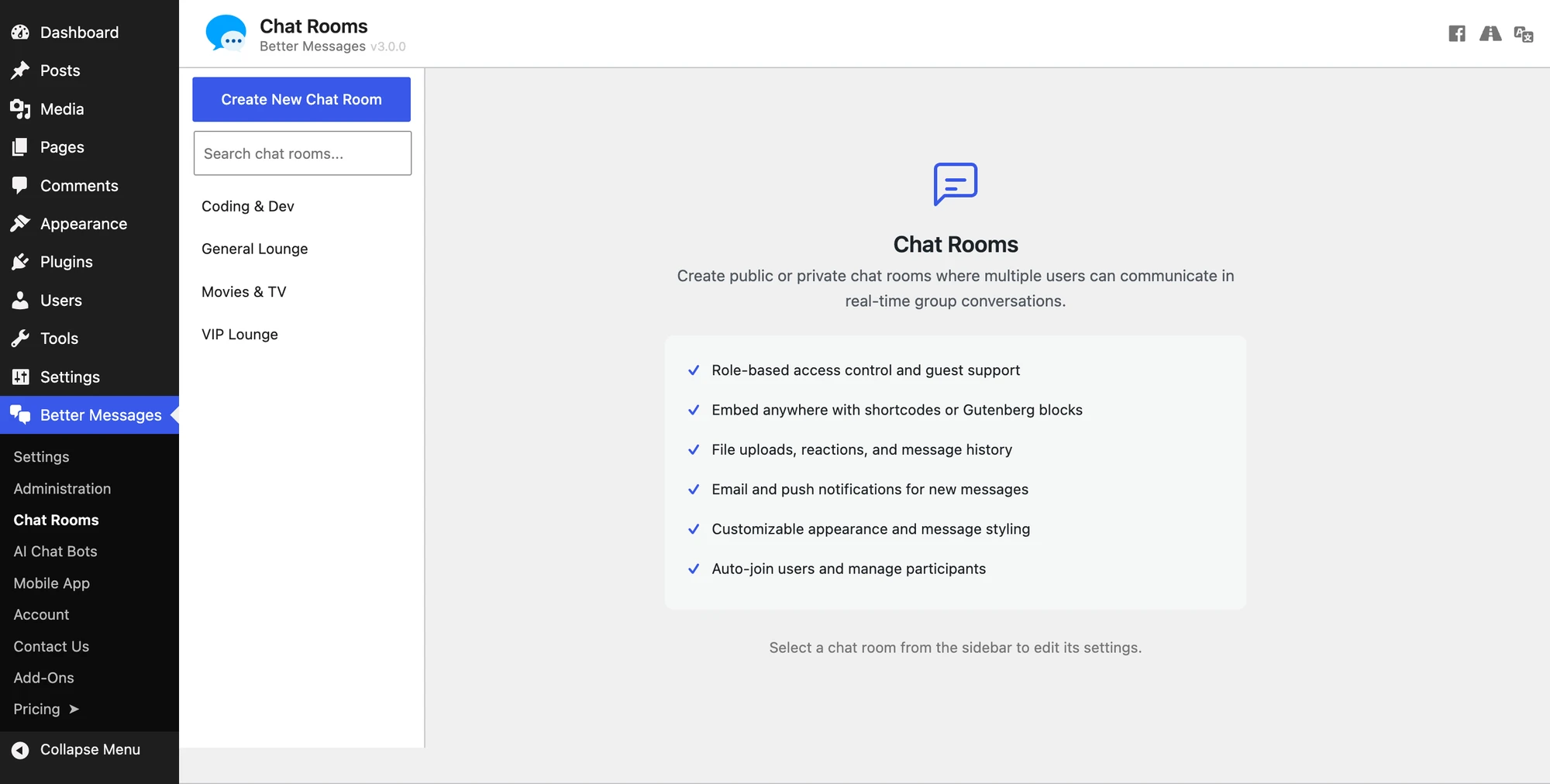
Embed the room with the shortcode [better_messages_chat_room id="123"] (accepts a full_screen="1" attribute) or the Better Messages — Chat Room Gutenberg block. The standard pattern is one WordPress page per room with the page slug matching the topic (/general/, /coding/, /movies/) — the shortcode goes on each page and the menu links to them.
Public vs private rooms: the access toggles#
Every room has a can_join setting that tells the plugin who can enter — by WordPress role, plus an optional Guests slot for unregistered visitors. Typical configurations:
- Public lobby — all editable roles + guests allowed.
- Member-only room — subscriber / member / your custom role. Guests off.
- Private paywalled room — paid-member role from your membership plugin. Guests off. Only joined can read on so non-members can't lurk.

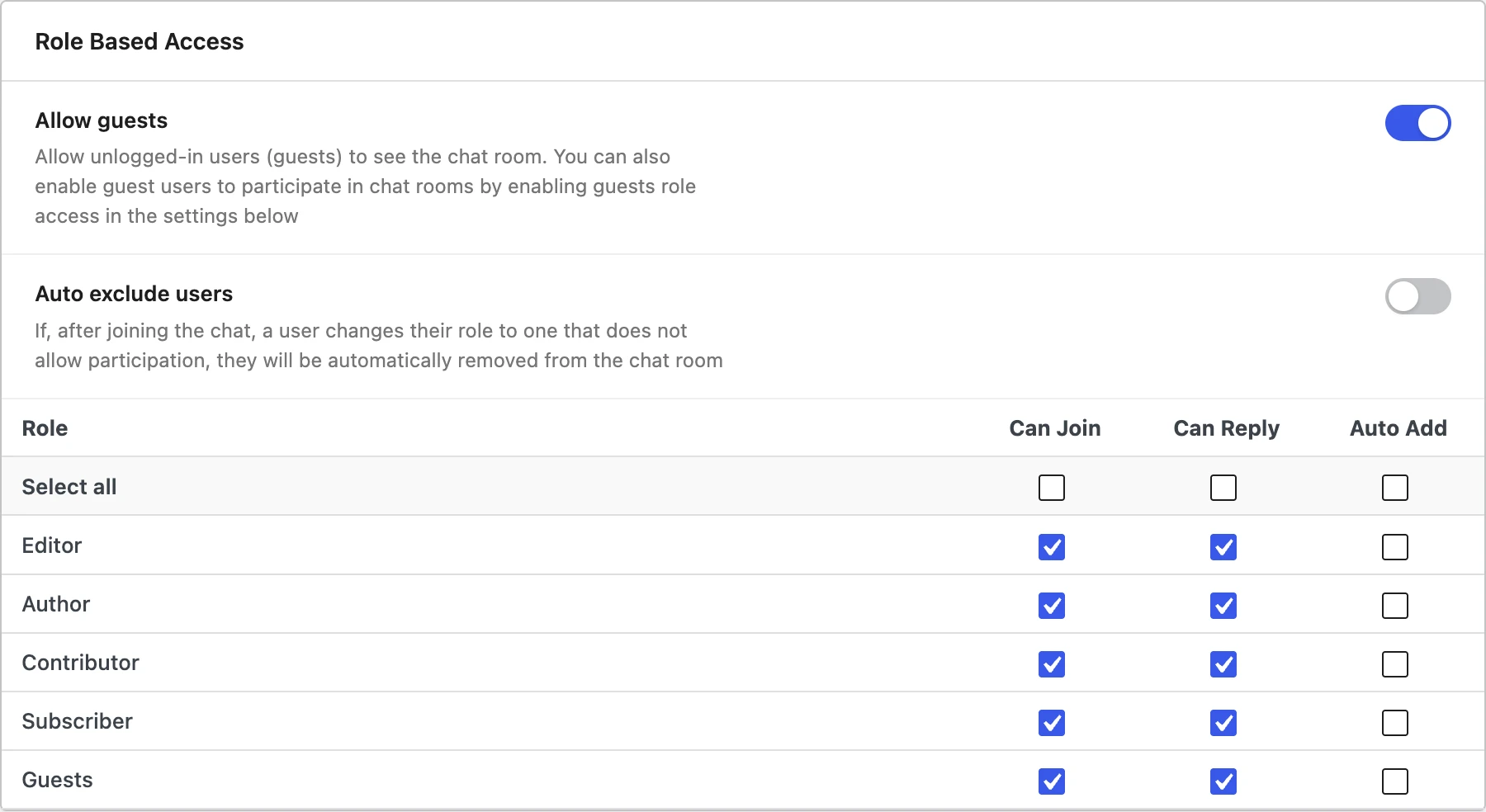
The plugin reads WordPress roles directly, so any role created by another plugin (memberships, WooCommerce, LMS, BuddyPress, BuddyBoss) appears in the same checklist — no separate permission system to maintain.
Guest access: the front door#
A chat-rooms site that requires registration before anyone can read a message rarely takes off. With Guests enabled on a room, an unregistered visitor sees a tiny "join as guest" form (display name, optionally email for lead capture), gets stored in the bm_guests table with a stable browser-side identity, and returns to the same display name across sessions. Guests can send messages, upload files, use reactions, get @-mentioned, receive notifications, and — on the WebSocket version — join a room’s group call. They authenticate on the REST API like any other participant, so nothing is closed to them by default. If you would rather they could not call, the Guests row in Settings → Group Calls → Restricted from Joining is where to say so.
Guest access is per-room, so the lobby can be guest-open while topic rooms require registration. The standard funnel: guest lobby → "create an account to join the other rooms" → registered member → paid upgrade.

What's inside every room#
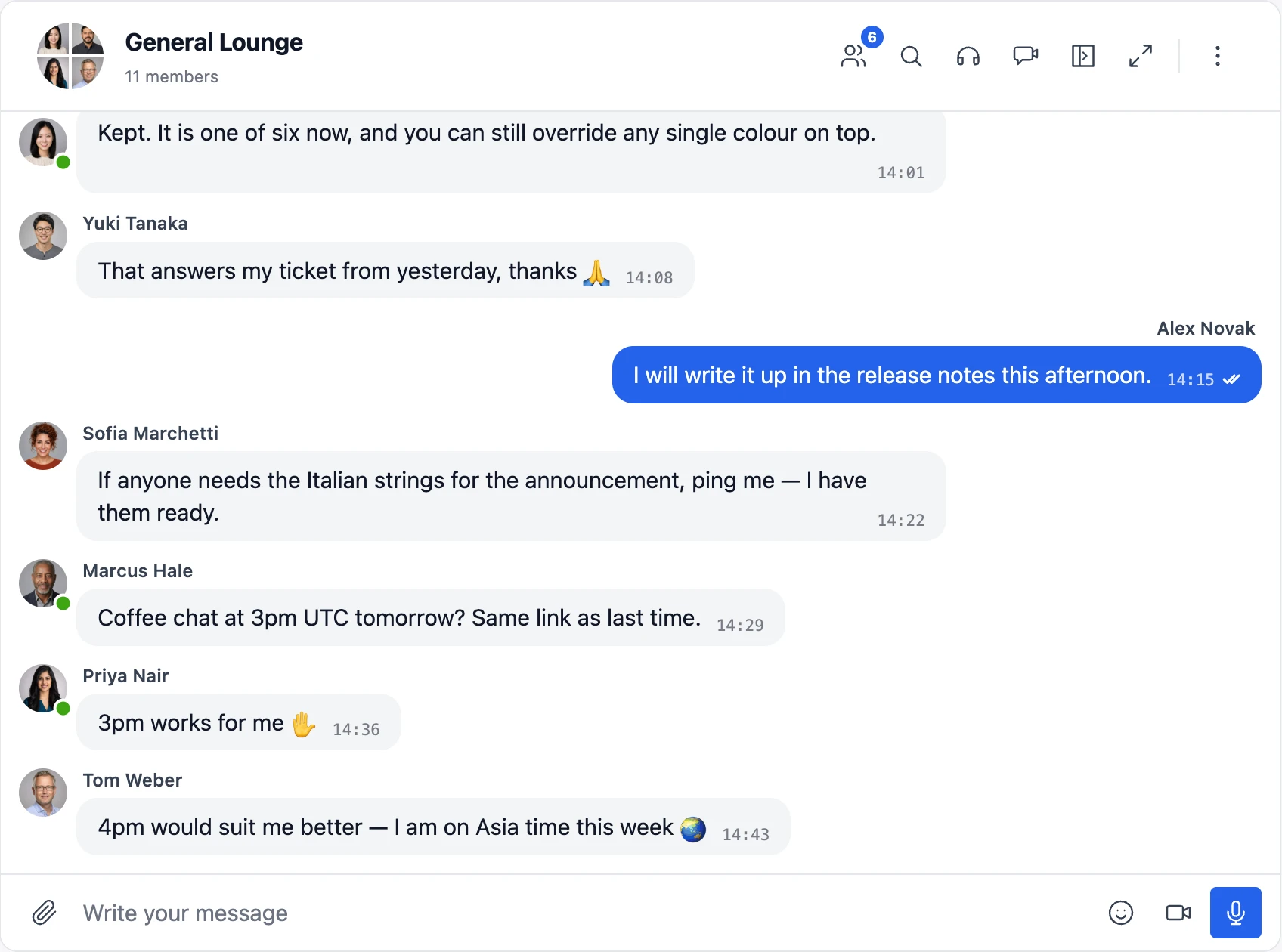
Every room ships the full Better Messages conversation surface: persistent message history, file sharing with resumable uploads, emoji selector, sticker packs, GIF search via GIPHY and Klipy, Markdown formatting, @-mentions, reply / edit / forward, reactions, and an online users sidebar.
On the WebSocket version you also get presence indicators, typing indicators, instant delivery, and group voice and video calls — up to 32 participants on video, 50 on audio — with the call button in every room's header.
Mini widget: every page becomes a chat surface#
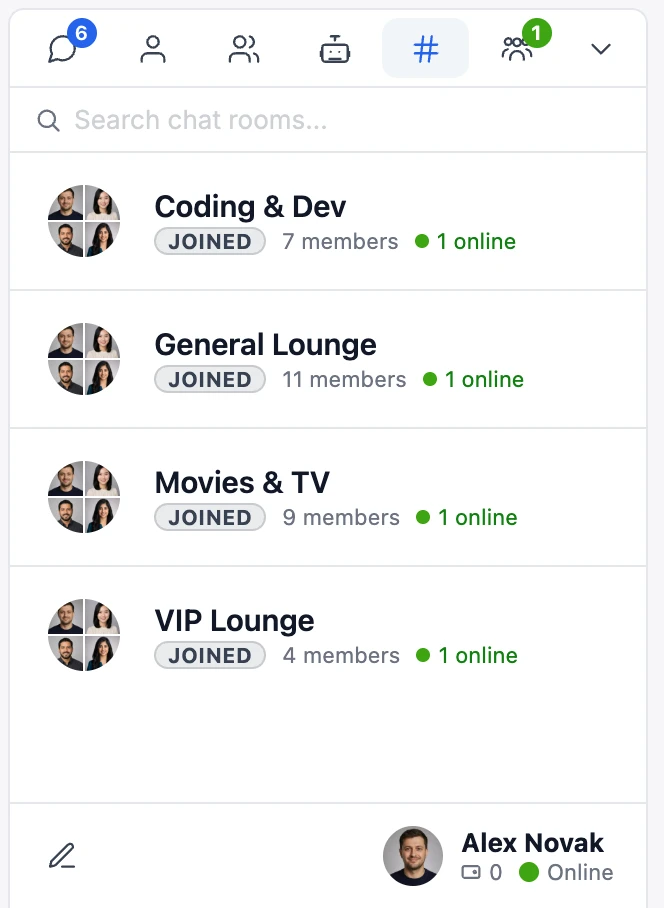
Beyond the room pages themselves, the Mini Widget pins a floating chat icon to every page on the site with a Chat Rooms tab listing joined rooms and unread counts. A visitor reads a post, sees a notification badge, opens the widget, finds two new messages in their favorite topic room, replies, and goes back to the post — no navigation to a room page required.

Moderation: keep the rooms healthy#
A chat-rooms site lives or dies by its moderation quality. Better Messages ships three composable layers:
- Pre-moderation — hold messages from designated users or roles until an admin approves. Configure under Better Messages → Settings → Moderation: hold first messages from new users, pre-moderate replies from specific roles, quarantine an individual.
- Bad words filter — a list of forbidden words. Block, asterisk-mask, or flag for review. It sits under Settings → Restrictions, not alongside the other two.
- AI Content Moderation (WebSocket version) — classifies messages across 23 content categories (hate, harassment, sexual content, violence, self-harm, illicit, and more), supports custom rules in plain text, and is aware of conversation context — it catches patterns split across multiple messages, like a phone number typed one digit per line. Choose Flag Only (deliver but mark for review) or Hold for Review (queue until approved).

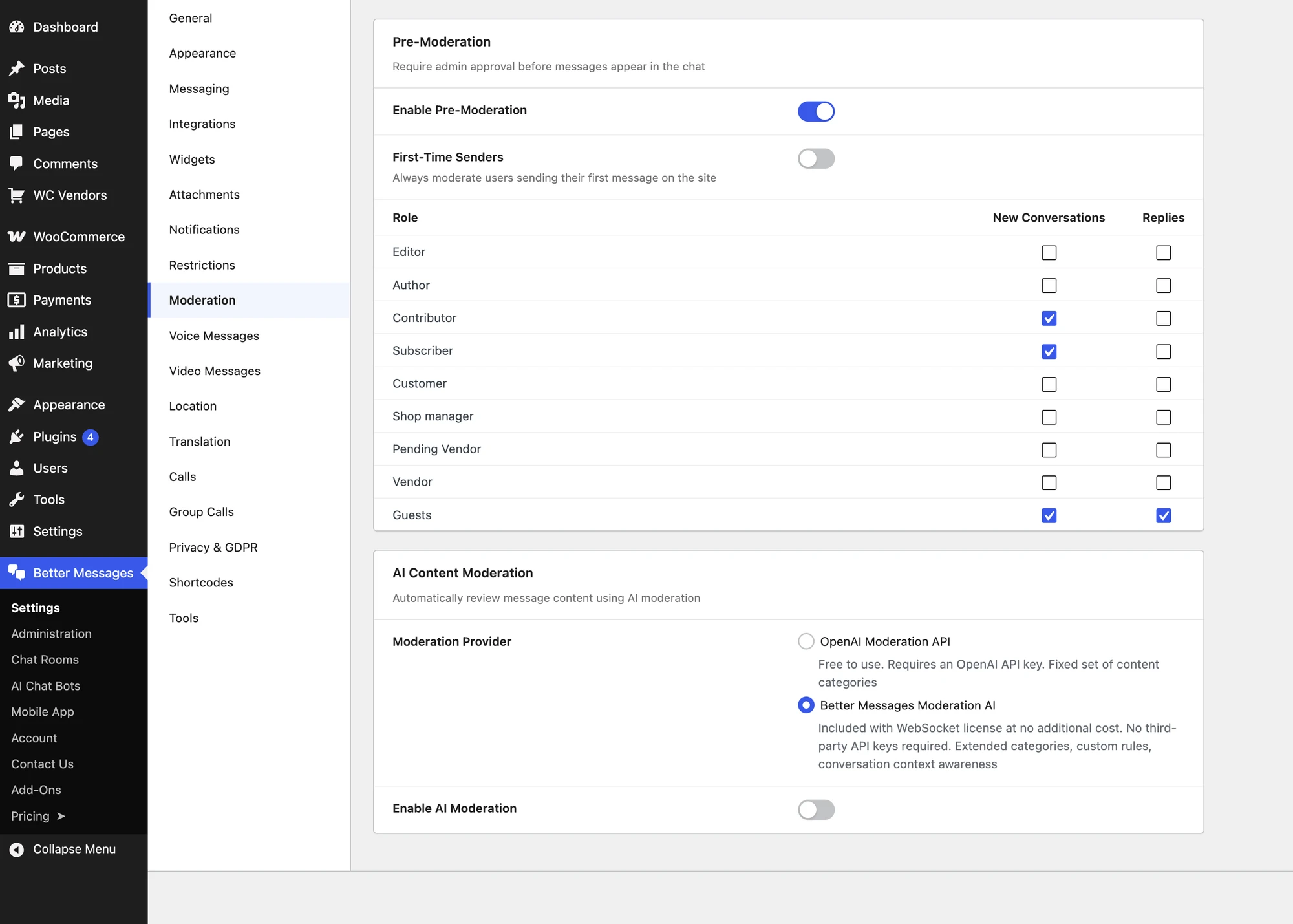
Flagged output lands in the admin Messages Viewer where moderators read in-context, approve, reject, ban, or delete. A realistic combination: bad words on for low-effort spam, AI moderation set to Flag Only across all rooms, pre-moderation on for first messages from brand-new accounts.
Monetization options#
Three common revenue patterns:
- Paid memberships — pair Better Messages with a membership plugin (Paid Memberships Pro, MemberPress, WooCommerce Memberships). The membership plugin creates the paid role. Better Messages restricts paid rooms to that role. Subscription start auto-adds the member. Cancellation removes them via the role change.
- Pay-per-message — credit economy via the myCred or GamiPress integration. Members earn or buy credits and spend them per message in paid rooms.
- Sponsored rooms — a brand sponsors a topic room, featured on your homepage or a curated landing. Standard WordPress content techniques apply — the room is just a custom post type.
The plugin doesn't take a cut of any of this.
Free version vs WebSocket version for a chat-rooms site#
| Feature | Free version | WebSocket version |
|---|---|---|
| Unlimited chat rooms | yes | yes |
| Public + private rooms via roles | yes | yes |
| Guest access per room | yes | yes |
| File sharing, emoji, stickers, GIFs | yes | yes |
| Markdown formatting | yes | yes |
| Mini widget with Chat Rooms tab | yes | yes |
| Pre-moderation + bad words filter | yes | yes |
| Real-time delivery | polling | instant |
| Presence + typing indicators | — | yes |
| Group voice and video calls inside rooms | — | yes |
| AI Content Moderation | 13 categories, your OpenAI key | 23 categories, no key needed |
| End-to-end encryption (per thread) | — | yes |
| Web push notifications | — | yes |
For a chat-rooms-first website the WebSocket version is the realistic choice. The polling overhead grows fast once you have a busy lobby, and the experience changes the moment delivery flips from "every few seconds" to "instant". Presence indicators, typing dots, and group calls are also what make a chat room feel like a chat room rather than a slow message board.
Frequently asked questions#
How is this different from adding a chat room to an existing site?#
The add a chat room tutorial covers "I have a WordPress site and want to drop one chat room onto a page". This post covers the chat-rooms-first case — site architecture, monetization, and moderation are different even though the plugin is the same.
Is this a real IRC alternative on WordPress?#
For the "users hop between topic rooms in real time and chat all evening" use case, yes — the WebSocket version reproduces that experience with WordPress accounts as the identity layer and WordPress roles as the access layer. You lose IRC-specific features like channel modes and /commands, but you get message history, file sharing, voice and video, mobile apps, and a mainstream identity system.
Can I have hundreds of rooms?#
Yes. Each room is a separate bpbm-chat post in the database and is embedded on a separate WordPress page, so the scaling limit is the WordPress server itself. For large catalogues, build a directory page that lists your room pages — a manual list, a custom Gutenberg block, or a navigation menu — and link each card to the WordPress page that embeds that specific room.
How do I keep participant lists from filling up with ghosts?#
Every room has an Auto-remove inactive users option. Pick a signal (no site visit, no message in room, no room visit), set a day threshold, and the cleanup runs on the standard five-minute cron. Most chat-rooms sites scope this to Guests only.
Does the shortcode work in Elementor / Bricks / Oxygen?#
Yes — every page builder that accepts WordPress shortcodes (Elementor, Bricks, Oxygen, Beaver Builder, Divi). The Gutenberg block works in any builder that supports Gutenberg blocks.
Are conversations indexed by search engines?#
Container pages are indexable, but messages load via REST after page render, so Google doesn't index message content. This is usually the right behavior — chat is ephemeral, not canonical SEO content.
Can members DM each other on the same site?#
Yes — Better Messages serves both surfaces from the same install. Members can DM through the main messenger while chat rooms run as separate persistent spaces, sharing the same inbox, notification stack, and identity.
Are encrypted chat rooms a thing?#
End-to-end encryption is a per-thread setting on the WebSocket version, available primarily for private one-on-one and group conversations using AES-256-GCM content encryption and ECDH P-256 key exchange — see End-to-end encrypted WordPress messaging for the architecture.
See also#
- How to add a chat room to your WordPress site — the tutorial for adding a single chat room to an existing site
- Chat rooms documentation — full reference for the chat-room feature
- WordPress guest chat without login — guest entry mechanics in depth
- AI content moderation for WordPress chat — the 23-category moderation engine
- Role-based access for WordPress chat — how role gates work across rooms and DMs
- WordPress community chat plugin — pairing chat with a community plugin
- WordPress chat mobile app — native iOS/Android apps for the same chat rooms
- Export transcripts — archive a room's conversation as a file