RealHomes Real Estate Chat: Buyer ↔ Agent Messaging
RealHomes from Inspiry Themes is one of the longest-running real-estate WordPress themes — property post types, agent and agency CPTs, the Easy Real Estate plugin, three design variations (Ultra / Modern / Classic), Elementor templates, and a polished user dashboard with CRM Inquiries. What it does not ship with is a real-time chat layer that keeps the conversation on-site, with persistent history, file attachments and the option to escalate to a call. The native contact form mails the agent, then the lead goes cold while the buyer browses the next listing. Better Messages adds a Live Chat row on every property page, every listing card, every agent and agency profile, and a Messages tab inside the RealHomes dashboard — same accent color as the rest of the theme, no template overrides needed.
What Better Messages adds to RealHomes#
Once Better Messages is installed and the RealHomes integration is enabled under Better Messages → Settings → Integrations → Directories:
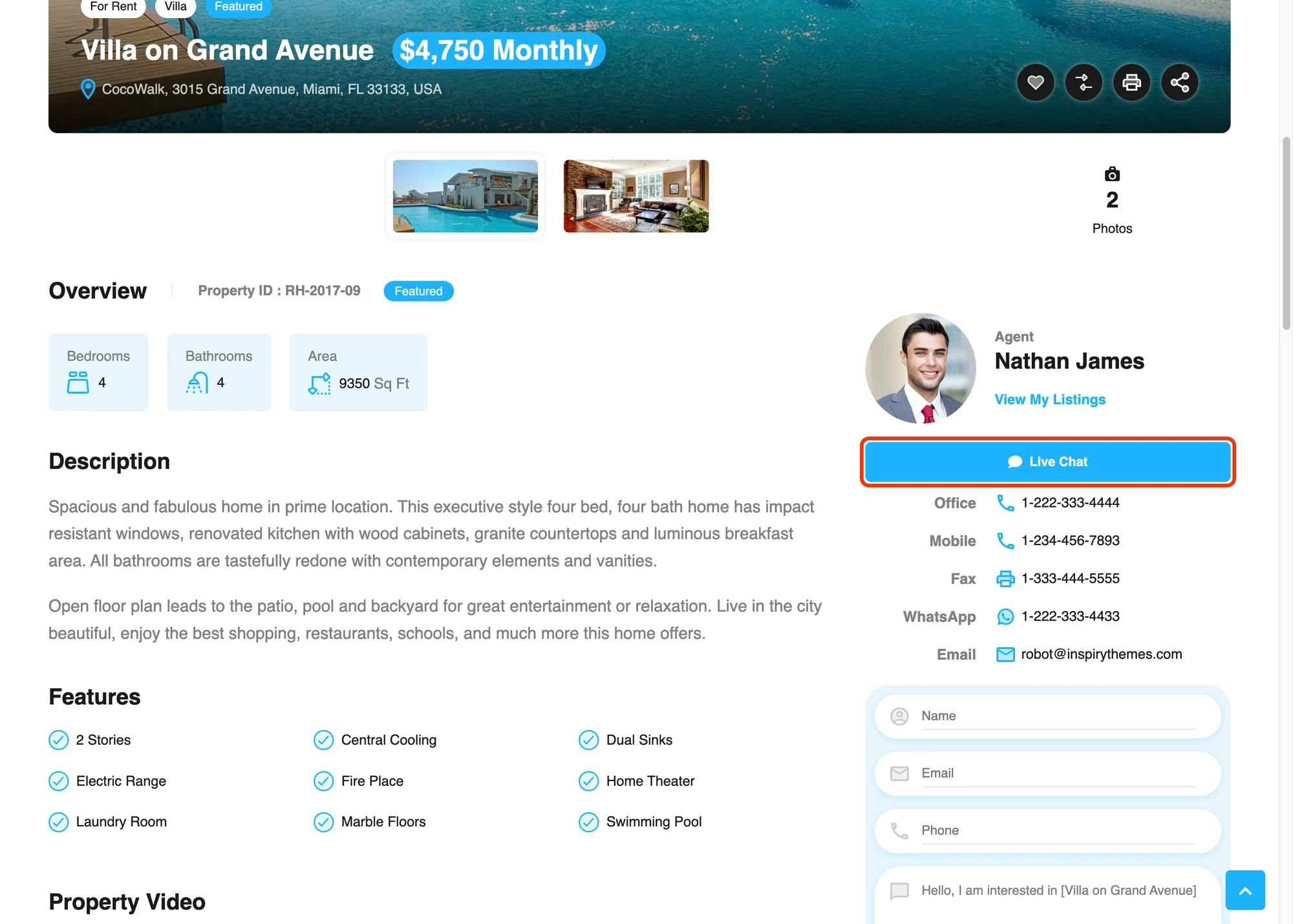
- Live Chat row on the single property page, one per agent, inside the agent contact card next to Office / Mobile / WhatsApp / Email.
- Live Chat icon on property cards as a small circular icon next to the native Favorite / Compare buttons, in both grid and list views. Hover tooltip uses RealHomes' own
rh-ui-tooltipstyle. - Live Chat row on agent profiles as a contact-list entry between Office / Mobile / Email — same layout as the native rows, same theme accent color.
- Live Chat row on agency profiles for chatting with the brokerage owner.
- Live Chat row on every card of the Agents and Agencies listing pages so buyers can start chatting without opening the profile first.
- Messages tab inside the RealHomes dashboard at
/dashboard/?module=bm-messages— full Better Messages inbox running edge-to-edge inside the native dashboard chrome. - Messages link inside the header user-avatar dropdown, with a live unread badge.
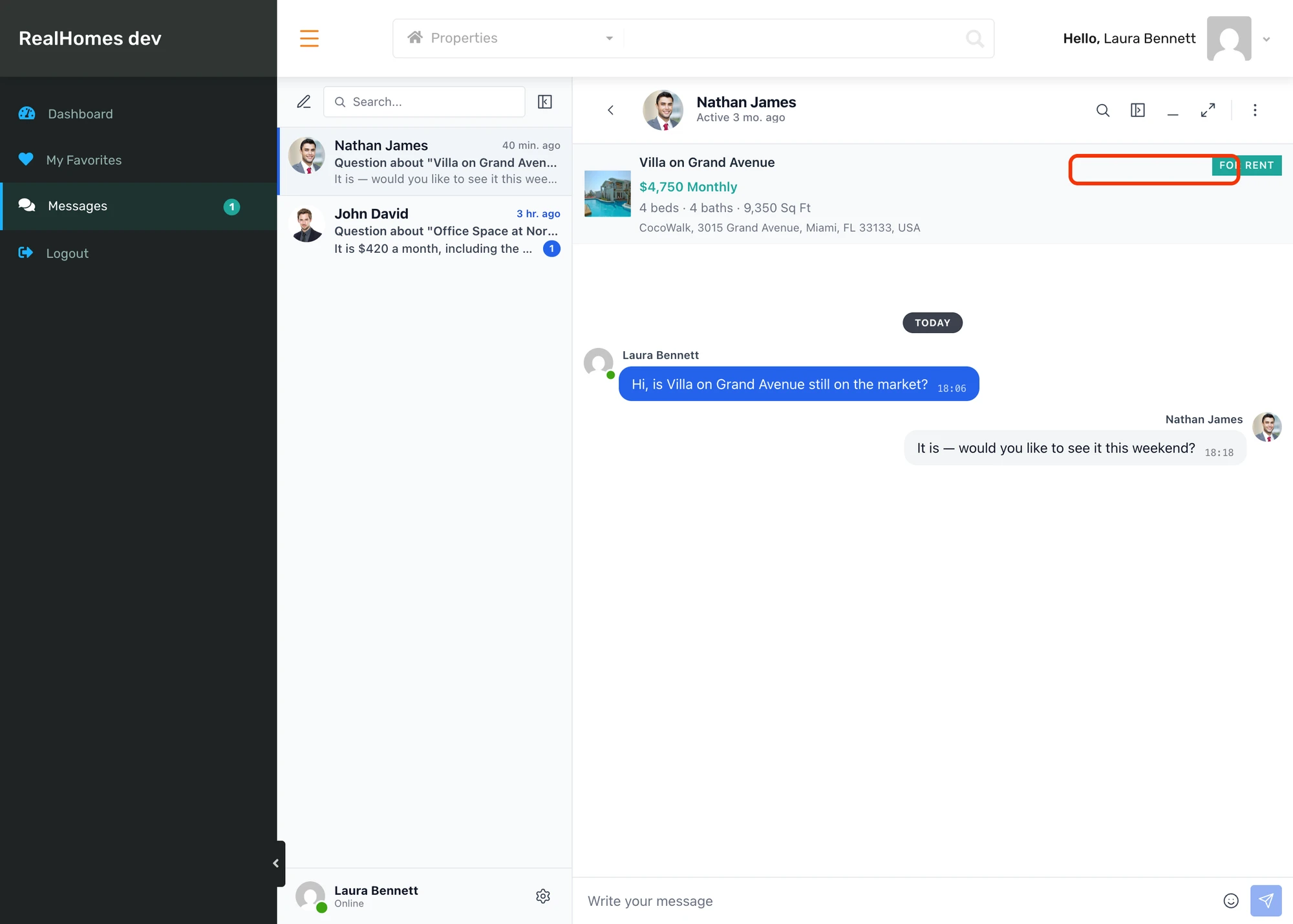
- Property info card inside the conversation — image, price, beds / baths / sq ft, address pinned to the top of every thread.
- Theme accent inheritance — buttons read the value from
--rh-global-color-primary(set from Theme Options → Global Styling → Primary Color) so they always match the rest of the theme.
Live Chat on property listing cards#

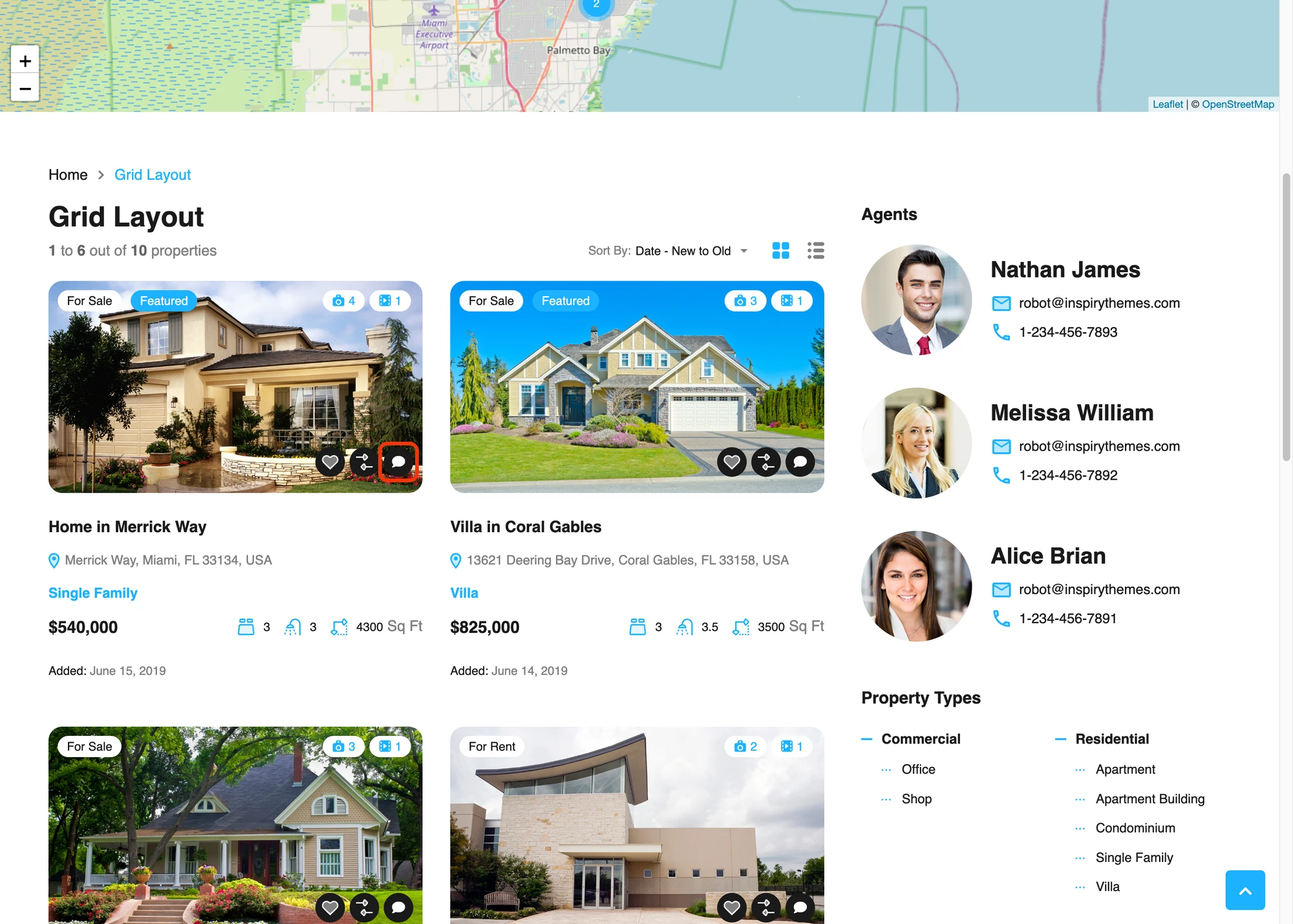
Buyers do not have to open each property to start a chat — the button is on every card in the grid view, sitting next to the native Favorite / Compare icons. The size and outline match the natives (32×32, transparent background, theme-accent icon, filled-accent on hover) and the tooltip uses RealHomes' own rh-ui-tooltip style so it pops up identically to the Add to compare tooltip you already know.

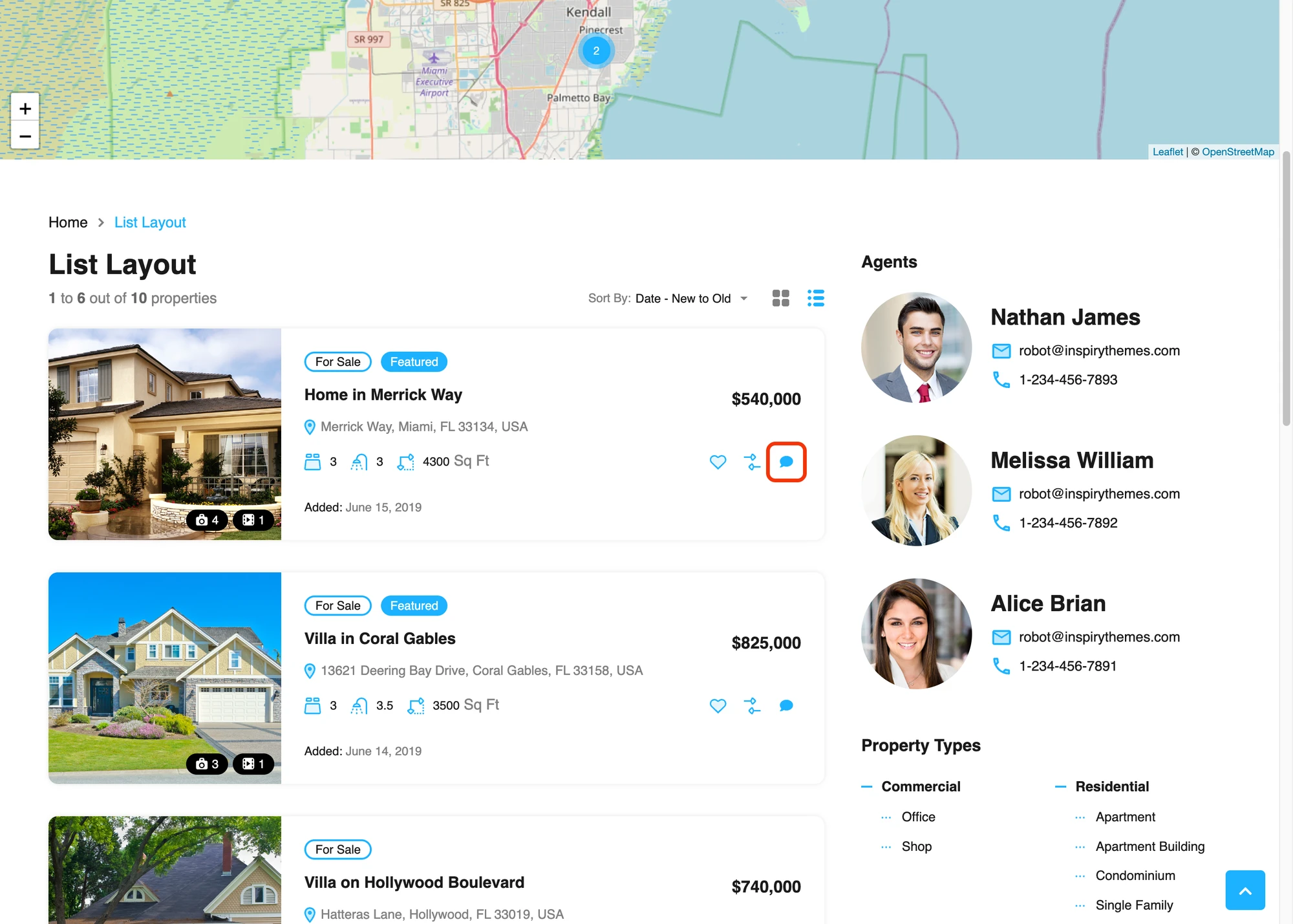
The list view gets the same button in its action row, alongside Favorite and Compare. List view is the layout RealHomes uses for the Half-Map property search — high-intent traffic that converts well into a chat.
Live Chat on agent and agency profiles#

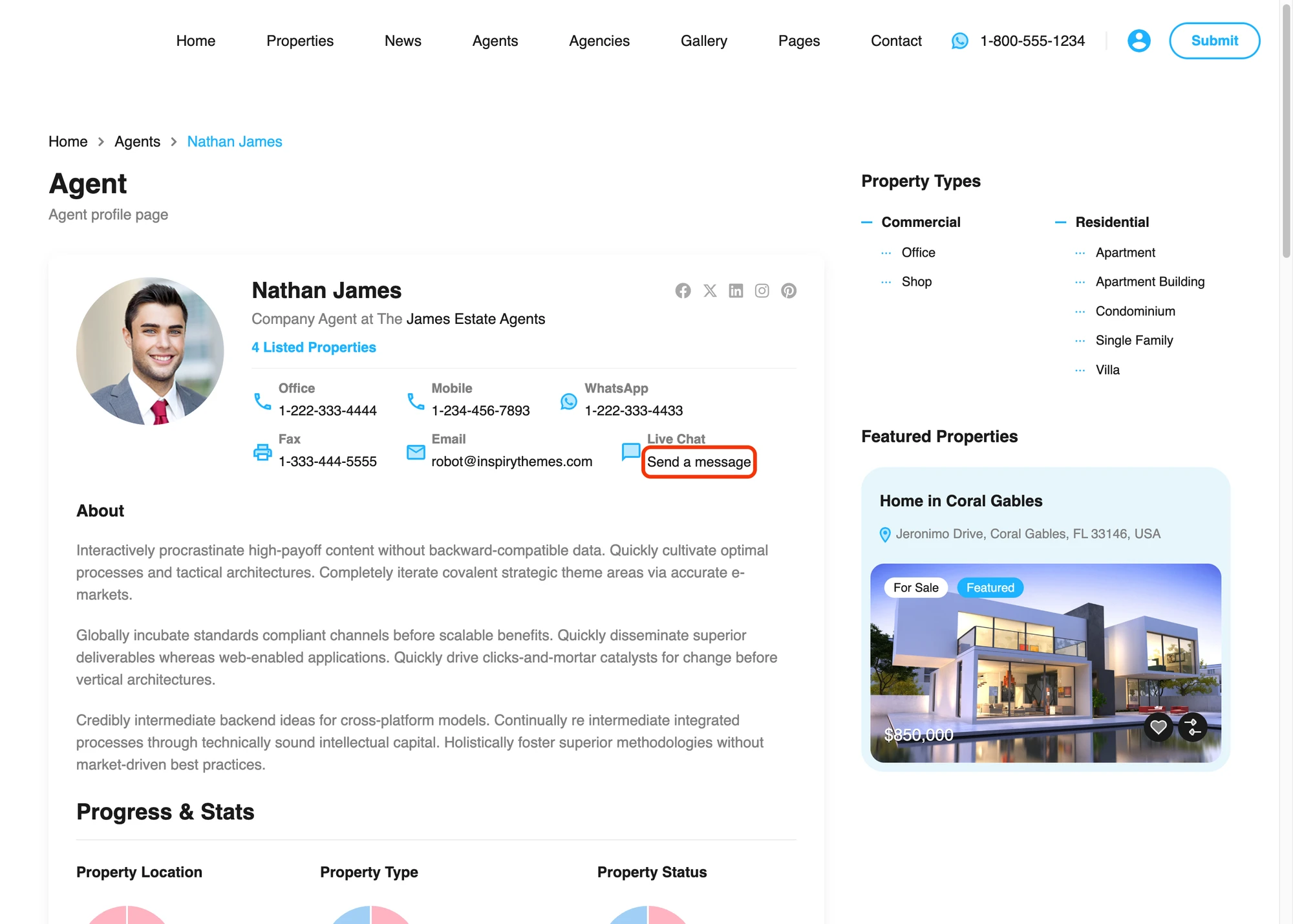
Agent profile pages get a Live Chat row inserted into the contacts grid alongside Office / Mobile / WhatsApp / Fax / Email. The chat-bubble icon takes the same shape and accent color as the native phone / envelope icons, the label reads Live Chat, the value reads Send a message styled as a normal link. The whole row is clickable — tap anywhere and the chat popup opens with the agent's name and headshot pre-loaded.

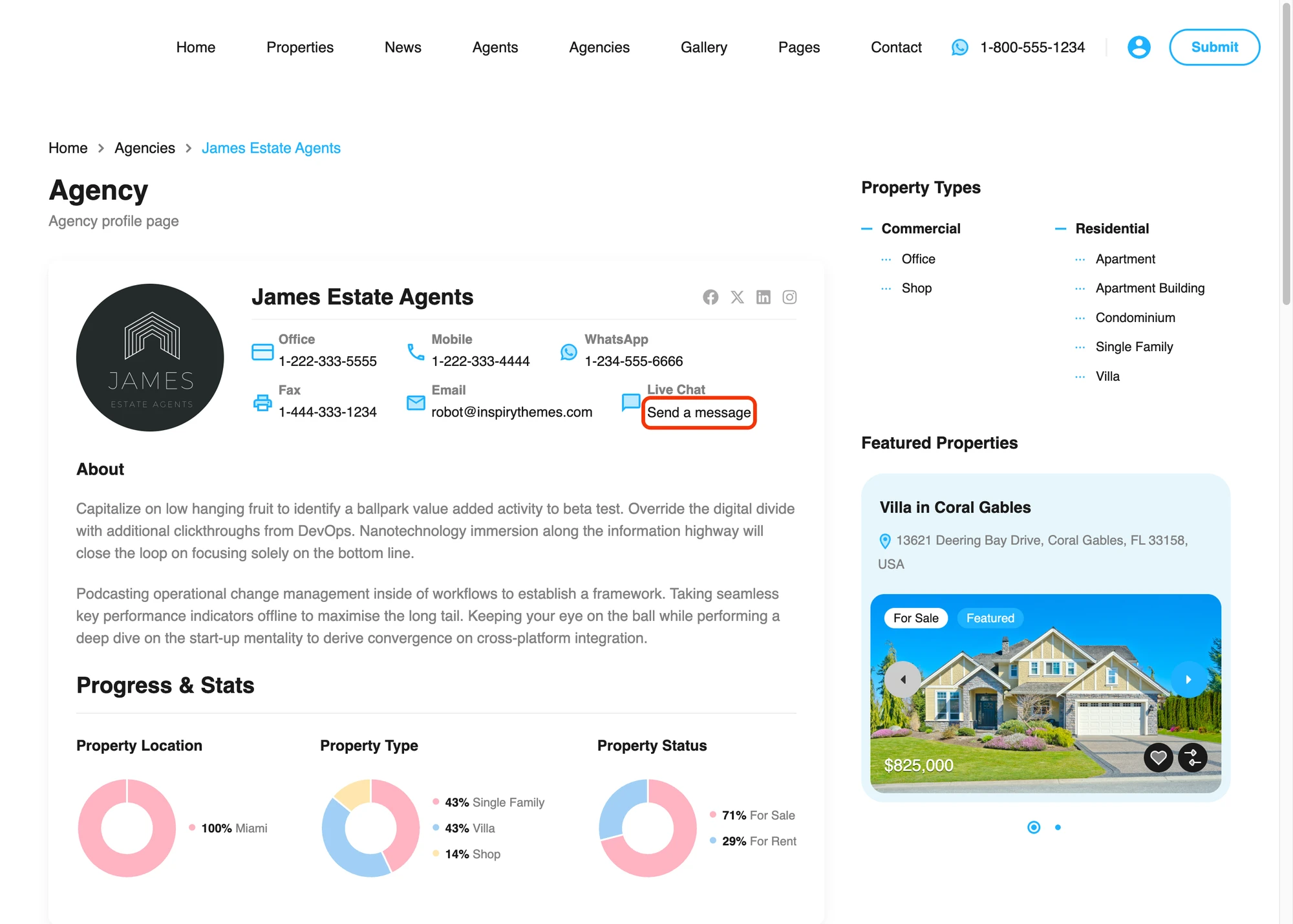
Agency profile pages get the same treatment — the link targets the WordPress user that owns the agency CPT (usually the brokerage owner).
Live Chat on the agents and agencies listings#

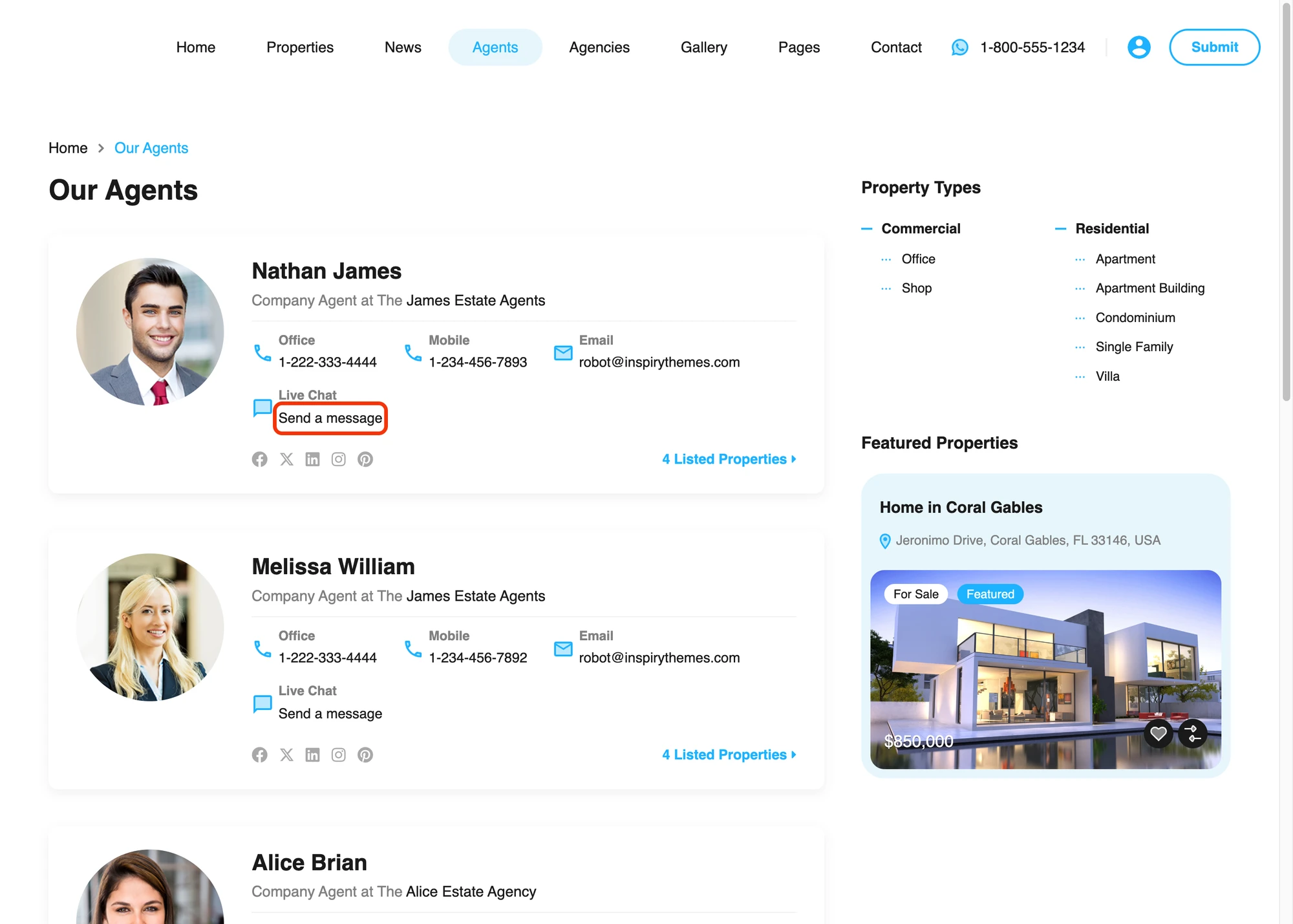
The Agents listing (/our-agents/ on a default RealHomes site) shows a Live Chat row on every card, sized and aligned to match the native Office / Mobile / Email rows. Same treatment on the Agencies listing.
Example: buyer ↔ agent conversation#

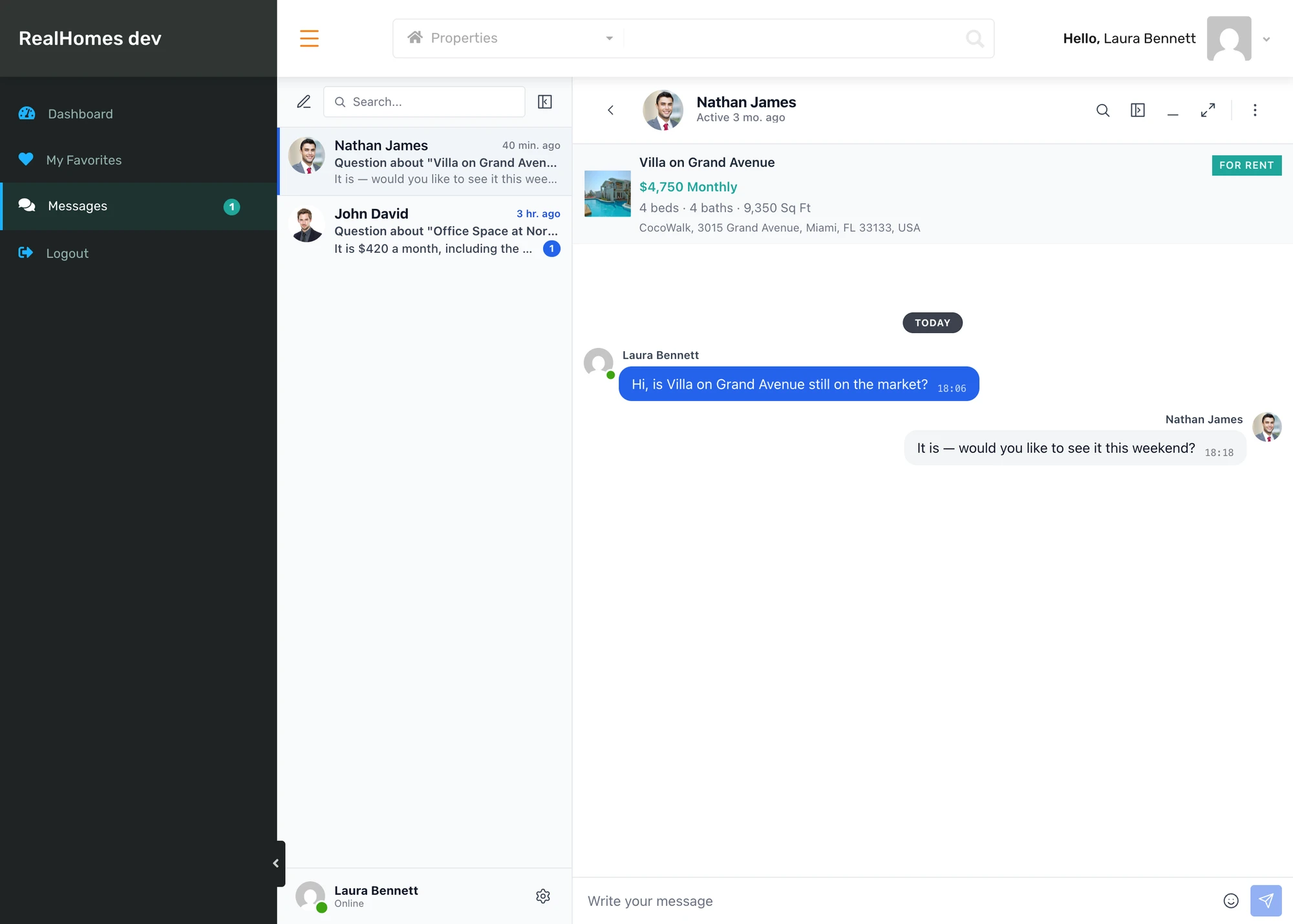
The conversation pane keeps the property in view — image, price, beds / baths / sq ft, address pinned at the top so neither side has to flip back to the listing to remember which property is being discussed. The yellow "Chatting as Melissa William" banner just below the property card tells the routed receiver which agent persona this conversation is attributed to (more on that in the Agent personas section below). Messages flow naturally back and forth on the same surface — no email roundtrip, no second tab, no "let me check my inbox."
Messages tab inside the RealHomes user dashboard#

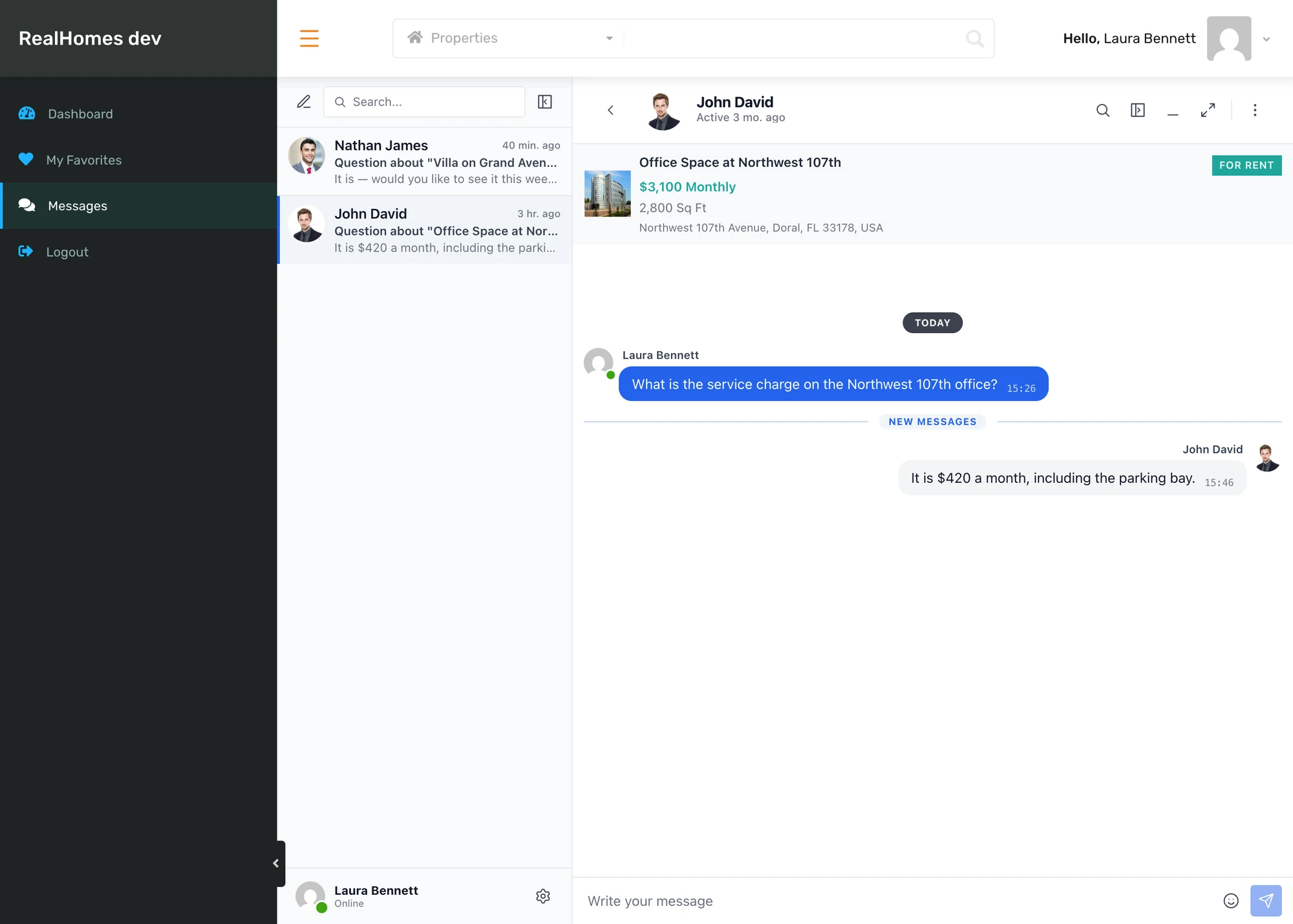
A Messages tab is added to the dashboard sidebar, sitting between My Saved Searches and My Profile. The tab is registered through RealHomes' native realhomes_dashboard_menu filter so it renders server-side with the same markup as Properties, Favorites and Saved Searches — same icon position, same active-state highlight, same responsive collapse on narrow viewports.
Clicking the tab loads the messenger inline at /dashboard/?module=bm-messages. The page-head breadcrumbs are hidden so the conversation pane takes the full available height — every reply form, every attachment picker, every emoji bar stays inside the visible viewport regardless of the surrounding theme header.
The Messages entry in the RealHomes dashboard sidebar also carries a live unread badge — a small circle with the total unread count — so users see new messages from anywhere in the dashboard. It updates the instant a message arrives (WebSocket version) or within a few seconds via polling (free version), and clears as soon as the user opens the unread thread. The same badge is mirrored on the Messages link inside the header user-avatar dropdown, so an agent never has to land on the dashboard to know there's something new.

Setting RealHomes as the messages location#
Better Messages → Settings → General has a Messages Location dropdown. Selecting Show in RealHomes Dashboard routes every "open inbox" link in the plugin into the dashboard at /dashboard/?module=bm-messages — notification emails, push notifications, on-site bell-icon links, the floating bubble. The dashboard tab toggle becomes force-enabled and locked while this option is selected, because the dashboard IS the inbox.
Agent personas without WordPress accounts#
RealHomes lets you create an agent CPT without a linked WordPress user — the property's post_author becomes the de-facto recipient of the contact form. That works for email but breaks for chat: with no linked user, the buyer would be messaging "admin" instead of "Nathan James".
Better Messages handles this with per-thread participant overrides. When the buyer clicks Live Chat on Nathan James' card:
- The chat is routed to the property's
post_authorso it actually lands in someone's inbox. - The buyer sees the agent's name, headshot and profile URL in the thread sidebar, conversation header and message sender chips — same name and avatar everywhere.
- The routed receiver keeps their real WordPress identity in the bottom-left profile widget, and gets a yellow "Chatting as Nathan James" banner above the property card so they always know which persona the buyer is contacting.
The same fallback account can host conversations for several different agent CPTs simultaneously — each thread still shows its own distinct persona to the buyer. Three buyers messaging three different agents on the same property all end up with three conversations in the same inbox, each displayed with a distinct agent name and photo. The "fake-user" pattern is documented in the per-thread fake users guide — the RealHomes addon and the Houzez addon are the two reference implementations.
Theme accent inheritance, no settings to copy#
The Live Chat buttons read RealHomes' own --rh-global-color-primary CSS variable for the button background, the property-card icon accent, the price label inside the thread context card, and the dashboard sidebar highlight. Change the RealHomes primary color in Theme Options → Global Styling → Primary Color and every Better Messages surface updates on the next page load. No second color picker to keep in sync, no caching to flush.
Guest chat — buyers do not have to register#
Most real-estate buyers will not sign up before sending a message. If guest chat is enabled in Better Messages → Settings → General → Guest Chat, anonymous visitors can use any of the Live Chat buttons without logging in — they pick a display name in the popup, the message is sent, the thread is theirs, and they can come back later (cookie-based identity) to read the reply.
Installing Better Messages on a RealHomes site#
- Install Better Messages from WordPress.org and activate it.
- Make sure RealHomes (Inspiry Themes) and the Easy Real Estate plugin are both active.
- Open WP Admin → Better Messages → Settings → Integrations → Directories → RealHomes Integration.
- Toggle Enable RealHomes Integration and the individual placement toggles you want (property page, listing cards, agent profile, agency profile, dashboard tab).
- Optionally pick Messages Location → Show in RealHomes Dashboard in Settings → General so every internal Messages link in the plugin routes into the new dashboard tab at
/dashboard/?module=bm-messages.
For custom Elementor templates, child-theme overrides or third-party property grids, place buttons manually:
[better_messages_realhomes_property_button]
[better_messages_realhomes_property_card_button]
[better_messages_realhomes_agent_button]
[better_messages_realhomes_agency_button]
The buttons inherit Theme Options → Global Styling → Primary Color automatically — change the RealHomes palette and every Live Chat surface updates on the next page load.
Free vs WebSocket version for RealHomes sites#
| Feature | Free version | WebSocket version |
|---|---|---|
| Live Chat row on property page, listing cards, agent and agency profiles | yes | yes |
| Messages tab inside the RealHomes dashboard | yes | yes |
| Property info card pinned to the top of every thread | yes | yes |
| Persona override (agent CPT without a WP user) | yes | yes |
| RealHomes theme-accent inheritance | yes | yes |
| Live unread badge on the Messages sidebar entry | yes | yes |
| Real-time delivery | polling | instant |
| Mini-widget popup chat (buyer stays on the property page) | — | yes |
| One-on-one voice and video calls inside the thread | — | yes |
| Group voice and video calls (e.g. buyer + listing agent + brokerage owner) | — | yes |
| Web push notifications for new inquiries | — | yes |
| Read receipts | — | yes |
| End-to-end encryption (optional) | — | yes |
For real-estate sites the WebSocket version's web push and instant delivery are the difference between a hot lead that converts the same day and a lead that goes cold while the agent is waiting for an email notification. The mini-widget keeps the buyer on the property page they were considering instead of redirecting them to a separate messages page, and the group calls let a buyer talk to the listing agent and a brokerage manager in the same call without leaving the site.
What's next#
The next iteration adds:
- Schedule-a-viewing canned reply on the agent side — one tap inserts "Are you free for a viewing this weekend?" into the reply box.
- Per-property unread filter in the agent inbox — filter all threads about a specific listing.
Frequently asked questions#
Does it work with the Ultra, Modern and Classic design variations?#
Yes — all three design variations (Ultra / Modern / Classic) ship the same realhomes_dashboard_menu filter and the same single-property / agent / agency templates. The Live Chat rows render natively on each. Switch design variation in Theme Options → Design Variation and the buttons re-render with the new variation's spacing and accent on the next page load.
Does it work with Elementor and RealHomes Studio templates?#
Yes for the default placements. If you build a property page or agent profile from scratch in Elementor, drop the appropriate shortcode ([better_messages_realhomes_property_button], [better_messages_realhomes_agent_button], etc.) into a Shortcode widget to place the button manually.
Should I disable the native CRM Inquiries panel?#
It's optional. The native CRM → Inquiries panel stays in place by default — agents can keep using it for email-style inquiries while Better Messages handles real-time chat. If you want a single inbox, turn on Hide Native Inquiries Tab in the RealHomes integration settings and the legacy panel is removed from the dashboard sidebar.
Can buyers chat without registering?#
Yes — if Guest Chat is enabled in Better Messages → Settings → General → Guest Chat, anonymous visitors can use any of the Live Chat buttons without logging in. They pick a display name in the popup, the message is sent, the thread is theirs, and a cookie-based identity lets them come back later to read the reply.
What happens when a property is unpublished?#
The Live Chat row is hidden on cards and on the single property page as soon as the property is not published. Existing threads remain readable on both sides — buyer and agent can still chat about a property that has been taken off the market.
Does it work with agent CPTs that don't have a WordPress user owner?#
Yes. When the agent CPT has no linked WordPress user, the chat is silently routed to the property's post_author (or to the agency owner). The buyer sees the agent CPT's name, headshot and profile URL everywhere in the conversation — the routed receiver gets a yellow "Chatting as [Agent name]" banner above the property card so they always know which persona the buyer is contacting. One fallback account can host inquiries for several different agent CPTs simultaneously, and each thread still displays its own distinct persona to the buyer.
Will Better Messages clash with the native RealHomes inbox?#
No. Both can coexist side by side. They use different database tables, different REST endpoints, different dashboard URLs. Most sites pick one and hide the other through the Hide Native Inquiries Tab toggle, but it's not required.
See also#
- RealHomes integration documentation — full setup reference
- Houzez real estate chat — the sister real-estate theme integration
- WordPress real estate chat — adjacent real-estate use case
- HivePress listing chat — for HivePress real-estate marketplaces
- Motors car dealer chat — Stylemix Motors classifieds
- Directorist chat — for general directory sites
- GeoDirectory listing chat — GeoDirectory-driven real-estate sites
- Classified Listing chat — Classified Listing (RTCL) sites
- Per-thread fake users guide — developer reference for the agent-persona override pattern
Install the RealHomes Real Estate WordPress Theme and Better Messages, enable the integration, and the Live Chat rows appear on every property, agent, agency, listing card and dashboard tab automatically. No template overrides, no shortcodes required for the default placement.