WordPress Live Chat Plugin: Real-Time Chat for Visitors and Members
"Live chat" on a WordPress site has two distinct meanings — and most WordPress live chat plugins only cover one of them. The first is visitor-to-staff support chat: a floating bubble in the corner, anonymous visitors typing to a sales or support agent. The second is member-to-member real-time chat: logged-in users private-messaging each other, group chats, chat rooms, community discussion. Better Messages handles both from one plugin, with a single chat surface and a single REST API.

This post covers what to expect from a WordPress live chat plugin, the two flavours of "live chat" Better Messages supports, and the trade-offs between AJAX polling (free version) and WebSocket (real-time) delivery.
What a WordPress live chat plugin needs to do#
Regardless of which "live chat" you mean, the plugin has to provide:
- A chat entry point on the front-end — a floating button, a shortcode-embeddable widget, a page in the WordPress menu, or a tab inside the user profile.
- Real-time message delivery — messages appear in seconds, not on next page reload.
- Conversation history — every chat is saved server-side, searchable, exportable.
- Notifications — sound, in-app badge, browser push, email, mobile push.
- Access control — who can chat with whom, whether visitors (guests) can start a thread, and which roles see which surfaces.
Better Messages covers all five, plus the bigger features most live-chat plugins skip — group conversations, voice and video calls inside the chat thread, AI chat bots, end-to-end encryption, and a native iOS / Android mobile app.
The Live Chat button#
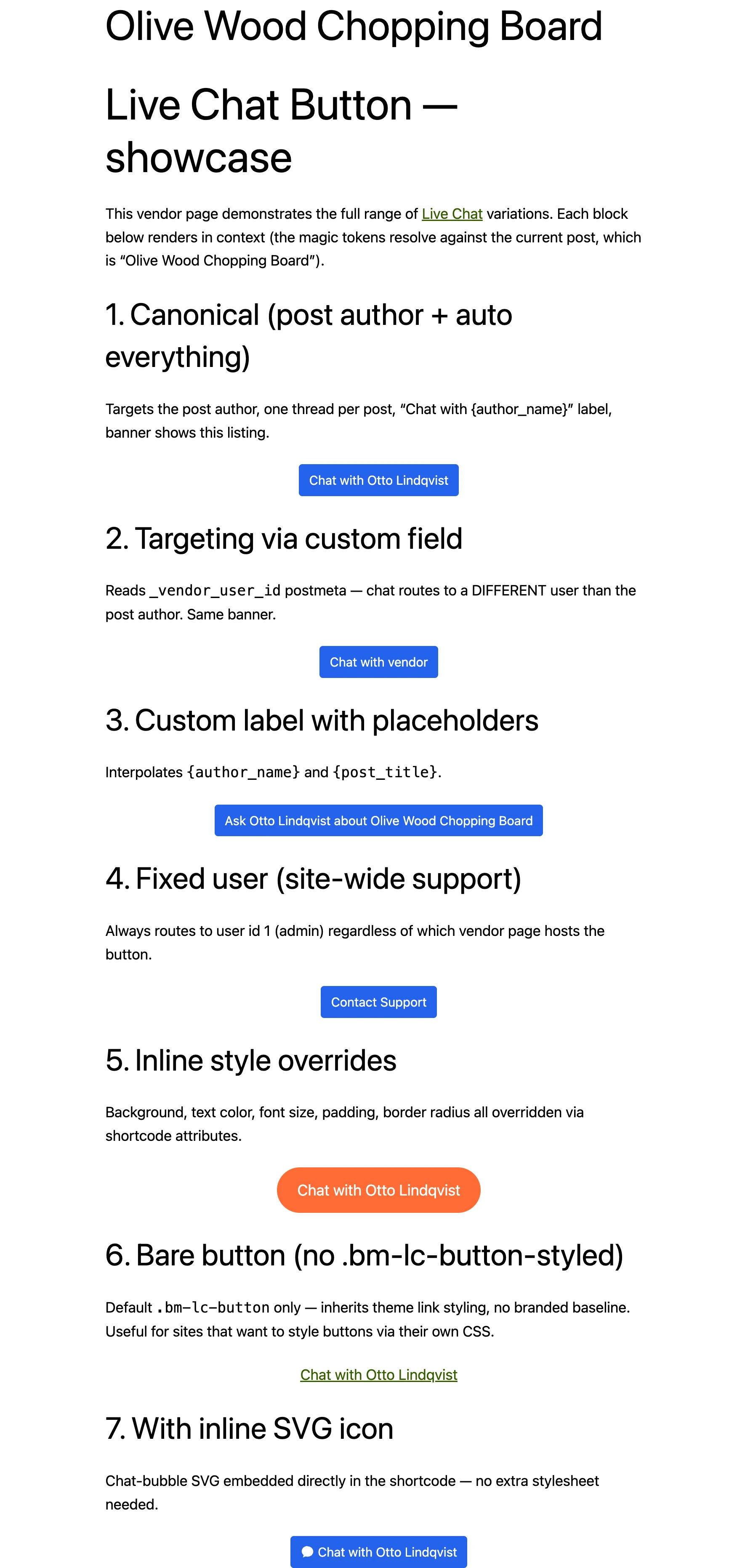
The simplest entry point is the Live Chat button — a single shortcode ([better_messages_live_chat_button]) that drops a button on any page, any post, or any custom post type. Clicking it opens a chat thread between the visitor and a designated recipient (configurable via the shortcode attributes — a specific user, the post author, etc.).
The button is the canonical entry for service-provider sites:
- Real estate — buyer clicks Live Chat on a property listing, opens a thread with the agent.
- Coaching / freelancers — visitor clicks Live Chat on the coach's profile, starts a private conversation.
- Marketplaces — buyer clicks Live Chat on a vendor's product page, threads land in the vendor's inbox.
- Directories — visitor clicks Live Chat on a business listing, contacts the listing owner.
The button label, target user, and behaviour for unauthenticated visitors are configurable per shortcode. For sites that prefer a single button across all custom post types without a shortcode, the Live Chat Button Shortcode Builder generates the markup from a WP-admin UI.

Floating bubble and mini widgets#
For sites that want chat available from any page (not pinned to a specific post), Better Messages ships two floating modes:
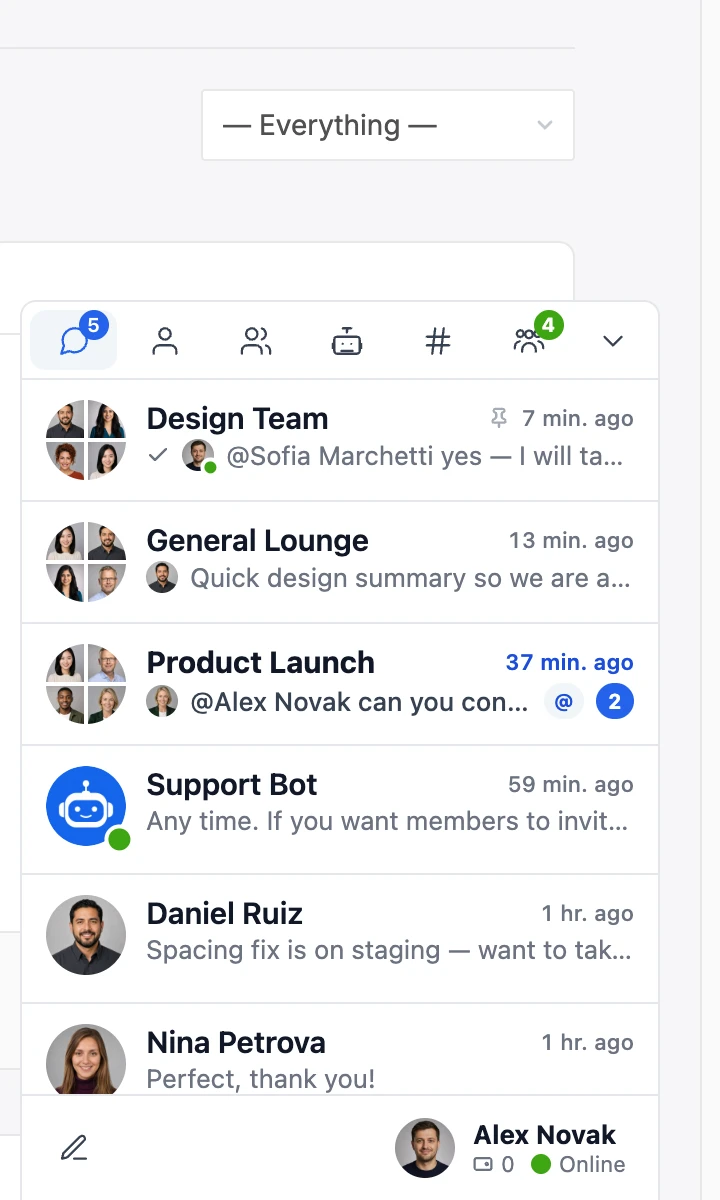
- Floating chat bubble — a single rounded button in the bottom corner. Clicking it opens the messenger panel as an overlay. Position and colour configurable.
- Mini chat widgets — multiple open chat threads stacked at the bottom of the screen with a Facebook-Messenger-like layout. Users can keep several conversations open while browsing. The number that fit depends on screen width.
See the WordPress chat widget guide for the visual breakdown and the choice between floating bubble vs mini widgets.

Live chat for visitors (no account needed)#
The biggest single barrier on a customer-facing site is the login wall — a visitor with a pre-sales question is not going to register an account just to ask whether the medium tee fits a 38" chest. Better Messages has guest chat built in: a visitor types their name, picks an avatar (or skips it), and starts chatting immediately. The guest gets a stable session — they can come back tomorrow and the conversation history is still there.
Guests are first-class participants — they show in the same inbox as registered users, they can join chat rooms (if the room allows guests), and a staff member can answer either guest threads and member threads from the same admin UI.
Live chat for members (private messaging between users)#
The other flavour is member-to-member chat — registered users private-messaging each other. This works on any WordPress site (no community plugin required — BM has its own user search and thread UI), and on top of that integrates natively with every major WordPress community plugin: BuddyPress, BuddyBoss, PeepSo, Ultimate Member, FluentCommunity, ProfileGrid, UsersWP, WP User Manager.
The integration is two-way: profile pages get a Live Chat button next to the existing community-plugin actions, and the community-plugin groups get paired chat threads (joining a BuddyBoss Group auto-adds the user to the matching group chat).
Group conversations and chat rooms#
Live chat is rarely one-on-one only. Better Messages supports:
- Group threads — pick multiple recipients from the new-thread screen, every participant sees the same conversation, replies route to the whole group.
- Chat rooms — persistent public or private rooms, embedded via shortcode or as a dedicated WordPress page. Optional guest access, role-based restrictions, online users sidebar. See How to add a chat room to your WordPress site.
- Mass messaging — send a one-to-many broadcast from WP-admin, every recipient gets their own private thread, replies route back individually. See WordPress mass messaging.
The same live-chat surface handles all three patterns — there is no separate "rooms plugin" to install.
Real-time delivery — AJAX vs WebSocket#
The free version of Better Messages delivers messages via short-interval AJAX polling — a request every couple of seconds. It works on every WordPress host, no extra infrastructure required. For most low-volume sites (a coach with a handful of clients, a freelancer chatting with leads, a small forum) the polling cadence is indistinguishable from real-time.
For higher-volume sites, the WebSocket version replaces polling with a persistent WebSocket connection. Latency drops from ~2 seconds to ~50 milliseconds, server CPU drops sharply (a single WebSocket connection is cheaper than 30 AJAX requests per minute per user), and the realtime stack unlocks the rest of the live-chat feature set: typing indicators, online presence, group voice and video calls, web push notifications, end-to-end encryption, and Better Messages Cloud AI for translation, moderation and voice transcription.
For the difference in practice and the install steps, see Real-time messaging on WordPress.
Voice and video calls inside the live chat#
The WebSocket version adds one-on-one and group voice and video calls directly in the chat thread. Click the call button next to the message input, the other participant gets a ring tone, and the call opens inside the same panel — no Zoom link, no Calendly, no separate window.
For a service business, this turns a pre-sales text chat into an instant face-to-face conversation when the conversation gets complicated. See WordPress video call plugin.
AI chat bots in the live chat#
Connect an AI model (OpenAI, Anthropic Claude, Google Gemini, or the Better Messages Cloud AI) and a registered bot user appears in the chat as a regular participant. The bot can:
- Answer pre-sales questions when a human agent is offline.
- Deflect common support tickets via a configurable system prompt.
- Translate messages in real time across 69 languages.
- Moderate incoming messages against configurable content categories.
- Transcribe voice messages.
See AI chat bots for WordPress private messaging for the bot setup and the choice between providers.
Search, history, and audit trail#
Every live chat is stored in the WordPress database. The chat search feature lets users find messages across every conversation they have access to. Admins can query the full database directly for compliance, support audits, or data-subject requests. GDPR export and erasure flow through the standard WordPress user-tools UI. See GDPR-compliant WordPress chat.
Free vs WebSocket version for live chat#
| Feature | Free | WebSocket |
|---|---|---|
| Live Chat button + floating bubble + mini widgets | yes | yes |
| One-on-one private chat | yes | yes |
| Group conversations | yes | yes |
| Chat rooms (public + private, guest-friendly) | yes | yes |
| Guest chat (no login required) | yes | yes |
| File / image / video attachments | yes | yes |
| AI chat bot replies | yes | yes |
| Message delivery latency | ~1–3 sec (polling) | ~50 ms (WebSocket) |
| Typing indicators + online presence | — | yes |
| Voice and video calls in the thread | — | yes |
| Group voice and video calls | — | yes |
| Web push notifications | — | yes |
| End-to-end encryption per thread | — | yes |
| AI message translation across 69 languages | — | yes |
| Native iOS + Android mobile app | set up only | yes |
For a live chat that handles 20+ concurrent conversations or runs voice / video calls inside the thread, the WebSocket version is the practical default — polling at that scale costs more CPU than the WebSocket licence does. For low-volume support sites with one or two active chats at a time, the free version is genuinely sufficient.
Installation#
- Install Better Messages from WordPress.org and activate.
- Choose where the chat lives:
- For a customer-facing Live Chat button, drop the
[better_messages_live_chat_button]shortcode on the page, or use the Shortcode Builder for a no-code admin UI. - For a floating bubble, switch the mini widget bar to Floating Bubble under Better Messages → Settings → Appearance → Mini widgets.
- For chat rooms, create the room under Better Messages → Chat Rooms and embed via shortcode or assign a page.
- For a customer-facing Live Chat button, drop the
- Open Settings → Restrictions to set who can start threads, reply and view messages per WordPress role, and Settings → Group Calls for who can start or join group calls.
- (Optional) Activate the WebSocket version under Better Messages → Account with your licence key.
Frequently asked questions#
Does the live chat work without a login?#
Yes — guest chat is built in. Visitors type a display name and start a thread without registering. Configurable per chat surface (you can require login on some rooms, allow guests on others).
Can I have multiple support agents?#
Yes — any WordPress user with the right role can reply to incoming live-chat threads. The admin Inbox shows every thread routed to the support role. Agents can claim, reply, transfer, and close threads. Combine with role-based access for tiered support (Tier 1 sees all, Tier 2 only escalated, etc.).
Does it work on mobile?#
The chat is fully responsive out of the box. For visitors, mobile browsers (including iOS Safari and Android Chrome) get a full-screen chat experience. For staff, the WebSocket version includes a native iOS / Android app — agents get push notifications, can reply on the go, and stay logged in across days. See WordPress chat mobile app.
Can the live chat run inside WooCommerce product pages?#
Yes — drop the [better_messages_live_chat_button] shortcode on the product page or template. Buyers click and chat with the seller / store owner. For vendor marketplaces (Dokan, WCFM, WC Vendors, MultiVendorX), the chat routes to the actual vendor, not the store admin. See WooCommerce customer chat.
Does it integrate with my existing community plugin?#
Yes — Better Messages integrates natively with BuddyPress, BuddyBoss Platform, PeepSo, Ultimate Member, FluentCommunity, ProfileGrid, UsersWP, WP User Manager, and more. The chat reads the existing user directory, role mapping, and group structure — no separate user import.
Does it work without a community plugin?#
Yes — Better Messages runs on any standard WordPress site without BuddyPress, BuddyBoss, or any other community plugin. It ships with its own user search, thread UI, group conversations, and chat rooms. The community-plugin integrations are additive: when present, they give you profile-page chat buttons, paired group chats, and member directory hooks. When absent, the chat still works end-to-end.
Is the live chat GDPR-compliant?
Yes — every conversation is stored in your WordPress database, not on a third-party SaaS. GDPR export and erasure use the standard WordPress user-tools UI. End-to-end encryption is available per-thread on the WebSocket version for the most sensitive conversations. See GDPR-compliant WordPress chat.
Can I see who is currently online?#
On the WebSocket version, yes — online users sidebar in chat rooms, online indicator on profile pages, typing indicators in active threads. On the free version, presence is approximated from recent activity (less precise but still usable).
How is this different from a SaaS live-chat widget (Tidio, Tawk, LiveChat)?#
SaaS widgets store conversations on the vendor's cloud and bill per agent per month. Better Messages stores conversations in your WordPress database, is licensed per site (not per agent), and the conversation surface is woven into the rest of your WordPress install — same user accounts, same roles, same theme. For sites that already run on WordPress, the operational cost is lower and the data stays on infrastructure you control.
See also#
- WordPress chat widget — floating bubble and mini widgets
- Live Chat Button Shortcode Builder
- Real-time messaging on WordPress
- WordPress guest chat without login
- How to add a chat room to your WordPress site
- WordPress group chat plugin
- AI chat bots for WordPress private messaging
- WordPress chat mobile app
- WordPress video call plugin