WordPress Monetized Messaging: Build a Paid DM Platform with Per-Message Billing
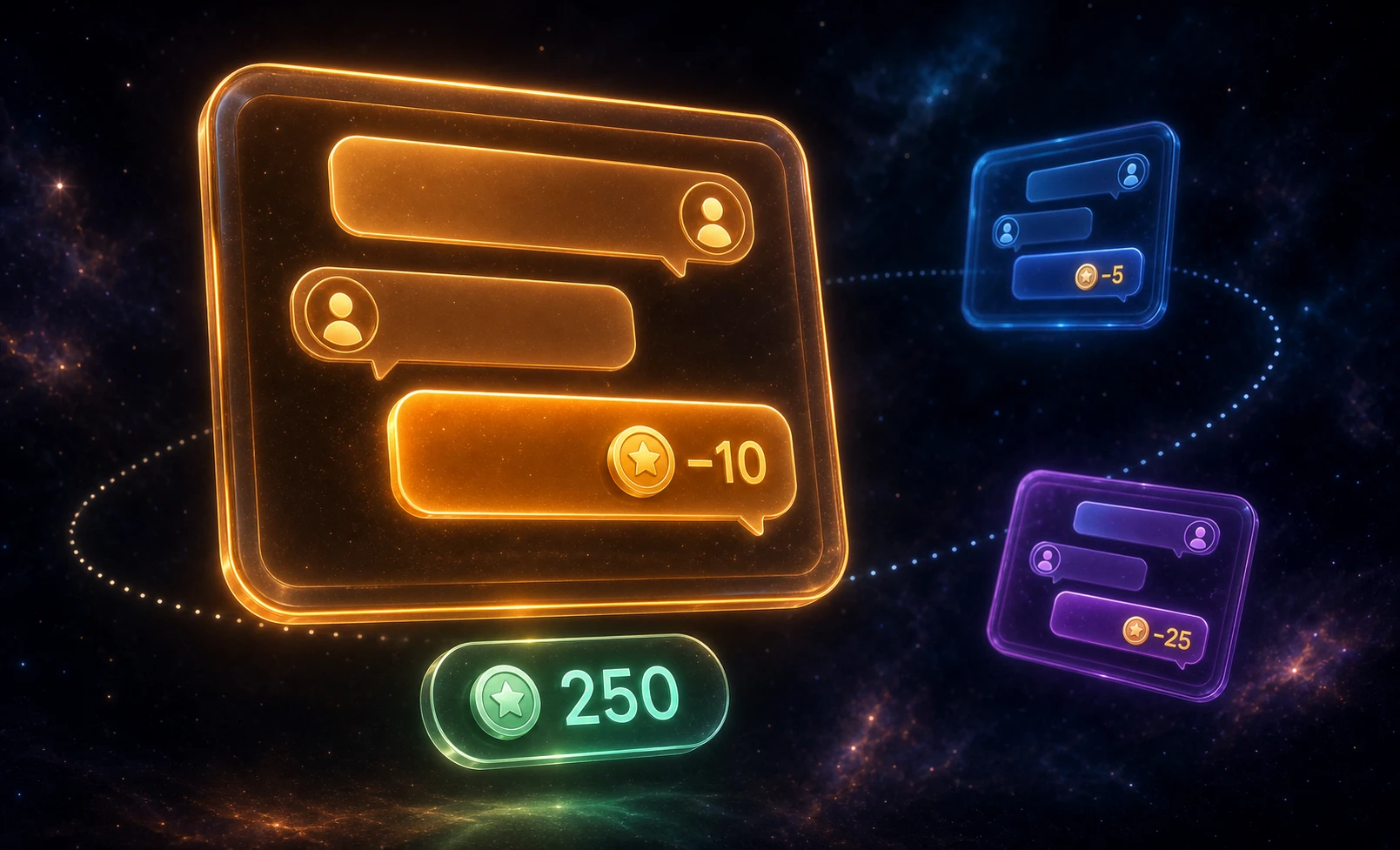
A monetized messaging platform sells the conversation itself. Visitors browse profiles for free, but sending a direct message costs points — and so does opening a new thread or placing a call. The business model is paid DMs: the platform charges per interaction, the recipient (a creator, coach, or expert) earns a share, and the user tops up a balance to keep talking. Better Messages plus a points engine (GamiPress or MyCRED) implements this on WordPress — per-message billing, per-role pricing, per-call rates, with the balance shown inside the chat.
This guide covers the building blocks: per-message pricing, per-call billing, role-gated tiers, and the moderation layer that keeps spam and contact-sharing from draining revenue.
The monetized messaging stack#
| Layer | Plugin / setting |
|---|---|
| User accounts | WordPress core |
| Points engine | GamiPress or MyCRED |
| Messaging | Better Messages (free) + WebSocket version for calls + push |
| Per-message billing | GamiPressNewMessageCharge / MyCredNewMessageCharge per WordPress role |
| Per-new-thread billing | GamiPressNewThreadCharge / MyCredNewThreadCharge |
| Per-call billing | GamiPressCallPricing / MyCredCallPricing — per call minute, one-on-one calls only |
| Spam / contact-sharing filter | Better Messages AI Content Moderation (23 categories) |
| Top-up checkout | WooCommerce + points-engine top-up product (or any custom URL) |
| Mobile app | Better Messages iOS + Android |
A self-hosted DM platform on one WordPress install — no SaaS fee, no per-seat licensing, no platform cut.
Per-message pricing setup#
The pricing primitive lives at Better Messages → Settings → Integrations → Points Systems. Pick GamiPress or MyCRED as the provider, then choose the point type to charge against. Both engines share the same UI and per-role configuration.

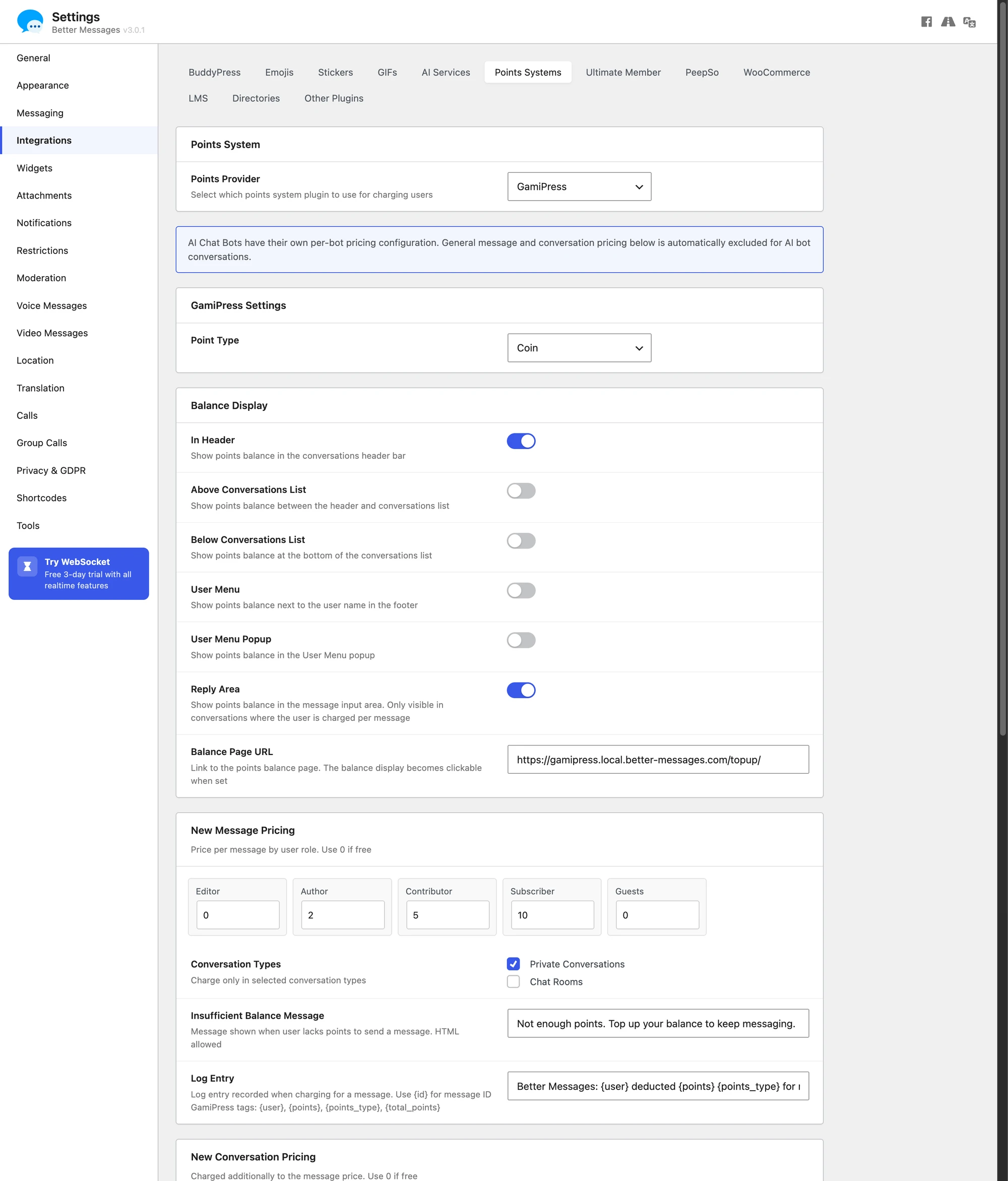
The pricing matrix has three sections (New Message Pricing, New Conversation Pricing, Private Call Pricing) and a Conversation Types picker — Private Conversations, Chat Rooms, and one entry per community plugin you run (BuddyPress, PeepSo, Ultimate Member, FluentCommunity Group Chats) — that combine. New Conversation Pricing is charged in addition to the message price, not instead of it. A typical paid-DM configuration: 10 points per message in private threads, 0 in groups, 25 to open a new thread, 5 per call minute. Group and chat-room chatter stays free, DMs are the monetized surface.
The charge is gated by category — set "private threads only" under NewMessageChargeTypes and groups stay free regardless of role. The charge_for_message action fires after delivery, deducting points from the sender. If a message fails moderation or validation, no points are deducted.

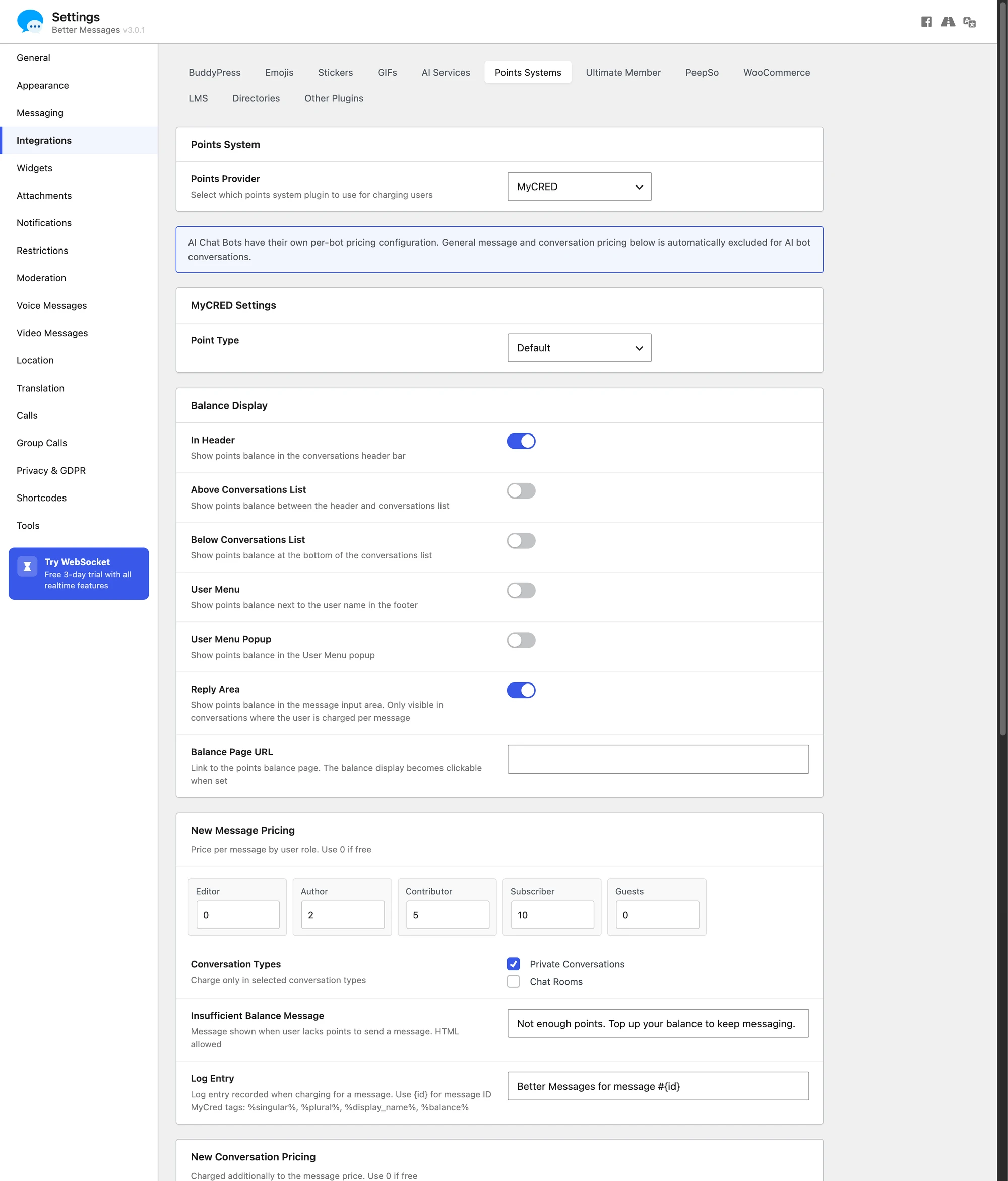
Every charge type has a row per WordPress user role. The pattern that converts: free users pay the headline rate, paid-tier members pay zero or a discounted rate, founding members pay nothing.
Per-call billing setup#
Voice and video calls have their own pricing row. The GamiPressCallPricing / MyCredCallPricing setting (per role) sets the rate per call minute — not per call. It applies to one-on-one calls. Group calls are not charged.

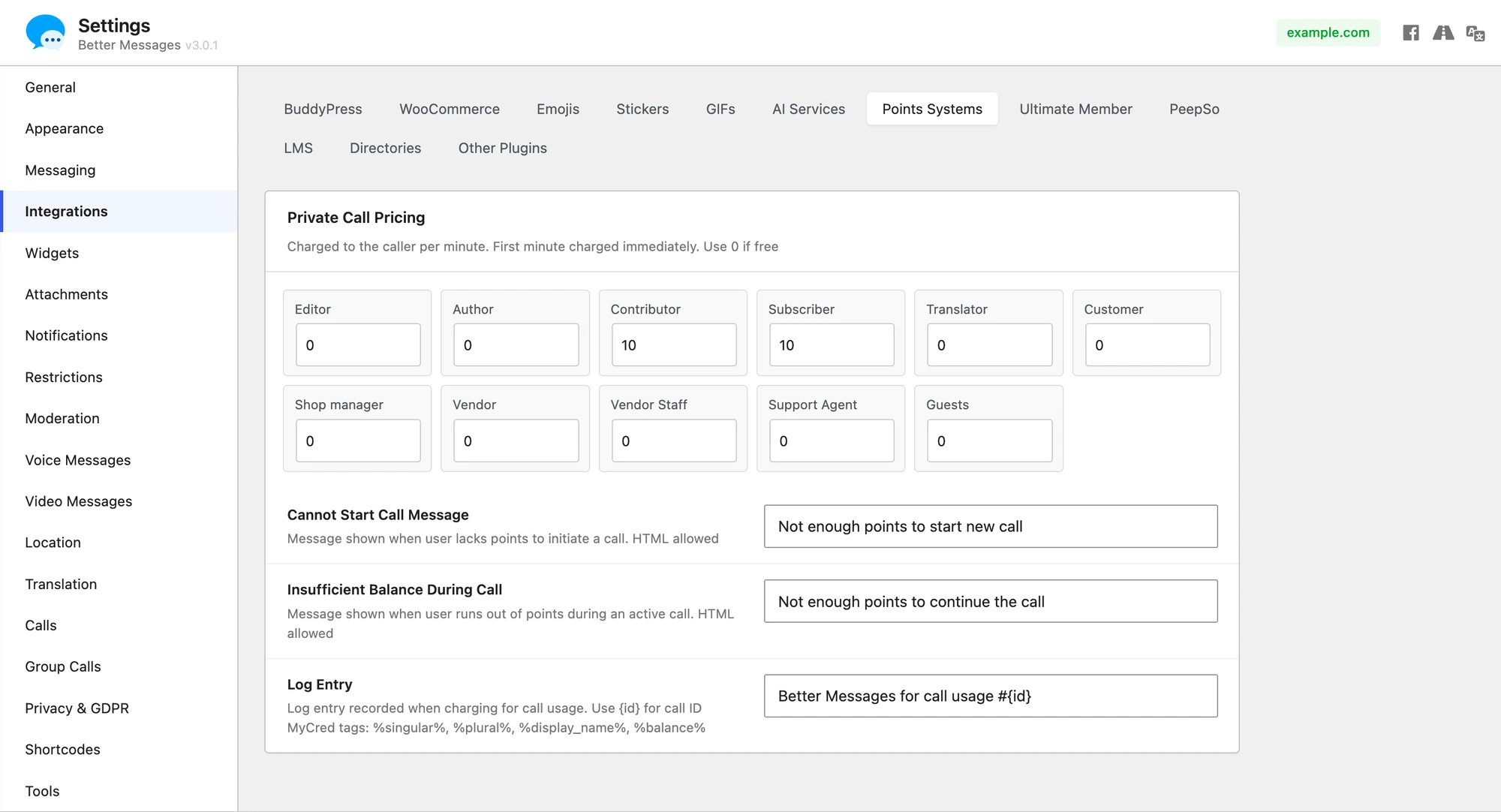
How the per-minute billing works:
- A user starts a call. The
check_call_balancefilter runs first — if the caller can't afford one minute, the call is blocked with theCallPricingStartMessage. - The call connects. Better Messages tracks confirmed call-traffic minutes in a message-meta counter.
charge_call_usagefires once per minute and deducts the configured rate. - If mid-call the balance drops below one more minute, the call ends gracefully with the
CallPricingEndMessage.
Billing covers one-on-one calls only — the setting is named Private Call Pricing, and the charging hooks fire from the one-on-one call addon, not the group one. Group calls are free however long they run, so a paid expert-AMA cannot be metered per attendee-minute this way. Gate the room by role and sell access to the role instead.
Role-gated tiers#
Monetized DM platforms usually run a tiered subscription model on top of per-message pricing — free users see profiles, paid tiers unlock the ability to send DMs at all. Better Messages handles tier gating with the restrictRoleBlock setting at Settings → Restrictions.
A common shape for a creator-economy DM platform:
| Role | Can send DMs | Per-message rate | Per-call rate |
|---|---|---|---|
| Subscriber (free) | No | n/a | n/a |
| Member (paid tier 1) | Yes | 10 points | 5 points/min |
| Premium (paid tier 2) | Yes | 5 points | 2 points/min |
| VIP (paid tier 3) | Yes | 0 points | 0 points/min |
| Creator (recipient) | Yes (replies only) | n/a | n/a |
The free Subscriber role is added to restrictRoleBlock so the Send Message button is hidden for it. Paid tiers progressively reduce the per-message cost via the per-role configuration. Combine with a membership plugin (MemberPress, Paid Memberships Pro, Restrict Content Pro) for the subscription side — it assigns the WordPress role on payment, Better Messages reads it on every send.
Spam, scam, and contact-sharing moderation#
A monetized DM platform attracts users trying to extract value without paying — spam DMs from bot accounts, scam / phishing links to high-value users, and contact sharing where users send phone numbers or social handles to continue off-platform.
Better Messages AI Content Moderation covers all three. The Cloud AI provider (included with the WebSocket version) covers 23 content categories — the OpenAI base set plus extended categories built for monetized platforms: Spam, Scam / Phishing, Contact Sharing, Doxxing, Commercial Promotion, Impersonation, Profanity, Threats, Drugs / Alcohol, and Minor Safety.
Two action modes per category — Flag Only (delivers, marked for review) and Hold for Review (held until a moderator approves). For a monetized DM platform, the high-leverage configuration is Contact Sharing → Hold for Review plus Spam → Flag Only.
On top of categories, Custom Rules let you define platform-specific rules in plain text:
Block any attempt to move conversation to email, SMS, Telegram, WhatsApp, Discord, or any external chat
Block sharing of phone numbers, emails, social handles, or external profile links
Block solicitation of payments outside the platform
The Cloud AI evaluates each rule against the message in context — it sees surrounding messages, not just one — useful for catching multi-message contact-sharing where a user splits a phone number across two sends.
Balance display#
The Balance Display section carries six independent toggles, one per placement: In Header, Above Conversations List, Below Conversations List, User Menu, User Menu Popup and Reply Area.

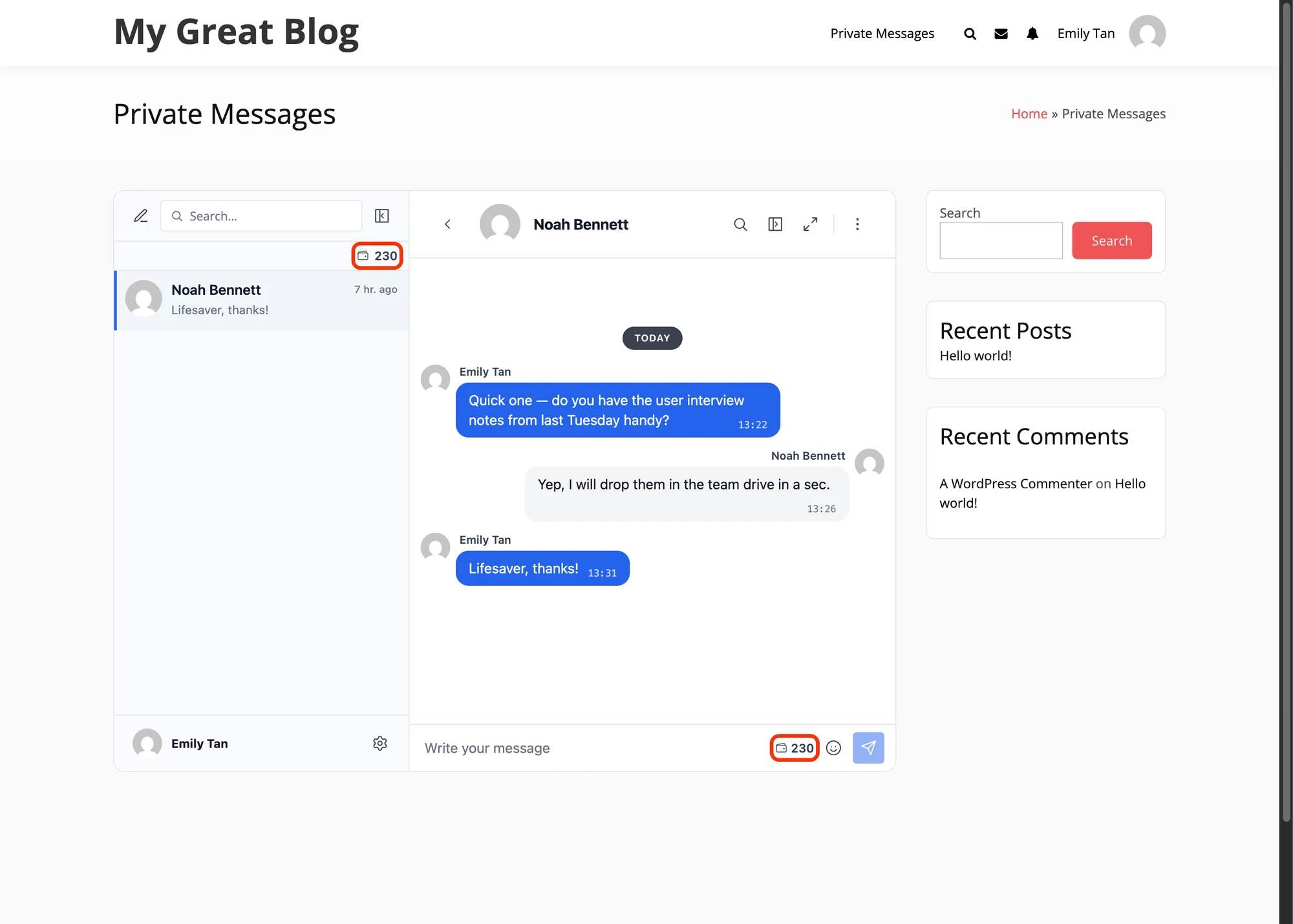
Most platforms enable In Header + Reply Area. The balance number links to the Balance Page URL you set below it — typically a WooCommerce product, a custom checkout, or a Stripe page. When a send is blocked, the message the user sees is the one in your points plugin's own setting: myCredNewMessageChargeMessage or GamiPressNewMessageChargeMessage, both defaulting to "Not enough points to send a new message."
Free vs WebSocket version#
| Feature | Free version | WebSocket version |
|---|---|---|
| Per-message billing (GamiPress / MyCRED) | yes | yes |
| Per-new-thread billing | yes | yes |
| Per-role pricing matrix | yes | yes |
| Balance display in messenger | yes | yes |
| Role-gated send | yes | yes |
| Real-time message delivery | polling | instant |
| Voice / video calls (1-on-1 + group up to 32/50) | — | yes |
| Per-call-minute billing | — | yes |
| AI content moderation (23 categories, Cloud AI) | OpenAI key | included with license |
| End-to-end encryption (AES-256-GCM, per thread) | — | yes |
| Web push notifications (desktop + iOS PWA) | — | yes |
| Native mobile app (iOS / Android) | set up only | yes |
For a monetized DM platform, the WebSocket version is where the model actually pays off — per-call billing is WebSocket-only, the Cloud AI moderation that catches spam and contact-sharing is included with the license, and web push notifications keep users coming back. The free version covers the basics. A real revenue platform leans on call billing, real-time delivery, and built-in moderation.
Frequently asked questions#
Can I charge different rates for different user roles?#
Yes — every charge type (new message, new thread, call) has a row per WordPress role. Free users pay the headline rate. Paid-tier members pay discounted rates. VIPs can be set to 0. The role lookup happens on every send, so changes apply immediately.
How do users top up their balance?#
The points engine handles the wallet, not Better Messages itself. Most platforms run a WooCommerce product that grants points on purchase (both GamiPress and MyCRED have official WooCommerce add-ons), or a custom Stripe checkout that calls the points-engine API on success.
Does Better Messages support both voice and video call billing?#
Yes for one-on-one calls — the CallPricing setting covers voice and video alike, billed per connected minute to the caller, with the per-role matrix applying as it does for messages. Group calls are not billed at all: the charging hooks fire from the one-on-one call addon only, which is why the setting is named Private Call Pricing. If you need paid group sessions, gate the room by role and sell the role.
Can I block spam contact-sharing automatically?#
Yes — enable AI Content Moderation under Settings → Moderation and set Contact Sharing to Hold for Review (or Flag Only for less friction). The Cloud AI catches phone numbers, emails, social handles, and external chat-platform mentions even when split across two messages.
What happens if a user's balance hits zero mid-message?#
The send is blocked with the NewMessageChargeMessage shown as a toast — typically "You need 10 points to send this message. Top up your balance." Mid-call, the call ends gracefully with the CallPricingEndMessage. No charge is taken for the partial minute that pushed the balance negative.
Can the recipient earn from messages they receive?#
The default model deducts from the sender only. For revenue-share scenarios, the charge_for_message action is the integration point — a small functions.php snippet can trigger a parallel credit to the recipient via the points-engine API.
Is the platform GDPR-compatible?#
Yes — every message, points transaction, and billing log lives in the WordPress database on your server. The cloud WebSocket relay stores no message content (only routing metadata is written down), so the cloud version is GDPR-compatible by default. For stricter cases, the self-hosted WebSocket relay keeps even the routing metadata on your infrastructure.
See also#
- Pay-to-Message with MyCred and GamiPress — canonical feature reference
- GamiPress integration — provider-specific setup
- MyCred integration — provider-specific setup
- GamiPress pay-to-message — the GamiPress integration reference
- MyCRED pay-to-message — the MyCRED integration reference
- Patreon-style creator chat — tier-gated chat (membership model rather than per-DM)
- WordPress fan community chat — paid-tier chat rooms and live events
- AI content moderation — spam, scam, and contact-sharing filter
- End-to-end encrypted messaging — for confidential paid conversations
- Role-based access — for tier and free-user gating