Better Messages 3.0: The Redesign, the Appearance Tab, and Everything Else in the Release
Better Messages 3.0 is out. It is the largest release the plugin has had: every surface of the messenger was redrawn, the styling moved out of the WordPress Customizer into the plugin's own Appearance tab with a live preview, and a handful of features landed alongside it — location messages, video messages, per-conversation translation, an offline outbox, a device cache that no longer resets itself on every update, and a Mobile App page that left alpha and is now visible on the free version.
Your conversations, settings and integrations carry across untouched, including the colors and sizes you had set in the Customizer. Three things do need your attention on upgrade, and they are listed at the bottom in Updating from 2.x.
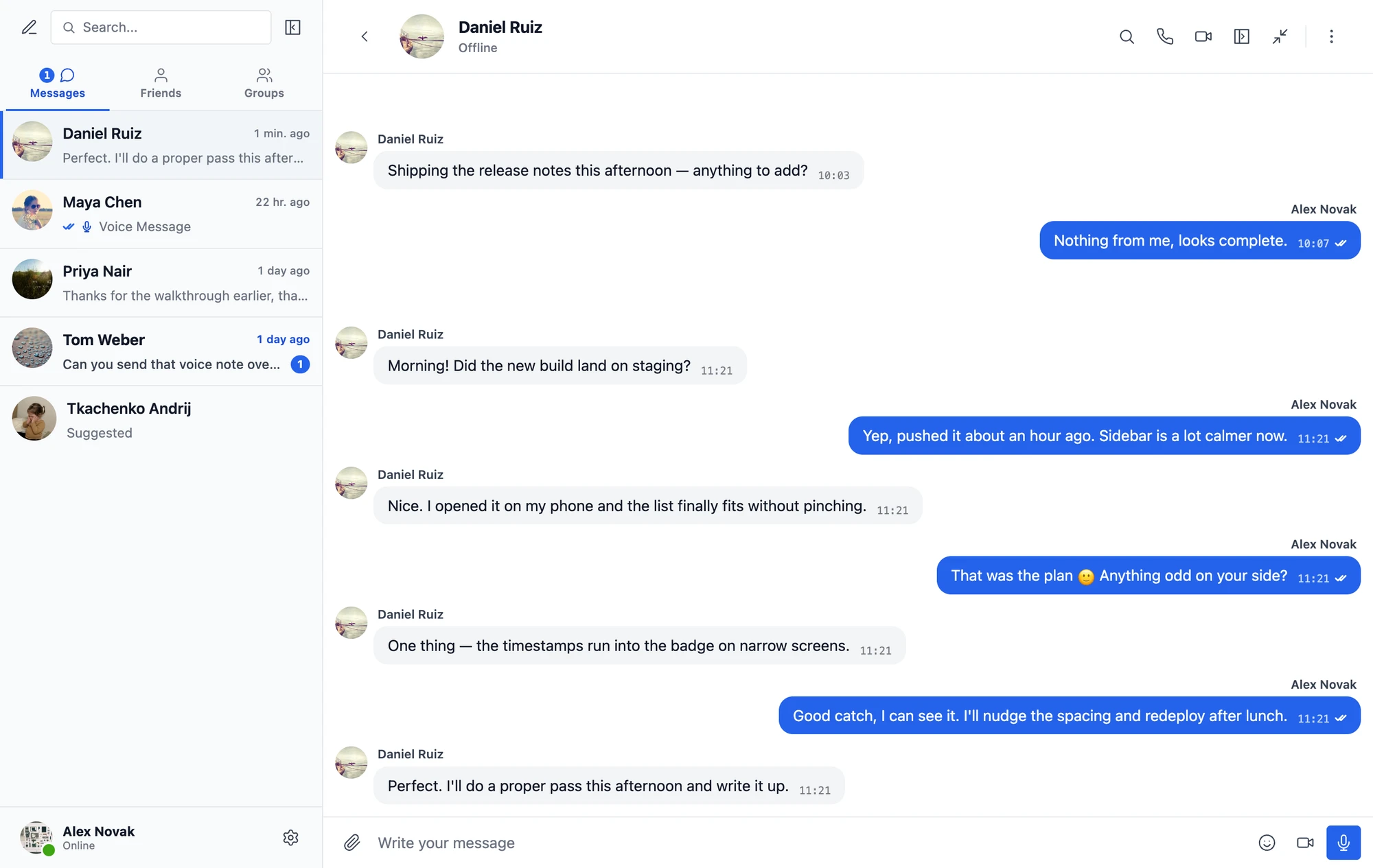
Redrawn, not rearranged#
The conversations list, the conversation itself, mini chats, popups, pickers, the call surfaces — all of it is new. What did not change is where things are. The list is still on the left, the composer is still at the bottom, the same buttons do the same jobs. Members who used your site yesterday do not have to relearn it today. It simply looks like software from this decade.
Everything visual now lives on one tab#
2.x styled the messenger through the WordPress Customizer, plus a scattering of controls across the settings page. 3.0 replaces both with a self-contained design system at Better Messages → Settings → Appearance, with a live preview next to the controls.

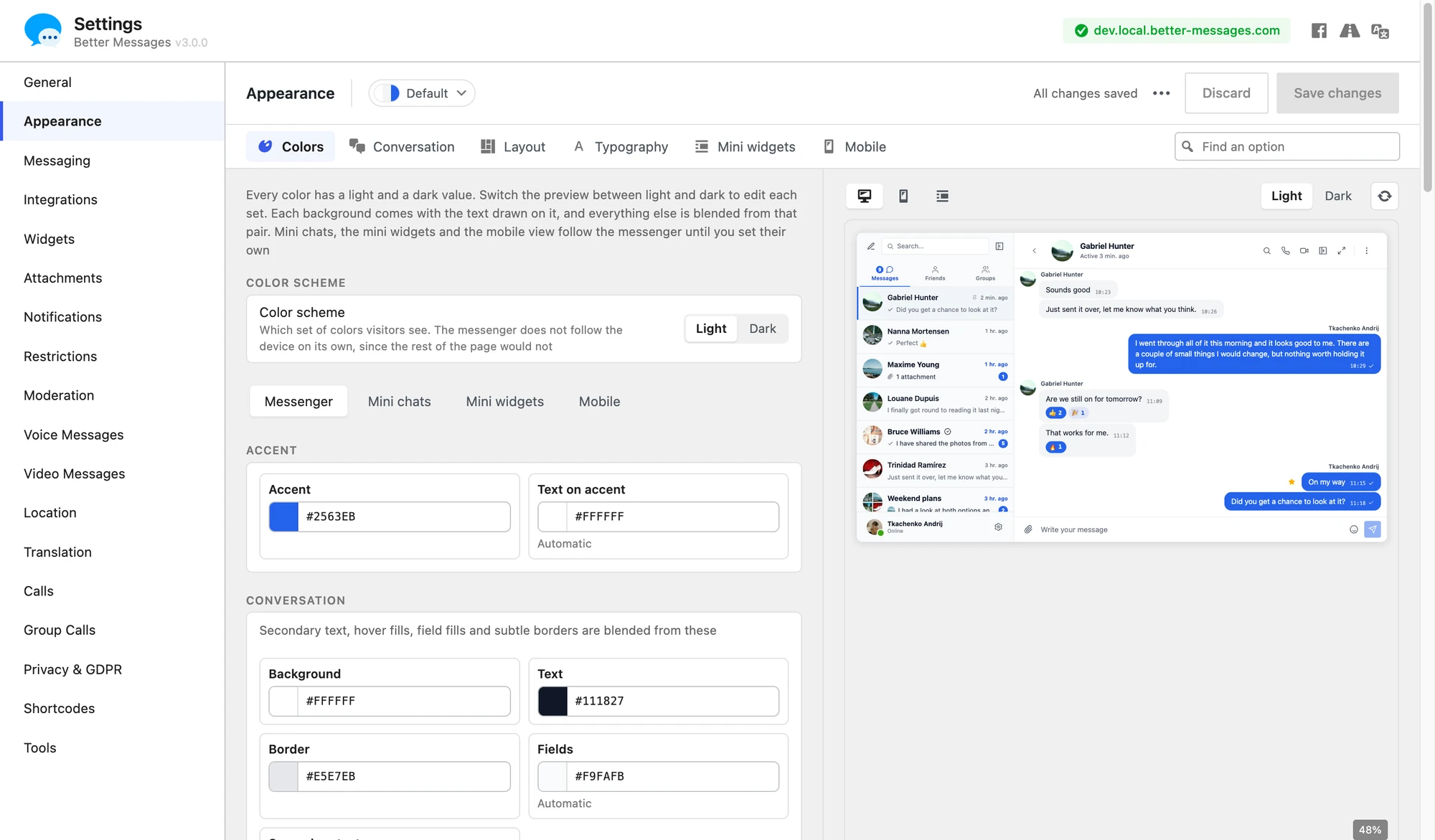
Six sections:
| Section | What it covers |
|---|---|
| Colors | Every color, in a light set and a dark set |
| Conversation | Message design, which side messages sit on, avatars, timestamps, the conversation header |
| Layout | Corners, spacing, messenger size, the sidebar and which panels appear |
| Typography | Font family, monospace font, text sizes, line height |
| Mini widgets | The widget bar, its placement, corners and icons |
| Mobile | Full screen behavior, swipe-to-go-back, the floating chat button |
A few things are worth calling out:
- Palettes. Six of them — Graphite, Evergreen, Sandstone, Indigo, Ocean and Rose. Applying one repaints colors only. Your sizes and layout are left alone. Touch any individual color afterwards and the selector switches to Custom.
- Light and dark are separate value sets, not one theme dimmed. Switch the preview between them and edit each.
- Colors are scoped. Messenger, mini chats, mini widgets and mobile each have their own tab. The last three follow the messenger until you give them their own values.
- Several fields are automatic. Text on the accent color, secondary text, field fills and subtle borders are blended from the colors you did set, until you override them.
- Nothing is written until you press Save changes. Discard throws away what you were trying, Reset design puts everything back to what the plugin ships with, and a Find an option search across the top handles the case where you know what you want to change but not where it lives.
Underneath, the whole thing is CSS custom properties — --bm-color-*, --bm-radius-*, sizes — which is also what makes the live preview honest rather than an approximation.
The design system is not WebSocket-only. It is there on the free version too.
Your font, without CSS#
Appearance → Typography picks the messenger's font: System, Classic sans-serif, Serif, Monospace, or Inherit from the theme. If your theme already loads a web font — Inter, Roboto, whatever it is — choose Custom and type its name.
A chat room can now look different from the rest of the site#
Each chat room's editor gained its own Appearance section with the same two choices the site has — Message design (Bubbles, Outlined, No bubbles) and Message side (mine on the right, mine on the left, all on one side) — each starting at Site default. A support room can read as a flat log while the rest of the site keeps its bubbles, without a line of CSS.
The design travels#
The Appearance tab exports what you built to a file and imports one back — including changes you have not saved yet, and telling you how many values the importing version had no place for. A design also rides along in the Tools settings export, so a look built on staging can be carried to production instead of rebuilt by hand.
What the migration carries over#
On upgrade a migration reads your old Customizer values and writes them into the new tokens: colors, sizes, avatar radius, density, the side conversations list width. Sites that were on the old Standard template come out as No bubbles + All on one side, which is the same look expressed as design options.
No stored setting was dropped in the move and no default changed — the controls relocated into the Appearance tab, so it is bookmarked navigation paths that need updating rather than values. The handful of things that genuinely went away are listed under What was removed below.
Messages can carry a location#
New Location tab, and a new addon behind it. It is off until you turn it on.
Sending is a map picker in the composer's attachment menu: search an address, pick from nearby places, or drop straight onto your current position. The received message renders as a map in the bubble with an open in maps action — OpenStreetMap, Google Maps or Apple Maps, your choice.
The providers are all configurable and all default to open services: OpenStreetMap tiles, Nominatim for address search, Overpass for nearby places. Point them at your own instances if you'd rather not depend on the public ones. There is a role restriction for who may send a location, and a precision control that rounds the coordinates before the message is stored, for sites that want the neighbourhood without the doorstep.
Works on both the free and the WebSocket version.
Video messages#
The Voice Messages add-on became Voice and Video Messages 2.0 and gained a camera button next to the microphone: record a short clip, round or square, and send it in the conversation. There is a new Video Messages settings tab for the shape, the maximum length, auto-deletion and which roles may send one.
That release has its own post — it also covers automatic transcription and talking to AI chat bots by voice.
A conversation in your own language#
Translation is no longer limited to private conversations. The Translation tab now reaches group conversations, chat rooms and chat bot messages, and can be on by default. A member turns it on for a conversation and every message arrives in their language, with the original one tap away.
Nothing is lost when the connection is#
Messages and files sent while offline are now kept on the device and sent by themselves once the connection is back — or cancelled before that, if the moment has passed. Previously they failed where they stood.
The device's copy survives the update#
Conversations cached on a device are kept across plugin updates and settings changes, and the oldest are trimmed automatically once the copy grows large. Members get a Storage on this device section in their own settings showing what is held, with Free up space and Clear local data. Administrators get a matching tool under Tools that makes every browser and app drop its copy and download it again — for the times when a change should reach every device at once.
The mobile app is out of alpha#
The Mobile App page was rebuilt, and the alpha label is gone with the rebuild. Three things about it are worth more than a line.
The page is in the free version now — the builds are not. Everything short of the build itself is there without a licence: app name and artwork, the App Store Connect connection, App IDs and certificates, the Firebase files, the Android signing keystore, the store screenshots. All of it is stored and waiting if you upgrade later. Creating a build still needs the WebSocket version, and that is the only screen on the page that says so — no locked tabs, no notice beside a field.
A readiness checklist tells you what is still missing, and why it matters. Each row names the thing and the consequence rather than a status code — a missing push key reads "without it the app receives no notifications" — so you find out before a build, not from a rejected one. Sharing a screen from the iOS app runs in its own broadcast extension, which needs its own App ID and an App Group, and the checklist tracks those rows too.
Store screenshots are generated for you. Apple and Google both refuse a listing without screenshots at their exact pixel sizes, and the app you are submitting is the one thing you cannot photograph before it exists. So the page photographs the messenger instead: the real thing, laid out as the app lays it out, at the sizes the stores accept, across five scenes — inbox, conversation, group chat, voice call, group call. The last two need the WebSocket version, because the free build does not carry the code that draws a call, so a free site photographs the first three. The conversations in them are fixtures, not anything from your live site, which is also the only content safe to publish on a store page.
The installed app also has better manners about updates: it says when one needs a restart, or when a newer version is waiting in the App Store or Google Play, and it replaces or rolls back a broken update by itself instead of sitting on it.
Smaller things you will notice daily#
- Uploads say what they are doing — conversion, optimization, type checks, per file, before the message is sent.
- A reply to a photo or file carries a thumbnail of it, so the reply makes sense on its own.
- The attachments list can jump to the message a file was sent in.
- Answering a call on one device stops the others ringing. They used to ring on until the caller gave up.
- Settings export to a file. Tools could already import settings. The export side is new, and both carry the design with them.
3.0 also fixes a crafted icon SVG that could smuggle markup past the sanitizer and run script on the icon preview screen, and carries every fix from the 2.15 line up to 2.15.35 — including the two security fixes released in 2.15.34.
What was removed#
- The WordPress Customizer integration, including
Better_Messages()->customize. Snippets calling it stop working. - The Classic design template selector — the Standard look is now No bubbles + All on one side on the Appearance tab.
- The follow-the-device color scheme option. The messenger is light or dark, because the rest of your page does not follow the visitor's device setting either.
- Settings → Mobile, folded into Appearance → Mobile.
- Mini Widgets → Layout, folded into Appearance → Mini widgets. The tab itself is now called Widgets.
Updating from 2.x#
The update is in place — no export, no migration step to run by hand. Three things to check afterwards:
- Custom CSS needs rewriting. Every messenger class is now prefixed
bm-, replacingbpbm-andbp-messages-. Rules written against the old names do nothing. - Update your caching or optimisation plugin's exclusion lists. The script and style files were renamed:
bp-messages*→better-messages*, andbpbm-worker.js→bm-worker.js. An exclusion list still naming the old files stops protecting the new ones. - Customizer snippets stop working. Colors and sizes live on the Appearance tab now. The values themselves are migrated for you.
If something looks wrong after updating, please tell us rather than living with it. A redesign this size can behave differently on a theme or plugin combination we have not seen — contact support, or open a topic on the support forum if you are on the free version.
Where to look next#
- Easy customization — the Appearance tab in full
- Modern design — message design, alignment and messenger size
- Voice and video messages — the add-on's own documentation
- Mobile app — the iOS and Android build guides
- Changelog — the full version-by-version history
- Roadmap — what shipped, and what is next