Better Messages 3.1: WordPlus Cloud, Notification Levels, Live Streams, Cloud Storage and an AI Assistant
Better Messages 3.1 is out. Where 3.0 redrew the messenger, 3.1 changes what runs behind it: the licences and updates of the WebSocket version now come from WordPlus Cloud, the plugin no longer carries the Freemius SDK, and the cloud brings something new to your chat rooms, live streams. Members now choose how much each conversation notifies them, attachments can live in cloud storage, and an AI assistant in your admin answers questions about the plugin from its documentation and your own settings.
Your conversations, settings and licence carry across without anything to do. The few things worth checking are at the bottom, in Updating from 3.0.
The cloud has a name: WordPlus Cloud#
The cloud behind the WebSocket version, which delivers messages, calls, push notifications, mobile app builds and Cloud AI, is now WordPlus Cloud, with an account of its own at www.wordplus.cloud. It serves every WordPlus plugin on a site, not only Better Messages.
On the first page load after the update, your licence moves there by itself, with the same key. In your account you find your licences and the sites that use them, your downloads, subscriptions and invoices, and a support form that takes files. In WordPress, Better Messages gets its own Licence, Upgrade and Support pages.
The plugin no longer loads the Freemius SDK. A licence bought through Freemius keeps renewing there at the same price, and new purchases are made at WordPlus Cloud. Introducing WordPlus Cloud explains the move in full, the Freemius part included.
Notifications, conversation by conversation#
Muting used to be on or off. In 3.1 each member chooses how much a group conversation or chat room notifies them, from the menu of the conversation: All messages, Mentions and replies or Nothing. A busy room can stay quiet until someone mentions you or replies to you, and Nothing can last an hour, a day or a week and then end by itself. The level decides the sound, the pop-up, the push and the email at once, and messages still count as unread at every level, so nothing goes missing.
Administrators choose the default for each kind of conversation under Notifications → Conversation Notifications: group conversations, the group chats of community plugins, course chats, and each chat room in its own settings. They all start at All messages, as notifications worked before.
More came with it:
- Replies notify like mentions. A reply to your message in a group conversation notifies you and marks the conversation the way a mention does.
- @all mentions everyone in a group conversation or chat room. Moderators can use it by default, and Notifications → Mention Everyone (@all) and each chat room decide who else may.
- Group call alerts, on the WebSocket version: when a group call starts, members get a pop-up, a push and an email with who started it, how many are in the call and a Join button, with a chime of its own. A cooldown for each conversation and a limit for each member keep them from getting noisy.
- A mark for new reactions to your messages, in the conversations list and in the conversation, with a button that jumps to each message reacted to.
- A choice of what you are emailed about, in the messenger settings: all notifications, only one-to-one conversations, mentions and replies, or nothing. Administrators set the default under Notifications → Default Email Scope.
Everything but the group call alerts is in the free version too. Notification levels has every setting, and the hooks and REST route for developers.
Live streams in chat rooms#
With the Live Stream plugin, on the same cloud, a chat room can host a live stream. A host goes live right from the room with a camera or a shared screen, or from OBS through the Live Stream studio, and the stream shows in the room the way a group video call does: beside the messages, opening by itself while the stream is live, with a Live banner to bring it back. Viewers get sound, quality, reactions, picture-in-picture and full screen in the call controls, and the room is the chat of the stream, with history, moderation and everything else a chat room has.
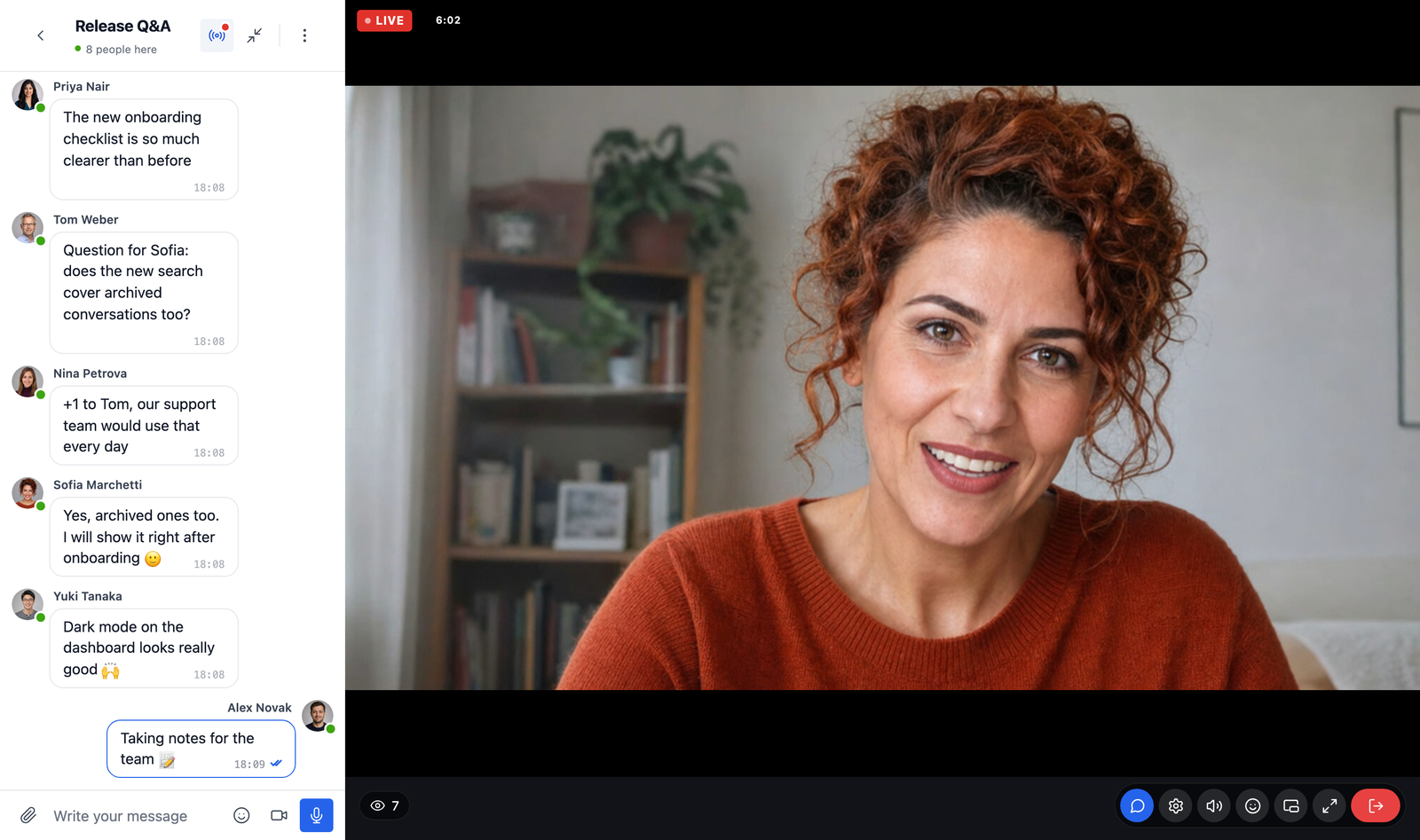
Start one from the room editor: Stream in this room sits below the group call settings of the room. Live streaming in chat rooms has the details.
Attachments in cloud storage#
Photos, videos, voice messages and documents that members send can be kept in Cloudflare R2, Bunny.net Storage, Amazon S3 or any S3-compatible storage, chosen per type of file under Attachments → File Groups. Files go straight from the browser or the mobile app to the storage, skipping your server, and members open them through links that expire. It works in the free version too. Chat attachments in cloud storage walks through the setup.
Max File Size by Type sets a separate upload limit for images, videos, audio and other files, and Media Optimization now converts a file the moment it is picked, so its preview shows what will be sent, and says so before sending if it is still too large.
An assistant in your admin#
Better Messages Assistant lives on Better Messages → Support, and Ask AI in every Better Messages page header opens it. It answers from the documentation and your settings, opens the setting it talks about, prepares setting changes for you to review and save, writes code snippets with links to the hooks they use, and fills in the contact form for anything a person should look at. It sends nothing until you press Start, and it is in the free version too.
Privacy: a key for each conversation#
What your site sends through the realtime server is now encrypted with a key for each conversation, which only its members get and which changes when someone leaves. Before, one key covered the whole site. Messages, files, conversation names and profiles cannot be read or changed on the way.
Calls#
- Group calls can be encrypted end to end. With Group Calls → End-to-End Encryption on, the sound, video and screen shares of group video and audio chats are encrypted in each browser and app with a key only your site gives out, so neither the media server nor WordPlus Cloud can see or hear them. It is off by default. Group video chat has the details.
- Sharper group video. The camera sends in a modern codec where the device encodes it in hardware, with a fallback every device can play, in three sizes up to 1080p, and each participant receives the size their screen shows.
- Your own camera shows the way the others see it, not mirrored, while the call rings, in a 1:1 call and on your tile in a group call, in the browser and in the mobile app. A shared screen is never mirrored.
- A Show Chat button in the call controls replaces the chevron on the edge of the call, which could cover the buttons of a participant.
- Moderator buttons in group calls show a spinner until the change takes effect.
- Calls work with the keyboard and screen readers: Answer, Reject and every call control can be reached with Tab and pressed with Enter or Space.
Smaller things#
- The admin pages lose their bp- prefix (
admin.php?page=better-messagesand so on). Old addresses keep working. - Background jobs run on one scheduled worker that never runs twice at once.
- The bubble launcher opens and closes in one smooth piece, with its list at full height from the start.
- AI chat bots know the prices of the newest models, and the Web Search setting of OpenAI and Claude bots shows the price per search.
- Mobile app builds no longer stop at a firewall: your site sends the files of the messenger with the build request.
- The Voice and Video Messages add-on is offered where it is needed, in the Voice Messages and Video Messages settings and the AI bot editor.
3.1 also fixes AI bot costs for several models, a freeze when starting a conversation in a messenger sized by a page builder, the online count in chat rooms that hide their participants, the Messages and Chat Room blocks on WordPress 5.9 to 6.5, and texts that stayed in English on translated sites. The changelog has every change.
Updating from 3.0#
The update is in place, and your licence moves by itself. Four things to check:
- A Content Security Policy needs the new addresses. The WebSocket version now connects to
ws.wordplus.cloudandrest.wordplus.cloud, and group calls tovideo.rtc.wordplus.cloud. If your site sends a Content Security Policy, allow the addresses the changelog lists in itsconnect-src. A self-hosted server keeps its own addresses. - Bookmarks to the admin pages still work, but the new addresses have no bp- prefix.
- The Voice and Video Messages add-on moves its licence over by itself from version 2.1. Update it when WordPress offers 2.1.
- Chat rooms with notifications off now start at Mentions and replies, so their members hear when someone mentions them or replies to them. Set a room to Nothing in its settings to keep it as quiet as before.
If anything looks wrong after updating, please tell us at support@better-messages.com, or on the support forum if you use the free version.
Where to look next#
- Introducing WordPlus Cloud: the account, the move off the Freemius SDK, and what stays the same
- Notification levels
- Live streaming in chat rooms
- Your licence
- Cloud storage