GamiPress + Better Messages: Charge Points to Send a Message
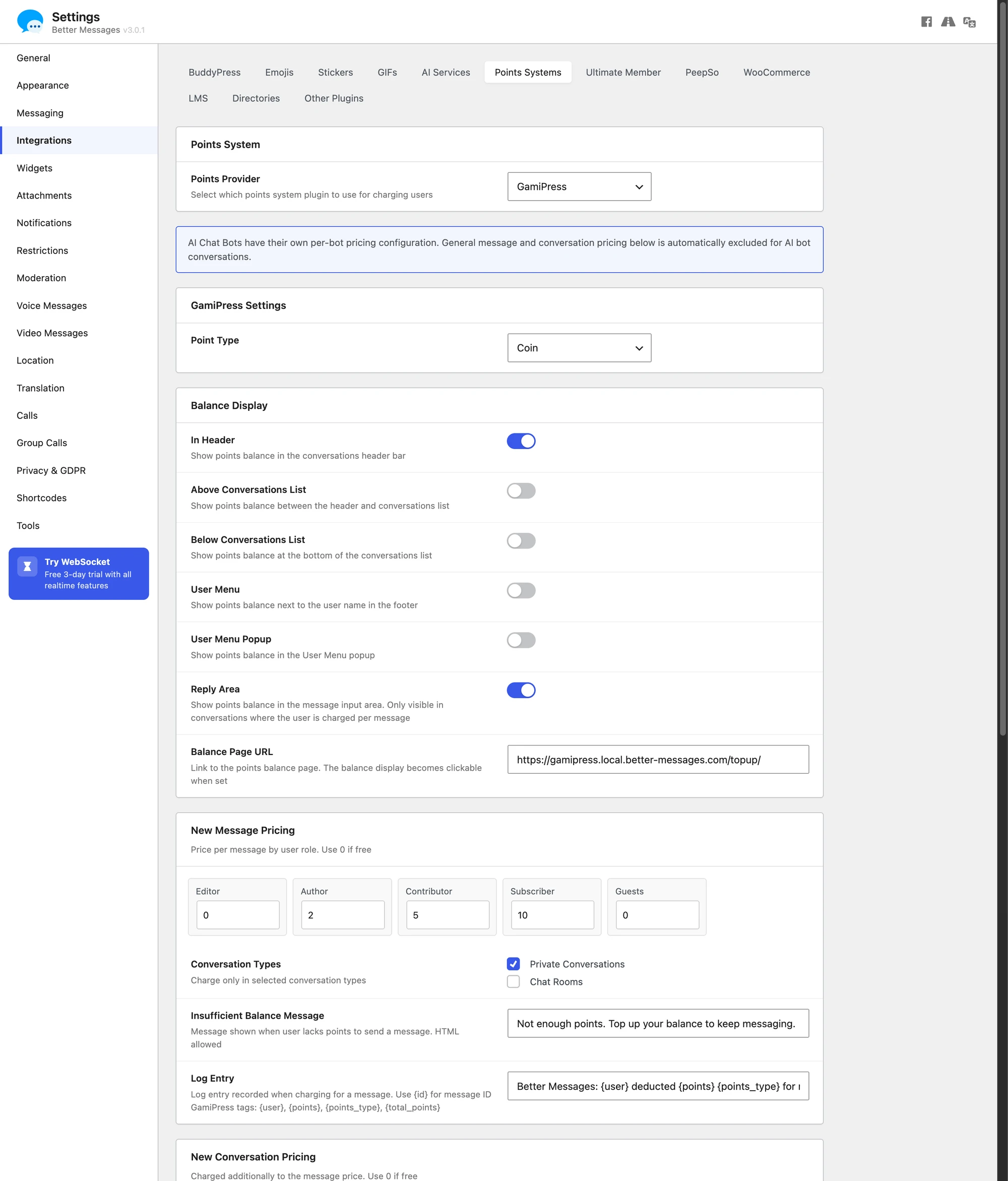
GamiPress turns WordPress into a points / achievements engine — used by community sites, paid-membership programs, and gamified marketplaces. Better Messages integrates with GamiPress so you can charge points for messaging actions: per-message, per-new-thread, per-call, per-role, and per-conversation-type. The user's current point balance can be displayed inline in the messenger, with a configurable URL where they can manage or top up their points.
Why charge points to message#
A few common scenarios where pay-to-message is the right model:
- Premium directories — visitors get free profile views but pay a small amount to send a message to a listing owner (anti-spam + revenue).
- Coaching platforms — clients spend points per message to a coach, with different rates for one-off DMs vs scheduled sessions.
- Paid communities — points are awarded for engagement (posts, comments) and spent on messaging the popular members.
- Marketplaces — buyers spend points to message vendors, with the point top-up being a separate monetization channel.
What you can charge for#
Better Messages exposes three pricing sections, each with its own per-role rate table:
- New Message Pricing — points per message.
- New Conversation Pricing — charged in addition to the message price when the send also opens a conversation, so a first message costs both.
- Private Call Pricing — charged to the caller per minute, with the first minute taken immediately. It covers one-on-one calls only. Group calls are not charged.
The first two carry a Conversation Types picker that decides where the charge applies: Private Conversations, Chat Rooms, and a separate entry per community plugin you run — BuddyPress Group Chats, PeepSo Group Chats, Ultimate Member Group Chats, FluentCommunity Group Chats. Leave a type unticked and it stays free whatever the role rates say.
So a paid-DM shape might be: 10 points per message with only Private Conversations ticked, 5 more to open the conversation, 2 points a minute on calls — and each of those adjusted per WordPress role.
Each section also has its own Insufficient Balance Message and a Log Entry template for the points ledger.
Per-role pricing#
The most common shape: paying members get a discount or zero rate, free members get charged. Configure pricing per WordPress role for messages, new threads, and calls separately.
Balance display#
The user's current point balance can be shown in the messenger in up to six places, each its own toggle under Balance Display:
- In Header
- Above Conversations List
- Below Conversations List
- User Menu
- User Menu Popup
- Reply Area — this one only shows in conversations where the user is actually charged per message
Pick the placements that match your UX — most sites use In Header plus Reply Area.
Balance Page URL#
A configurable URL where users top up their points (a WooCommerce product, a custom page, a Stripe checkout). Setting it makes the balance display clickable, so a user who hits zero can refill without leaving the messenger.
AI bot charging#
If you also run the Better Messages AI add-on, GamiPress can charge points for AI bot responses. Configure per-bot in the AI Bots settings — a useful guard against runaway AI costs on a public site.
Installing Better Messages with GamiPress#
- Install GamiPress and configure at least one point type.
- Install Better Messages from WordPress.org and activate it.
- Open WP Admin → Better Messages → Settings → Integrations → Points Systems.
- Select GamiPress as the provider, pick the point type to charge against, and configure charge types / categories / per-role pricing.
Frequently asked questions#
Does this work with MyCred too?#
Yes — Better Messages has a unified Points System with a provider abstraction. GamiPress and MyCred share the same UI. Pick whichever is your existing points stack. See MyCred pay-to-message for the MyCred variant.
What happens when a user runs out of points?#
The send action is blocked with a friendly error linking to your configured Balance URL. The user tops up and can send.
Can I charge for receiving as well as sending?#
The default model charges senders. For receive-side charges (e.g. an instructor earns points when students message them), the relevant code path is open via filters — set a custom logic in your theme's functions.php.
Will free messages still work?#
Set a 0-point rate for the relevant role / category and messages are free for that scope. The integration is opt-in per charge type.
Does it count messages that fail to send (validation errors)?#
No — points are only charged when the message actually goes through. A blocked / moderated message does not consume points.
See also#
- GamiPress integration documentation — full setup reference
- MyCred pay-to-message — same feature on the MyCred points engine
- AI chat bots — for pairing AI charging with GamiPress