MyCred + Better Messages: Charge Points to Send a Message
MyCred is the longest-running points-and-rewards engine on WordPress — used by community sites, gamified LMS courses, paid memberships, and marketplaces. Better Messages integrates with MyCred so you can charge points for messaging actions: per-message, per-new-thread, per-call, per-role, and per-conversation-type. The user's current point balance can be displayed inline in the messenger, with a configurable URL where they can top up.
Why charge points to message#
A few common scenarios where pay-to-message is the right model:
- Premium directories — visitors get free profile views but pay a small amount to send a message to a listing owner (anti-spam + revenue).
- Coaching platforms — clients spend points per message to a coach.
- Paid communities — points are awarded for engagement and spent on premium actions like messaging popular members.
- Marketplaces — buyers spend points to message vendors, with point top-ups as a revenue channel.
What you can charge for#
Better Messages exposes three pricing sections, each with its own per-role rate table:
- New Message Pricing — points per message.
- New Conversation Pricing — charged in addition to the message price when the send also opens a conversation, so a first message costs both.
- Private Call Pricing — charged to the caller per minute, with the first minute taken immediately. It covers one-on-one calls only. Group calls are not charged.
The first two carry a Conversation Types picker that decides where the charge applies: Private Conversations, Chat Rooms, and a separate entry per community plugin you run — BuddyPress Group Chats, PeepSo Group Chats, Ultimate Member Group Chats, FluentCommunity Group Chats. Leave a type unticked and it stays free whatever the role rates say.
So a paid-DM shape might be: 10 points per message with only Private Conversations ticked, 5 more to open the conversation, 2 points a minute on calls — and each of those adjusted per WordPress role.
Each section also has its own Insufficient Balance Message and a Log Entry template for the points ledger.
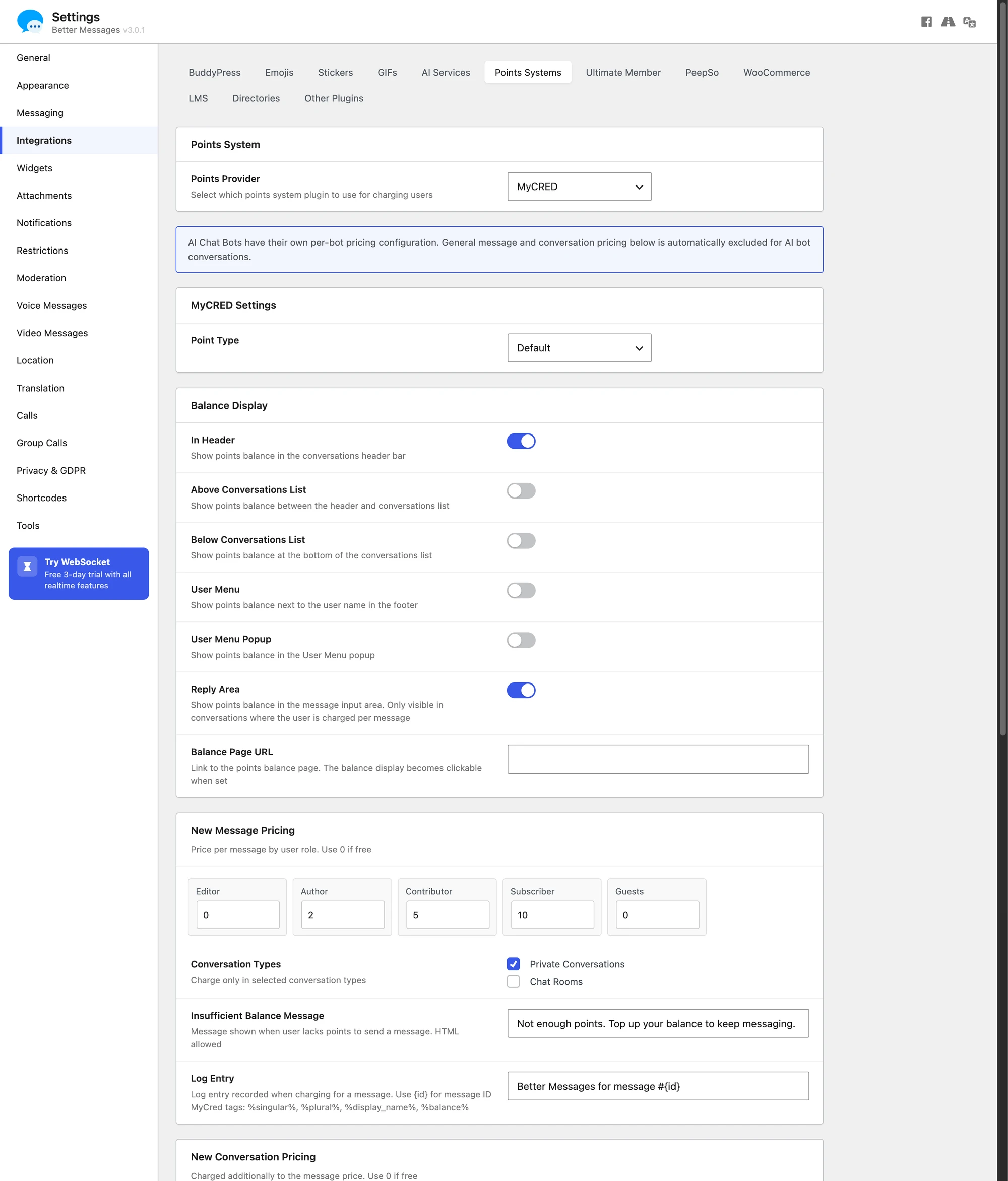
Per-role pricing#
The most common shape: paying members get a discount or zero rate, free members get charged. Configure pricing per WordPress role for messages, new threads, and calls separately.
Balance display#
The user's MyCred balance can be shown in up to six places inside the messenger, each its own toggle under Balance Display:
- In Header
- Above Conversations List
- Below Conversations List
- User Menu
- User Menu Popup
- Reply Area — this one only shows in conversations where the user is actually charged per message
Pick what fits your UX. Most sites use In Header plus Reply Area.
Balance Page URL#
A configurable URL where users top up their MyCred points (a WooCommerce product, a custom checkout, a Stripe page). Setting it makes the balance display clickable, so users can refill without leaving the messenger.
AI bot charging#
If you also run the Better Messages AI add-on, MyCred can charge points per AI bot response — useful to prevent runaway AI costs on a public site.
Installing Better Messages with MyCred#
- Install MyCred and configure at least one point type.
- Install Better Messages from WordPress.org and activate it.
- Open WP Admin → Better Messages → Settings → Integrations → Points Systems.
- Select MyCred as the provider, pick the point type, and configure charge types / categories / per-role pricing.
Frequently asked questions#
Does this work with GamiPress too?#
Yes — Better Messages has a unified Points System abstraction. MyCred and GamiPress share the same configuration UI. Pick whichever is your existing points stack. See GamiPress pay-to-message.
What happens when a user runs out of points?#
The send action is blocked with a friendly error linking to your configured Balance URL.
Can I run multiple point types?#
You select one point type per Better Messages charge category. If MyCred runs multiple types (e.g. Coins and Credits), pick the one used for messaging spend.
Does it support MyCred's transfer / gift mechanics?#
The integration charges from the user's MyCred balance using MyCred's standard deduct API, so transfers, top-ups, and gifts that affect the balance all work transparently.
Does free messaging still work?#
Set the rate to 0 for the relevant role / category. The integration is opt-in per charge type.
See also#
- MyCred integration documentation — full setup reference
- GamiPress pay-to-message — same feature on the GamiPress engine
- AI chat bots — for pairing AI charging with MyCred