WordPress Video Call Plugin: One-on-One and Group Calls Inside Chat
WordPress sites that need video calls have three options today: link out to Zoom (loses the on-site context), embed Whereby / Daily / Twilio (third-party billing, separate UI), or roll your own (a multi-month engineering project involving a media server, TURN/STUN, signaling, and a UI). Better Messages adds a fourth path: voice and video calls inside the messenger threads members are already using, hosted on relay servers included in the WebSocket license, with both one-on-one and group call support.
Where calls live#
Voice and video calls are not a separate feature — they are buttons inside the messenger thread that members already use for chat. In a 1:1 thread, a phone icon and a video icon sit next to the message composer. In a group chat or chat room, the same buttons start a group call that every thread participant can join.
This is the right shape because the call inherits the context: the call participants are the thread participants, the thread continues during the call (text-and-call hybrid), and the call recording (if you enable it) attaches to the thread for later reference.
One-on-one calls#
In any 1:1 thread, either participant taps the audio or video call button. The other side gets a ringing notification (in-browser overlay + sound + web push if they have the site closed). They tap to accept. The call connects.
The call UI is full-screen on mobile, picture-in-picture on desktop (the chat stays usable below). Mute, camera on/off, screen share, and switch-camera are the standard controls. Either side can end the call.
Group calls inside threads and chat rooms#
The biggest differentiator: group calls work inside any group thread or chat room, not just 1:1 DMs.
Practical use cases:
- Cohort office hours — a LearnDash course chat hosts a group video call for the week's office hours, then the chat continues asynchronously after.
- Community AMA — a BuddyBoss group with the founder host runs an AMA call inside the group's chat.
- Vendor team huddle — a Dokan vendor + 2 assistants run a quick call about a custom order from inside the customer chat.
- Marketplace candidate panel interview — a WP Job Manager chat between candidate and 3 hiring managers escalates into a panel video call.
- Study group — a membership-site chat for a peer cohort runs a weekly study session inside the chat.
Group calls run up to 32 participants on video and 50 on voice-only — those are enforced ceilings on the media server, not rough estimates. Past roughly 25 cameras a call stops feeling like a meeting and starts feeling like a webinar, which is what broadcast mode is for: only moderators publish, everyone else joins as a viewer.
Restrictions and access control#
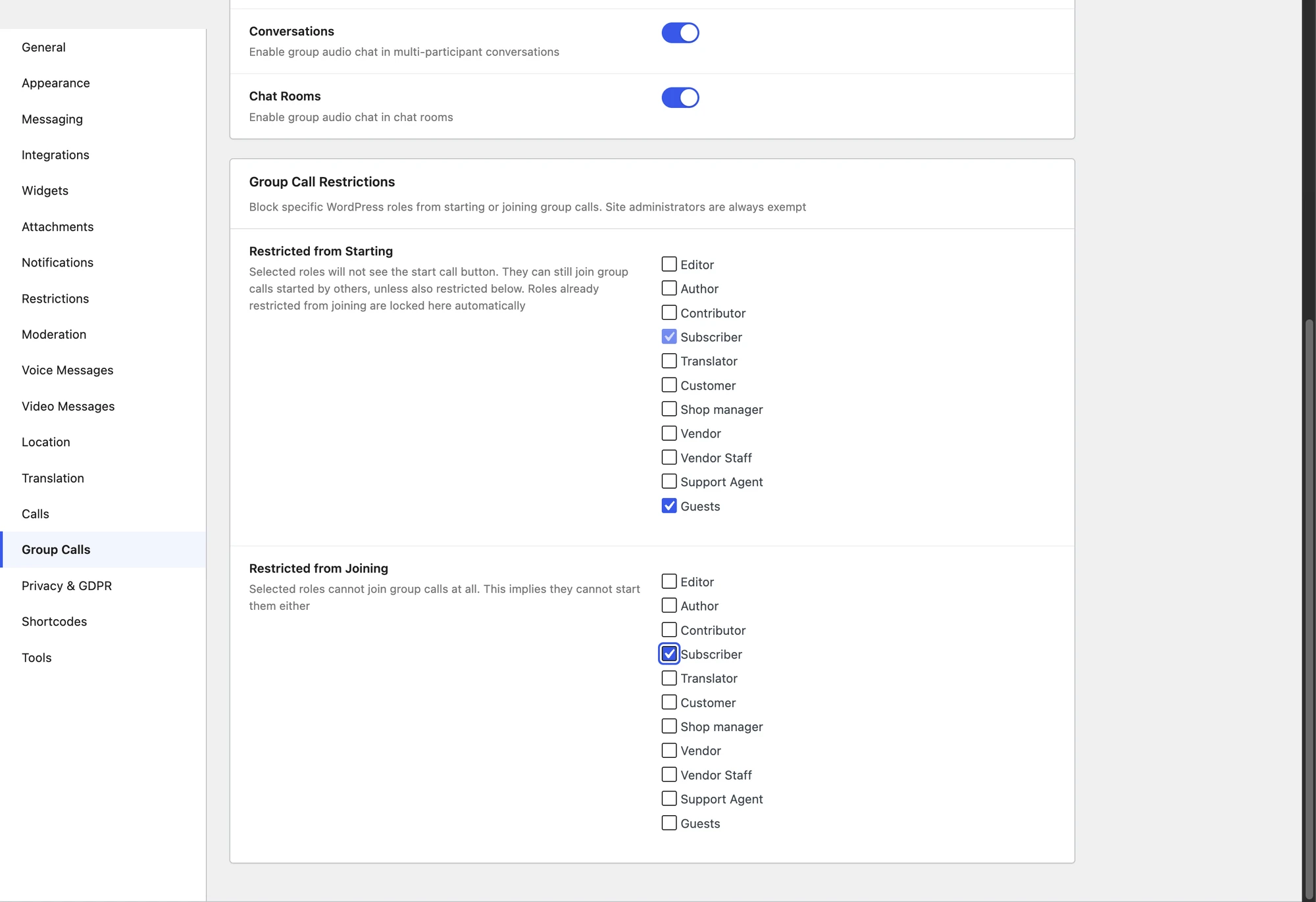
A few practical guards:
- Only Friends Can Call — restrict 1:1 calls to users who are connected (friend / follow relationship, depending on community plugin).
- Per-role call permissions — restrict who can place calls by WordPress role.
- Per-role group call permissions — restrict who can start a group call inside a thread, separately from who can join one.
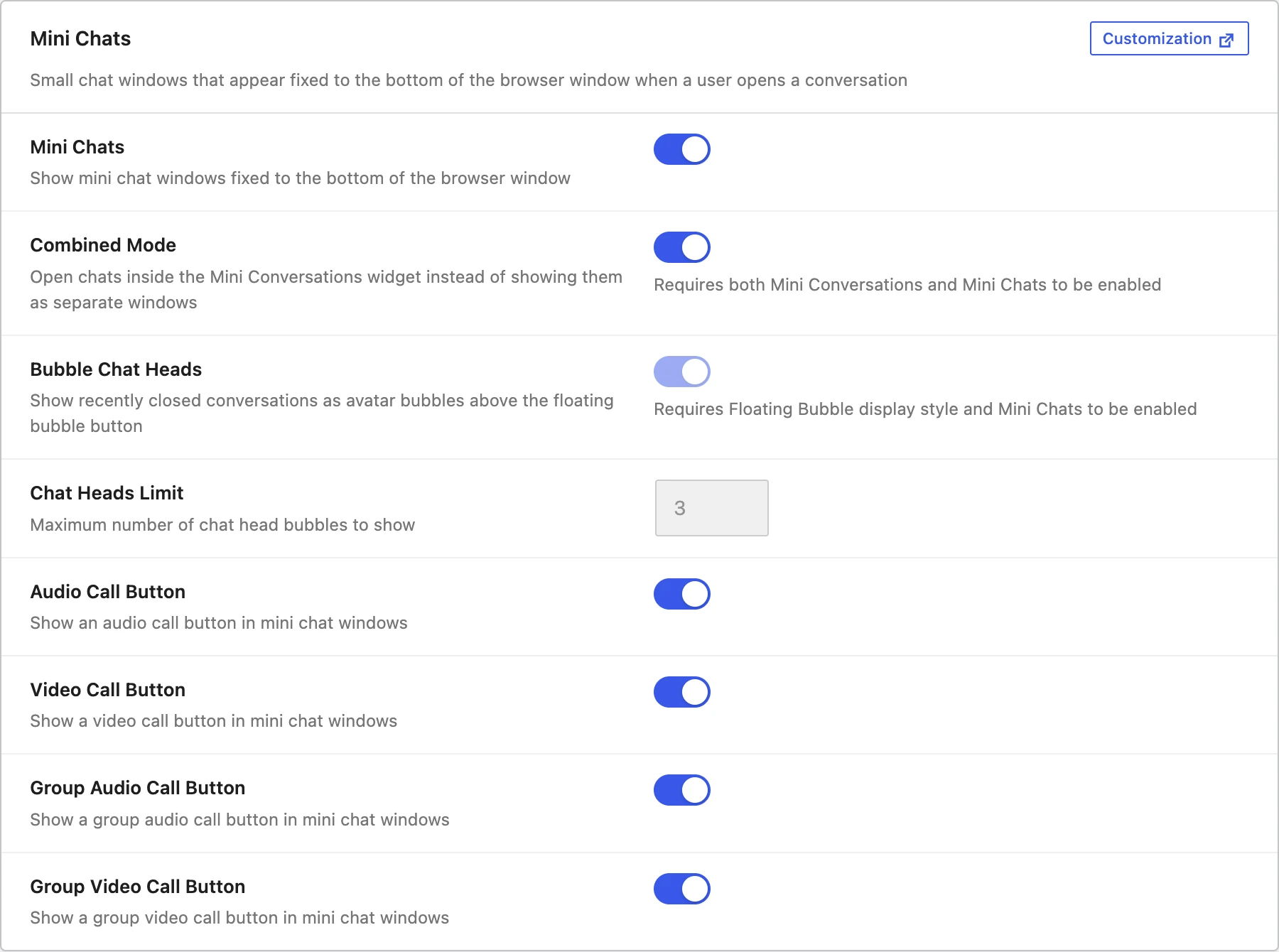
- Calls inside chat rooms — enable per chat room. Useful for keeping public rooms text-only.

Hosted relay servers, no separate billing#
The WebSocket license includes hosted WebSocket and media relay servers. There is no separate Twilio account, no Daily / Whereby subscription, no Zoom developer plan. The license covers the infrastructure.
For sites that need data residency (HIPAA-adjacent, GDPR Article 9 regulated data), consider upgrading to the self-hosted plan — talk to support.
Installing voice and video calls on WordPress#
- Install Better Messages from WordPress.org and activate it.
- Buy the WebSocket version license from your Better Messages account dashboard.
- Activate the license in Better Messages → Account.
- Configure call permissions in Better Messages → Settings → Calls.
The audio and video call buttons appear inside the messenger automatically.
Free vs WebSocket version for calls#
Calls are a WebSocket-version-only feature — the media relay runs on the WebSocket cloud. The free (AJAX) version does not have access to the relay, and call buttons are hidden there.
Frequently asked questions#
What browsers are supported?#
Chrome / Edge / Firefox / Safari (desktop and iOS Safari 17+). Modern WebRTC is required, which excludes very old browsers but covers >95% of real-world traffic.
Does it work in the mobile app?#
Yes — the Better Messages mobile app (iOS + Android, Capacitor-based) supports calls natively.
Are calls recorded?#
No. Better Messages does not record calls — there is no recording setting, and nothing is written to your site or to the relay when a call ends. What lands in the thread is a call system message noting that a call happened and how long it lasted. If you need recorded sessions, that is a job for a dedicated meetings tool.
Can a guest join a call?#
Yes if guest chat is enabled and the guest is a participant in the thread. The call button is hidden for unauthenticated visitors.
What is the call participant limit?#
One-on-one calls are two people by definition. Group calls are capped on the relay: 32 participants in a group video call and 50 in a group audio call, per conversation. The cap is applied when the join token is issued, so it is not something a site setting can raise.
Can I disable calls for a specific role?#
Yes — per-role permissions in Settings → Calls. A common pattern: paying members can place calls, free-tier members cannot.
See also#
- Video calls documentation — full feature reference
- Audio calls documentation — voice call settings
- Group video chat — multi-party video
- BuddyPress messaging plugin — community sites benefit most from group calls
- WordPress LMS chat plugin — cohort office hours via group calls
- WordPress marketplace chat — vendor team and customer calls