oEmbed Support
Better Messages auto-embeds rich media when users paste a supported URL into a message — YouTube and Vimeo become inline video players, SoundCloud and Spotify embed audio, and any URL from WordPress's oEmbed provider list renders as a native widget. For regular non-oEmbed URLs, the plugin generates "nice link" preview cards with thumbnail, title, and description, so shared links look like rich attachments instead of bare URLs.

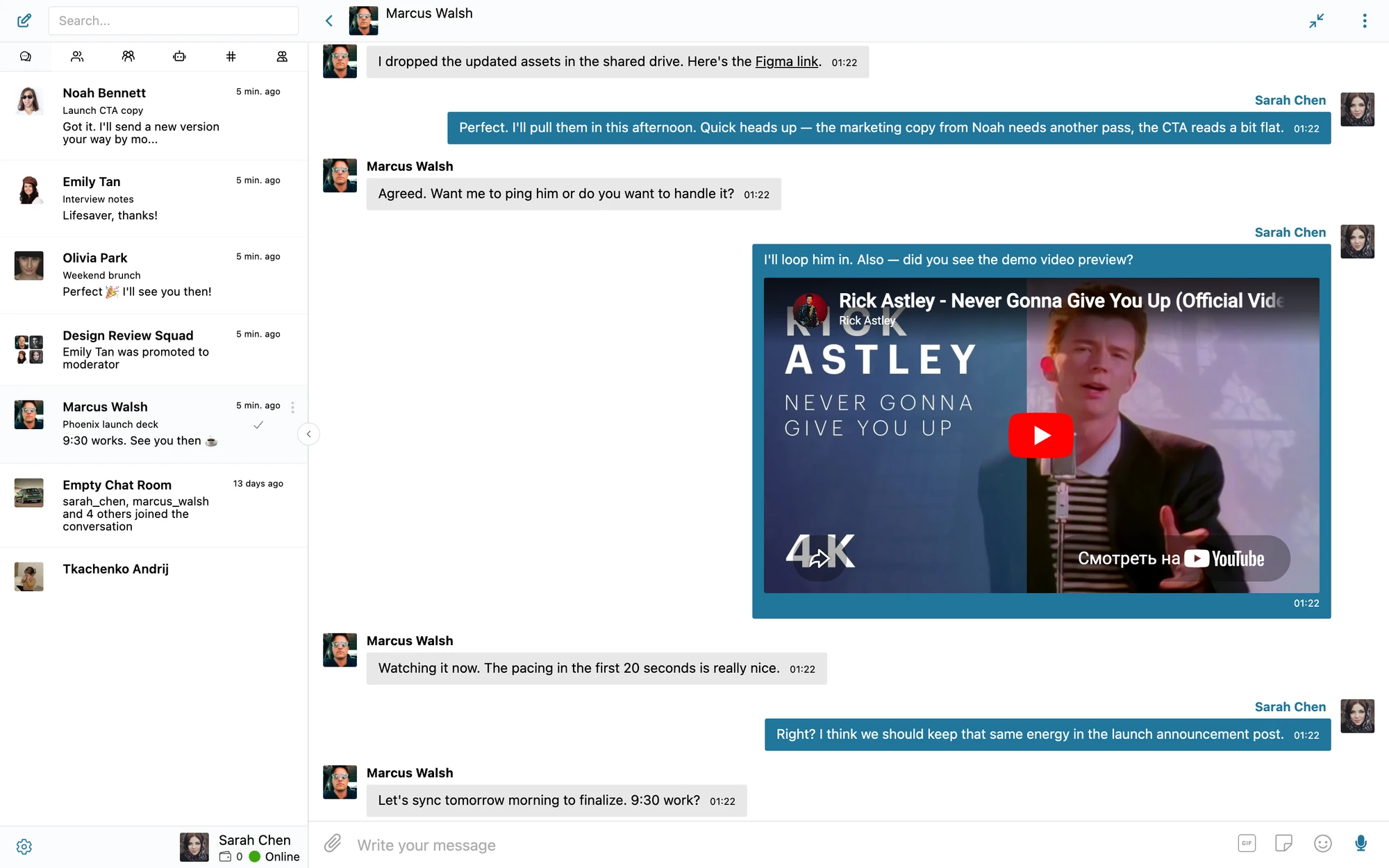
What it adds#
- Auto-embed inline media when a supported URL appears in a message
- Native players for YouTube, Vimeo, SoundCloud, Spotify, Twitch, Twitter / X, TikTok, Reddit, Imgur, Flickr, and every other WordPress oEmbed provider
- "Nice link" preview cards (thumbnail + title + description) for regular URLs
- Media plays inline without leaving the conversation
- Works in DMs, group chats, and chat rooms — same rendering everywhere
How it works#
When a user submits a message, Better Messages scans the text for URLs. For each URL:
- Check oEmbed providers — if the host matches an oEmbed-supporting service (YouTube, Vimeo, etc.), an embed iframe is rendered inline
- If not oEmbed, fetch metadata — for regular URLs, the plugin requests the page and parses OpenGraph + Twitter Card metadata to build a "nice link" card
- Cache the result — the fetched metadata is stored in the message's own meta, keyed by a hash of the URL, so a link is fetched once for that message and never re-fetched on later renders
- Render in the bubble — the embed or card appears below the message text
| URL type | Rendered as |
|---|---|
youtube.com/watch?v=... | Inline YouTube player |
vimeo.com/12345 | Inline Vimeo player |
soundcloud.com/.../track | Inline SoundCloud player |
spotify.com/track/... | Inline Spotify widget |
twitter.com/.../status/... | Inline tweet card |
tiktok.com/@user/video/... | Inline TikTok player |
| Regular site URL | Thumbnail + title + description card |
| URL inside a code block | Plain text (no embed) |
When it matters#
| Use case | Why oEmbed helps |
|---|---|
| Course / LMS discussion | Instructor shares a YouTube lecture — students watch inline |
| Marketing / podcast community | Embedded SoundCloud / Spotify episode players |
| Marketplace product help | Vendor shares a Vimeo demo of a product |
| Social network DMs | Users share TikToks / tweets, rendered as native widgets |
| Support chat | Knowledge-base link shows a thumbnail + summary preview |
How to enable#
oEmbed expansion runs through the standard WordPress oEmbed system, so it's always on. Better Messages adds a preview card on top for ordinary links.
Navigate to WP Admin → Better Messages → Settings → Messaging → oEmbed.
- Link Previews — automatically fetch and show a title and description for links shared in messages, including URLs that aren't backed by an oEmbed provider
Frequently asked questions#
Does the embed contact the original site?#
Yes — the embed iframe is served by the source (YouTube, Vimeo, etc.). Their tracking / cookies apply. For privacy-strict sites, consider the Privacy-friendly oEmbeds setting which shows a static thumbnail until the user clicks play, so the third-party iframe isn't loaded on page load.
Can I block specific oEmbed providers?#
Yes — hook the embed_oembed_html WordPress filter (Better Messages uses standard WP oEmbed under the hood) and return an empty string for hosts you want to suppress.
Why doesn't a link embed even though it's from a supported service?#
Possible reasons: the URL is inside a code block, the URL is a redirect that the provider doesn't recognize, or the WordPress oEmbed cache has a stale failure. Clear the post oEmbed cache via WP-CLI (wp post meta delete <id> _oembed_<hash>) or by editing the message to re-trigger.
Are embeds rendered in the mobile app?#
Yes — the mobile app uses a WebView for the messenger surface, so embeds render the same as on the web. Bandwidth-conscious users can disable embeds in the global settings.
Does this work in email notifications?#
Email notifications include the link as a clickable URL, not as an embedded player (email clients don't support inline video). Nice-link previews appear as a thumbnail + title in the email.
See also#
- Markdown support — text formatting in messages
- File sharing — for attached media not coming from URLs
- Stickers — pre-built visual reactions
- GIPHY integration — animated GIF picker