Site Moderators
Better Messages lets you delegate messaging moderation to trusted non-administrators. Users with moderation access get the Administration page in the WordPress admin — its Messages, Guests and Bulk Messaging tabs — and site-wide moderation powers inside the chat, without receiving the manage_options rights of a full administrator.
What it adds#
- A Roles That Can Access Administration setting — pick which WordPress roles get moderation access, no code or role-editor plugin required
- Access to WP Admin → Better Messages → Administration, with its Messages tab (where reported and held messages are reviewed) and Guests tab. The Bulk Messaging tab is gated separately — see below.
- Site-wide moderation powers in the chat interface: edit or delete any message, review messages held by pre-moderation, and handle user reports
- An Administration flag in the messenger with the number of messages waiting for review, so moderators see them without opening wp-admin
- Per-user granting via a standard WordPress capability, for giving one person access without changing a whole role
- Works on both the free and WebSocket versions
The Roles That Can Access Administration setting was added in Better Messages 2.15.24. On older versions, grant the bm_can_administrate capability with a role-management plugin instead — that method keeps working too.
How to enable#
Go to WP Admin → Better Messages → Settings → Moderation and check the roles under Roles That Can Access Administration. Users with those roles immediately gain the Administration page and moderation powers. Unchecking a role revokes them again.
Administrators always have full access — they don't need to be listed.
If your site previously granted the bm_can_administrate capability to a role with a role-management plugin, check that role here after updating — the setting now manages role-level grants, and roles left unchecked lose the capability on the next settings save. Capabilities granted to individual users are not affected.
Administration flag#
Everyone who can open the Administration page gets a flag beside the Settings button in the messenger while there is something to review. The flag carries the number of reported messages and messages waiting for approval, and its tooltip says it in words, such as "3 messages to review".

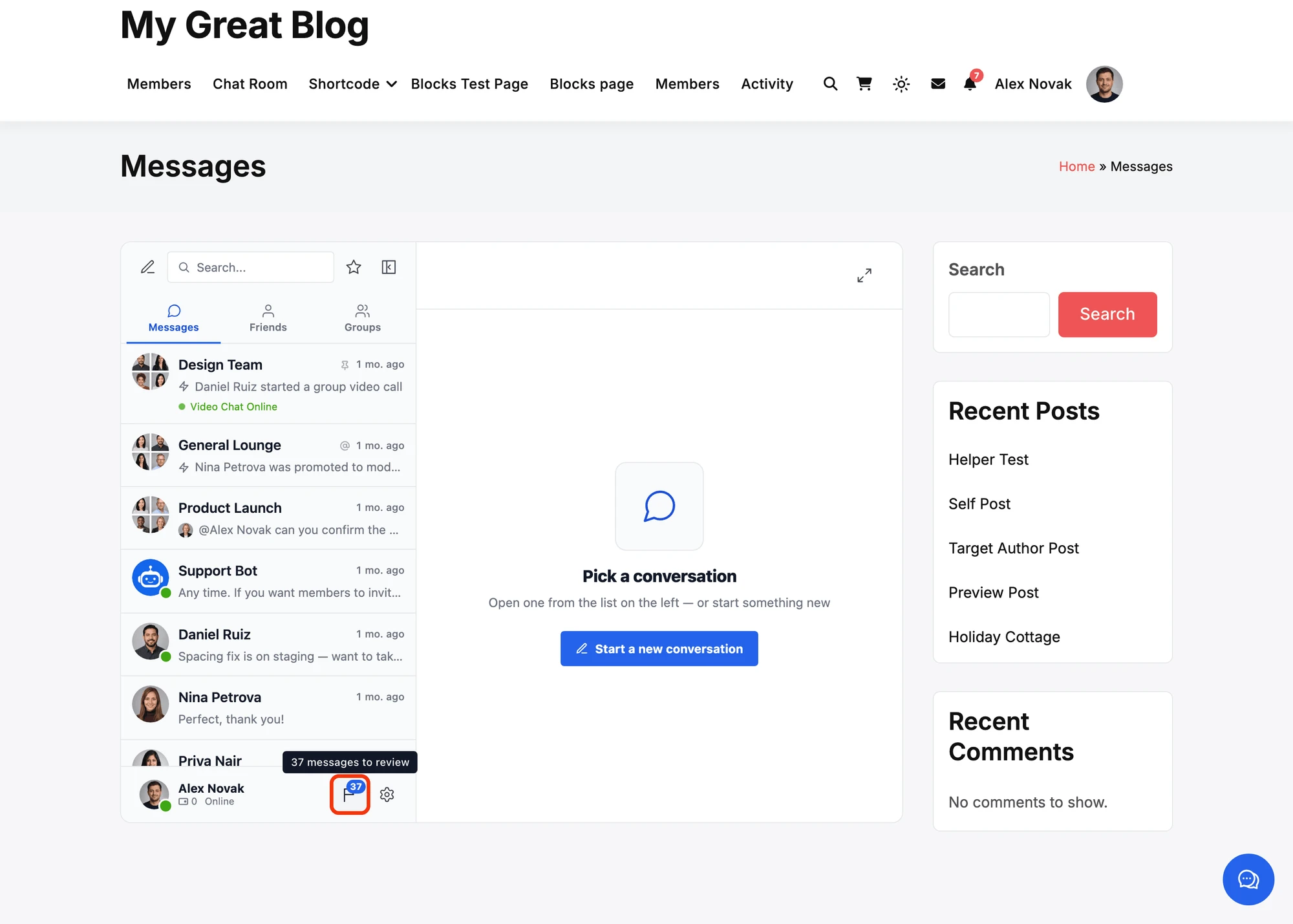
- Who sees it. Administrators and the roles checked in
WP Admin → Better Messages → Settings → Moderation → Roles That Can Access Administration, or
anyone with the
bm_can_administratecapability. Nobody else gets the flag or the count, guests included. - What a click does. It opens the Administration page in a new tab, on the reported messages while there are any, and on the messages waiting for approval otherwise. The page shows one kind at a time, with a panel for the other kind above the list.
- When it goes. A report is handled once it is dismissed or the message is deleted, and a held message once it is approved or deleted. With nothing left to review, the flag disappears.
- How it stays current. The count comes with the page, with every check for new messages, and again when the moderator comes back to the tab. There is no extra polling.
- Where it sits. In the footer of the conversations list, before the Settings button, in the header on phones where the tab bar takes the footer's place, and on the collapsed side rail above the Settings button. The mini widgets and the mobile app do not show it, since the mobile app cannot open wp-admin.
The flag shows in the free and the WebSocket version. The WordPress admin menu keeps its own count next to Administration as before.
Granting access to a single user#
Everything is driven by the standard WordPress capability bm_can_administrate. To give one specific user moderation access without opening it to their whole role, add the capability to that user with any role-management plugin (for example User Role Editor or Members). Role checkboxes in the setting manage the capability at the role level. User-level grants are yours and are never touched by the setting.
The same pattern works for bulk messaging with the bm_can_bulk_message capability — see Mass Messaging permissions.
Site moderators vs chat room moderators#
These are two different features:
| Site moderators | Chat room moderators | |
|---|---|---|
| Scope | The whole site | One specific chat room |
| Assigned via | Settings → Moderation (roles) or the bm_can_administrate capability | The room editor's Moderators section |
| Powers | Administration page, edit/delete any message, review pre-moderation and reports | Kick, mute and ban participants of their room, add participants, reply while the room is closed |
| Typical use | Community moderation staff | A group leader managing their own room |
Frequently asked questions#
How do moderators know there are reported messages?#
The Administration flag in the messenger shows the number of reported messages and messages waiting for approval, and opens the Administration page on them. The WordPress admin menu also shows the count next to Administration.
Can a moderator change plugin settings?#
No. The Administration page does not include plugin settings — those remain behind manage_options, so only administrators can change how Better Messages is configured.
Can a moderator send bulk messages?#
Only if you also allow it. Bulk messaging has its own permission — see Mass Messaging permissions.
My moderators are redirected away from wp-admin on a WooCommerce site#
WooCommerce normally blocks customer-level accounts from the WordPress admin area. Better Messages automatically makes an exception for users with moderation or bulk-messaging access, so they can reach the Administration page while everyone else keeps being redirected as usual.