Message Reactions
Better Messages supports emoji reactions on messages — the Slack / Discord / WhatsApp pattern where you click a reaction button to acknowledge or respond to a message without sending a full reply. Reactions reduce notification noise in busy threads and make group conversations feel more alive.

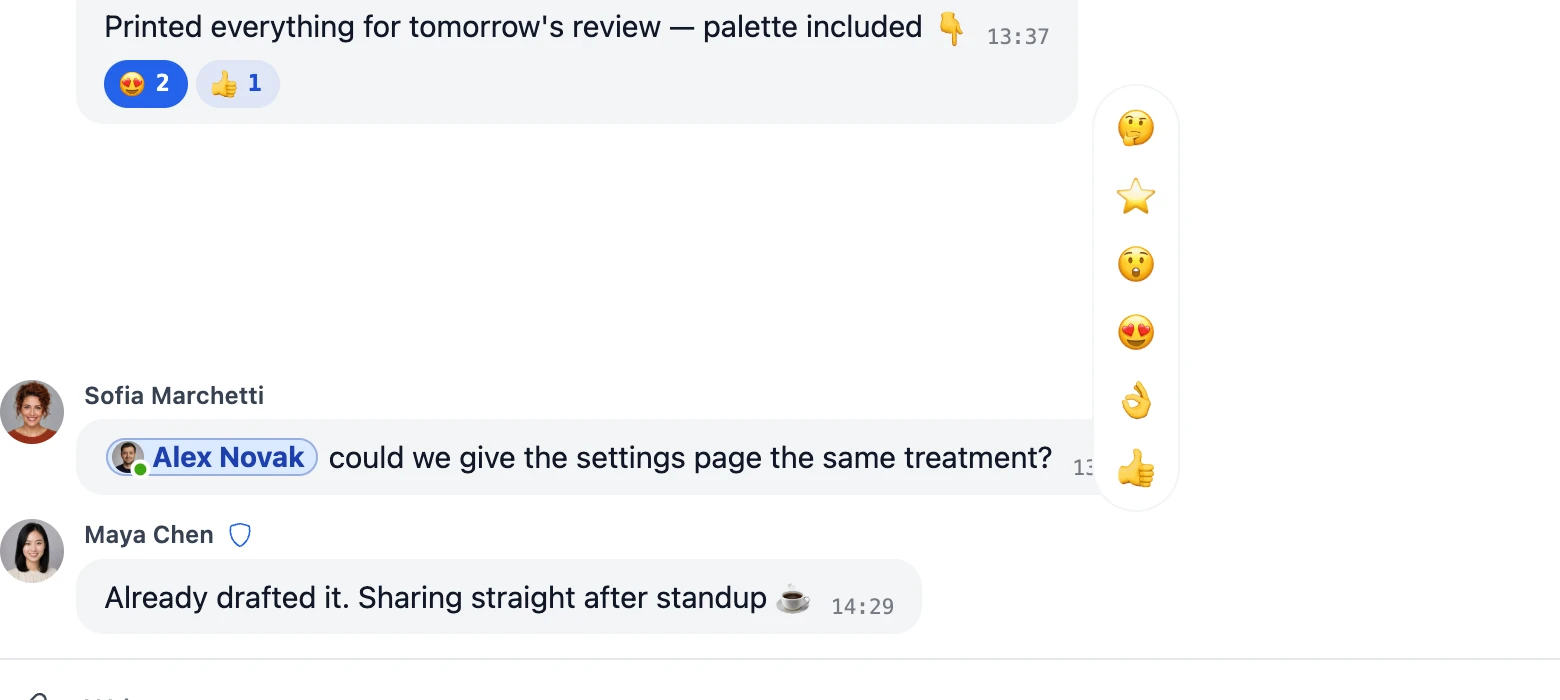
What it adds#
- Tap-to-react button on every message
- Multiple users can react with the same or different emojis
- Reaction badges below each message, with a count once two or more people pick the same emoji (e.g., 👍, ❤️ 2)
- Click a reaction badge to see exactly which users reacted with that emoji
- Customizable reaction emoji set — admins choose which emojis are available
- Drag-and-drop reordering of the available reaction set in admin
How it works#
When a user clicks the reaction button on a message, a small picker appears with the configured emoji set. Selecting an emoji adds a reaction record (user, message, emoji) to the database. Reactions are surfaced as small badges under the message body.
| Action | Outcome |
|---|---|
| User clicks 👍 on a message | Their reaction appears as a 👍 badge |
| Another user also clicks 👍 | Badge count increments to "👍 2" |
| First user clicks 👍 again | Their reaction toggles off — the badge drops back to a plain "👍" |
| User clicks the badge | Popup lists every user who reacted with that emoji |
| Sender deletes the message | All reactions on that message are removed |
Reactions are real-time on the WebSocket version (instant updates for all participants). On the free version, they appear after the next poll.
When reactions help#
| Scenario | Why reactions matter |
|---|---|
| Busy group chat | Acknowledge a message without flooding the thread with "👍 thanks!" replies |
| Community announcements | Members react to show interest without long comment threads |
| Marketplace order chat | Vendor reacts ✓ to confirm receipt of buyer's address without typing |
| Course discussion | Students react 💡 to mark "great explanation" — useful for instructor signal |
| Support chat | Quick ✓ or ❌ for resolved / not-resolved status |
How to enable#
Navigate to WP Admin → Better Messages → Settings → Messaging.
- Message Reactions → Reactions — allow users to react to messages with emoji
- Message Reactions → Detailed Reactions — show who reacted when the reaction count is clicked
The set of emoji people can pick from lives on a different tab: Settings → Integrations → Emojis → Reaction Emojis.
Frequently asked questions#
Can users react with any emoji, or only the admin-defined set?#
Only the admin-defined set is exposed in the reaction picker. To change the available reactions, edit the Reaction Emojis list under Settings → Integrations → Emojis.
How many emojis can be in the reaction set?#
There's no hard cap, but for usability a curated 5–8 emoji set keeps the picker fast and the badges scannable. Long lists become harder to choose from quickly.
Do reactions count as messages for notification purposes?#
No — reactions don't trigger sound, push, or email notifications. They're a low-friction signal by design.
Are reactions translated for different locales?#
The emoji characters themselves are universal. The "Who reacted" popup labels are translatable through your WordPress translation tool.
Can I export or analyze reaction data?#
Yes — the bm_reactions table is queryable. Common analyses: most-reacted messages, most-active reactors, reaction trends over time. Useful for community engagement reporting.
See also#
- Emoji selector — full emoji picker for messages (different from reactions)
- Stickers — larger pre-built sticker packs as message bodies
- GIPHY integration — animated GIF picker
- Reply, edit, forward — other message-level actions