Markdown Support
Better Messages renders standard Markdown syntax in chat messages — users can type **bold** or *italic* and the formatting appears automatically when the message sends. This works in private conversations, group chats, and chat rooms across the free and WebSocket versions, with no setup required.

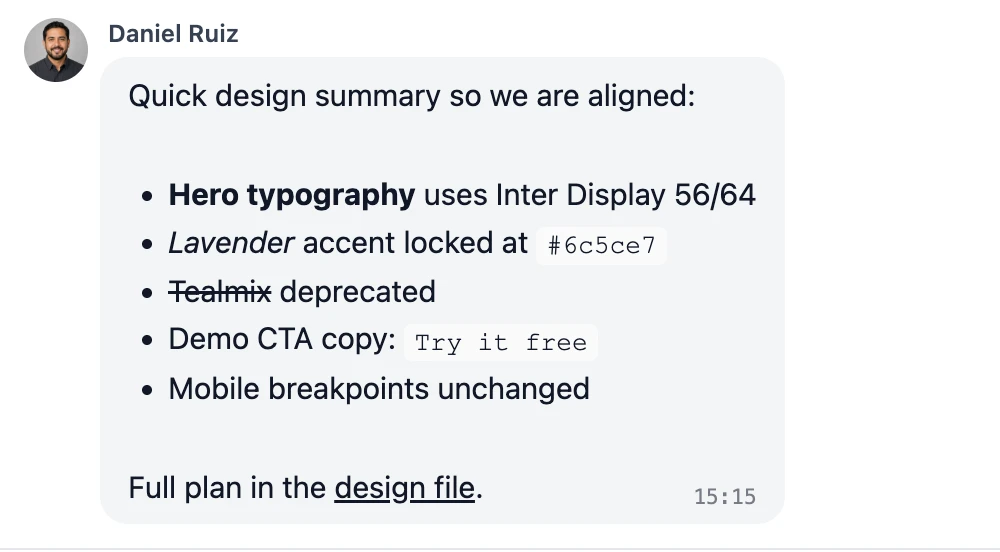
What it adds#
- Markdown syntax recognized in every conversation type — DMs, group chats, chat rooms
- Live rendering when the message is sent (no preview toggle needed)
- Pairs with the formatting buttons — members pick whichever they prefer
- Identical rendering on the web app and the mobile app
- Also understood by the Mass Messaging editor in the admin area, so broadcasts can carry headings, lists and links
- No admin setting to configure — enabled by default
Supported syntax#
| Markdown | Rendered |
|---|---|
**bold** | bold |
*italic* | italic |
~~strikethrough~~ | |
# Heading | a section heading |
- item | a bulleted list |
1. item | a numbered list |
`inline code` | inline code |
```code block``` | a multi-line monospaced block |
[link text](https://example.com) | a clickable hyperlink |
How it works#
When a message is rendered, the frontend converts the raw message body through the marked Markdown parser in the browser. The original syntax characters are stored in the database — editing a message lets you tweak the same **bold** source you typed, while lists, headings and links come back formatted in the message field, as the formatting buttons make them, and are saved as the same Markdown. Re-rendering happens on the fly, so changes propagate instantly to anyone with the thread open.
URL detection is applied to plain links too, so a user typing a bare https://... gets the same clickable result as the explicit [link](url) form. Code blocks suppress URL detection and emoji expansion, which keeps technical content readable.
The formatting buttons show their formatting live while a message is written. The lists, headings and links they make are stored as this same Markdown, and bold, italic, underline and strikethrough as their HTML tags.
When it's useful#
| Audience | Why Markdown helps |
|---|---|
| Developer / technical communities | Inline code and fenced code blocks make sharing snippets natural |
| Course cohorts (LMS) | Bold and italic emphasis in study discussions without learning a UI |
| Marketplace vendors | Quick price/SKU emphasis in product Q&A messages |
| Mobile-app users | Markdown is quicker to type than opening the formatting buttons on a small screen |
Frequently asked questions#
Can administrators disable Markdown rendering?#
Markdown is part of the core client-side message renderer. There is no separate "disable Markdown" toggle. If you need to transform message text before render, hook the PHP filter bp_better_messages_pre_format_message (or bp_better_messages_after_format_message for post-render HTML) to strip or rewrite messages before they reach the client.
Does Markdown work in chat rooms?#
Yes. Markdown is rendered identically in private conversations, group chats, and public/private chat rooms.
What happens if a user types Markdown that doesn't render correctly?#
Unrecognized syntax is preserved as plain text. For example, an unmatched **bold (with no closing **) will display the asterisks literally. The renderer is conservative — it never produces invalid HTML.
Does Markdown render in email notifications?#
Email notifications carry messages as plain text, so the Markdown is turned into plain words first: headings and emphasis lose their symbols, lists keep their dashes and numbers, and a link reads as its words followed by its address. Notifications on the mobile app read the same way.
Can I add my own Markdown extensions?#
The PHP filter bp_better_messages_after_format_message runs on every server-rendered message body and lets a theme or addon transform the message before it is broadcast to clients. This is the supported way to add custom transformations (footnotes, callouts, internal-link rewriting, etc.).
See also#
- WordPress chat plugin overview — the canonical "What is Better Messages?" page
- oEmbed support — auto-render YouTube / X / SoundCloud embeds in messages
- Stickers — pre-built sticker packs for non-text expression
- REST API for developers — programmatic message rendering