Group Conversations
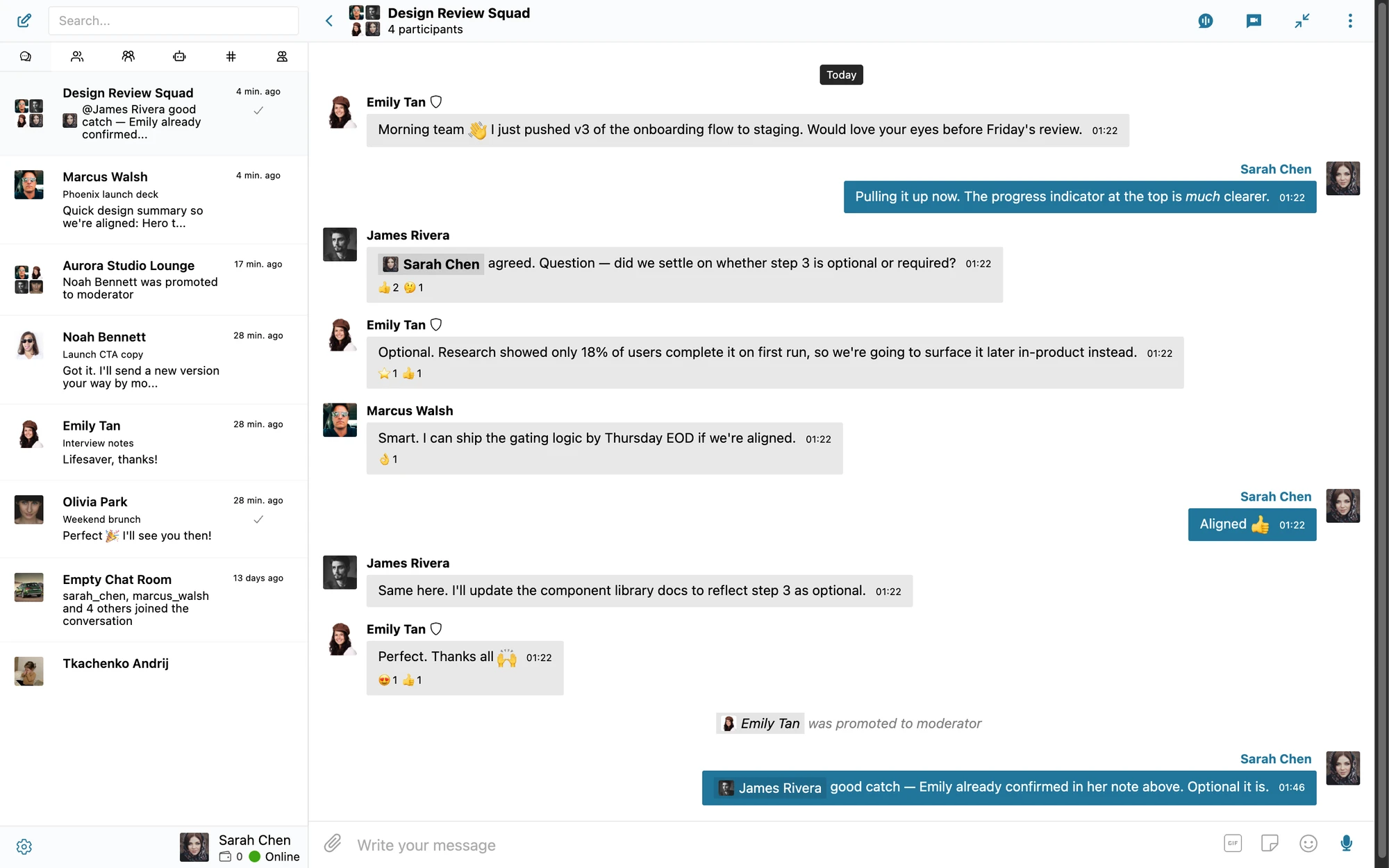
Better Messages supports multi-participant group conversations alongside private 1-on-1 DMs. Any user can start a group thread with multiple recipients, add or remove participants over time, and use every messaging feature — file sharing, reactions, calls, AI bots — exactly as in 1-on-1 chats. No participant cap, no separate "group plan", no premium gate.

What it adds#
- Unlimited participants per conversation
- Any user can start a group conversation from the new-thread screen
- Thread moderators (creator + WP admins) can invite additional users later. Opt-in setting lets every participant invite
- Participants can leave group conversations (opt-in setting)
- Subjects help identify group threads in the inbox
- Full feature parity with DMs: file sharing, reactions, replies, voice / video calls, AI bots
- AI chat bots can be added — they respond to
@botnamementions
How it works#
A user starts a new conversation, opens the recipient picker, and adds multiple users. Submit creates a single thread with all participants. Every participant sees every message in real time (WebSocket version) or with a short polling delay (free version, AJAX polling).
| Action | Outcome |
|---|---|
| User starts a group conversation | All recipients added. The creator is registered as the thread moderator |
| Moderator invites a new participant later | New user joins and sees the full thread history |
| Participant leaves the conversation | Their access ends. Thread continues for the others |
| Moderator removes a participant | Same effect — their access ends |
| New message arrives | All current participants get notifications |
| Last participant leaves | Thread is empty — orphaned conversation, retained in the database |
New participants get access to the full thread history when they're added (same model as email-thread invites). If you need a "joined-at-this-point" privacy model, use a chat room with the auto-remove inactive participants setting instead.
When to use group conversations vs chat rooms#
| Use case | Better choice |
|---|---|
| Ad-hoc team discussion (project, decision) | Group conversation — short-lived, private to the participants |
| Persistent space (community channel, support room) | Chat room — public/private with admin-set members or roles |
| One-time announcement to many | Mass messaging (each gets a 1-on-1) |
| Cohort study group | Group conversation or chat room depending on persistence needs |
How to enable#
Navigate to WP Admin → Better Messages → Settings → Messaging.
- Conversation Features → Group Conversations — allow users to create conversations with multiple participants. Turn it off for a site that should only have 1-on-1 chats.
- Group Conversation Settings → Leave Conversation — let participants leave a group conversation. The conversation's creator cannot leave their own.
- Group Conversation Settings → Invite Participants — let participants invite others into a private conversation, turning it into a group. Administrators can always add participants regardless of this setting.
Group conversations are enabled by default.
Frequently asked questions#
Is there a maximum number of participants?#
No technical cap. Practical considerations: very large groups (100+ participants) work better as chat rooms with role-based access controls than as ad-hoc group conversations.
Can participants see who else is in the group?#
Yes — the conversation header shows the participant list. By default members are listed in join order. The site-wide Participants list order setting can switch the list to alphabetical (A–Z) and pin online members to the top. To hide the list (e.g. for anonymity), override the relevant React templates via the standard plugin override pattern under your child theme.
Do voice / video calls work in group conversations?#
Yes (WebSocket version) — see group video chat and group audio chat for the technical details. Up to 32 video / 50 audio participants per call.
Can I add an AI chat bot to a group conversation?#
Yes. AI bots are added like any participant. They respond when @-mentioned with their configured name — @assistant What's the weather?. See AI chat bots.
What happens when a user is removed from a group?#
The user loses access to the conversation immediately. They can no longer see new messages or send. Past messages remain in the conversation for the remaining participants.
See also#
- Chat rooms — persistent public/private rooms with admin-set membership
- Group video chat — up to 32 video participants
- Group audio chat — up to 50 voice participants
- WordPress group chat plugin blog post — feature overview
- Mass messaging — broadcast as individual DMs
- Export transcripts — download a group conversation as text, a web page or a spreadsheet