WordPress Chatbot Plugin: AI Chatbots on OpenAI, Claude or Gemini
To add an AI chatbot to WordPress, install Better Messages, save an API key of OpenAI, Anthropic or Google Gemini, and create a bot under Better Messages → AI Chat Bots. The bot is free on WordPress.org and becomes a member of your messenger: people chat with it one to one, mention it in a group or chat room, or open it from a live chat button on any page.
Each bot has its own provider, model, instructions and welcome message, so one site can run a sales bot on the pricing page and a help bot in the members area. This post shows how to set one up, what it can do and where it stops. For the wider choice of chat plugins, see how to choose a WordPress chat plugin.
How to add an AI chatbot to WordPress#
- Install Better Messages from WordPress.org and activate it. The bots need PHP 8.1 or newer, and on an older PHP their screens say so.
- Open Better Messages → Settings → Integrations → AI Services, paste the API key of the provider you chose and press Save key. The key is checked and saved at once.
- Open Better Messages → AI Chat Bots and press Create New Bot. Give it a name and an avatar.
- Under AI Provider, pick the provider and the model. The model list comes from the provider, so a new model shows up without a plugin update.
- Under Behavior, write the Instruction, the prompt that tells the bot who it is and what it answers, and a Welcome Message if you want one.
- Press Save, then place the bot where people meet it: the Live chat button shortcode shown in the bot editor goes into any page, post or widget.
There is nothing separate to install or buy for the bots. The provider bills you for what the bot uses, by the token, and Better Messages shows what each answer cost. Every setting is in the AI chat bots documentation.
Three providers, chosen per bot#
Every bot talks to a provider you hold the key for. The site keeps one key per provider, and a bot can use a key of its own instead.
| Provider | What it adds beyond chat |
|---|---|
| OpenAI | File search over documents you uploaded to OpenAI, image generation, web search, reasoning effort and service tier. Its audio models answer a voice message with a voice message |
| Anthropic Claude | Extended thinking and web search. No image generation |
| Google Gemini | Image generation, extended thinking and web search |
All three read pictures and files that people send, and take a temperature and a cap on the length of an answer. Different bots can use different providers, so a quick, low-cost model can answer common questions while a stronger one sits in the room where harder questions come up.
A model on your own server, or any service with an OpenAI-compatible API, can be added as a fourth provider with a few PHP filters. The custom AI provider guide has a starter plugin.
Better Messages Cloud AI, which the WebSocket version includes for translation, moderation and transcription, does not run bots. A bot always answers through one of the providers above.
A bot is a member of the messenger#
A bot is not a widget pasted on top of the site. It has a name, an avatar and conversations in the same inbox as everyone else, so people reach it the way they reach any member:
- One to one. Starting a conversation with the bot opens a thread, and the bot answers every message there.
- In groups and chat rooms. With Respond to Mentions on, add the bot to a group conversation or a chat room and it answers only when someone writes
@and its name. It sees the recent messages of the conversation and can mention people in its answer. - From any page. The bot editor shows two ready shortcodes with the bot's id: a Conversation shortcode that embeds the chat with the bot, and a Live chat button shortcode. Visitors without an account can use the button too once guest access is on.
- In the bottom bar. The mini widgets can list AI bots beside friends, groups and chat rooms.
A button to a bot looks like this, with the negative id the bot editor shows:
[better_messages_live_chat_button user_id="-3" text="Ask our assistant"]
The live chat button builder sets its text, style and subject without editing the shortcode by hand, and the WordPress live chat post shows the same button opening a conversation with a person.
Instructions, welcome message and placeholders#

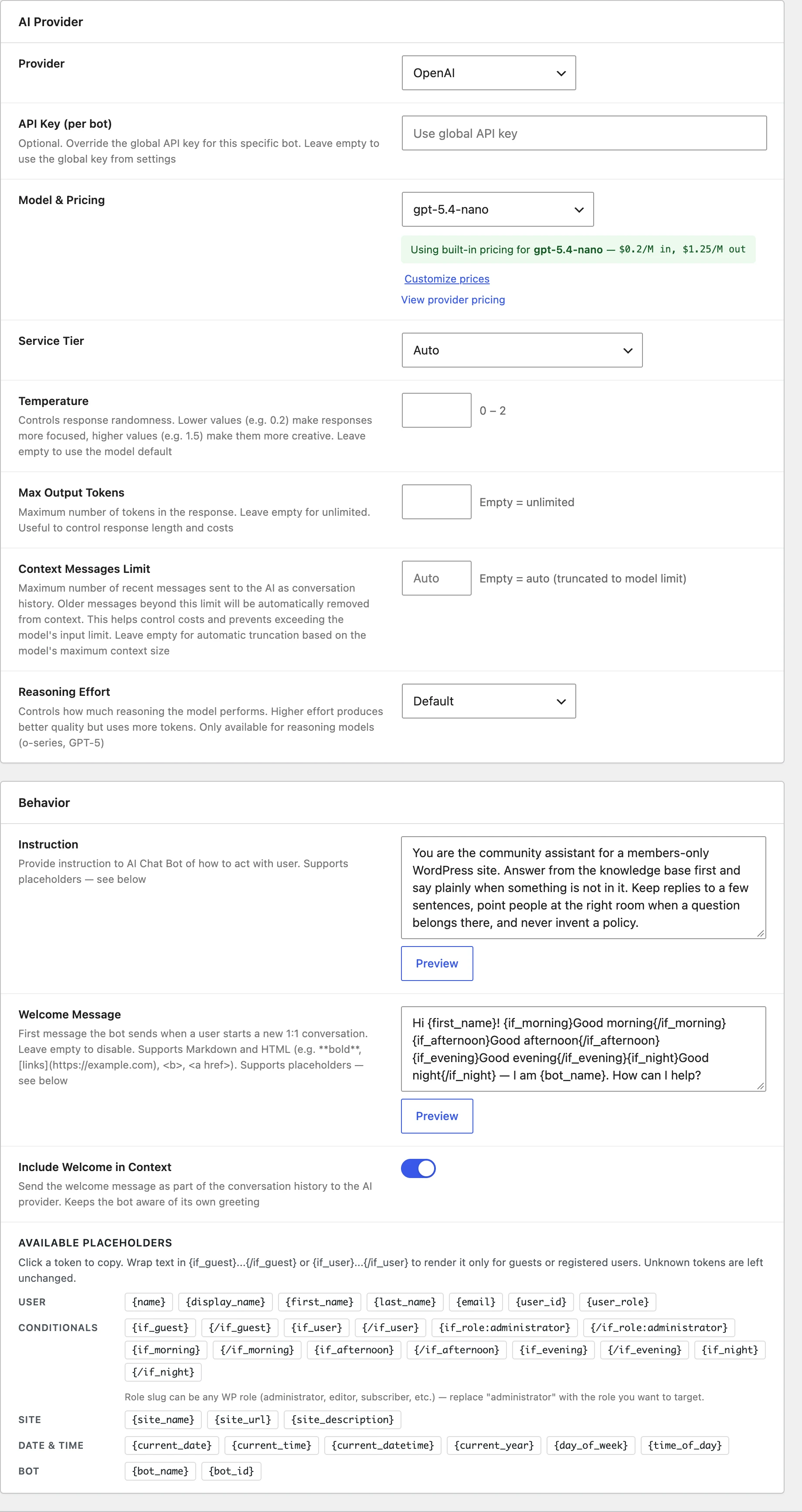
The Instruction is the system prompt: who the bot is, what it answers, what it refuses and how long its answers are. The Welcome Message is the first thing the bot says when someone starts a one to one conversation with it. It shows on the New Conversation screen as soon as the bot is picked, then stays as the first message of the thread. It raises no unread count and sends no notification, and it supports Markdown and HTML.

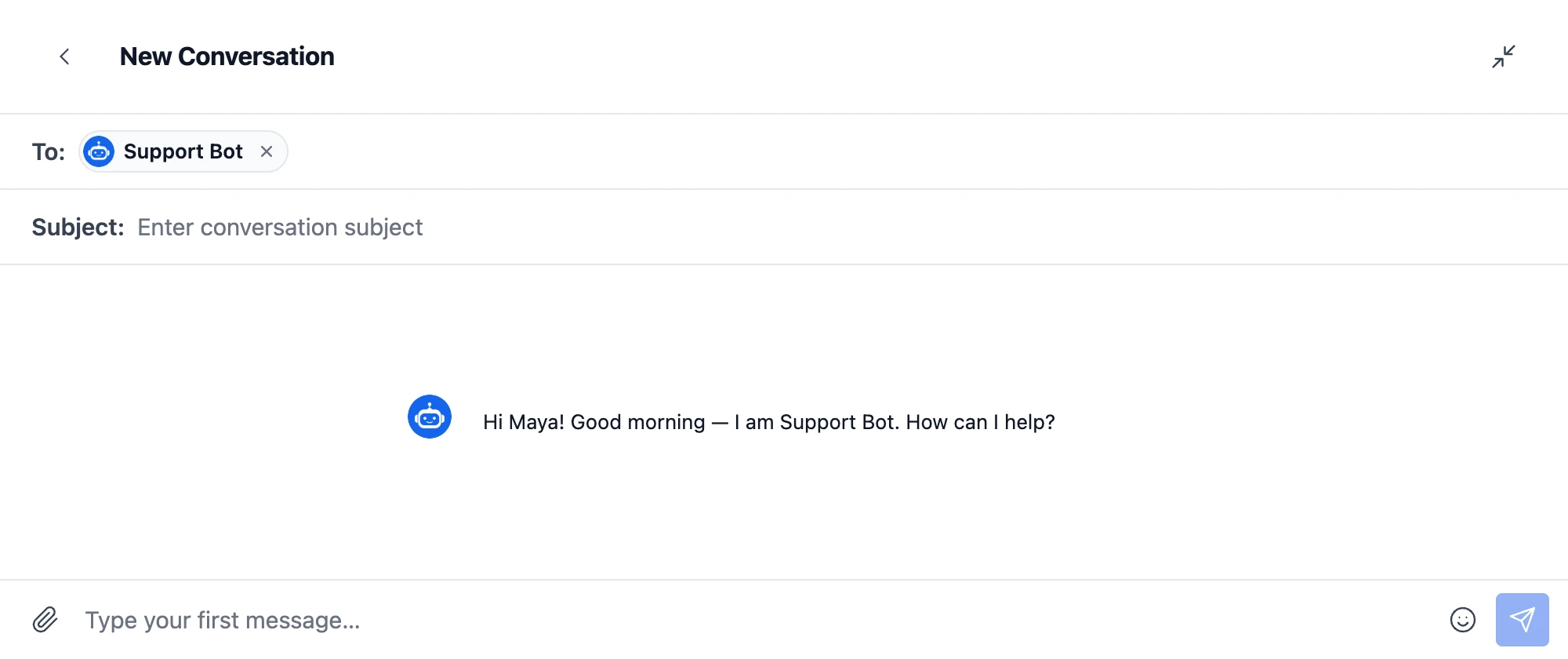
Both fields take placeholders, filled in for each person:
- User:
{name},{display_name},{first_name},{last_name},{email},{user_id},{user_role} - Site:
{site_name},{site_url},{site_description} - Date and time, in the site timezone:
{current_date},{current_time},{current_datetime},{current_year},{day_of_week},{time_of_day} - Bot:
{bot_name},{bot_id}
Blocks show text only to some people: {if_user} and {if_guest}, {if_role:editor} for a WordPress role, and {if_morning}, {if_afternoon}, {if_evening} and {if_night}. A welcome message for a pricing page could read:
{if_user}Hi {first_name}!{/if_user}{if_guest}Hi there!{/if_guest} I am {bot_name}, the assistant of {site_name}. Ask me about plans, billing or how the site works.
The Preview button under each field fills in the placeholders for your own account, so you see the result before saving.
What the bot remembers#
The bot reads the conversation before it answers, not only the last message. In a one to one conversation, Context Messages Limit sets how many recent messages it reads, and left empty it reads as many as the model takes. In groups and chat rooms, Group Context Messages sets it, 20 by default. When someone replies to an older message, the bot gets that message too, even when it is outside the window.
A shorter window costs less per answer, since every message read is billed as input by the provider. Bots can also write summaries of a long conversation, and post a scheduled digest into a conversation hourly, twice a day or daily, searching the web for it when web search is on.
What a bot can do beyond text#
Each capability is a switch in the bot editor, shown when the provider supports it:
- Enable Images and File Input: the bot reads pictures and files people send it.
- Voice Input: people speak to the bot instead of typing. The recording is transcribed and the bot answers what was said, on any of the three providers. This needs the Voice and Video Messages add-on and a transcription provider, and voice message transcription explains both.
- Image Generation on OpenAI and Gemini: the picture arrives as an attachment of the answer.
- Web Search: the bot looks up current information before answering.
- File Search on OpenAI: the bot answers from documents you uploaded to OpenAI, given as up to two vector store ids.
Costs: token usage and points#
Every answer stores the tokens it used and what it cost, from a price list of the models that ships with the plugin and that Check for new prices, under AI Services, brings up to date. Token Usage in the bot editor shows the totals, and Customize prices sets your own rates for a model.
To pass the cost on to members, User Pricing charges MyCred or GamiPress points for each answer, either a fixed number of points or points per dollar of what the answer cost, with a minimum balance to start. The GamiPress and MyCred posts cover the points side, so a site can give each member points to spend on its assistant.
What it does not do#
A chatbot that says plainly where it stops is easier to plan around:
- It does not hand a conversation over to a person. There is no queue or transfer. Write in the Instruction what the bot says when someone asks for a person, and put a second Live Chat button, to a member of your team, beside the bot on the same page.
- It does not act on the site. A bot answers in the conversation and does not create orders, posts or tickets. AutomatorWP and Uncanny Automator can send a private message when something happens on the site, but they do not act on what a bot says.
- It stays out of encrypted conversations. Bots are left out of end-to-end encrypted conversations, since the server cannot read them.
- It needs PHP 8.1 or newer.
Other AI beside the bot#
Three AI features work on messages between people rather than as bots:
- Content moderation flags or holds harmful messages, with an OpenAI key or, on the WebSocket version, with Better Messages Cloud AI.
- Voice message transcription writes out voice messages, with an OpenAI key or with Cloud AI on the WebSocket version.
- Message translation shows each reader the messages in their own language, from 69, on the WebSocket version.
An Anthropic or Gemini key runs bots only. Moderation and transcription take an OpenAI key or Cloud AI.
Free or WebSocket for a chatbot#
| Feature | Free | WebSocket |
|---|---|---|
| AI chat bots on OpenAI, Anthropic and Gemini, with your key | yes | yes |
| Instructions, welcome messages, placeholders and conditions | yes | yes |
| Answers in groups and chat rooms when mentioned | yes | yes |
| Pictures, files, voice input, web search, file search | yes | yes |
| Custom provider through PHP filters | yes | yes |
| Points per answer with MyCred or GamiPress | yes | yes |
| How an answer arrives | whole, once it is written | word by word as it is written |
| Typing indicator and the bot shown online | — | yes |
| AI moderation with an OpenAI key | yes | yes |
| Better Messages Cloud AI: moderation, transcription, translation | — | yes |
The bot itself is the same on both versions. The WebSocket version, which runs on WordPlus Cloud, streams the answer as the model writes it and shows the bot typing, so a long answer starts at once instead of after a wait. Prices of the WebSocket version are on the pricing page.
Frequently asked questions#
Is there a free chatbot plugin for WordPress?#
Yes. Better Messages is free on WordPress.org, and its free version includes AI chat bots on OpenAI, Anthropic Claude or Google Gemini. The plugin charges nothing for the bots, and the provider bills you for the tokens they use.
Do I need an OpenAI, Anthropic or Gemini account?#
Yes, an API key from at least one of them. A bot always answers through a provider you hold the key for, or through a custom provider you add, such as a model on your own server.
Can visitors without an account chat with the bot?#
Yes. Turn on guest access and place the bot's Live Chat button on a page. A visitor types a name and starts chatting, and the welcome message can greet guests differently from members.
Can the bot answer from my own documents?#
On OpenAI, yes: File Search lets the bot search documents you uploaded to OpenAI. On every provider, the facts the bot needs most can go into its Instruction, and Web Search lets it look up current pages.
Can the bot hand a conversation over to a person?#
No. Write in the Instruction what the bot says when someone asks for a person, and place a Live Chat button to a member of your team beside it.
Does the bot see private user data?#
It sees the conversation it is in, and what you put into its Instruction. Placeholders such as the name or email of the person add that data only when you write them into the prompt. Bots are left out of end-to-end encrypted conversations.
Can I run the bot on a model on my own server?#
Yes, through a custom provider registered with PHP filters, for any server with an OpenAI-compatible API that streams its answers. The custom AI provider guide has a starter plugin.
How is this different from a hosted chatbot widget?#
A hosted widget adds a script to your site and keeps conversations on its own servers, with its own accounts. A Better Messages bot runs inside WordPress, with the same user accounts, roles and theme, conversations in your database, and your own key with the provider you choose.
See also#
- AI chat bots for WordPress messaging: every setting of a bot, walked through
- AI chat bots documentation: keys, the price list, extended thinking and voice input
- How to choose a WordPress chat plugin: the two kinds of chat plugin and what to check
- WordPress live chat plugin: visitors writing to your team from any page
- AI content moderation for WordPress chat
- AI message translation for WordPress chat
- Add a custom AI provider
- Better Messages AI and MCP integration: for administrators who manage conversations from an AI assistant