FluentNotify Integration: Firebase Web Push for Chat
FluentNotify is a push notification plugin for WordPress from the FluentCRM and FluentCommunity team. It delivers browser push through Firebase Cloud Messaging, using a Firebase project you own. Better Messages detects FluentNotify automatically and routes every chat push notification through it.
What the integration adds#
- Push per new message — when a message arrives, recipients with an active FluentNotify subscription get a browser notification with the sender's name and avatar, and clicking it opens that conversation.
- Push for incoming calls — call notifications go out on the same channel, sent immediately rather than queued.
- Your own Firebase project — notifications go out through Firebase Cloud Messaging on credentials you control. The service account private key never leaves your site: WordPress signs a short-lived access token, and only that token is used to send.
- Your existing subscribers — anyone who has already opted in through FluentNotify receives chat notifications too. There is no second opt-in prompt to build.
- Both push timing options — When user is offline and When offline or message is unread for 5 seconds both work, the same as they do on the built-in web push.
- No extra configuration — once FluentNotify holds valid Firebase credentials, Better Messages picks it up on its own.
Requirements#
- The WebSocket version of Better Messages, with the messaging mechanism set to WebSocket. Chat push is scheduled by the Better Messages cloud server, so there is no push of any kind on the free version
- FluentNotify, configured and enabled with a complete set of Firebase credentials
Until FluentNotify holds a complete configuration, Better Messages leaves it alone and its own Web Push add-on keeps working as before.
Installation#
- Get FluentNotify and install it following the standard WordPress installation process.
- In the Firebase console, create a project (or open an existing one).
- Under Project settings → General, register a Web app and copy its
apiKey,appId,messagingSenderIdandprojectId. - Under Project settings → Cloud Messaging → Web configuration, generate a Web Push certificate key pair and copy the public key.
- Under Project settings → Service accounts, choose Generate new private key to download the service account JSON.
- Paste all of it into FluentNotify → Settings, then use Verify credentials to confirm Firebase accepts them.
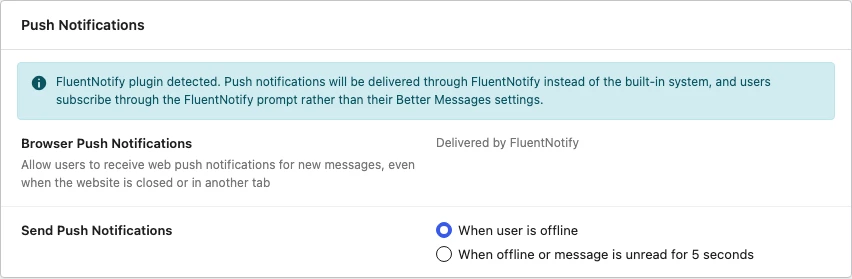
Better Messages detects FluentNotify as soon as it is configured. Open Better Messages → Settings → Notifications to confirm:

How users subscribe#
Subscriptions are handled by FluentNotify, not by Better Messages. It loads its push client on the front end for every logged-in user, and asks for browser permission through its own prompt — on a FluentCommunity site, that prompt appears in the portal.
Because FluentNotify owns the opt-in, the per-user push toggle in the Better Messages notification settings is hidden while the integration is active. Users who have already granted browser permission are subscribed automatically on their next page load.
What Better Messages still controls#
The integration changes who delivers the notification, not who receives one. Everything you have configured in Better Messages → Settings → Notifications still applies:
- Send Push Notifications — both options work. When user is offline skips anyone with the site open. When offline or message is unread for 5 seconds also reaches someone who had it open but did not read the message
- Notification levels — a conversation sends a push only about what its level allows: every message, mentions and replies, or nothing while it is muted
- Force Notifications for Mentions and Replies — a mention or a reply still reaches a muted conversation when this is enabled
Disabling the integration#
The integration activates on its own whenever a configured FluentNotify is detected. To keep the two plugins separate — for example, you use FluentNotify only for marketing pushes and want chat push to keep running through the built-in Web Push add-on — disable it with a PHP filter:
To be able to implement this guide, you need to learn how to insert PHP snippets to your website.
You can find guide here: WP Beginner
add_filter( 'better_messages_fluent_notify_integration', '__return_false' );
With this filter in place Better Messages does not route any chat notification through FluentNotify, and its own web push takes over again when enabled.
Frequently asked questions#
Do I need both FluentNotify and the built-in Web Push add-on?#
No — pick one. They are never both active: while FluentNotify is configured, Better Messages stands its own web push down so nobody receives the same message twice.
Does this work on the free version?#
No. Chat push notifications are a WebSocket-version feature on every provider, the built-in one included — the whole push pipeline lives in the WebSocket module, and the cloud server is what decides who is offline and whether a message is still unread. On the free version FluentNotify still works for the rest of your site, but chat messages do not trigger it.
Do guests receive push notifications?#
No. FluentNotify stores subscriptions against WordPress user accounts, and guests do not have one. Guests still see in-page notifications while the chat is open.
What about end-to-end encrypted conversations?#
They send push notifications like any other conversation. Encryption costs you nothing here, because a push only ever carries the sender's name and a link — never message text — so there is nothing the server would need to read. The first message in a new encrypted conversation is announced as "New encrypted conversation from …".
Does the message text appear in the notification?#
Not by default. The notification names the sender and links to the conversation, so message content is not written into a browser notification.
Does a member get two notifications for one message?#
No. While the site is open, FluentNotify's in-page card is skipped for a message the messenger announces itself. Where on-site notifications are off, at Notifications → Onsite Notifications → New Message Notifications or by the member's own choice, FluentNotify's card shows instead.
See also#
- FluentCommunity integration — the community platform from the same team
- Web Push add-on — Better Messages' built-in web push, no third party
- OneSignal integration — push through OneSignal instead
- Progressify integration — PWA-based push, including iOS
- Real-time messaging — what the WebSocket version unlocks