Locations and Addresses
Better Messages shows an administrator where a guest or a member connects from: the country, the city and the addresses (IP addresses) of their last connections. The location is found on the site itself. No address is sent to a service to look it up.
It is a tool for moderation. A guest who signs up again under another name shows the same address, and an address used by several people names them all.
What it adds#
- The country and city of guests and members, with a flag
- The last 20 addresses of each person, with the dates they were seen and who else used the same address
- Shown to administrators only, in Administration → Guests, in Administration → Messages, in the details of a conversation and in the user screens of WordPress
- An optional country flag beside each person in the online lists, which everyone sees
- A setting for how long addresses are kept, and a switch to keep none
Where a location comes from#
An address alone says nothing about a place. Better Messages asks three sources in this order, and the first that knows the answer wins.
| Source | What it gives | When it is used |
|---|---|---|
| Cloudflare | The country, and the city where the visitor location headers of Cloudflare are on | The site is behind Cloudflare. The headers are believed only on a request that really came from Cloudflare |
| The DB-IP database | The country, or the country and the city | A database is chosen in the settings and downloaded to the site |
| WooCommerce | The country | WooCommerce is active with its own location database set up |
Where Cloudflare gives the country alone, the database adds the city.
With none of the three, addresses are still kept and shown, with no country and no city beside them.
Setting it up#
Navigate to WP Admin → Better Messages → Settings → Integrations → Locations.
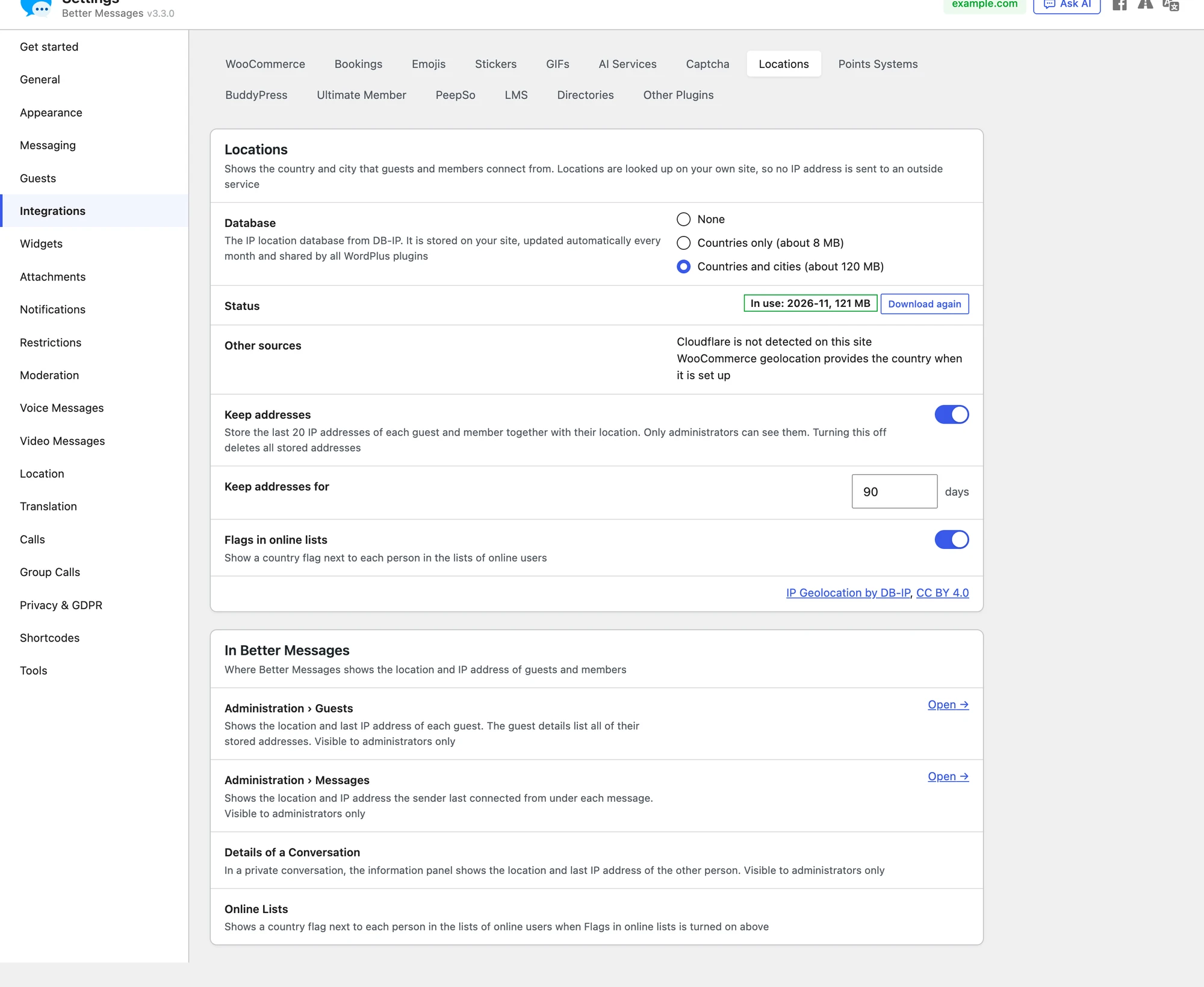
| Setting | What it does | Default |
|---|---|---|
| Database | None, Countries only (about 8 MB on the site) or Countries and cities (about 120 MB on the site). The download itself is about half of that, as the file comes packed. Nothing is downloaded when you choose one or save it | None |
| Status | Shown once a database is chosen. Not saved yet until the choice is saved, then Not downloaded yet with the Download button, Downloading… while it comes, and In use with the month of the database and its size, where Download again takes it again at once | — |
| Other sources | Says whether Cloudflare is detected and what it provides, and whether WooCommerce provides the country | — |
| Your location | Your own location as the site finds it, a quick check that it works | — |
| Keep addresses | Stores the last 20 addresses of each guest and member. Turning it off deletes every stored address when the settings are saved | On for a new site. Off on a site updated from a version before 3.3.0, where no address is stored until you turn it on |
| Keep addresses for | The number of days an address is kept, from 1 to 3650 | 90 days |
| Flags in online lists | Shows the flag of the country beside each person in the lists of who is online | Off |
Nothing on this screen is saved until you press Save Settings, which shows at the foot of the page as soon as something is changed. Saving with Keep addresses turned off asks first, as it deletes every stored address and cannot be undone.
The card In Better Messages under the panel lists the screens that show a location, with a link to the list of guests.
The database#
The database is one of the free databases of DB-IP, which DB-IP publishes under the Creative Commons Attribution 4.0 licence.
- Nothing is downloaded by choosing a database. Save the choice with Save Settings, then press Download to start the first download
- It is downloaded into
wp-content/uploads/wordplus/geo/on your own site - Once a database was downloaded, a background task takes the new one each month. It is never downloaded during the request of a visitor
- Choosing the other kind keeps the database in use until the new one is downloaded
- A new file replaces the old one only after it was read back and answered correctly, so a broken download leaves the site with the database it had
- None deletes the files
- Every WordPlus plugin on the site uses the same copy
If the download fails, the panel says why: the uploads folder is not writable, the zlib extension of PHP that unpacks the file is missing, or the file could not be downloaded or read.
Where an administrator sees it#
In the screens of Better Messages, an administrator is anyone who may open Administration: the administrators of the site and the roles chosen at Settings → Moderation → Reports and Holds → Roles That Can Access Administration. The two columns of the Users list of WordPress are shown to administrators of the site alone.
Administration → Guests#
Navigate to WP Admin → Better Messages → Administration → Guests. The list has a Location column, with the flag, the city and the country, and a Last address column.

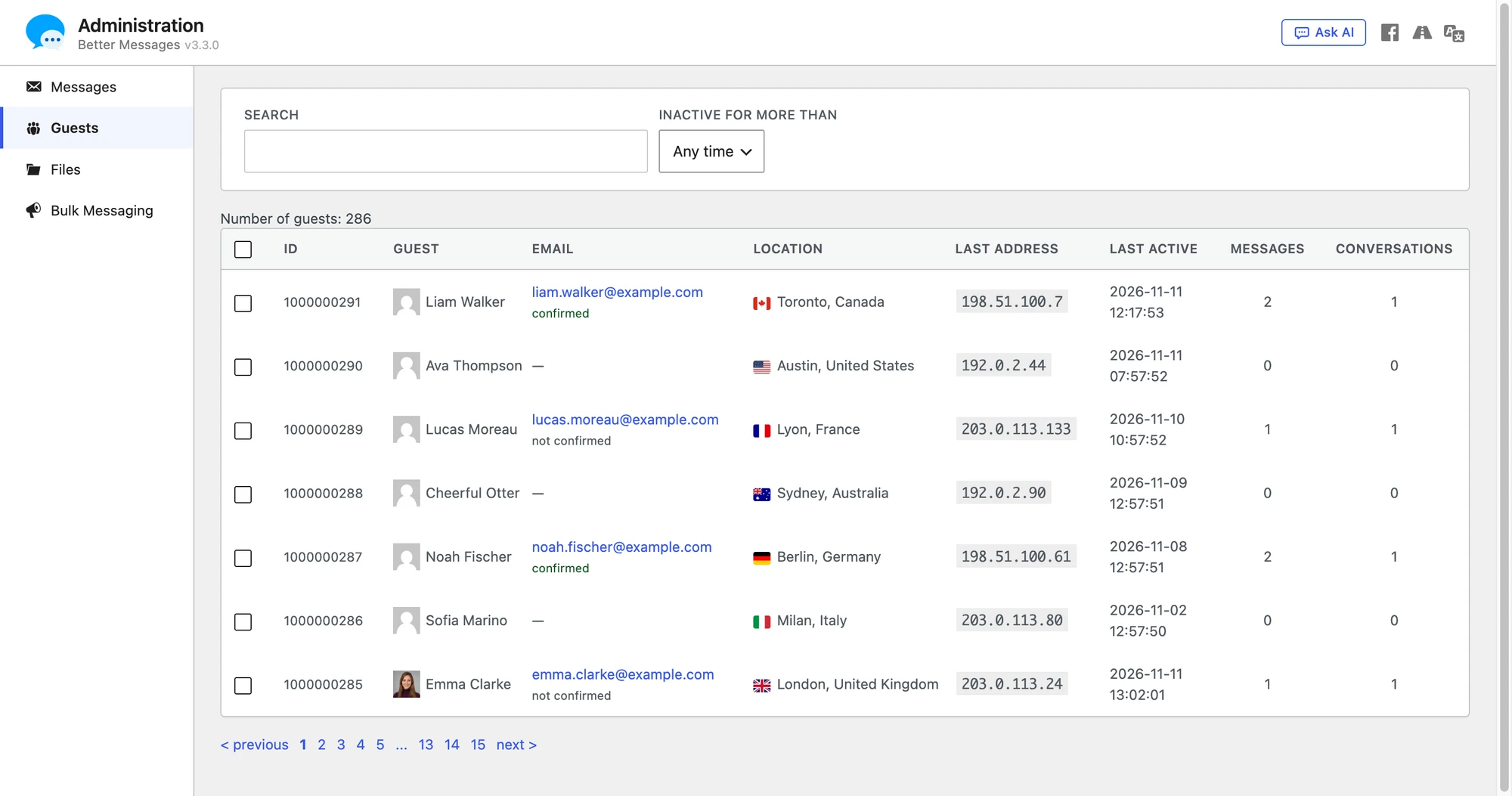
Press a row to open Guest Info. Its Addresses table lists every address kept of the guest:
| Column | What it shows |
|---|---|
| Address | The IP address |
| Location | The flag, the city and the country, where they are known |
| Last seen | The last time the guest connected from it |
| Also used by | The other guests and members seen on the same address |

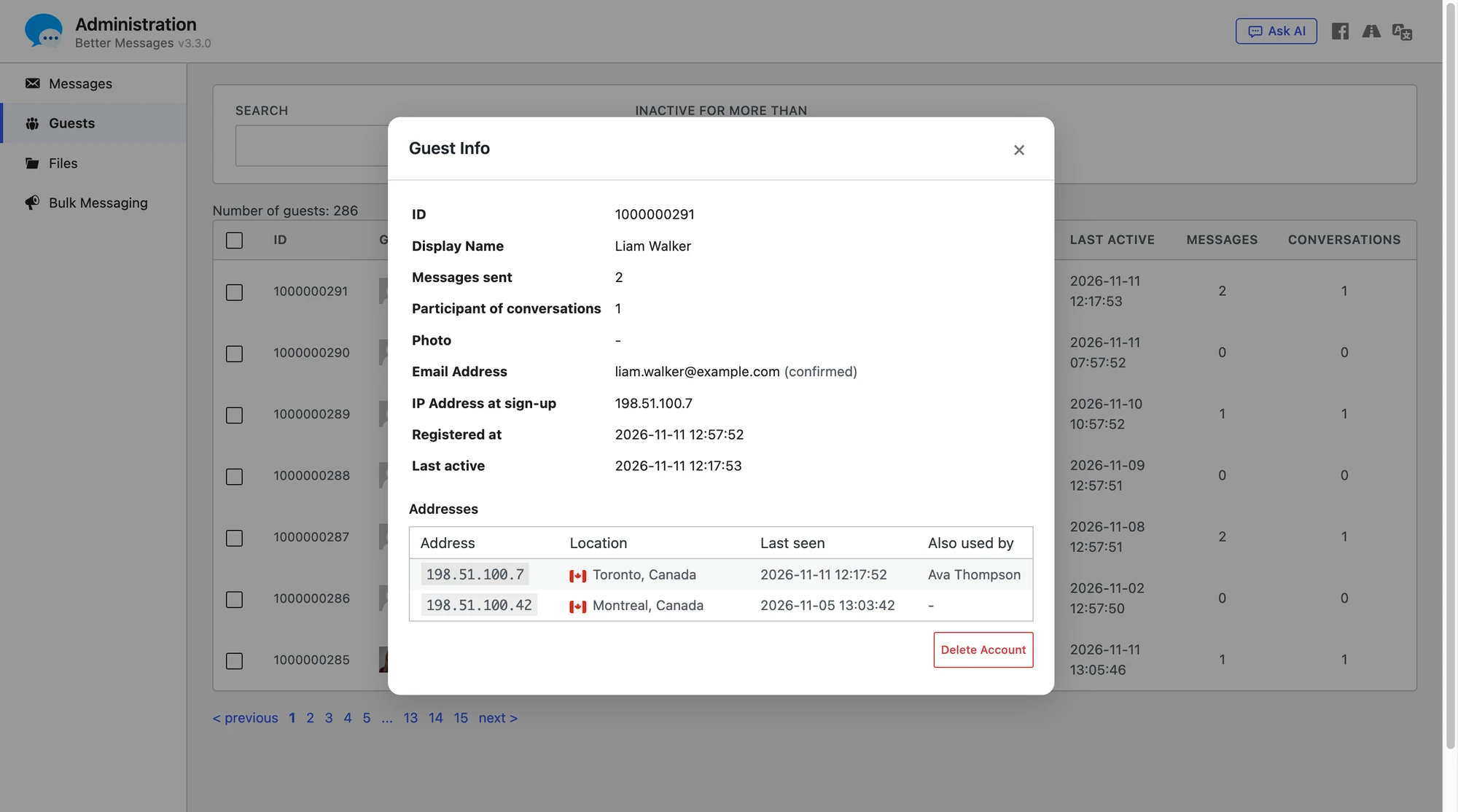
The popup also shows the IP Address at sign-up, which is kept with the guest. While no address was kept yet, the list shows that one as the last address.
Administration → Messages#
Navigate to WP Admin → Better Messages → Administration → Messages. Under the number and the time of each message, the list shows where its sender last connected from: the flag, the city and the country, and the IP address. It is there for guests and for members.

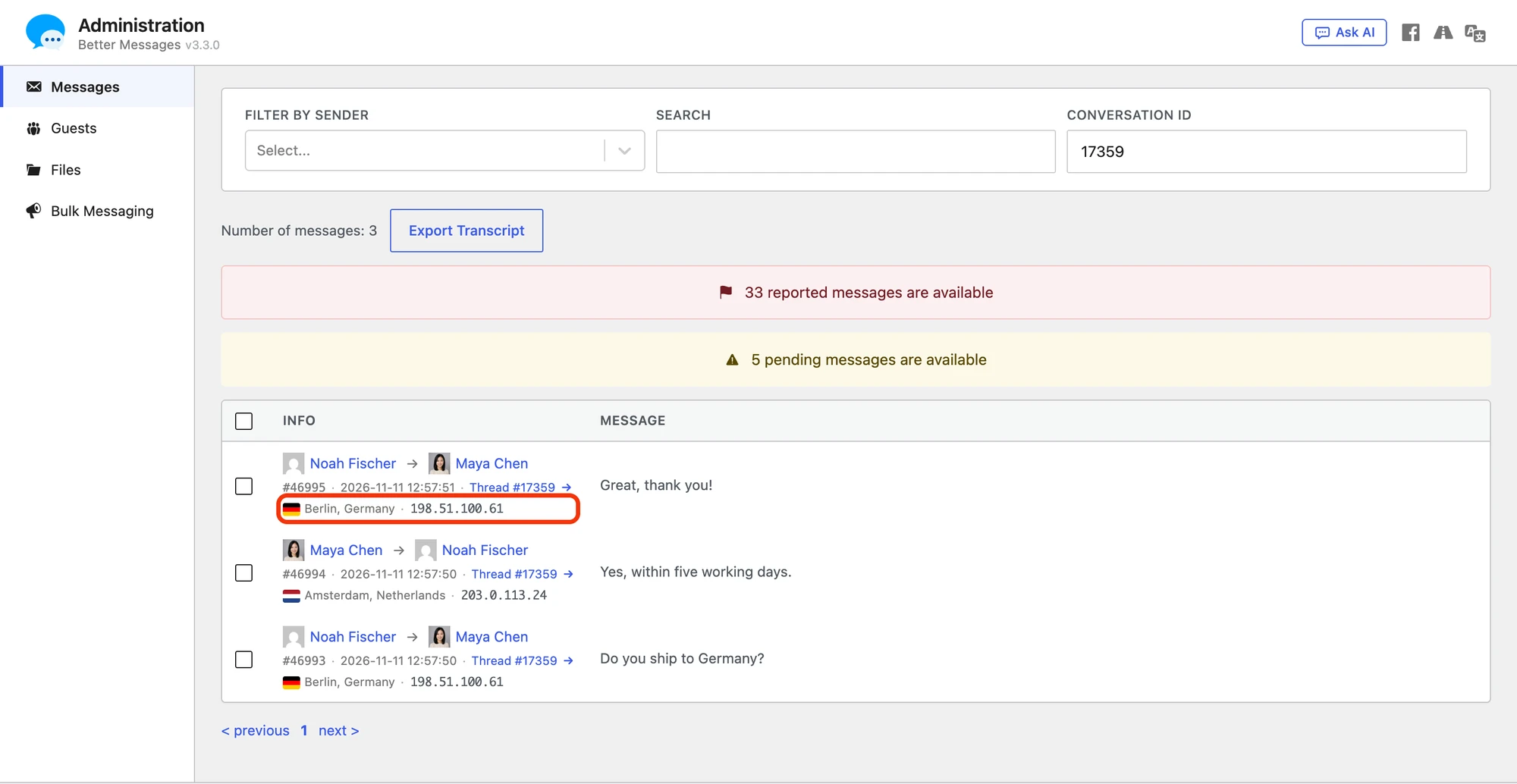
- It is the last address of the sender, not the address a message was sent from. Better Messages keeps addresses with the person, not with each message
- The date it was last seen shows when the pointer rests on the line
- A sender with no address kept has no such line
The details of a conversation#
In a conversation of two, the information panel of the messenger shows an administrator a Details block about the other person, a guest or a member.

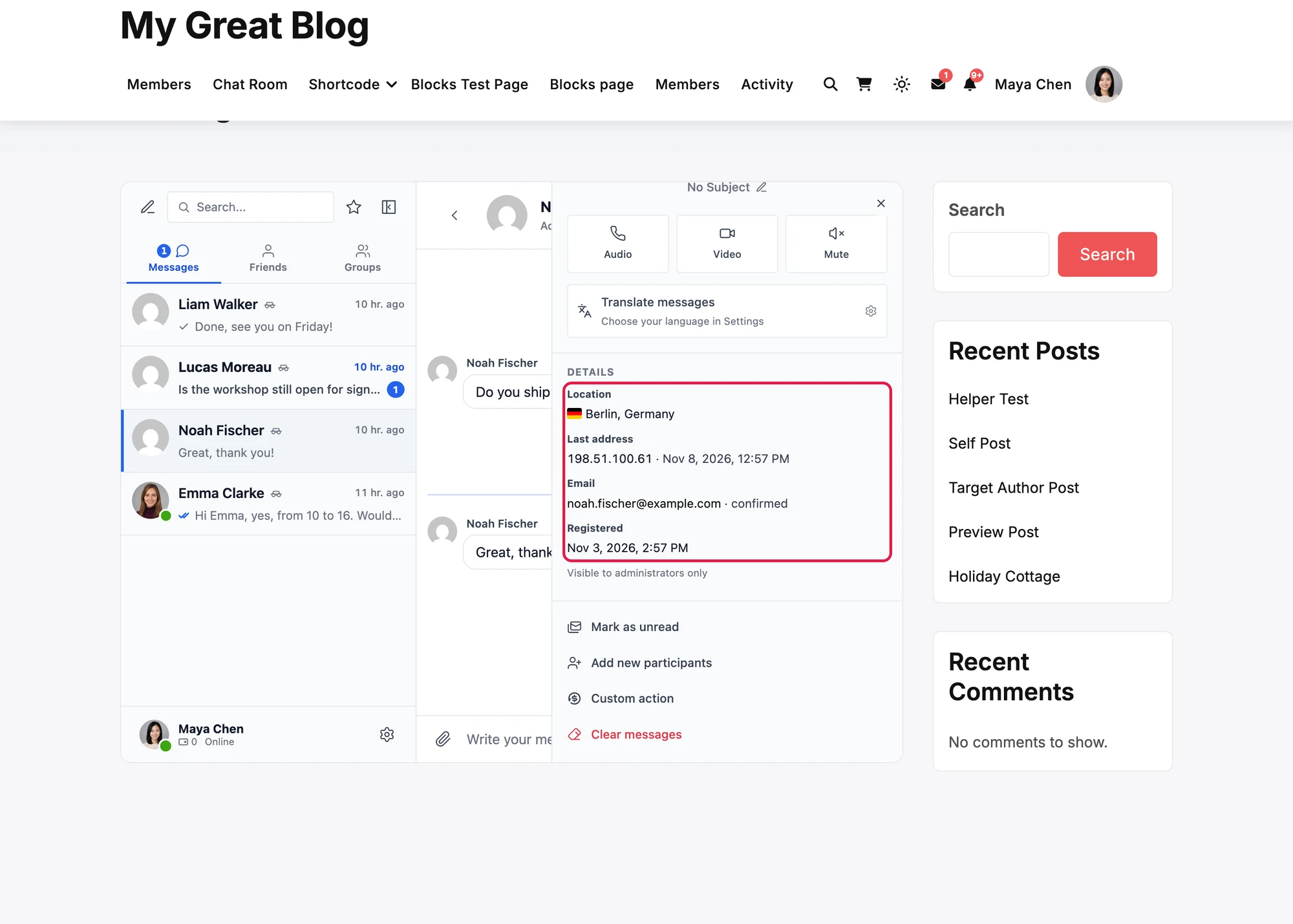
| Row | What it shows |
|---|---|
| Location | The flag, the city and the country, where they are known |
| Last address | The IP address and when it was last seen |
| For a guest: the email and whether it is confirmed, not confirmed or from a booking | |
| Registered | When the person registered or signed up |
| Agreed to the terms | For a guest: when they ticked the consent checkbox of the sign-up form |
The block ends with Visible to administrators only. A member who is not an administrator never sees it, and the site does not send them its content. Group conversations and chat rooms have no such block, and neither has the mobile app.
The user screens of WordPress#
For members, WordPress itself shows the same in two places.
The Users list gets two columns, Location and Last address.
The screen of a user (Users → Edit) has it in its Better Messages section, under the numbers of messages and conversations of the user:

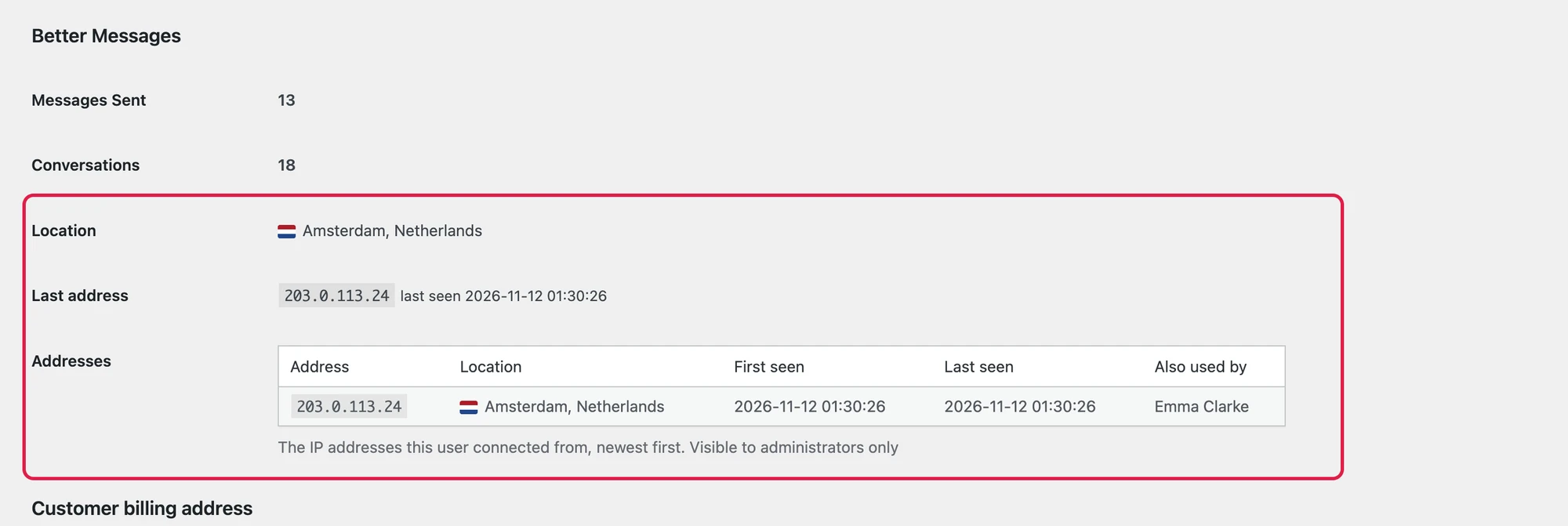
| Row | What it shows |
|---|---|
| Location | The flag, the city and the country of the last address |
| Last address | The IP address and when it was last seen |
| Addresses | Every address kept of the user: the address, its location, when it was first and last seen, and who else used it |
The section is shown to anyone who may open Administration. The rows are there once an address of the user was kept, while Keep addresses is on.
Flags in the online lists#
Turn Flags in online lists on to show the flag of the country beside each person in the lists of who is online: the online list of a chat room, and the Friends, Users and Online lists and the search results of the messenger.
- Everyone who sees the list sees the flag, guests included
- Only the flag is shown. The city and the address are never sent to anyone but an administrator
- The name of the country shows when the pointer rests on the flag
- A person whose country is not known has no flag
It is off by default.
What is kept, and for how long#
- Up to 20 addresses per person. Each with its country, region and city, the first and the last time it was seen, and how many times
- At most one write an hour for a person and an address. An address is noted when the messenger of a member or a guest talks to the site, and when a member logs in. Opening a page alone notes nothing
- 90 days, or the number of days you set. A daily background task deletes what is older
- Keep addresses off deletes every stored address once the settings are saved and the question is confirmed, and nothing is noted while it is off
- Deleting a member or a guest deletes their addresses
- The address at sign-up of a guest is kept with the guest, as it was before 3.3
- With Stored Data Encryption on (Settings → Messaging), the addresses and their locations are stored sealed
Addresses are personal data. While Keep addresses is on, Better Messages adds a paragraph Addresses and locations to the privacy policy text WordPress suggests at Settings → Privacy, which says what is kept, for how long and who sees it.
The personal data tools of WordPress cover the addresses of a member: Tools → Export Personal Data lists each address with its country, region, city and the first and last time it was seen, and Tools → Erase Personal Data removes them. Both tools find a person by the email of a user account, so they do not reach guests: the addresses of a guest leave the site when their days are over, when Keep addresses is turned off, or when the guest is deleted.
Frequently asked questions#
Is any address sent to another company?#
No. The location is read from a file on your own site, or from what Cloudflare already sent with the request. The only request the feature makes is the monthly download of the database from DB-IP, which carries nothing about a visitor.
How exact is the location?#
The country is right in almost every case. The city is the best guess of the database and can be a neighbouring city. A person on a VPN or a mobile network shows the place of that network.
The site is behind Cloudflare. Do I need the database?#
Not for the country. For the city, either turn the visitor location headers on in Cloudflare or choose Countries and cities here.
Can members see where other members are?#
No. The location and the addresses are for administrators. The only thing others can see is the flag, and only after Flags in online lists is turned on.
Does it slow the site down?#
A lookup reads a local file, and an address is written at most once an hour for each person.
What happens to the addresses when I turn it off?#
Turning Keep addresses off and saving deletes every stored address. The page asks you to confirm it first, as it cannot be undone. Choosing None as the database deletes the database files, and new addresses are then kept with no location.
For developers#
A person is a user id: a member is a positive id, a guest a negative one.
// The place of an address: country, region, city and the source that knew it.
$place = wordplus_geo()->locate( '203.0.113.7' );

// The addresses kept of a person, newest first, and the last one.
$addresses = wordplus_addresses()->of( $user_id );
$last      = wordplus_addresses()->last( $user_id );
wordplus_geo_locateanswers a lookup yourself: return an array withcountry,regionandcityfor an addresswordplus_addresses_can_viewdecides who sees the addresses in the user screens of WordPresswordplus_geo_can_managedecides who may change the Locations panelwordplus_trusted_proxieslists the proxies in front of the site, so the address of the visitor is read and not the address of the proxy
See also#
- Guest access — the list of guests and the Guest Info popup
- Site moderators — who may open Administration
- Privacy & GDPR — what is stored about guests and members