Spam Protection
Spam Protection watches what accounts do, not only what they write. An account that writes to dozens of people it never talked to, sends the same text to many conversations, or posts links from a fresh account looks like a spammer, and Better Messages holds or refuses it before members are bothered. Moderators see each such account in one place, with its reasons in plain words, and remove everything it sent with one button.
It works in the free version and in the WebSocket version alike. Its settings are part of Settings → Moderation, beside reports, pre-moderation and the moderator emails, and what waits for a moderator is in one queue, Administration → Review.
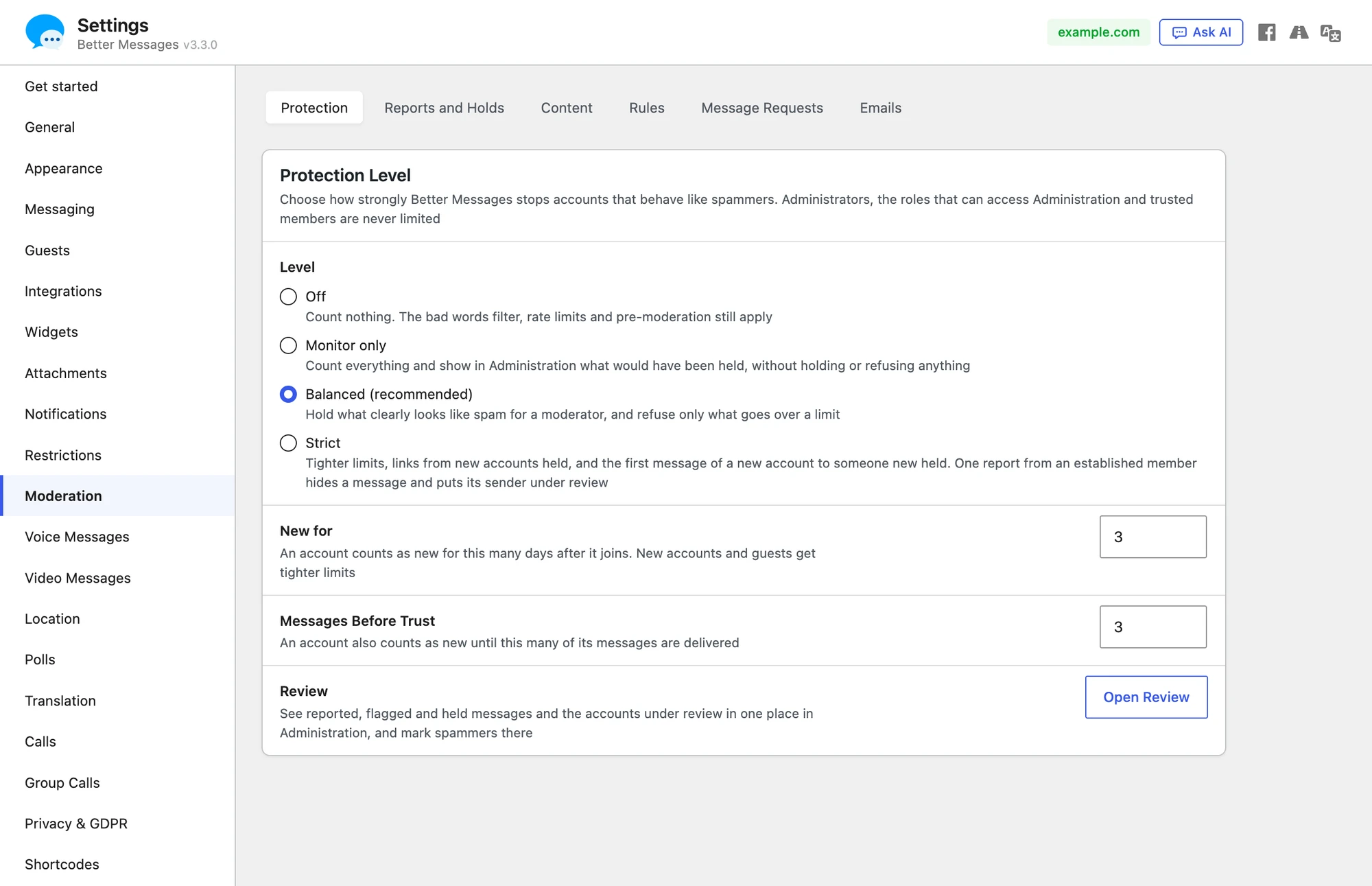
The protection level#
Navigate to WP Admin → Better Messages → Settings → Moderation. It opens on Protection, where the level is one choice:
| Level | What it does |
|---|---|
| Off | Counts and records nothing. The bad words filter, the rate limits and pre-moderation still work |
| Monitor only | Every rule runs and is recorded, but nothing is held or refused. Review shows what would have happened |
| Balanced (recommended) | Holds what clearly looks like spam for a moderator, and refuses only what goes over a limit |
| Strict | Tighter limits, links from new accounts held, and the first message of a new account to someone new held. One report from an established member hides a message and puts its sender under review |
| Custom | Shows once any rule is changed. See Custom rules |
New sites start at Balanced. A site that updates from an older version starts at Monitor only, so nothing changes for its members until the admin chooses. At Monitor only, Protection says what it would have stopped so far, with Use Balanced, and after a week a notice in WP Admin says the same, with Open Moderation.
Administrators, the roles that can access Administration, AI chat bots and members marked as trusted are never limited.
New accounts and established members#
Every rule has one limit for new accounts and a higher one for established members. Who counts as new is set on Settings → Moderation → Protection, under the level:
- an account counts as new for 3 days after it joins (New for)
- and until 3 of its messages were delivered (Messages Before Trust)
Guests always count as new accounts.
What the rules watch#
| Rule | Balanced, new / established | Strict, new / established |
|---|---|---|
| People written to for the first time, in an hour | 10 / 40, then hold | 5 / 20, then hold |
| People written to for the first time, in a day | 30 / 150, then hold | 15 / 60, then hold |
| Conversations started in an hour | 10 / 30, then refuse | 5 / 15, then refuse |
| The same text in many conversations, in an hour | 3, then hold / 5, then flag | 2 / 3, then hold |
| The same text from many new accounts, in a day | 3, then hold and review | 2, then hold and review |
| Messages in a minute | 10 / 30, then refuse | 5 / 15, then refuse |
| Calls started in 10 minutes | 5 / 15, then refuse | 3 / 8, then refuse |
| Links to other sites | held for new accounts | held for new accounts, flagged for established |
| A first message to someone new | delivered | held for new accounts |
"People written to for the first time" are people the account shares no private or group conversation or booking with. A chat room everyone joins does not count as having talked.
Hold keeps the message from the recipients until a moderator approves it. The sender sees it with Awaiting moderator approval. Refuse stops it with a message that says why and when to try again, for example You have started many conversations in a short time. You can start a new one in 12 minutes. Nothing the member wrote is lost. Flag delivers the message and gives no strike, and the account shows under Watched accounts in Review. At Balanced the same text in many conversations is only flagged for established members, so a vendor who sends one reply to many customers is neither held nor put under review for it.
Links and contact details#
Both are on Settings → Moderation → Content → Links and Contact Details, and are checked only while the level is not Off.
- Allowed Sites — links to these sites, one address per line, are never held. Links to the site itself never are.
- The rule More than this many links to other sites in a message, with a line for new accounts and guests and one for established members, as the rules on Rules have. Changing it makes the level Custom, see Custom rules.
- Contact Details — what happens to email addresses, phone numbers and messenger usernames in messages: Allow them, Hide them, Hold the message for a moderator or Refuse the message. Useful on dating and marketplace sites where deals should stay on the site.
Accounts under review and suspended#
Each action a rule holds or refuses gives the account a strike, and a flag gives none. At 3 strikes in a day (2 at Strict) the account goes under review: everything it sends is held until a moderator looks at it, and the member reads on each held message that the account is being reviewed. An account also goes under review when:
- two established members report its messages (one at Strict). Their reports also take that message back from the conversation until a moderator reviews it, and its sender sees only Awaiting moderator approval on it, not that it was reported. See Report messages
- three established members block it in a day (two at Strict). Blocks from new accounts and guests do not count
- three of its message requests are declined in a day (two at Strict)
- it sends the same text as other new accounts
Under review never ends by waiting. A moderator releases it, trusts it, suspends it or marks it as a spammer.
A suspended account cannot send messages, start conversations or calls, and its realtime connections and app sessions are cut.
The Review tab#
WP Admin → Better Messages → Administration → Review is the one queue of everything that waits for a moderator, in two views, Messages and Accounts. The flag beside Settings in the messenger and the moderator emails open it. A red badge beside Review in the sidebar of Administration counts what waits, and the views say it too, such as Messages (4) and Accounts (1). Review opens on Messages when any wait, else on Accounts.

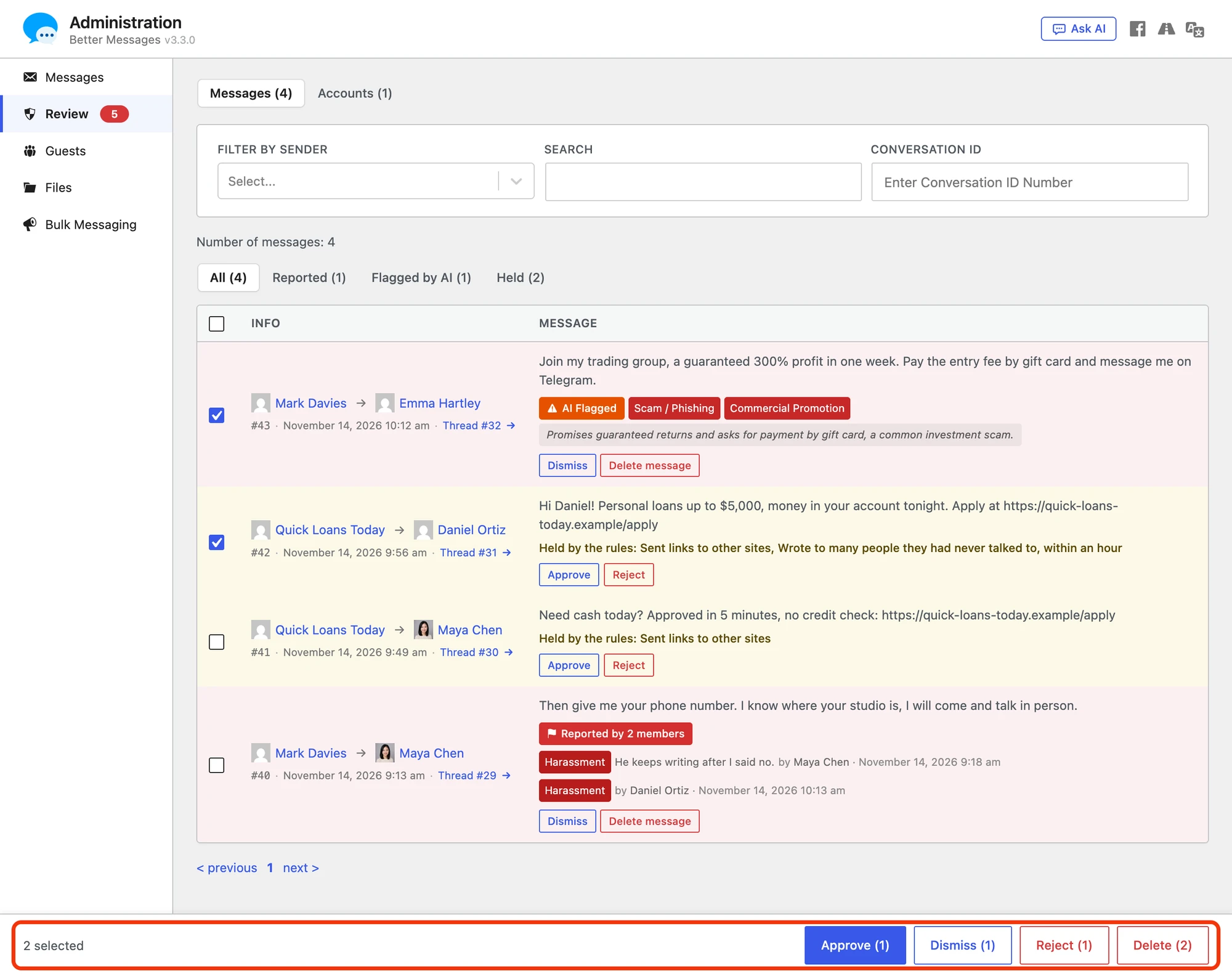
Messages lists each message waiting for a decision, newest first, with why it waits:
- User Report, or Reported by 2 members and so on when several reported it, with the category, the note and the name of each member who reported it
- AI Flagged, with the categories in words, such as Scam / Phishing, and the reason the AI gave. See AI content moderation
- Held by the rules, with the rules in words, Held by pre-moderation, Held after the AI flag or Hidden after reports
All, Reported, Flagged by AI and Held narrow the list, and the sender filter, the search and the conversation ID work as on the Messages tab. A held message has Approve and Reject under the line that says why it waits, and the reports of a message or an AI flag have one Dismiss and one Delete message. Dates are in the date and time format of the site.
A message that waits in Review stays reviewable when its sender changes it. Deleted, the members see This message was deleted in the conversation, whatever Delete Method says, and Review keeps its text and files with the line Deleted by its sender on … over them until a moderator dismisses or deletes it. A held message the sender deleted is never delivered, so it has Reject and no Approve. Edited, Review shows the text it had before each edit under the new one. An account deleted with Delete Messages on Account Deletion on takes its messages under review with it.
A bar at the foot of the window acts on several messages at once. With nothing ticked it says Tick messages to act on several at once, with its buttons greyed. Once messages are ticked, it says how many and shows only the buttons that apply, each with the number of ticked messages it acts on: Approve and Reject for the held ones, Dismiss for the reported and AI flagged ones, and Delete for all of them. Each asks once before it acts. In bulk, Approve and Reject act on the messages alone: no sender becomes trusted or goes under review. The box at the head of the table ticks every message of the page, and the ticks go when another page or filter opens. The Accounts view has no bulk actions.

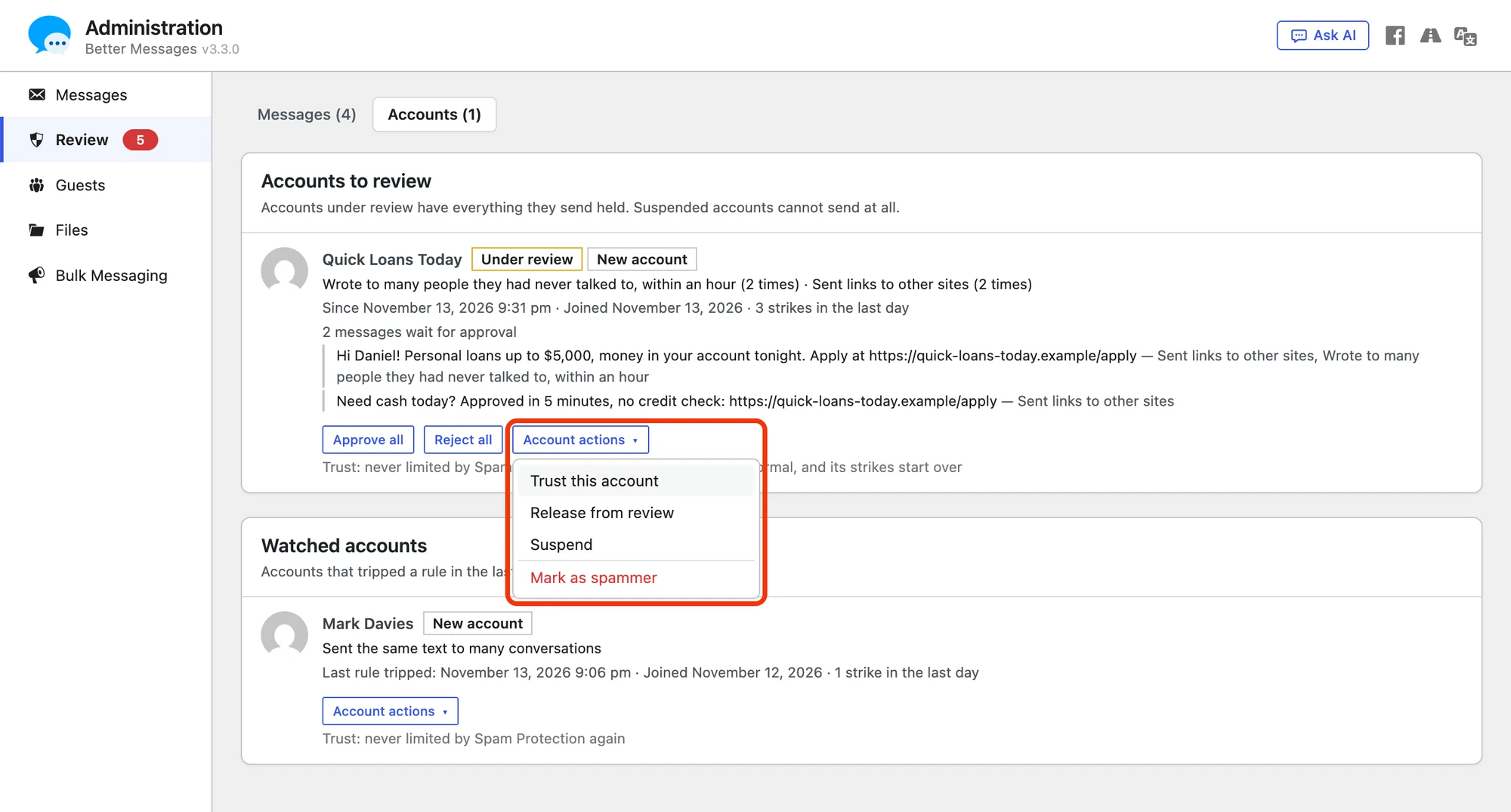
Accounts shows one card per account, not one row per message:
- the reasons in plain words and how often, for example Sent the same text to many conversations
- since when, when it joined, in the date format of the site, and its strikes of the last day
- its held messages, with Approve all and Reject all
- Account actions, a button that opens a menu with Trust this account (never limited again), Release from review (back to normal, its strikes start over), Suspend or Lift the suspension, and Mark as spammer
Under Watched accounts are the accounts that tripped a rule in the last 7 days but are not under review, so a moderator can look before anything happens. In Monitor only every card says what would have been held.
Administration → Messages stays the place to browse and search every message. Where messages wait, a line above its list says how many and links to Review.
Mark as spammer#

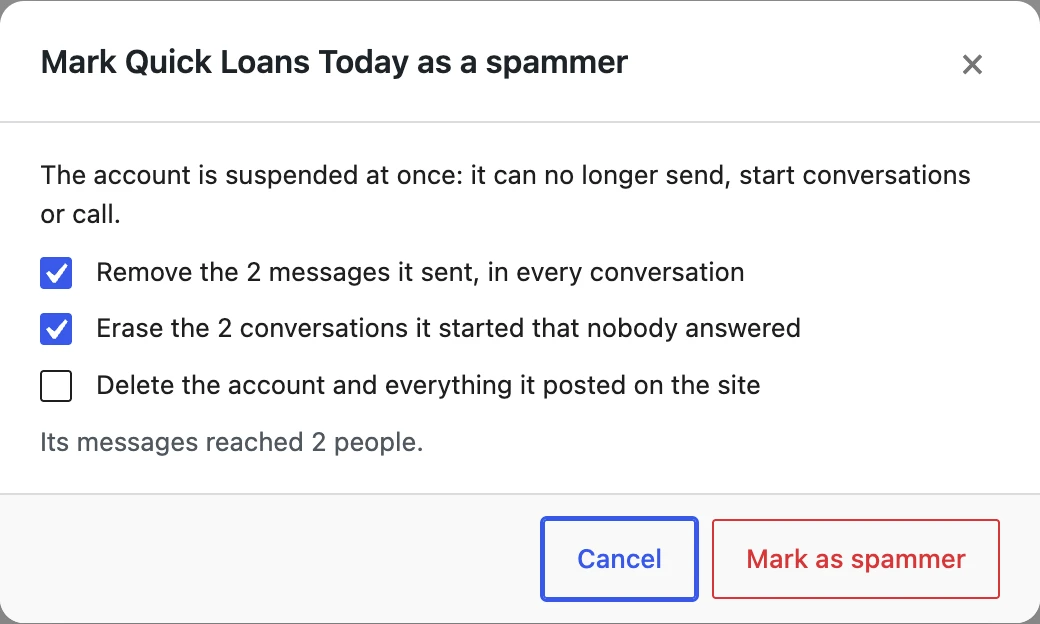
Choose Mark as spammer in Account actions, and a confirmation shows the counts:
- Suspends the account.
- Removes every message it sent, in every conversation (on by default).
- Erases the conversations it started where nobody ever answered (on by default). A conversation someone else started and a booking are never erased.
- Deletes the WordPress account or the guest (off by default, and only for those allowed to delete users).
A large clean-up runs in the background, so the page does not wait for it.
Emails to moderators#

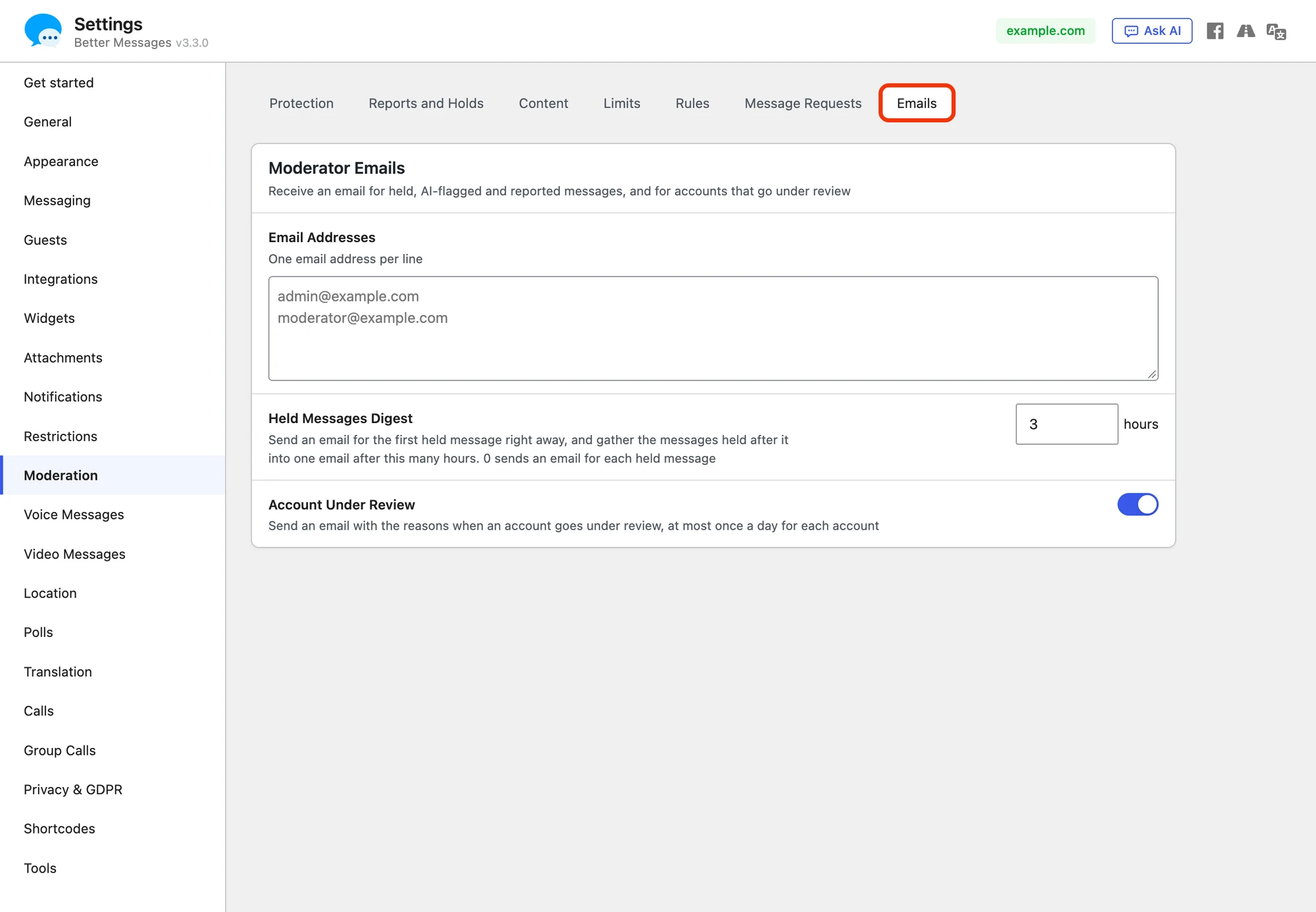
Every email to moderators is set on Settings → Moderation → Emails. The emails go to the addresses in Email Addresses, one per line, in the design of the other emails of Better Messages. While nothing sends these emails, the field is off and says what turns them on.
- Held Messages Digest — an email for the first held message right away. The messages held after it are gathered into one email after the hours set here, without the ones a moderator already approved or rejected. 0 sends an email for every held message. A new site starts at 3 hours, and a site that ran Better Messages before 3.3.0 starts at 0, so it keeps the email for each held message it got before.
- Account Under Review — an email with the reasons and what the account held when it goes under review, at most once a day for each account. Its Open Review button opens the Accounts view.
Guests#
The limits on new guests are on Settings → Moderation → Rules → Guests:
- New Guests per Hour — for the whole site, 0 for no limit (the default).
- New Guests per Address — from one network address in an hour, 10 by default.
The limits count after the captcha, so a captcha and the limits work together. No address is stored to count them. With Guest Chat off, a guest can no longer start conversations or send messages anywhere but the chat rooms that let guests in and their bookings, one-to-one bookings included.
Custom rules#

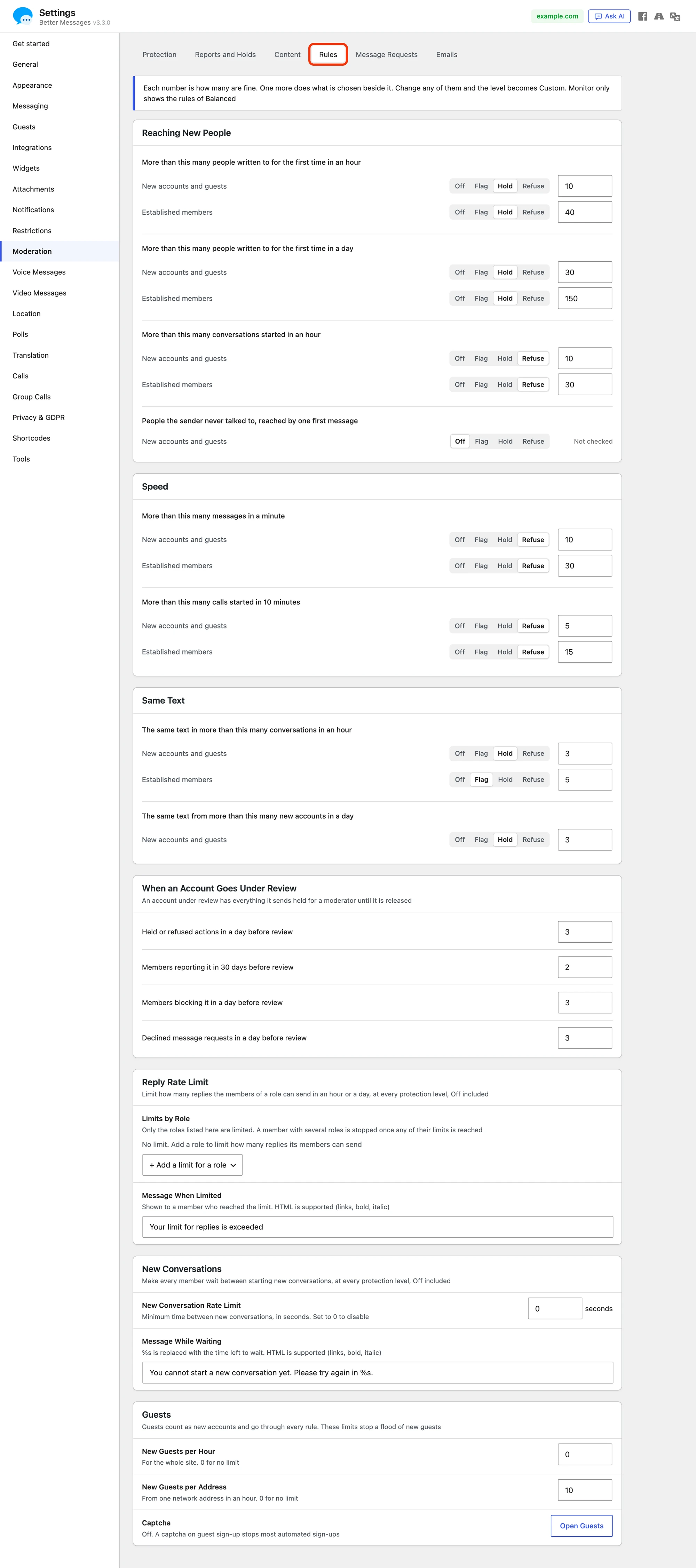
Settings → Moderation → Rules holds every limit on what members do over time. First the rules of the level in cards: Reaching New People, Speed and Same Text. The links rule is on Content, with the allowed sites. Each rule is a sentence, such as More than this many conversations started in an hour, with a line for New accounts and guests and one for Established members. Each number, at the end of its line, is how many are fine, and one more does what is chosen beside it: Off, Flag, Hold or Refuse. A rule set to Off says Not checked. When an Account Goes Under Review holds the four numbers that put an account under review: held or refused actions in a day, members reporting it in 30 days, members blocking it in a day and declined message requests in a day.
Changing any of them makes the level Custom, which keeps every value shown. Choose another level on Protection to go back to its values. At Monitor only the tab shows the rules of Balanced.
After the rules come the limits by role, Reply Rate Limit and New Conversations, and the limits on new guests. The limits by role are not rules of the level: they hold at every level, Off and Monitor only included, as they did before 3.3.0, so a site that had them keeps them after updating.
Where the settings are in 3.3.0#
Settings → Moderation holds Spam Protection and the other moderation settings in six sub-tabs, each setting in one place. Every setting kept its value when it moved:
- Protection — the level, who counts as new (New for and Messages Before Trust) and the way to Review
- Reports and Holds — Reports and Moderators (Messages Viewer, Message Reports, Roles That Can Access Administration) and Pre-Moderation
- Content — what is in a message: the Bad Words Filter (from Restrictions), Links and Contact Details with the links rule, and AI Content Moderation
- Rules — what members do over time: the rules of the level (see Custom rules), Reply Rate Limit and New Conversations, with its New Conversation Rate Limit (both from Restrictions), and the limits on new guests
- Message Requests — see Message requests, with User Conversation Restrictions (from Restrictions), which lets members choose who can start conversations with them
- Emails — the moderator emails, see Emails to moderators

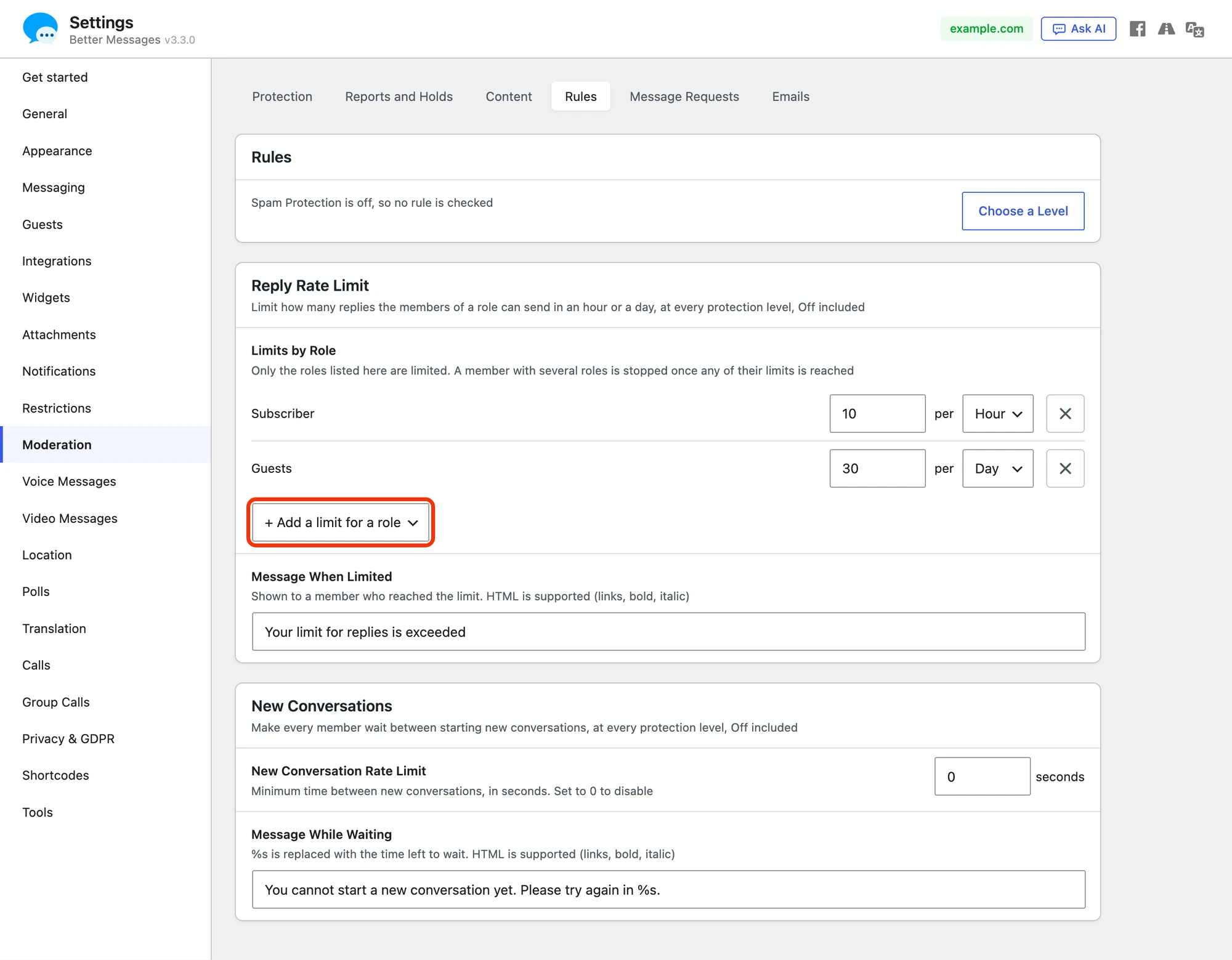
Reply Rate Limit lists only the roles that have a limit, each with its number, Hour or Day and a × button to remove it. + Add a limit for a role adds one, and with none the card says No limit. Message When Limited is what a member who reached the limit reads, and Message While Waiting on New Conversations is what a member reads before the wait between new conversations is over. Who may message whom stays on Restrictions, and Bulk Messaging moved to Settings → Messaging. An old link to the Spam Protection tab opens Moderation, and one to the Limits sub-tab of the first 3.3.0 betas opens Rules.
Message requests#
Message requests make whatever still gets through silent: a conversation someone a member never talked to starts waits until the member accepts it. They are set on Settings → Moderation → Message Requests.
Frequently asked questions#
Will it hold messages from my real members?#
Established members have high limits that normal use does not reach, and a false positive costs a member a short delay, never their account: the automatic step stops at under review. Start at Monitor only to see what Balanced would do on your site before it acts.
Does it slow down sending?#
Each check is a few indexed queries on one table. It runs while the message is saved, the same way the bad words filter does.
Can I change a single limit?#
Yes, in Custom rules, or in code with the better_messages_spam_rules filter.
Can I see what it decided?#
Administration → Review shows every account it acted on under Accounts, and every message it held under Messages. Developers get every decision through the better_messages_spam_checked action.