Better Messages 3.3: Polls, Spam Protection, Chat for Bookings, Encrypted Storage and a New Guest Sign-up
Better Messages 3.3 is out, and it is a release about the people in your chat: what they can do together, who may write to them, and what your site keeps about them. Members can run polls in their conversations, Spam Protection and message requests keep spammers away from them, every booking of Amelia, LatePoint, FluentBooking and Simply Schedule Appointments gets a conversation of its own, stored messages can be encrypted, and guests get a sign-up form, a way back from another device and a way into an account.
Your conversations, settings and licence carry across. An updated site starts Spam Protection in a mode that only watches, the mobile apps need no new build, and what is worth checking is at the bottom, in Updating from 3.2.
Polls in WordPress chat#
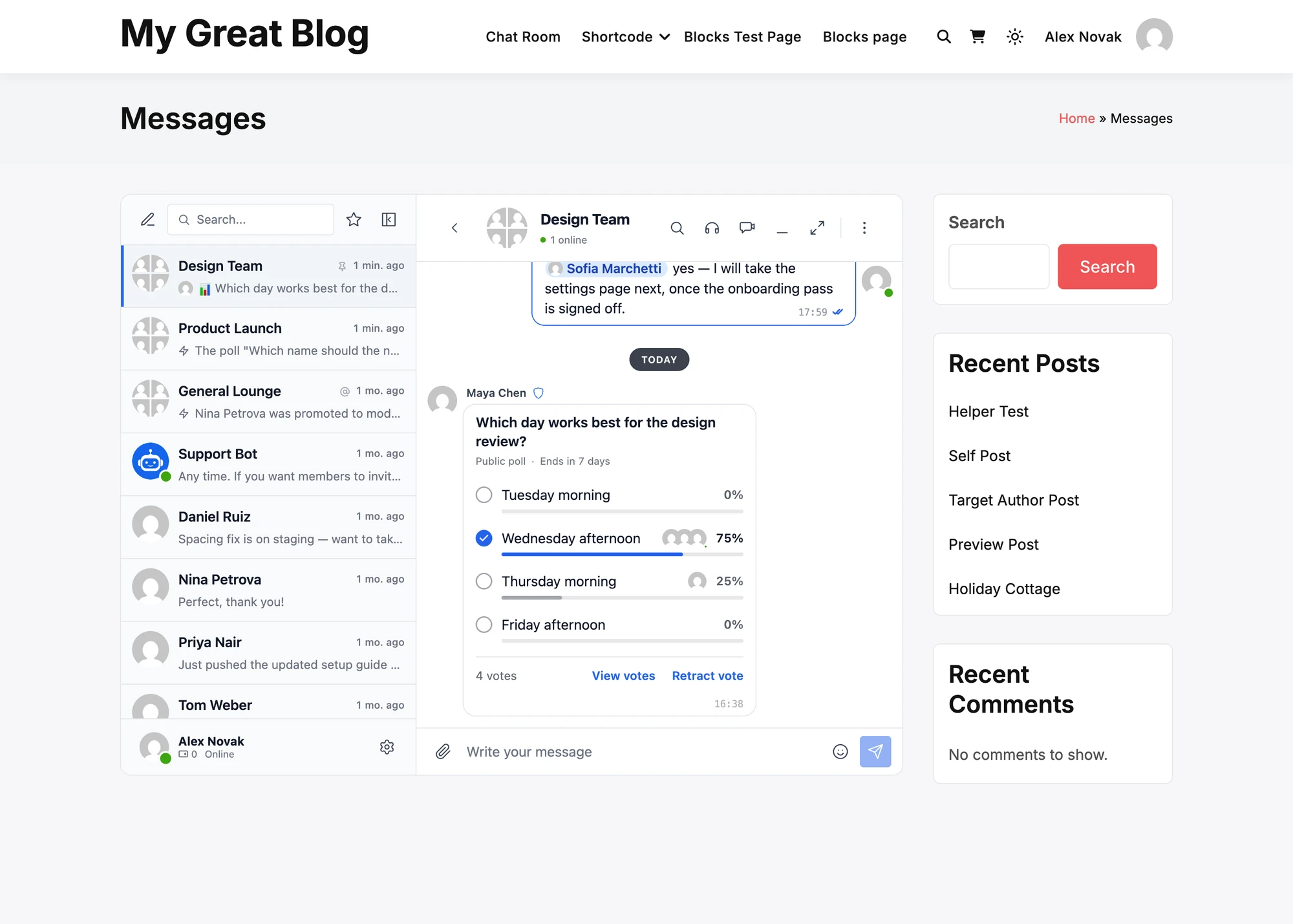
Polls were among the most requested features, and they lead this release. A member presses the paperclip of the composer, chooses Poll, writes a question with 2 to 12 options and sends it. Everyone in the conversation votes with one tap on its card, moves the vote with a tap on another option, or takes it back with Retract vote.
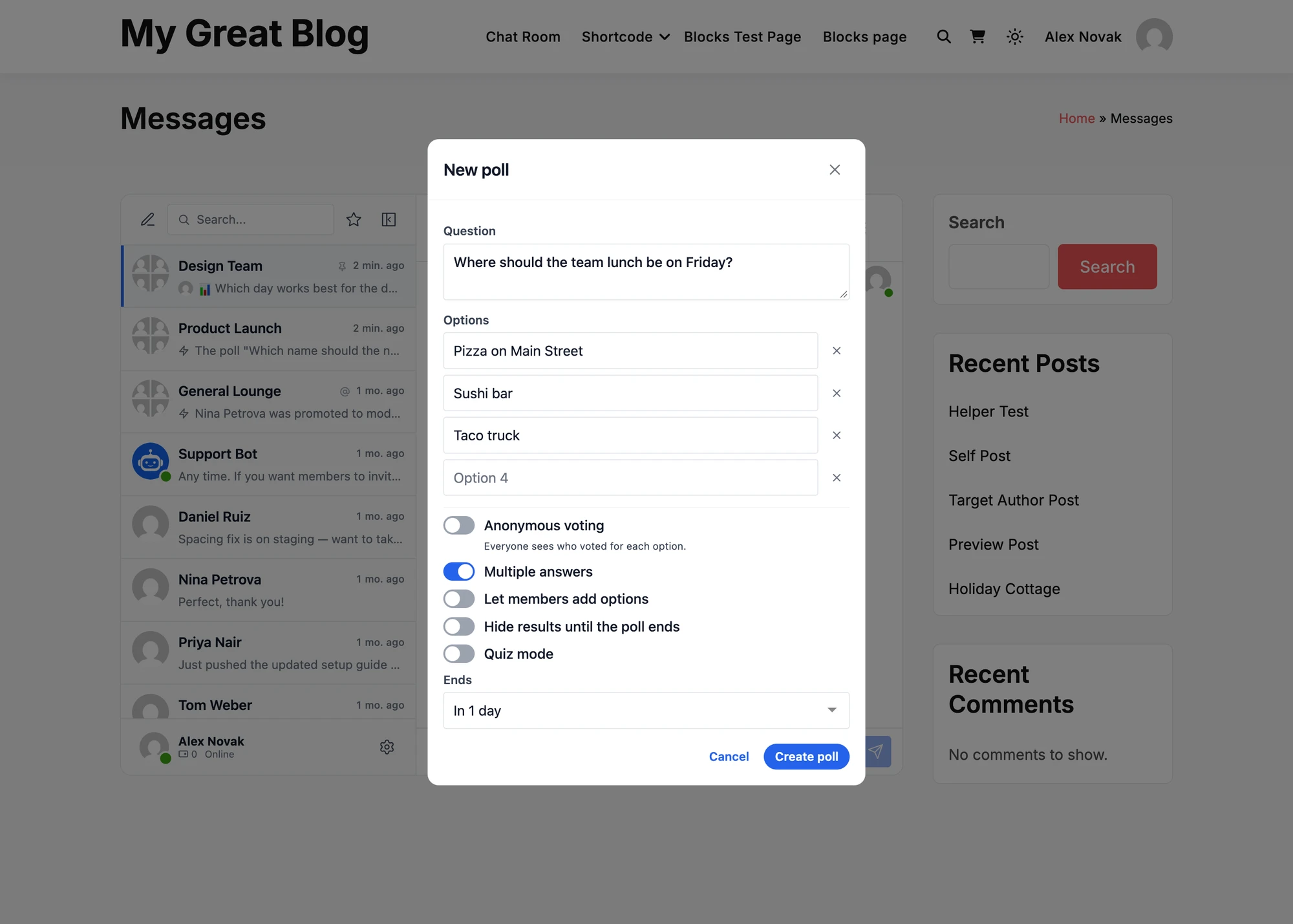
The form decides what kind of poll it is:
- Anonymous voting, on by default: nobody sees who voted for what, the administrator included. A public poll shows the faces of the voters beside each option, and View votes lists them.
- Multiple answers, where members tick several options and press Vote.
- Let members add options while the poll is open, up to 12 in all.
- Hide results until the poll ends, so early votes do not sway later ones.
- Quiz mode, with one right answer and an optional explanation that each person sees after answering once.
- Ends never, in an hour, a day or a week, or at a time the member chooses.

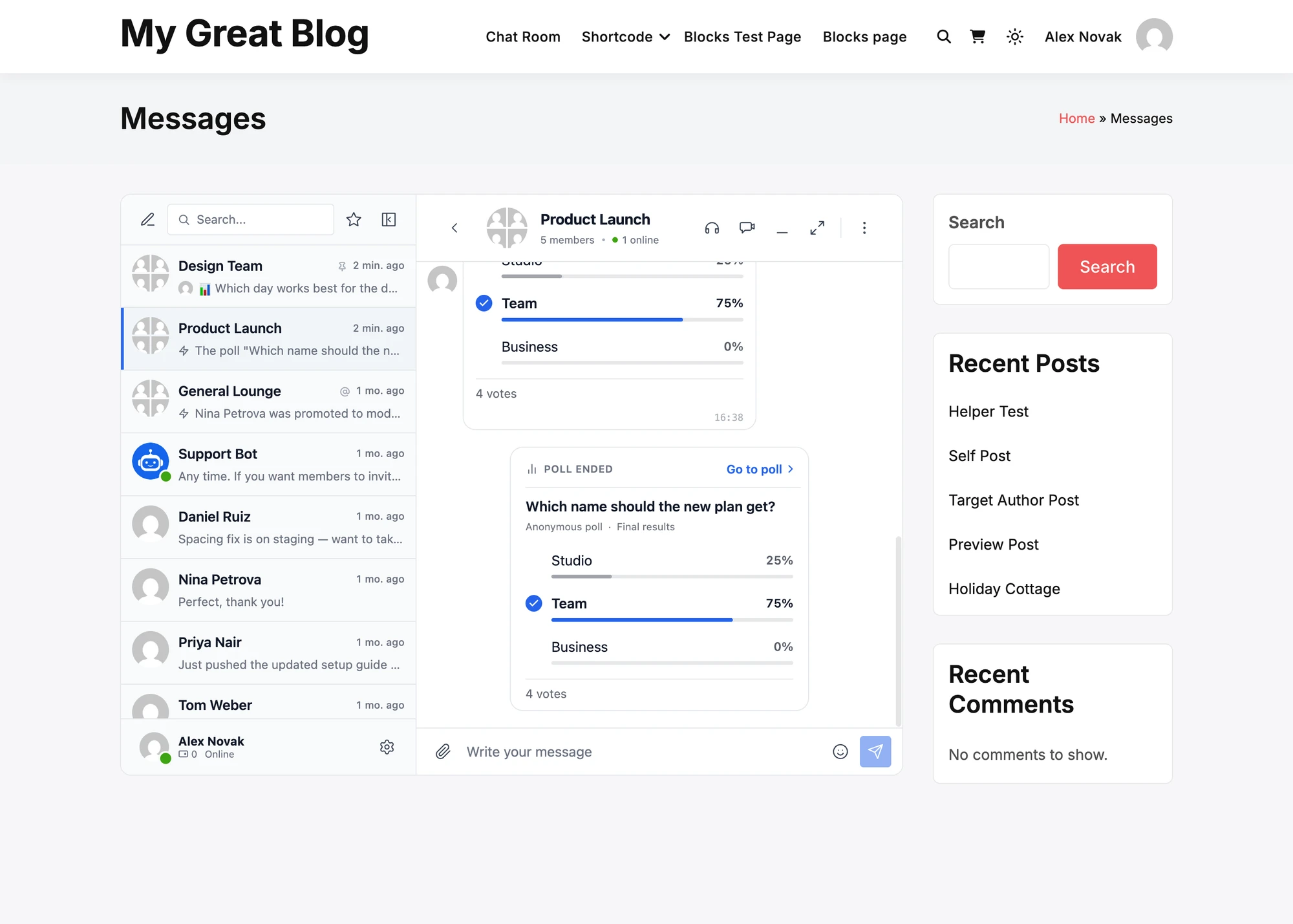
A poll ends at its end time, or when its creator, a moderator of the conversation or a site administrator presses End poll. The conversation then gets a Poll ended card with the final results and Go to poll, and the list of conversations, emails and notifications name the poll by its question.

Polls are on by default in group conversations, chat rooms, the groups of BuddyPress, BuddyBoss, PeepSo, FluentCommunity and the other integrations, and course chats. Settings → Polls has a switch for each kind of conversation, with private conversations off by default, and a role list that restricts the ticked roles or allows only them. Guests vote in the conversations they are in. Votes reach everyone at once in the WebSocket version and with the next check for new messages in the free version, as polls are in both. Polls has every setting.
Spam Protection and message requests#
Spam Protection watches what accounts do, not only what they write. An account that writes to dozens of people it never talked to, sends the same text to many conversations, or posts links from a fresh account looks like a spammer, and Better Messages holds or refuses what it sends before your members are bothered. It lives in Settings → Moderation, which now holds everything about moderation in sub-tabs, in the free version and the WebSocket version alike.
Its Protection sub-tab is one choice. Off counts nothing. Monitor only runs every rule and records what it would have done, but holds and refuses nothing. Balanced, the recommended level, holds what clearly looks like spam for a moderator and refuses only what goes over a limit. Strict has tighter limits and holds links and first messages from new accounts. New sites start at Balanced. An updated site starts at Monitor only, so nothing changes for its members until you choose, and after a week it says what it would have stopped, with a button to move to Balanced.

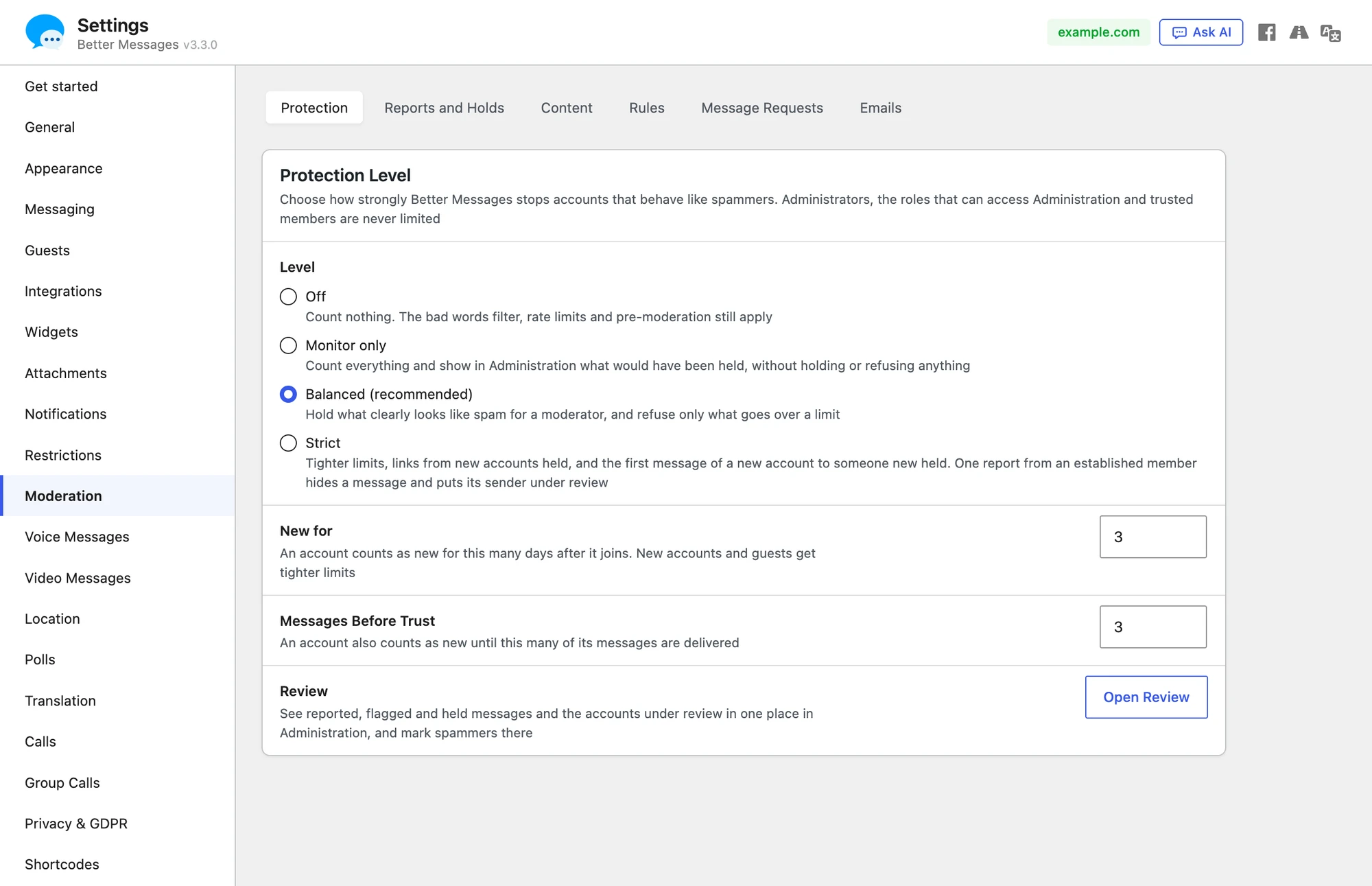
New accounts and guests get lower limits than established members. An account is new for 3 days and until 3 of its messages were delivered, and guests always count as new. Administrators, the roles that can access Administration, AI chat bots and trusted members are never limited. Contact Details decides whether email addresses, phone numbers and messenger usernames in messages are allowed, hidden, held or refused, for dating and marketplace sites where deals should stay on the site. The bad words filter, the rate limits, pre-moderation, reports and AI moderation are sub-tabs of the same tab, and Rules shows every rule of the level as a sentence with its numbers, each set to Off, Flag, Hold or Refuse.
An account that trips the rules goes under review, and so does one reported by two established members or blocked by three of them in a day. Everything it sends is then held. Reports also hide the reported message from the others until a moderator looks at it.
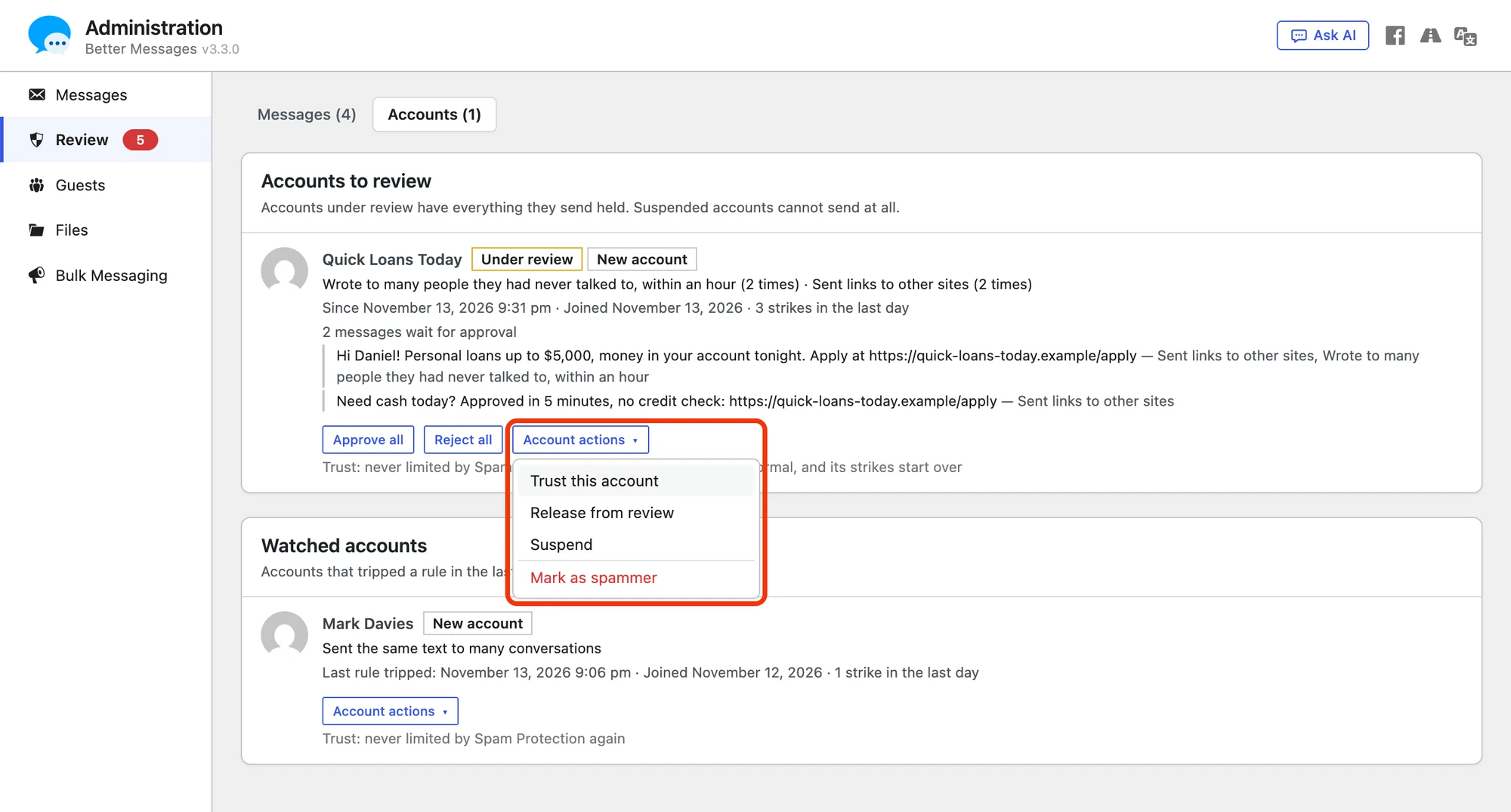
Administration → Review is the one place for everything that waits for a moderator. Its Messages view lists what members reported, what AI moderation flagged and what is held, each with why. Its Accounts view shows one card for each account, with its reasons in plain words, its held messages and the actions to approve, reject, trust, release, suspend or Mark as spammer, which suspends the account and removes everything it sent in one step. A message that waits there stays reviewable when its sender deletes or edits it: the members see it deleted, and Review keeps its text and files, or shows the text before each edit. Pre-moderation now shares the trusted accounts and the accounts under review with Spam Protection, so its old whitelist and blacklist are the same two lists under those names.

Message requests, off by default, make whatever still gets through silent. A conversation someone a member never talked to starts waits in a Message requests row, with no notification, sound or unread count, until the member accepts it, replies or deletes it. The sender is not told. Requests come from new accounts and guests, or from anyone new to the member, as you choose, and never from chat rooms, bookings or the contact buttons of your site. See Spam Protection and Message requests.
Chat and video calls for bookings#
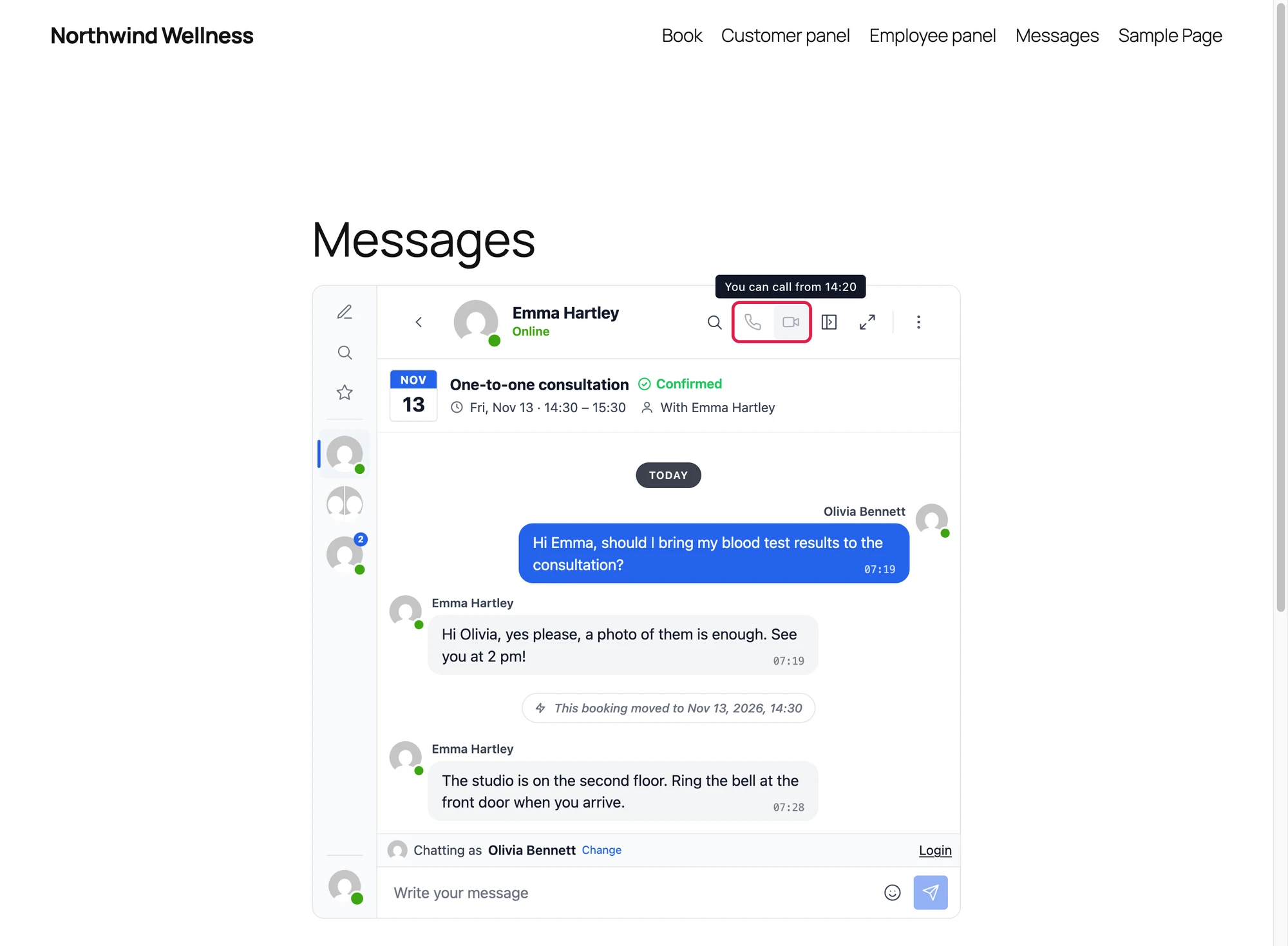
Each booking of Amelia, LatePoint, FluentBooking and Simply Schedule Appointments gets a conversation between the customer and the staff member, opened from a Message button or a link in the booking emails. A card at its top shows the service, the time and the status, and follows the booking when it moves or is cancelled. A customer without an account chats as a guest through a signed link, even where guest chat is off. Turn each plugin on under Settings → Integrations → Bookings.
In the WebSocket version the same conversation holds the video call, which opens for the customer shortly before the booking starts, and Join Meeting in the booking leads into it. The conversations work in the free version, and calls need the WebSocket version. Chat and video calls for WordPress bookings goes through each booking plugin.

Guests who sign up, come back and become members#
Everything about guests now lives in Settings → Guests. Its sign-up form can ask for a display name and an email, each optional or required, with a consent checkbox and a captcha, and Confirm Before Chatting keeps the reply form closed until the guest opens the link sent to the email. Only administrators see the email of a guest. The captcha is set under Settings → Integrations → Captcha, with seven providers, among them ALTCHA, which runs on the site itself with no account and no keys.

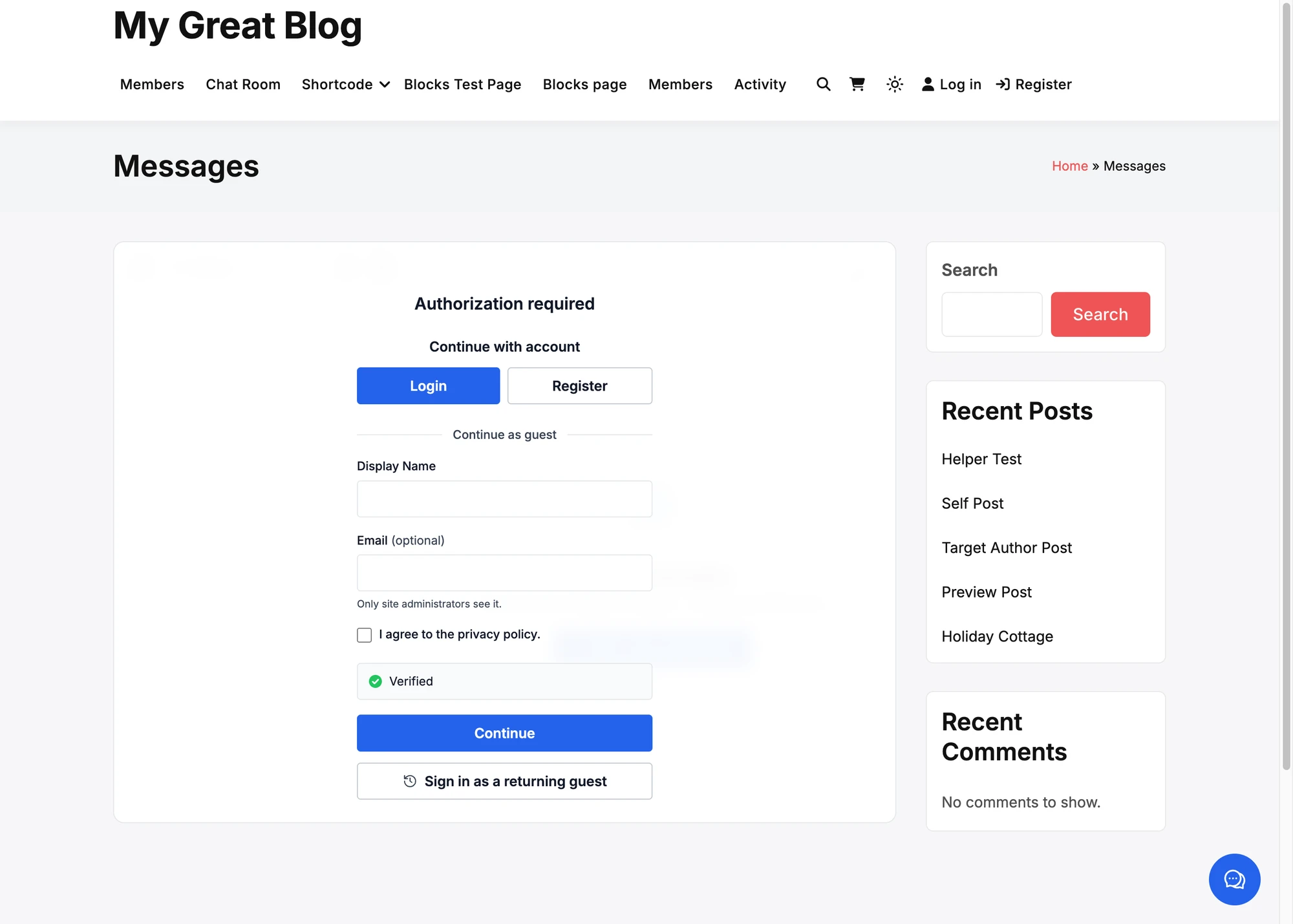
A guest with a confirmed email gets the emails about unread messages, and Sign in as a returning guest sends a link that brings the guest back on another device. Guests also get the Settings screen members have, with Sign out.
A guest who registers or logs in is asked once whether to move the conversations, messages, files and chat rooms of the guest into the account, or to forget the guest. Offer to Move Conversations turns the question off. Delete Inactive Guests removes guests who were not seen for the number of days you choose. All of it is in the free version too. Guest access and Captcha have the details.
A name and a photo of their own#
On a site where no profile plugin keeps names and photos, members now change both in the messenger, from Edit profile in the menu of their own name. The name is their display name in WordPress. A photo comes from the device or from Take a photo with the camera, and opens in an image editor to crop, rotate, flip and zoom it before Use this photo.

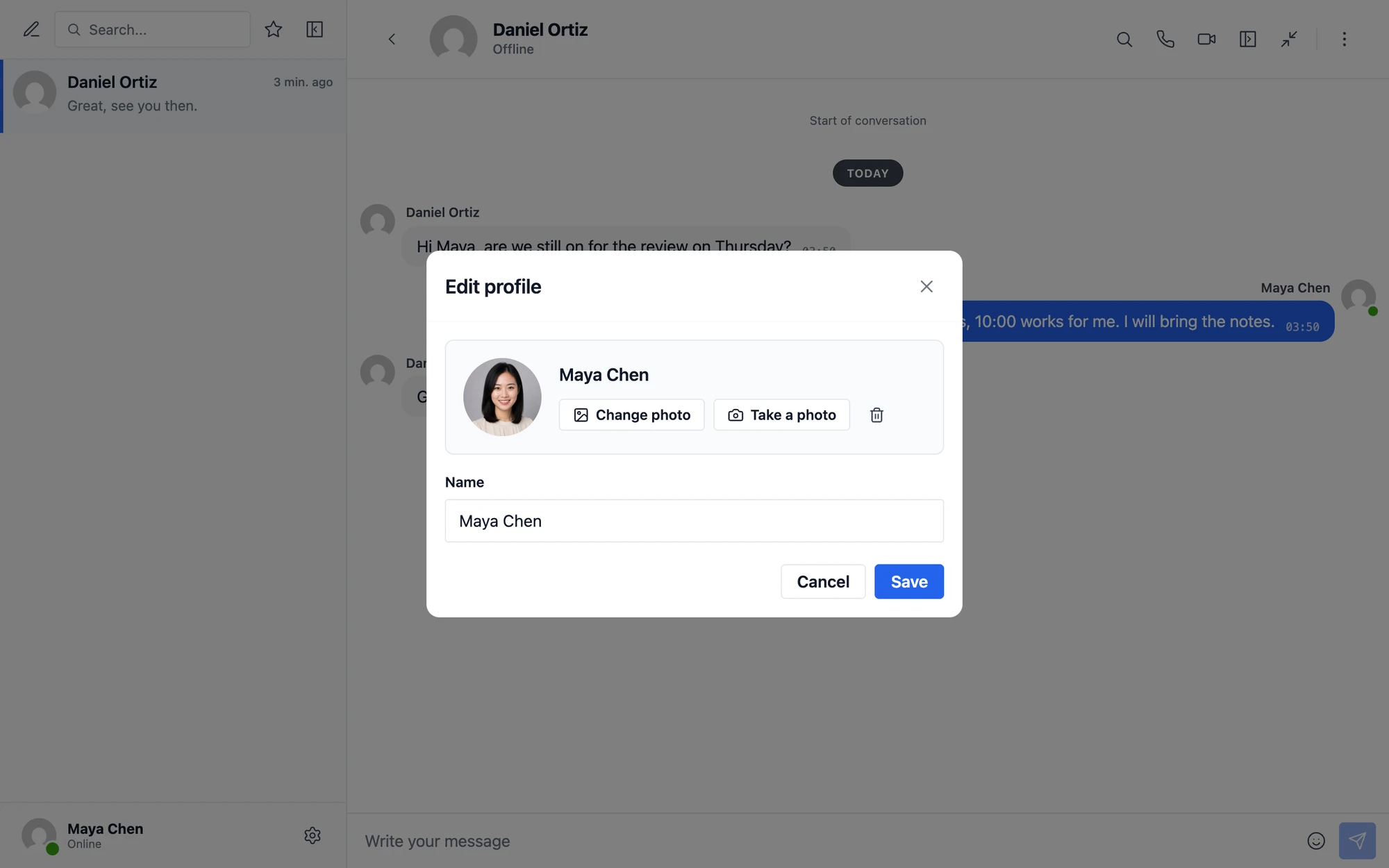
The photo becomes the avatar of the member on the whole site, in comments, the author box and the admin bar. Others see the change at once in the WebSocket version, and on the next load in the free version. Settings → General → Profiles has a switch for the name and one for the photo. A new site starts with both on, and a site updated from an older version starts with both off, so nothing changes for its members until you turn them on.
On sites with BuddyPress, BuddyBoss, PeepSo, Ultimate Member, FluentCommunity or another profile plugin, that plugin keeps the names and photos, and the messenger offers no Edit profile. Guests get a photo with Guests Can Add a Photo under Settings → Guests, off by default. Profile name and photo has the rest.
Encrypt what is stored#
Settings → Messaging → Stored Data Encryption keeps what members write encrypted where your site stores it: messages, the names of conversations, uploaded files, voice and video messages, the email and IP address of guests, and the addresses people connect from, in the database, the uploads folder or the bucket of your cloud storage. A dump or a backup of the database then holds encrypted values instead of messages.
Create Key writes the key into wp-config.php, never into the database, and shows it once to download. Keep that file somewhere safe and away from the site, as nothing encrypted with a lost key can be read again, by anyone. Turn On encrypts what was stored before in a background job.

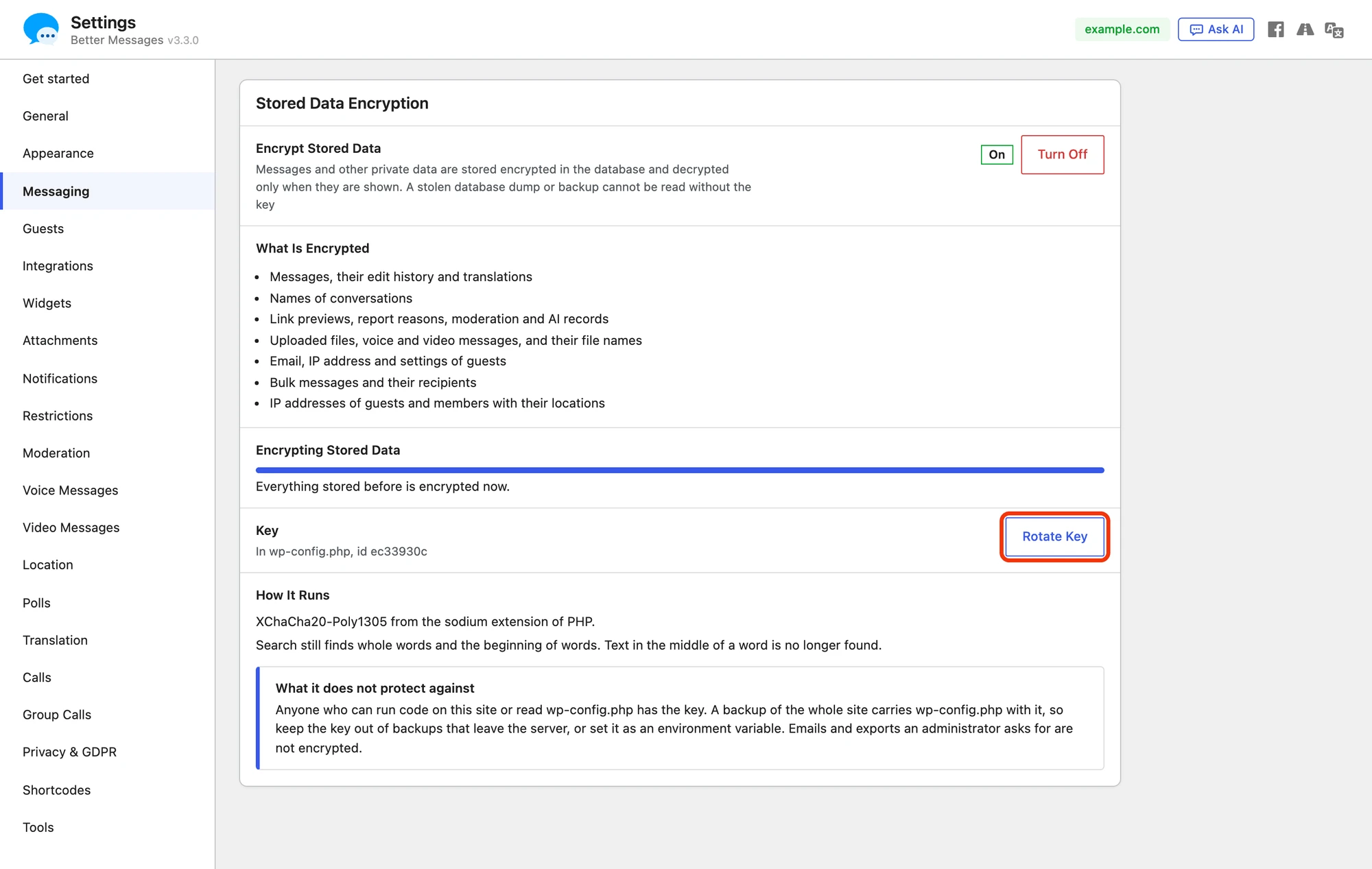
Search still finds whole words and the start of words, but not a part in the middle of a word. Rotate Key replaces the key and encrypts everything again, and a missing key shows in the panel and in Site Health.
It is not end-to-end encryption. It protects data at rest, not against anyone who can run code on the site or read wp-config.php. For messages that not even the site can read, use end-to-end encryption. Stored data encryption is part of the WebSocket version, and its licence has to be active to turn it on. Stored data encryption walks through it.
Emails that look like the messenger#
The emails about unread messages have a new design: your logo or the name of the site above a white card, a heading that counts the new messages, and the messages of each sender as chat bubbles beside their photo. Until you set a color of its own, the email follows the accent color of Appearance, and with the default colors, mail apps in dark mode show the email dark.

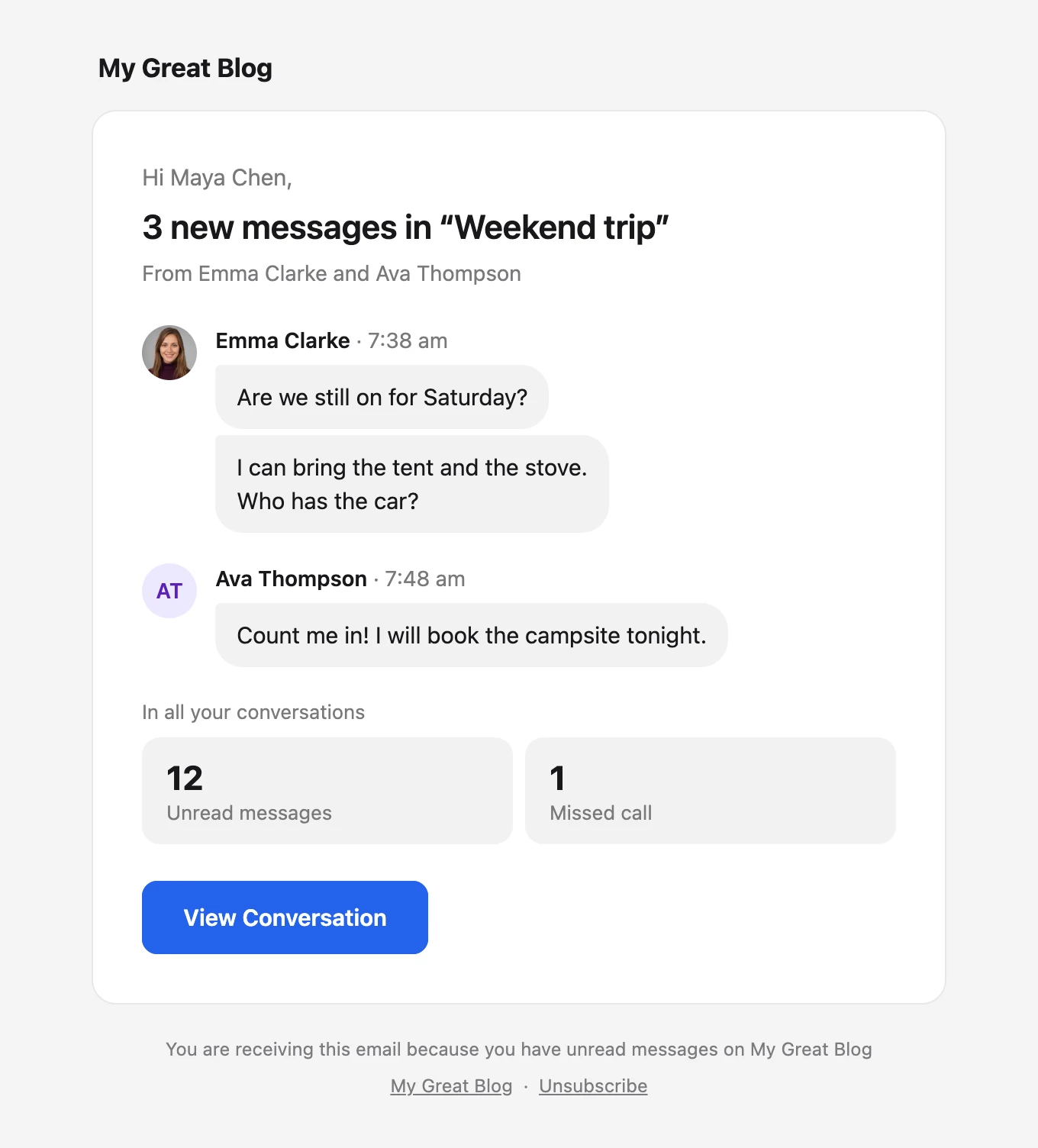
Email Content, under Settings → Notifications → Email Notifications, shows the full messages, only who wrote them, or only that there are new messages, in every email template. Each email also counts the unread messages and missed calls in all the conversations of the member. The emails of moderators take the same design, and Held Messages Digest gathers held messages into one email every few hours, the first one at once. The emails are in the free version too. Email notifications has the settings.
Invisible mode#
Members of the roles you choose under Settings → Messaging → Invisible Mode can turn on Appear offline from the menu of their own name. Until they turn it off, everyone sees them offline, their last active time stands still, messages to them get no delivered and no seen mark, and nobody sees them typing.

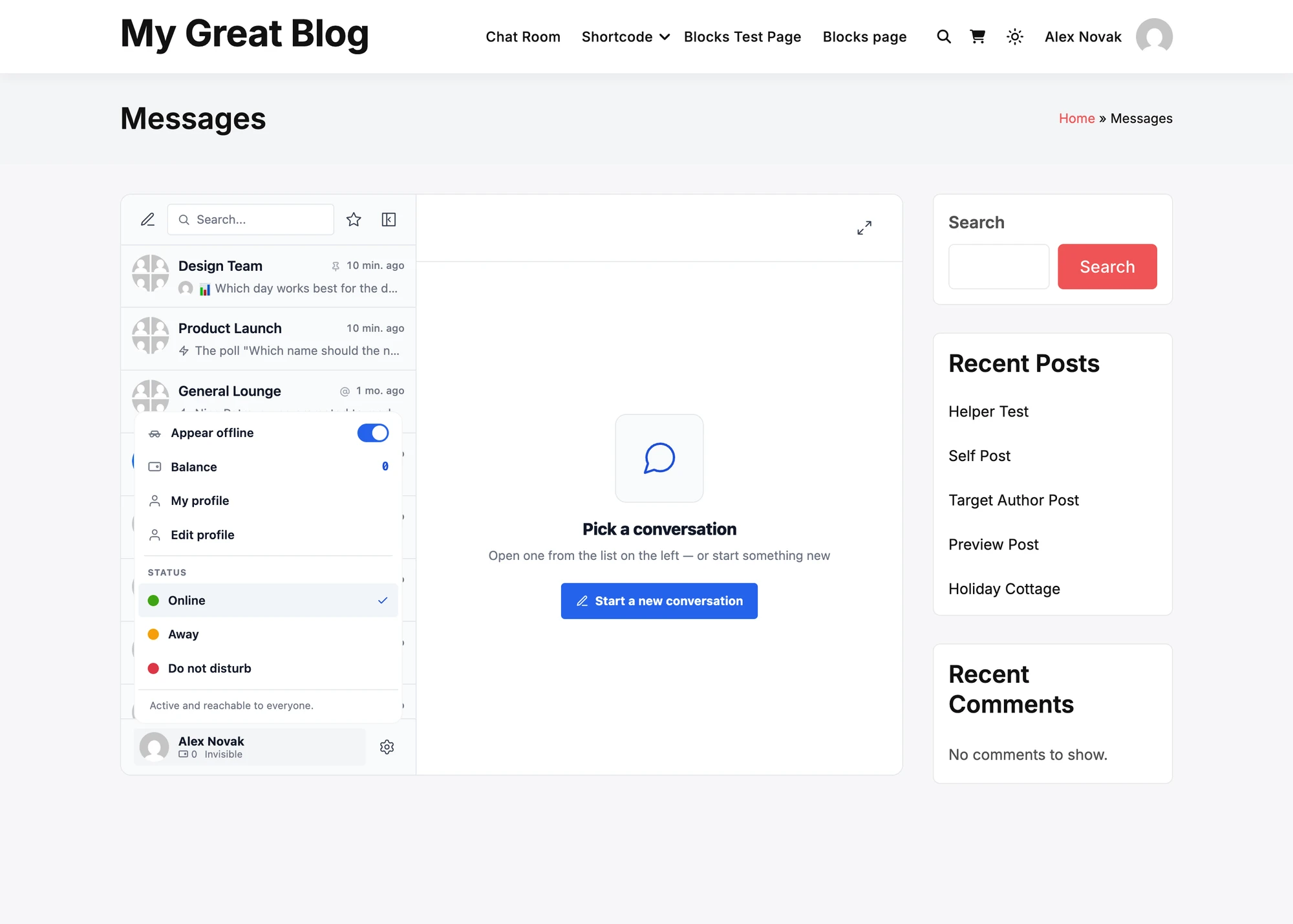
The member reads, writes and gets notifications as usual, and calls still ring. Administrators can always appear offline, and no other role can until you tick it. Invisible mode is part of the WebSocket version, and a self-hosted realtime server needs a version that knows it. Invisible mode has the details.
Mini chats with the whole messenger one click away#
Conversation information, at the top of the menu under the title of a mini chat, shows the members, the files and the details of the conversation inside the chat window.

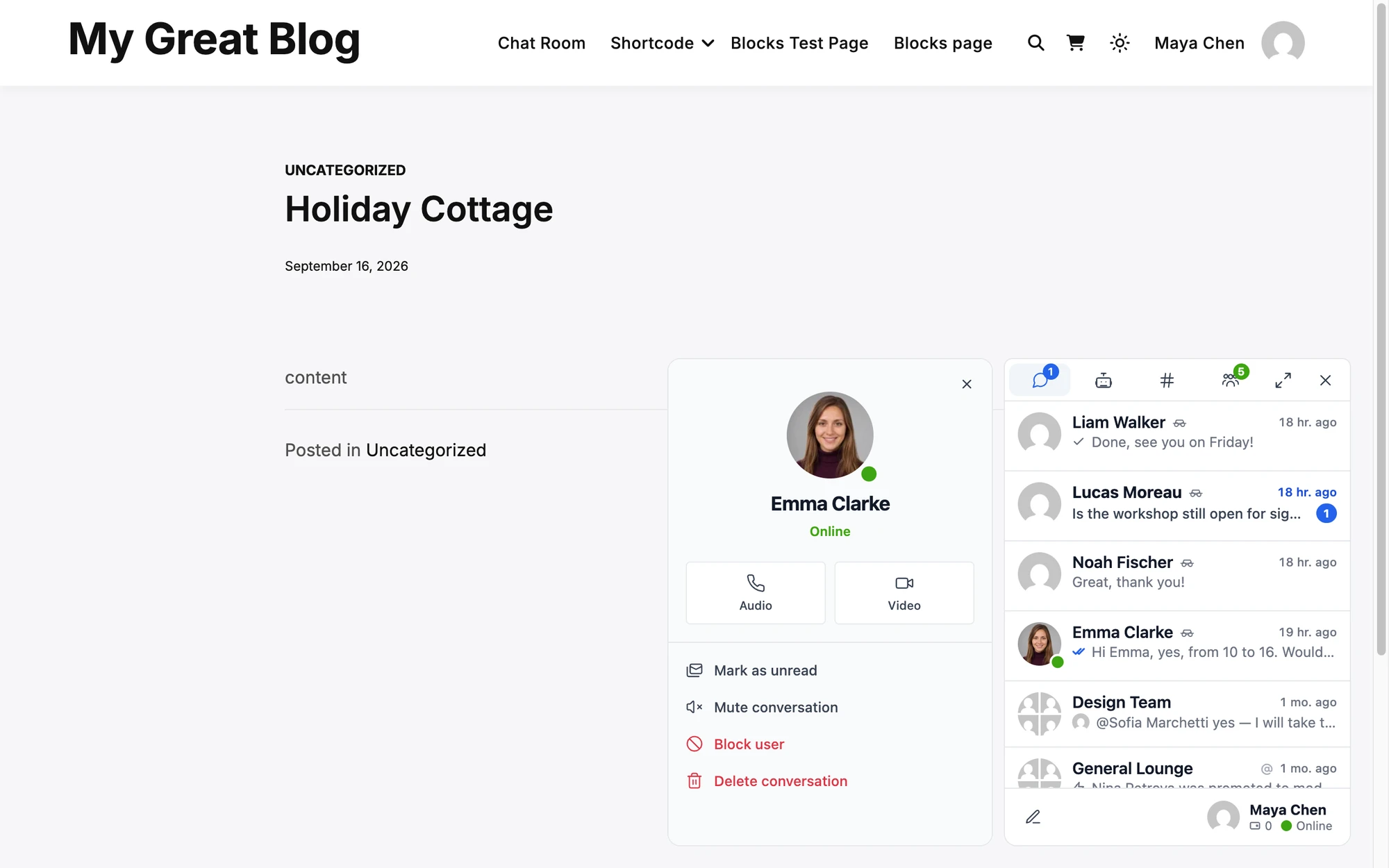
Open Full Screen now opens the whole messenger over the page with that conversation open and the others beside it, where it used to open that one conversation alone. The call buttons of a mini chat, Answer on an incoming call and Join of a group call open the same way. The mini widget gets a Maximize button that does the same, on by default. Mini chats are part of the WebSocket version. See Mini chats.
Locations#
Administrators now see where a guest or a member connects from: the country, the city and their last 20 addresses, with who else used the same address. It shows in Administration → Guests, under each message in Administration → Messages, in the details of a conversation of two and on the user screens of WP Admin. Members never see it.

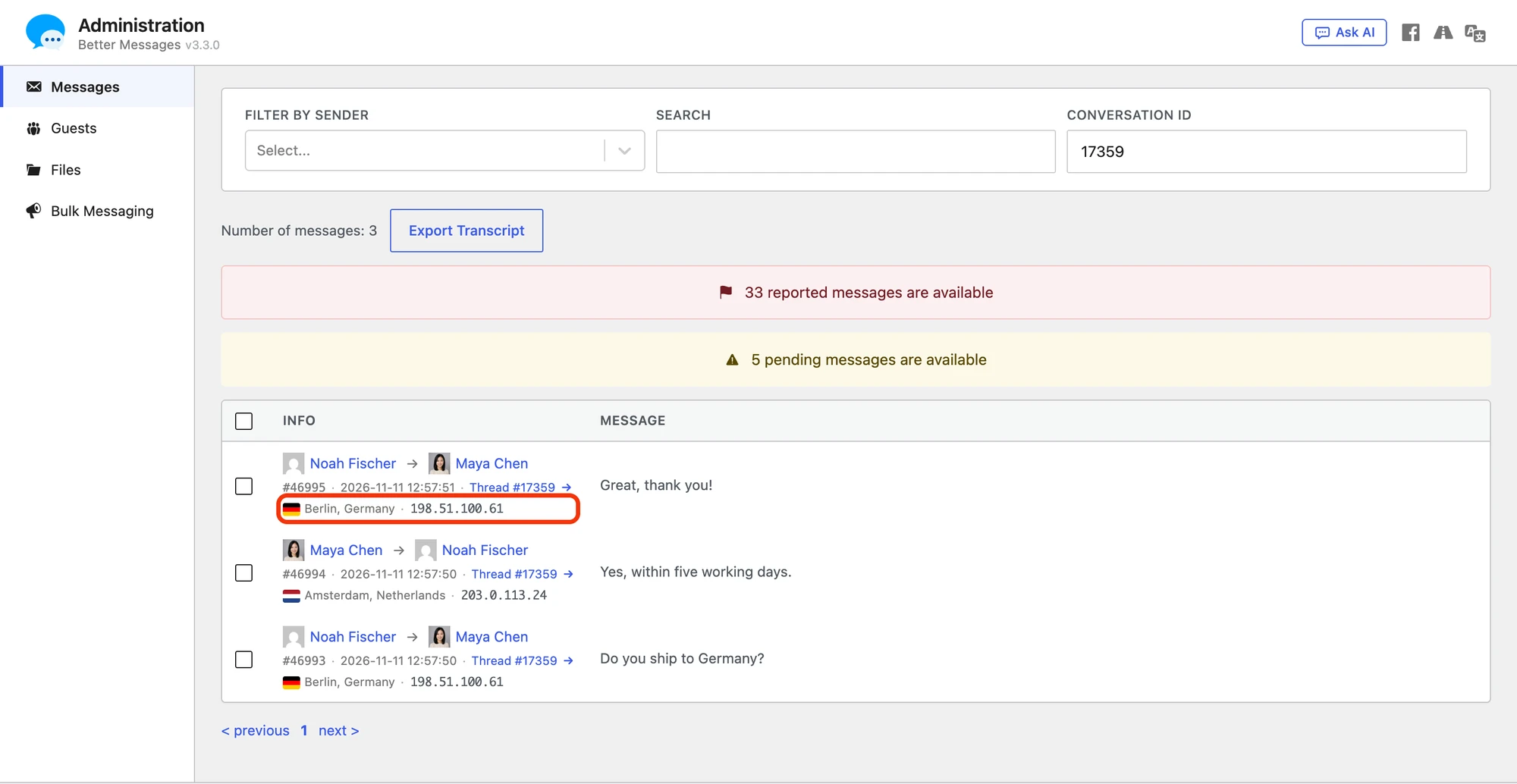
The place is looked up on your own site, from a DB-IP database you download under Settings → Integrations → Locations, from Cloudflare or from WooCommerce, so no address goes to a lookup service. Keep addresses keeps them for 90 days, and turning it off deletes every stored address. It is on for a new site and off on a site updated from an older version, where no address is stored until you turn it on. Locations are in the free version too. Locations and addresses has every setting.
Smaller things#
- Maximum Participants. Settings → Messaging → Group Conversation Settings sets the most people a group conversation can have, its creator included. Administrators are not limited. See Maximum Participants.
- A stricter Bad Words Filter. A word with signs such as c++ now blocks, words in Chinese, Japanese or Thai are found inside a sentence, an empty line in the list no longer blocks every message, and conversation names and edits are checked. See Bad words filter.
- Emoji on sites with Amelia. Emoji are no longer saved as "????" on sites with Amelia whose database charset in
wp-config.phpis utf8. - Readable names. Names in the messenger no longer turn faint on themes that color links, such as the dark mode of BuddyX.
- Secure keys. The keys of guests, conversations and calls come from a cryptographically secure generator.
- Guest Chat off means off. Guests can no longer send messages outside chat rooms and bookings once Guest Chat is off.
- Limits that hold. The cooldown between new conversations and the reply rate limit no longer let through requests sent at the same moment.
- Held means held. A message held for approval is no longer delivered when Better Messages Moderation AI answers late.
The changelog has every change.
For developers#
- Spam Protection adds the
better_messages_spam_checked,better_messages_message_held,better_messages_account_state_changedandbetter_messages_marked_as_spammeractions, and thebetter_messages_spam_rules,better_messages_spam_enforceandbetter_messages_spam_refusalfilters. See PHP actions and PHP filters. - Message requests have the
better_messages_message_requests_created,better_messages_message_request_acceptedandbetter_messages_message_request_declinedactions and thebetter_messages_message_requestfilter. - Edits, renames and new participants can be refused through the
better_messages_before_message_edit,better_messages_before_subject_changeandbetter_messages_before_add_participantsactions. - Polls, Invisible mode, group sizes and profiles have
better_messages_user_can_create_poll,better_messages_user_can_be_invisible,better_messages_max_participantsandbetter_messages_profile_plugin.
Updating from 3.2#
The update is in place. Ten things to check:
- Open WP Admin once after updating. A small database step runs on that visit. It does not touch the messages table.
- Spam Protection starts at Monitor only on an updated site. Nothing is held or refused. After a week it says what it would have stopped, and Balanced is one step away. New sites start at Balanced. Your moderation settings are where they were, in Settings → Moderation, now in sub-tabs, and Bulk Messaging is under Settings → Messaging.
- The Bad Words Filter is stricter. Conversation names and edited messages are checked, and words with signs or written inside other scripts now match. Look at the list once under Settings → Moderation → Content.
- No address is kept until you turn it on. On an updated site Keep addresses starts off, so the addresses members and guests connect from are not stored. Turn it on under Settings → Integrations → Locations to see where people connect from, kept for 90 days. While it is on, the privacy policy text WordPress suggests gains a paragraph about them.
- Polls are on. Members can make polls in group conversations, chat rooms, groups and courses. Settings → Polls turns them off or limits who can make them.
- Edit profile starts off. On a site with no profile plugin, members can change their name and photo in the messenger once you turn Members Can Change Their Name and Members Can Change Their Photo on under Settings → General → Profiles. An updated site starts with both off.
- Emails have the new design. The built-in template takes it by itself, and a custom template keeps working. Moderators of an updated site still get an email for each held message, until you set Held Messages Digest under Settings → Moderation → Emails.
- Clear the page cache and the CDN after updating, so every visitor gets the new script.
- The mobile apps need no new build for 3.3.
- Before going back to 3.2, turn stored data encryption off. Wait until the panel says everything is decrypted, as 3.2 cannot read encrypted data.
If anything looks wrong after updating, please tell us at support@better-messages.com, or on the support forum if you use the free version.
Where to look next#
- Polls: the form, voting and where polls can be made
- Spam Protection: the levels, the rules and the Review tab
- Message requests: who sends them and what a member sees
- Chat and video calls for WordPress bookings: the four booking plugins
- Guest access: the sign-up form, sign-in links and the move into an account
- Profile name and photo: Edit profile and the image editor
- Stored data encryption: the key, search and rotation
- Email notifications: the new design and Email Content
- Locations and addresses: the sources and how long addresses are kept