Browser Tab Notifications
Better Messages shows unread messages in the browser tab of your site, so members notice them while they read another page or work in another tab. The tab can show the unread count in its title, a symbol next to it, a badge on the site icon and a title that flashes when a new message arrives.
What it adds#
- The unread count in front of the page title, for example (3) My Site
- A symbol after the count, for example (3) 🔴 My Site
- A badge on the site icon of the tab, with the unread count or a dot
- The shape of the badge (round or square), its colour, the colour of its number and the corner it sits in
- A title that switches between the page name and New message while the tab is in the background
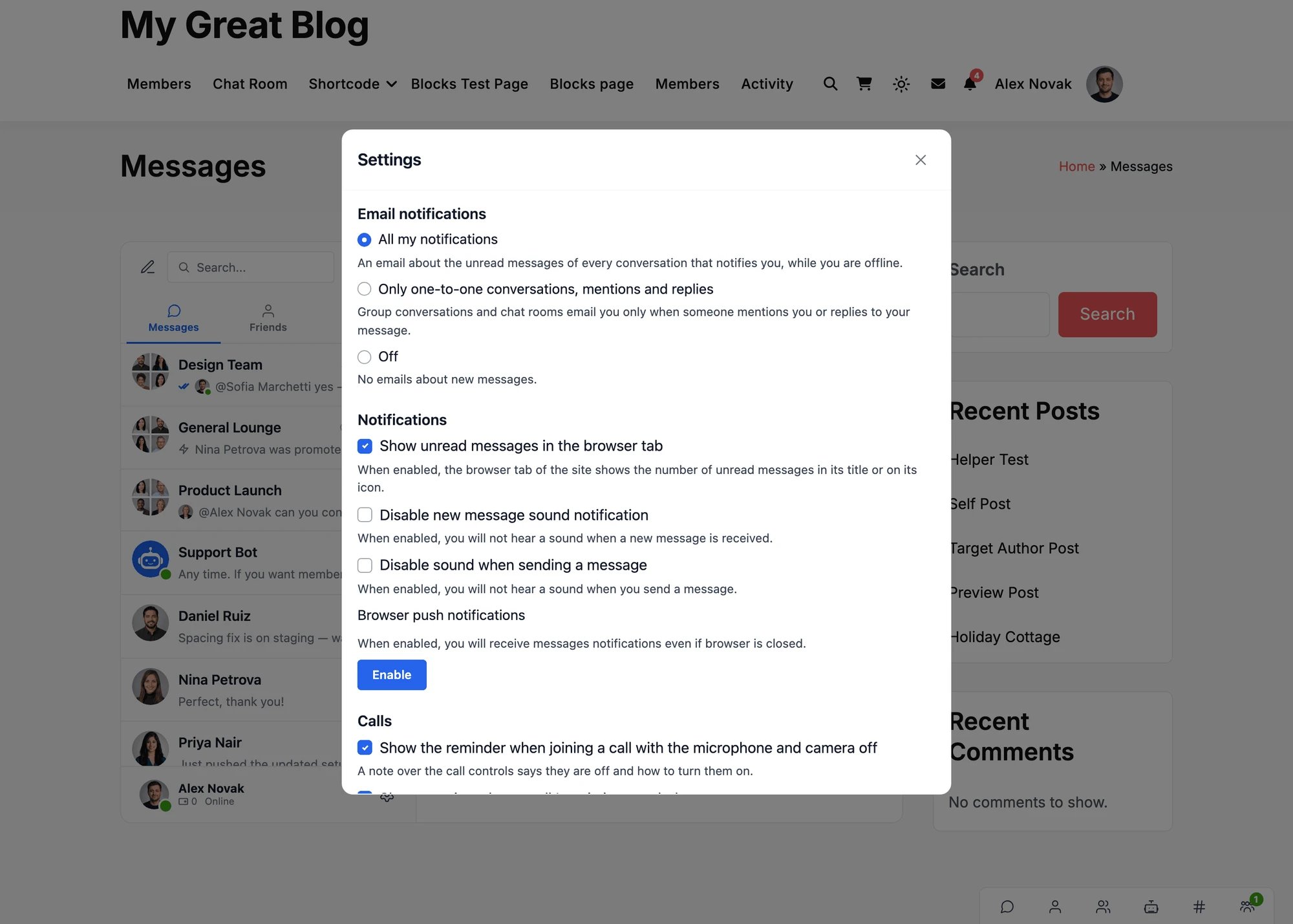
- A switch for each member to turn it all off for themselves
The badge on the icon is the most visible of them: a browser shows the icon of every tab, while a long title is cut off as soon as several tabs are open.
How to set it up#
Go to WP Admin → Better Messages → Settings → Notifications → Browser Tab.

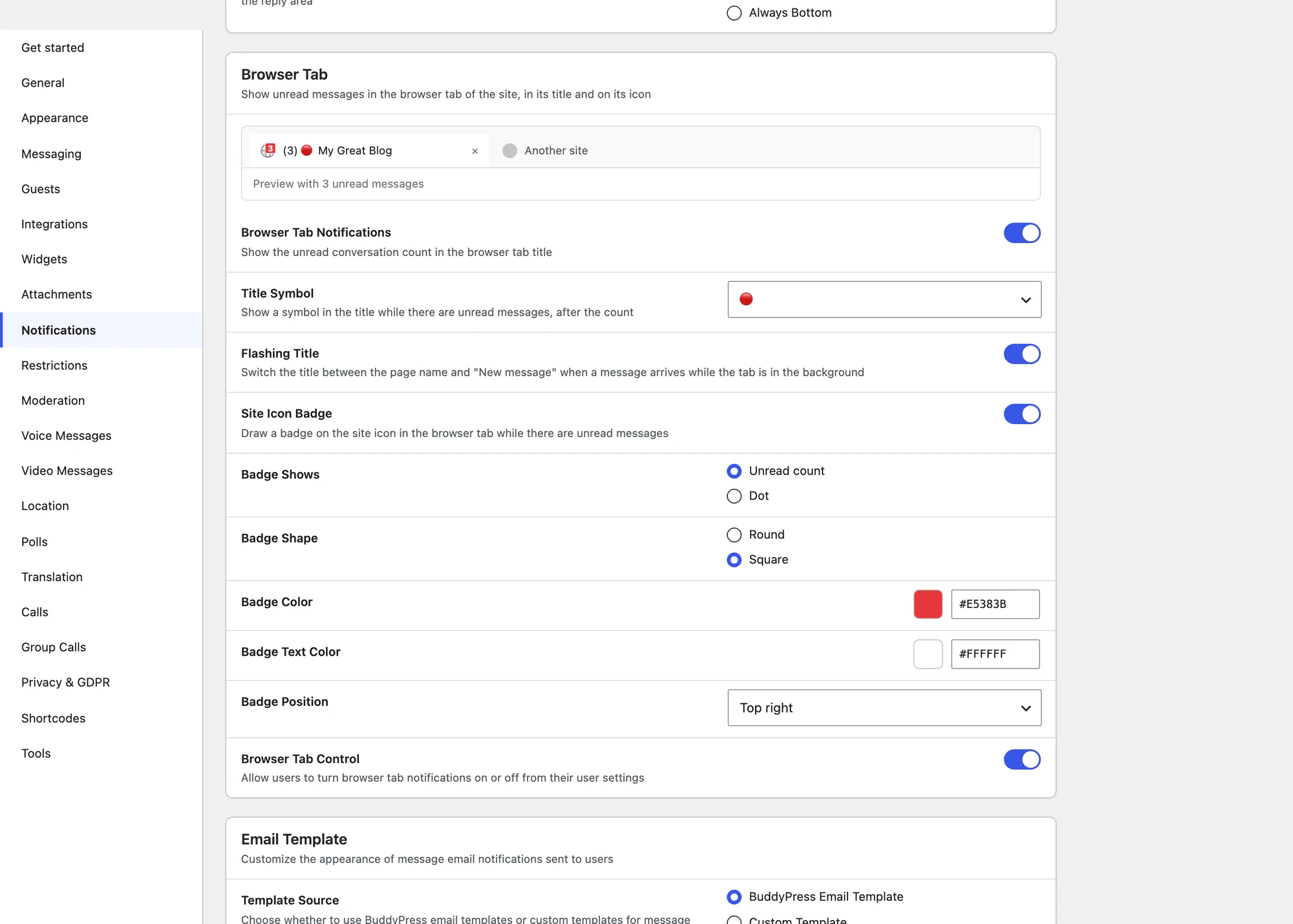
The preview at the top of the section shows the tab as a member sees it with three unread messages, and changes as you change the settings. It draws the badge on your own site icon (Settings → General → Site Icon in WordPress), or on a plain globe when the site has none.
| Setting | What it does |
|---|---|
| Unread Count in Title | Shows the unread count in front of the page title. On by default |
| Title Symbol | Adds a symbol after the count: a coloured circle, a bell, a speech bubble, an envelope or a dot |
| Flashing Title | When a message arrives while the tab is in the background, the title switches between the page name and New message until the member opens the tab |
| Site Icon Badge | Draws a badge on the site icon while there are unread messages. Off by default |
| Badge Shows | The unread count (9+ above nine, as more does not fit on a tab icon) or a dot |
| Badge Shape | Round, or square with slightly rounded corners |
| Badge Color and Badge Text Color | The colour of the badge and of the number on it. Red and white by default |
| Badge Position | The corner of the icon the badge sits in |
| Members Can Turn Tab Notifications Off | Lets members turn browser tab notifications off in their own settings |
Save the settings with Save Settings at the bottom of the page.
What members can choose#
With Members Can Turn Tab Notifications Off on, every member finds Show unread messages in the browser tab in the Notifications group of their messenger settings. It is on until they turn it off, and turning it off removes the count, the symbol, the flashing title and the badge for them. Guests have the same choice.

Other plugins in the tab#
Some plugins write their own count in the title too, PeepSo and some chat plugins among them. When another plugin puts its own count in front of the title, Better Messages leaves the title to it instead of writing over it, and the site icon badge keeps showing the unread messages. Once that count is gone, the title shows the Better Messages count again.
Sites that change pages without reloading, such as the FluentCommunity portal, get the count on each new page at once.
Frequently asked questions#
Can the title be bold or in colour?#
No. A browser shows the tab title as plain text and gives a website no way to style it. That is why the symbol and the badge exist: the symbol adds colour to the title, and the badge puts it on the icon.
Does the badge work in every browser?#
Chrome, Edge and Firefox show it. Safari on a Mac does not always redraw the icon of a tab after the page has loaded, so it may keep showing the plain site icon. The title count works in every browser.
Why does the badge show without my logo?#
The site icon is served from another domain (a CDN) that does not allow the browser to read it, so the badge is drawn alone. Allow cross-origin requests for the image on your CDN, or serve the icon from your own domain. A site with no site icon gets the badge on the icon its server answers for /favicon.ico. Set one in Settings → General → Site Icon.
How fast does the title flash?#
About every second and a half while the tab is in the background. Browsers slow down timers in background tabs after a few minutes, so a tab left in the background for long flashes less often. The flashing stops as soon as the member opens the tab.
Does it work on the free version?#
Yes. Browser tab notifications work in the free and the WebSocket version alike.
Does the mobile app show it?#
No. The app has no browser tabs, so these settings do nothing there.
See also#
- Site notifications: the pop-ups on the page when a message arrives
- Sound notifications: the sound of a new message
- Web push notifications: notifications while the site is closed (WebSocket version)
- Email notifications: for members who are away