Administration Page
WP Admin → Better Messages → Administration is where an administrator, or a site moderator, looks at what members did in the messenger: what waits for a decision, every conversation, every message, the calls, the members and the guests.
Each section shows only when its feature is on and the person may use it, so a site without calls has no Calls section.
| Section | What it lists |
|---|---|
| Review | The reported, flagged and held messages and the accounts under review, with the number that waits |
| Conversations | Every conversation of the site (from 3.3.1) |
| Messages | Every message, to browse and search |
| Calls | One-to-one calls and group calls (from 3.3.1) |
| Members | The members who have a conversation (from 3.3.1) |
| Guests | The guests |
| Files | The files of Cloud Storage |
| Bulk Messaging | Messages sent to many members at once |
Conversations#
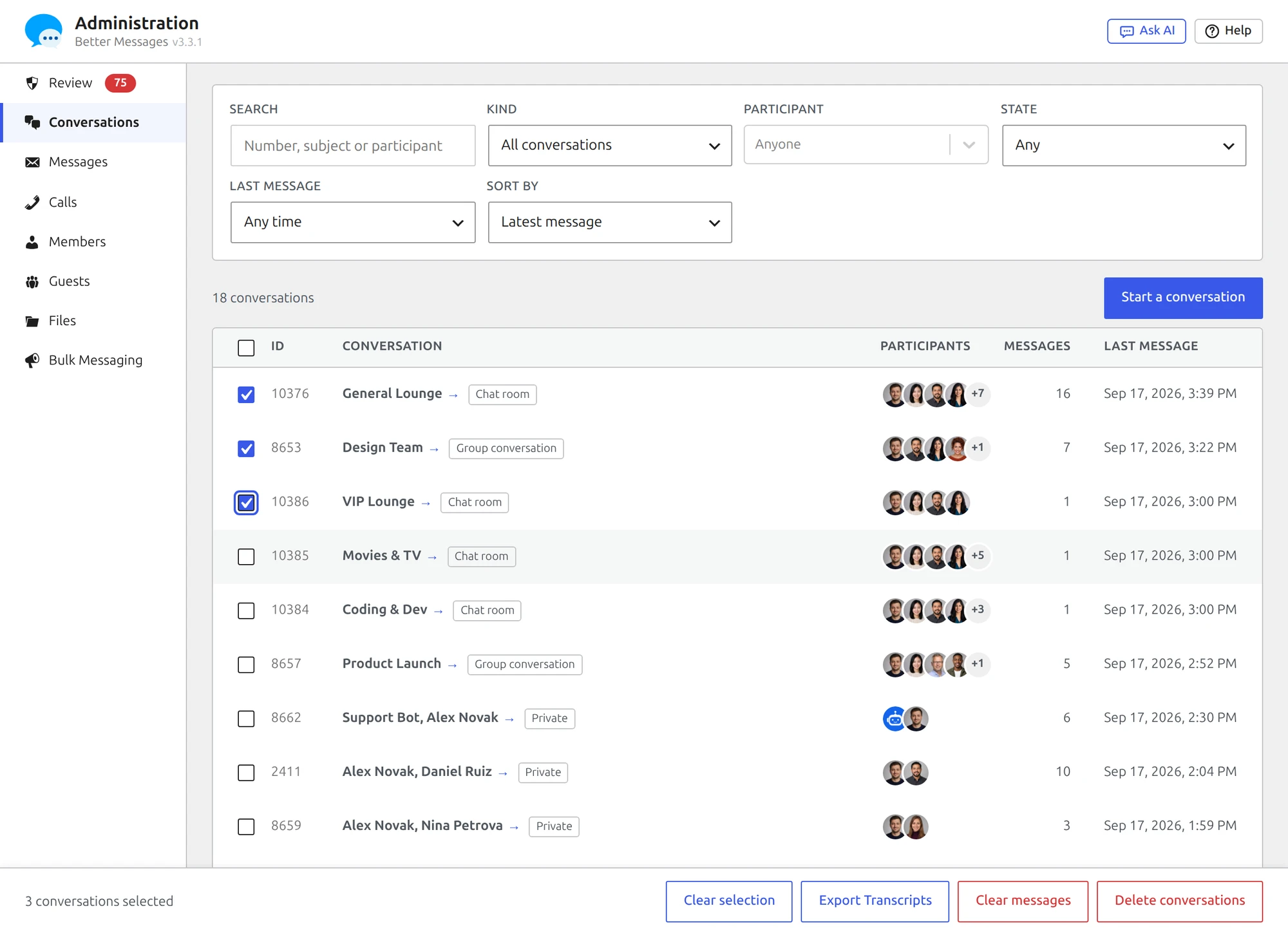
A list of every conversation, newest first, 20 a page. Each row has:
- Conversation: its subject, the name of its chat room, or the names of its first participants, with what kind it is: Private, Group conversation, Chat room, Group, Course or Booking
- Participants: how many, with the first four photos
- Messages: how many
- Last activity: when the last message was sent
- End-to-end encrypted where it is
Filter the list by:
- Search: a conversation number, words of the subject, or the name of someone in it
- Kind: private and group conversations, chat rooms, groups, courses or bookings
- Participant: the conversations of one member or guest
- State: with messages, without messages, end-to-end encrypted, or with someone muted or banned
- Last message: today, in the last 7 or 30 days, older than 90 days or older than a year
Sort by the newest conversation, the latest or the oldest message, the most messages or the most participants.
Start a conversation opens a new conversation with the members you choose, with a subject and a first message from you.
Many conversations at once#
Tick conversations, or tick the box of the page and Select all … matching this filter, and the bar at the bottom of the page offers:
- Export Transcripts, where transcripts are on
- Clear messages: every message of each conversation is deleted, its participants stay
- Delete conversations: each conversation is deleted for everyone. It asks to type the word first
The bar says how far it got while it works, and what it left out at the end: an end-to-end encrypted conversation is never cleared, and a conversation of a chat room, a group, a course or a booking is never deleted here. With Last message: Older than a year and Delete conversations, old conversations are cleaned up in one go.

A conversation's details#
Click a row to open its details:
- View messages opens Messages with that conversation alone
- Export Transcript, where transcripts are on
- Clear messages deletes every message and keeps the conversation and its participants
- Delete conversation deletes it for everyone. It asks to type the word first
- Subject, and Participants can invite others and System messages, for a group conversation
- Participants, with who moderates, who is muted and who is banned, and buttons to show only Moderators, Muted or Banned people

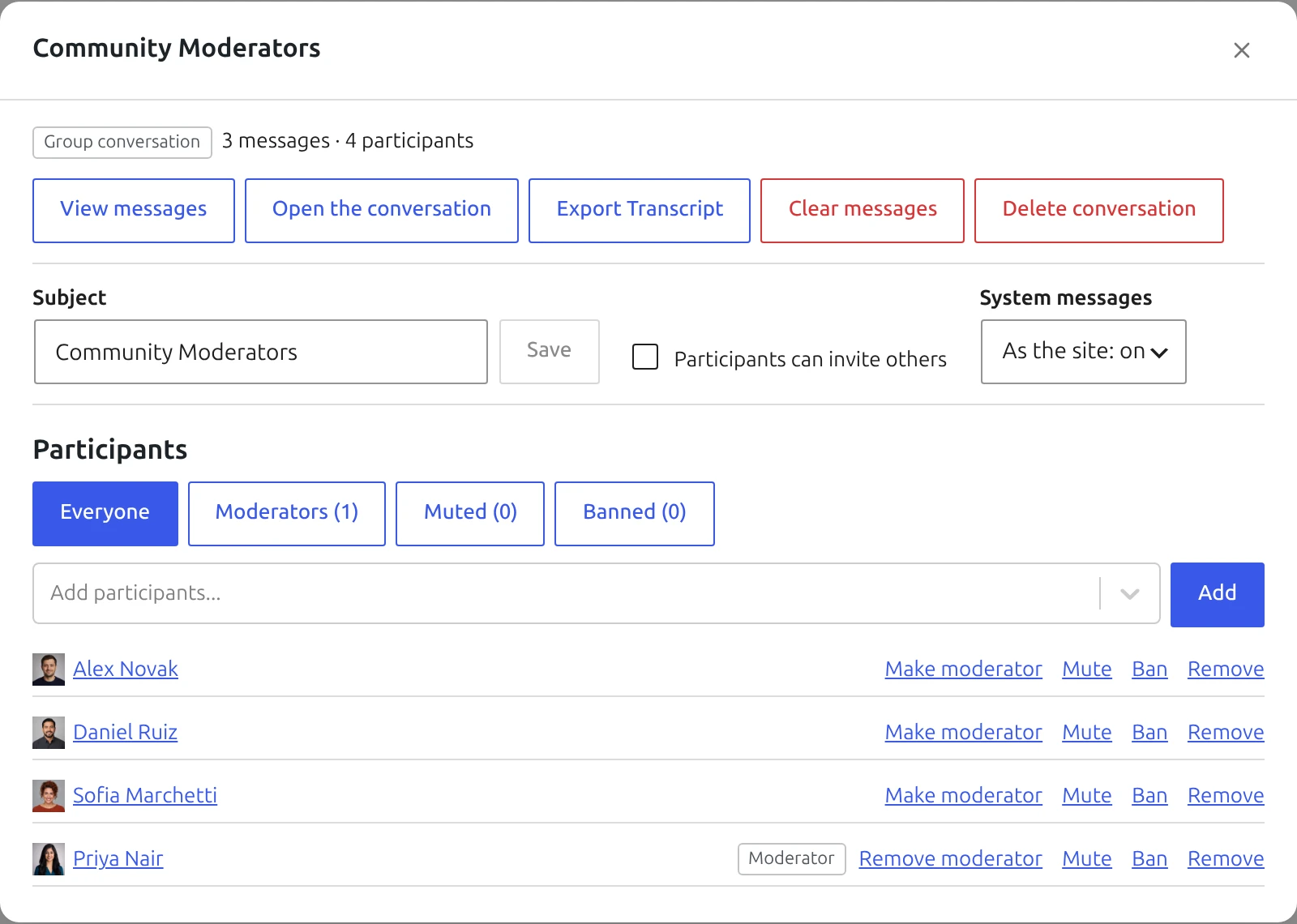
Each participant has, as far as the conversation allows it:
- Make moderator and Remove moderator
- Mute for an hour, a day, a week, 30 days or permanently, and Unmute: a muted member stays in the conversation and reads it, but cannot write in it until the mute ends
- Ban for the same lengths, and Unban: a banned member is taken out of the conversation and cannot open it or come back until the ban ends, even while they are still a member of its group, course or booking. Unban puts them back in a group conversation, and a group, a course or a booking adds them again itself
- Remove

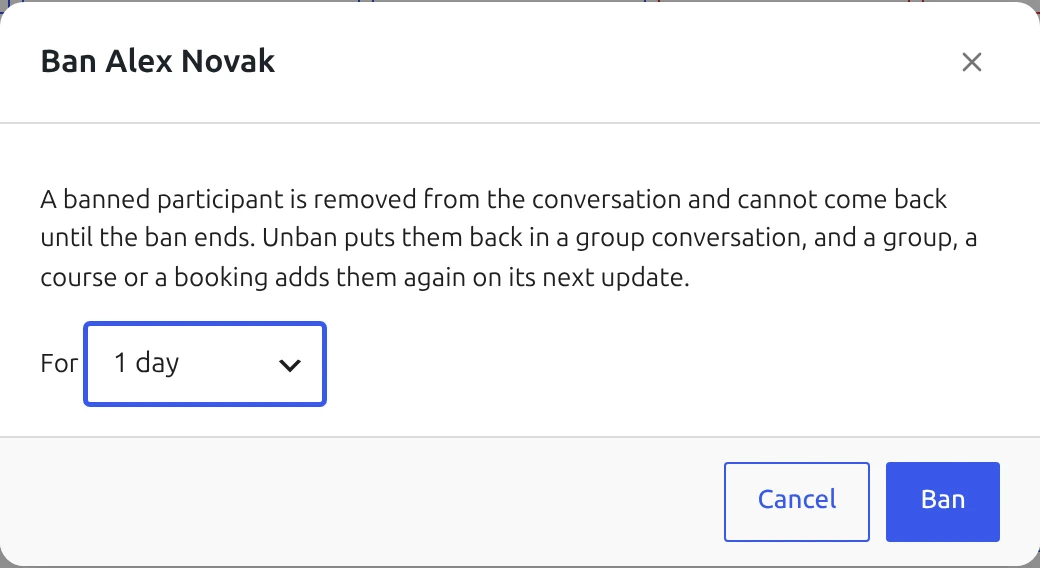
Everything works as it does for a moderator in the messenger, so members see the same notices.
| Kind | Clear | Delete | Participants and moderators | Mute | Ban | Subject and settings |
|---|---|---|---|---|---|---|
| Private | Yes | Yes | — | — | — | — |
| Group conversation | Yes | Yes | Yes | Yes | Yes | Yes |
| Chat room | Yes | In its editor | Yes | Yes | Yes | In its editor |
| Group, course, booking | Yes | With it | With it | Yes | Yes | With it |
A conversation of a group, a course or a booking follows its owner: its members are those of the group, the course or the booking, and it is deleted with it. A ban is the way to keep one member out of it.
Moderators of a conversation have Mute user and Ban user in the same kinds of conversations in the messenger, from the menu of a participant (from 3.3.1, before it in chat rooms only). Clear messages and Delete are for administrators only, and neither can be undone. An end-to-end encrypted conversation can be deleted but not cleared, as the site cannot read it.
Messages#
Every message of the site, newest first, filtered by sender, by words and by conversation.
From 3.3.1 the Conversation filter takes a conversation number, or words: type a subject or the name of a participant and pick the conversation from the list.
A message that waits for a moderator is marked here with why it waits, and has Review it, which opens Review at its conversation. Approving, rejecting and dismissing are done in Review alone, so there is one place for what waits. Delete message stays in Messages.
Calls#
One-to-one calls lists every call members made: who called whom, audio or video, when, how long, and whether it was answered, missed, declined or cancelled. A small mark says whether the call went directly between the two browsers or through the call servers. Calls made before 3.3.1 are listed too, as each call was already kept as a message of its conversation. Filter by a member, or show the missed calls alone.
On a site with a points system connected, a Points column shows what the caller was charged for each call. Points are recorded from 3.3.1 on, so an earlier call, and a call nobody was charged for, shows a dash.
In Messages, a message whose sender was charged points shows them in its details: the points for the message, and for starting the conversation where that was charged too. These are recorded from 3.3.1 on as well.
Group calls has two parts:
- Running now: the group calls and video and audio rooms with someone in them, who started each, how many people are in it, and End Call, which takes everyone out
- History: each group call with its conversation, who started it, when, how long it lasted, how many people joined and the most at once
Click the people of a call, running or past, for its details: who started it and everyone who joined, by name. For a running call the list is who is in it now, with the people who joined and left under it.
Credits shows what a call took where the site's group calls are counted in credits: the site includes a number of people at once in all its group calls together, and each person above them takes a credit a minute on video and half a credit on audio. The number is this site's own count, taken about once a minute and shared between the calls running at the same time by their people. The account's balance, which WordPlus Cloud counts, is on the Licence page. Where group calls take no credits (a staging or local copy, or a site on its own realtime server) the column shows a dash and a line above the history says so.
The history of group calls starts with the update to 3.3.1, as nothing was recorded about them before. It is kept until its conversation is deleted. A group call's end is noticed within about a minute, so its length is right to about a minute.
better_messages_group_calls_keep_days deletes the history of group calls after a number of days. It returns 0,
which keeps it, unless a site changes it.
Lists that follow the site#
Conversations, Messages and both lists of Calls ask the site again by themselves while the page is on screen, every 10 to 20 seconds, and at once when you come back to the tab. A new conversation, a new message, a call that starts or ends and the people who join a group call show without a reload. Only the first page of a list does this, and Messages waits while messages are ticked.
Members#
The members who have a conversation, most recently active first: their role, when they were last active, how many messages they sent and how many conversations they are in, and where they stand with moderation: Trusted, Under review, Suspended, or Can administrate.
Search by name or email, or filter by status. The message and conversation counts are links to Messages and Conversations for that member.
The actions on a row are the ones the WordPress profile page of a user and Review have:
- Trust this account: its messages are never held
- Put under review: its messages wait for approval until it is released
- Suspend: it can no longer send, start conversations or call until the suspension is lifted
See Spam Protection and Pre-moderation for what each status means.
Who can open it#
Administrators, the roles checked under Roles That Can Access Administration, and anyone with the
bm_can_administrate capability. See Site Moderators.
Two things need more than that:
- Clear messages and Delete conversation need an administrator
- Bulk Messaging has its own permission, see Site Moderators
Privacy#
The page shows who wrote to whom and who called whom, to the roles you gave access. One-to-one calls show what the call messages already hold. The history of group calls is a new record from 3.3.1: the conversation, who started the call, who joined it, and when it started and ended. It is kept until its conversation is deleted. A member or guest who is deleted is taken out of it.