Better Messages for LatePoint: Chat and Video Calls for Every Booking
The LatePoint integration gives every booking a private conversation between the customer and the agent. The customer opens it from the booking email, from the customer cabinet or from a booking summary, and the agent opens it from the same email or from the Better Messages inbox. The booking itself sits at the top of the conversation, and the conversation is told when the booking moves or is cancelled.
With the WebSocket version the same conversation holds the video call of the booking. That call becomes one of the video meeting systems of LatePoint, named Video call, so a service can use it in place of Zoom or Google Meet, with no outside account for the customer or the agent.
To install the plugin ensure that your website running:
- WordPress 5.9 or newer
- PHP 7.4 or newer
What the integration does#
- A private conversation per booking between the customer and the agent of the booking. It is made the first time one of them opens it, not when the booking is made, so bookings nobody writes about leave nothing behind.
- A group conversation for group bookings. A time slot of a service that takes more than one customer, and a LatePoint event, have one group conversation with the agent and every customer booked on it.
- One conversation for a recurring booking. All dates of a recurring series share one conversation, and the booking card follows the next date.
- Customers without an account reach the conversation by a signed link in their booking email. It signs them in as a guest of Better Messages for that email, even when guest chat is off on the site, and opens the conversation.
- Calls around the booking in the WebSocket version. The customer can call from a few minutes before the start until the end, the agent at any time.
- Notices in the conversation when the booking moves or is cancelled. A cancelled booking keeps its conversation readable and closes replies.
Chats work in the free and WebSocket versions. Calls need the WebSocket version, as every call in Better Messages does.
Setup#
- Install and activate LatePoint and Better Messages.
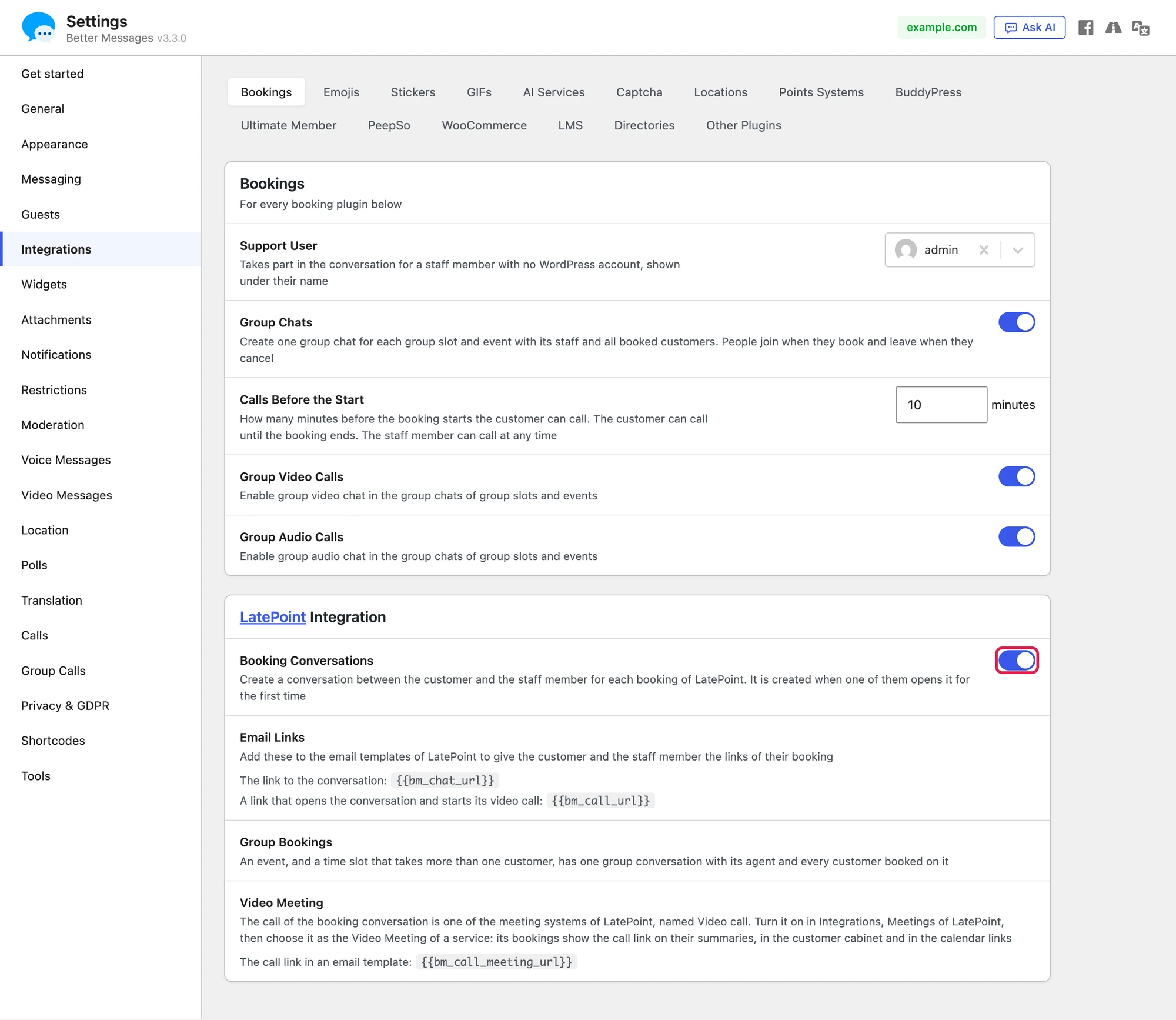
- Go to Better Messages → Settings → Integrations → Bookings.
- In the LatePoint Integration card, turn on Booking Conversations.
- Make sure Better Messages has a page for its messages (Messages Location under Better Messages → Settings → General). The links of the booking emails land on that page. While no page is set, the Bookings card shows a warning, as customers who booked without an account would have nowhere to read their messages.
Settings shared by every booking plugin#
The Bookings card at the top holds the settings that every booking plugin of the site shares:
- Support User: a user who takes part in the conversation for an agent with no WordPress account. The customer sees the name of the agent over the support user. In LatePoint Pro an agent gets a WordPress account with Connect to WP User on the agent form, and then answers in person.
- Group Chats: one group chat for each group slot and event, with its agent and all booked customers. People join when they book and leave when they cancel. When it is off, group bookings have no conversation.
- Calls Before the Start: how many minutes before the start the customer can call, 10 by default. The customer can call until the booking ends, the agent at any time.
- Group Video Calls and Group Audio Calls: group calls in the group chats of group slots and events.
The LatePoint Integration card also lists the two Email Links to copy into LatePoint templates, says what makes a Group Booking in LatePoint, and explains the Video Meeting of LatePoint (below).
Video call as the video meeting of a service#
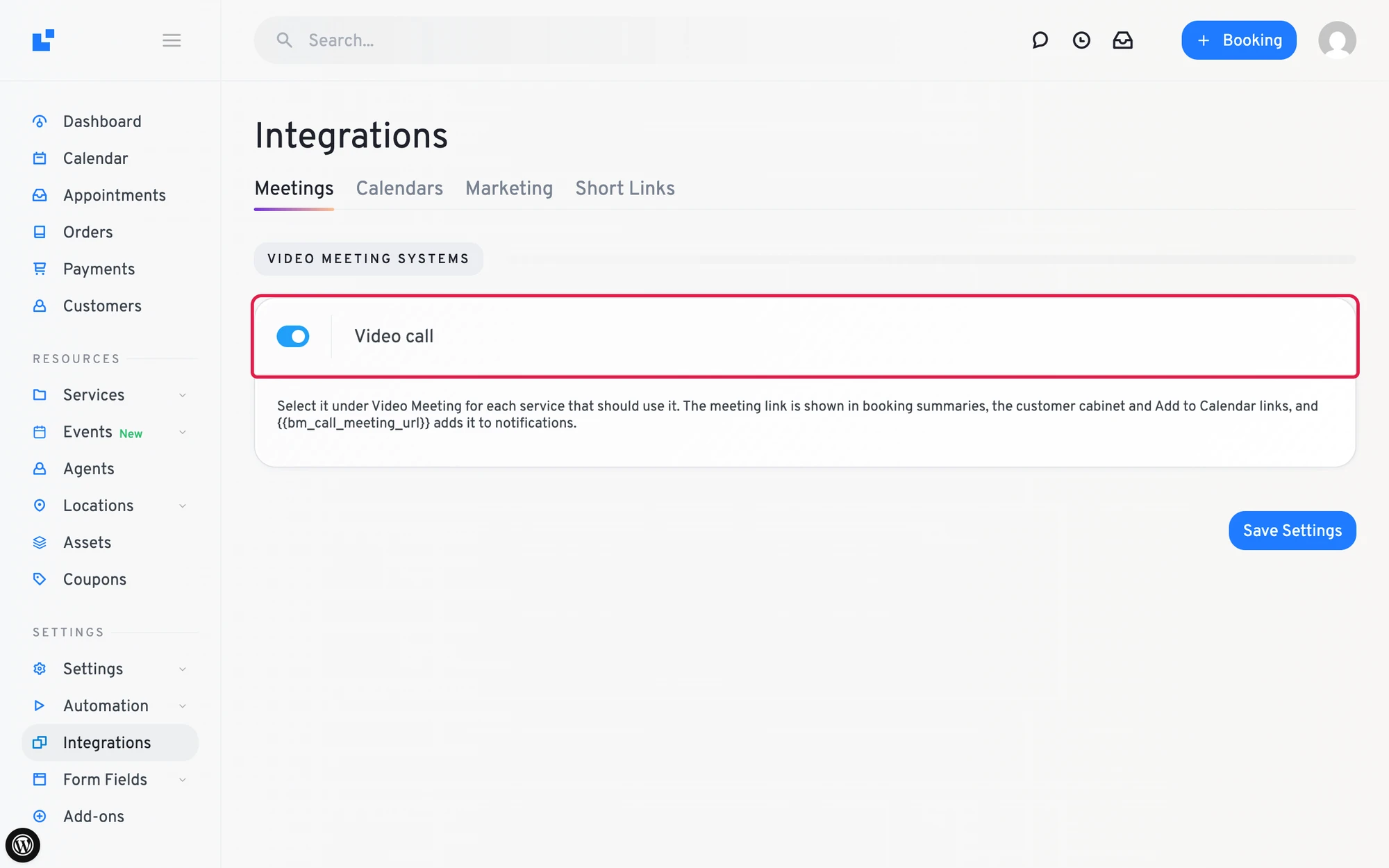
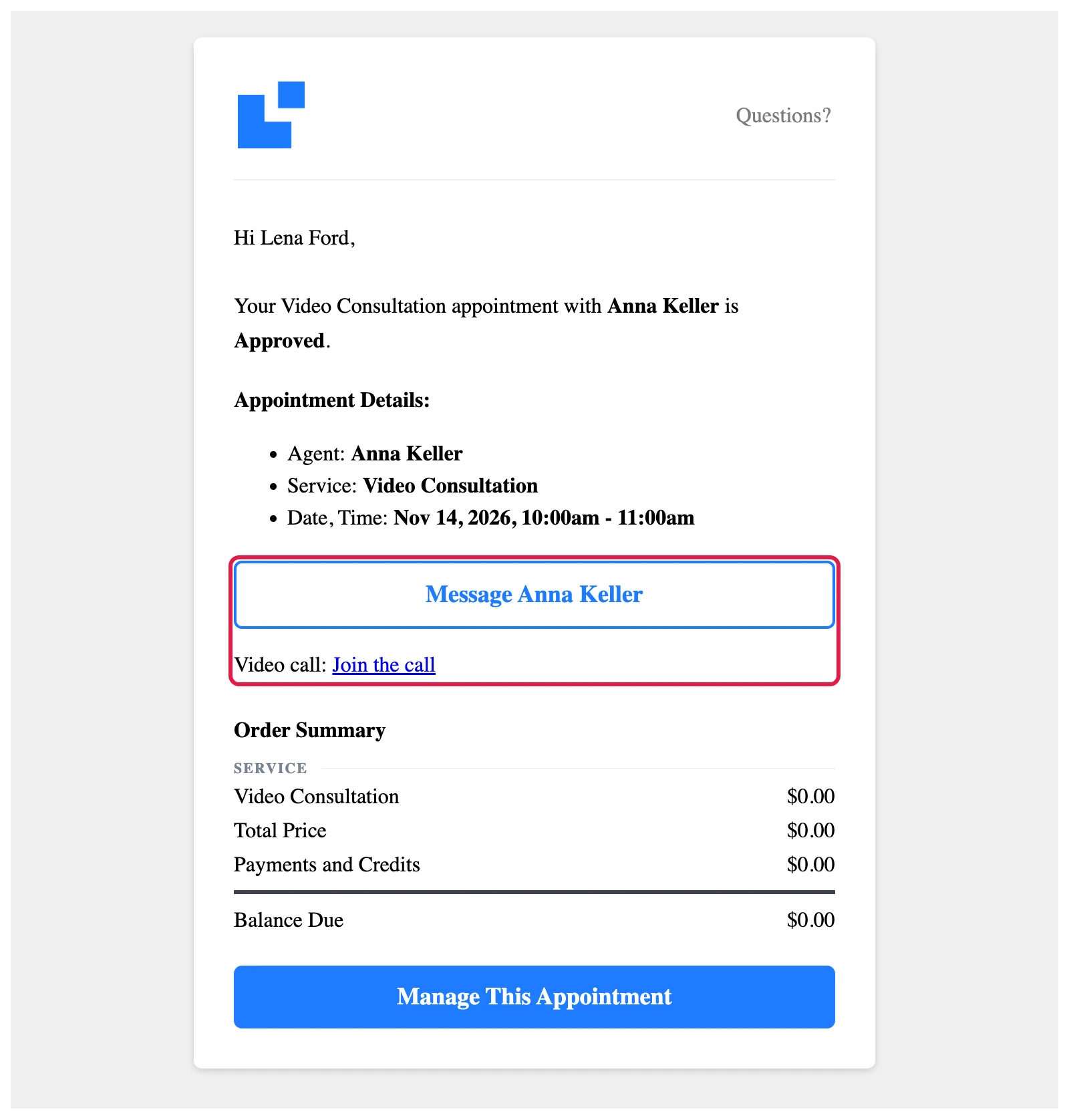
LatePoint lets a plugin add its own video meeting system, and Better Messages adds the call of the booking conversation as Video call. The name carries no plugin name, so customers see it as a call of the site itself. Once it is on, the bookings of a service that uses it show a link that opens the conversation of the booking and starts its video call.
- In LatePoint, go to Integrations → Meetings and turn on Video call, then Save Settings.

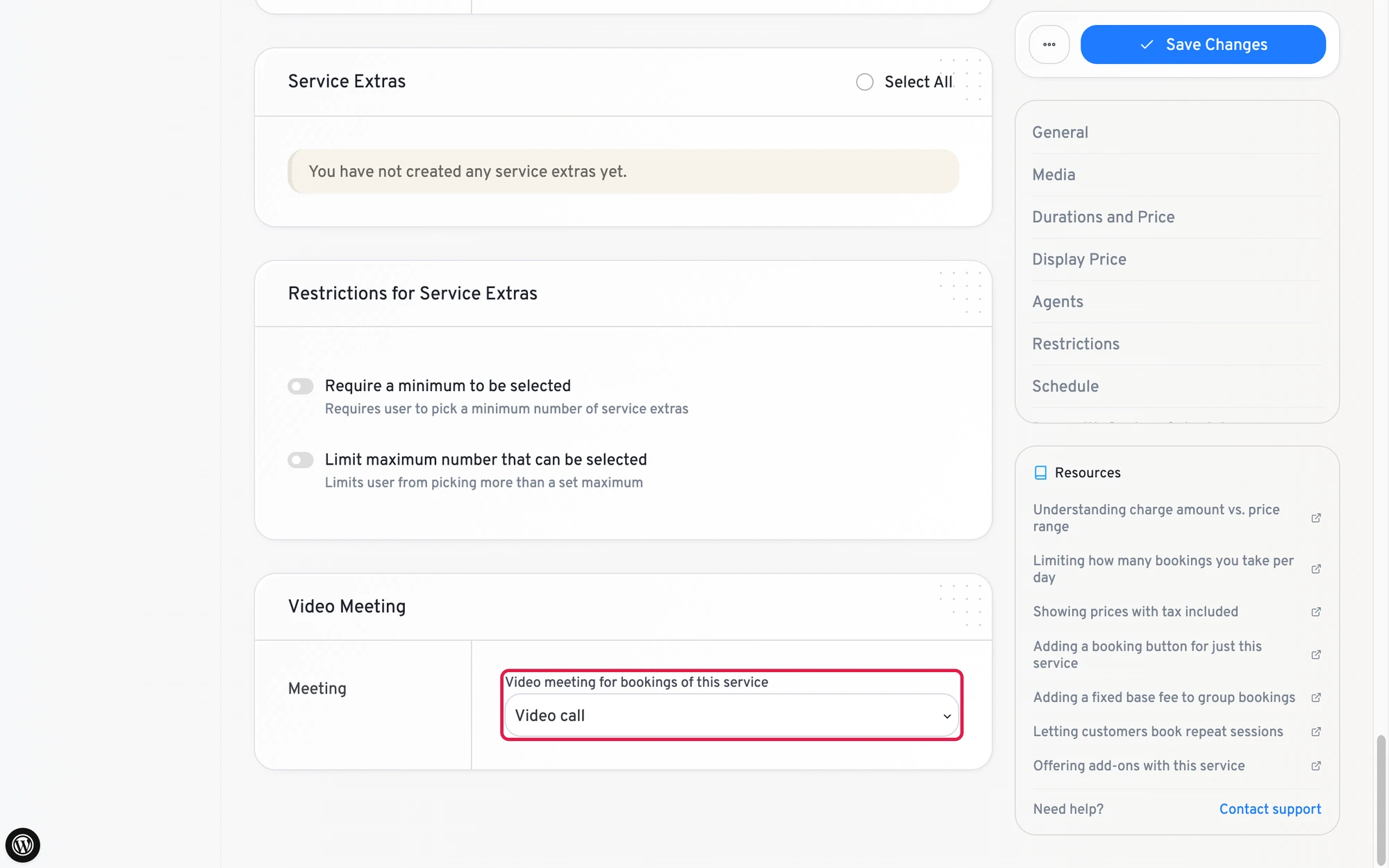
- Open the service in Services, scroll to the Video Meeting box at the bottom of its form, choose Video call under Video meeting for bookings of this service, and Save Changes.

The bookings of that service then show Video call: Join:
- In the booking summaries: the confirmation of the booking form, the manage page that the email of LatePoint links to, and the printed summary
- On the booking tile of the customer cabinet
- On the booking form of the admin
- In the Google Calendar and Outlook links of Add to Calendar (the
.icsfile does not carry it) - In notifications, where you put
{{bm_call_meeting_url}}
The card in the conversation then says Online in place of the location. Nothing is written into the booking itself, and a cancelled booking shows no call link.
The customer gets a link of their own that also signs them in when they have no account. The agent, the admin and anyone else get the plain address of the booking, which asks them to log in.
Email links#
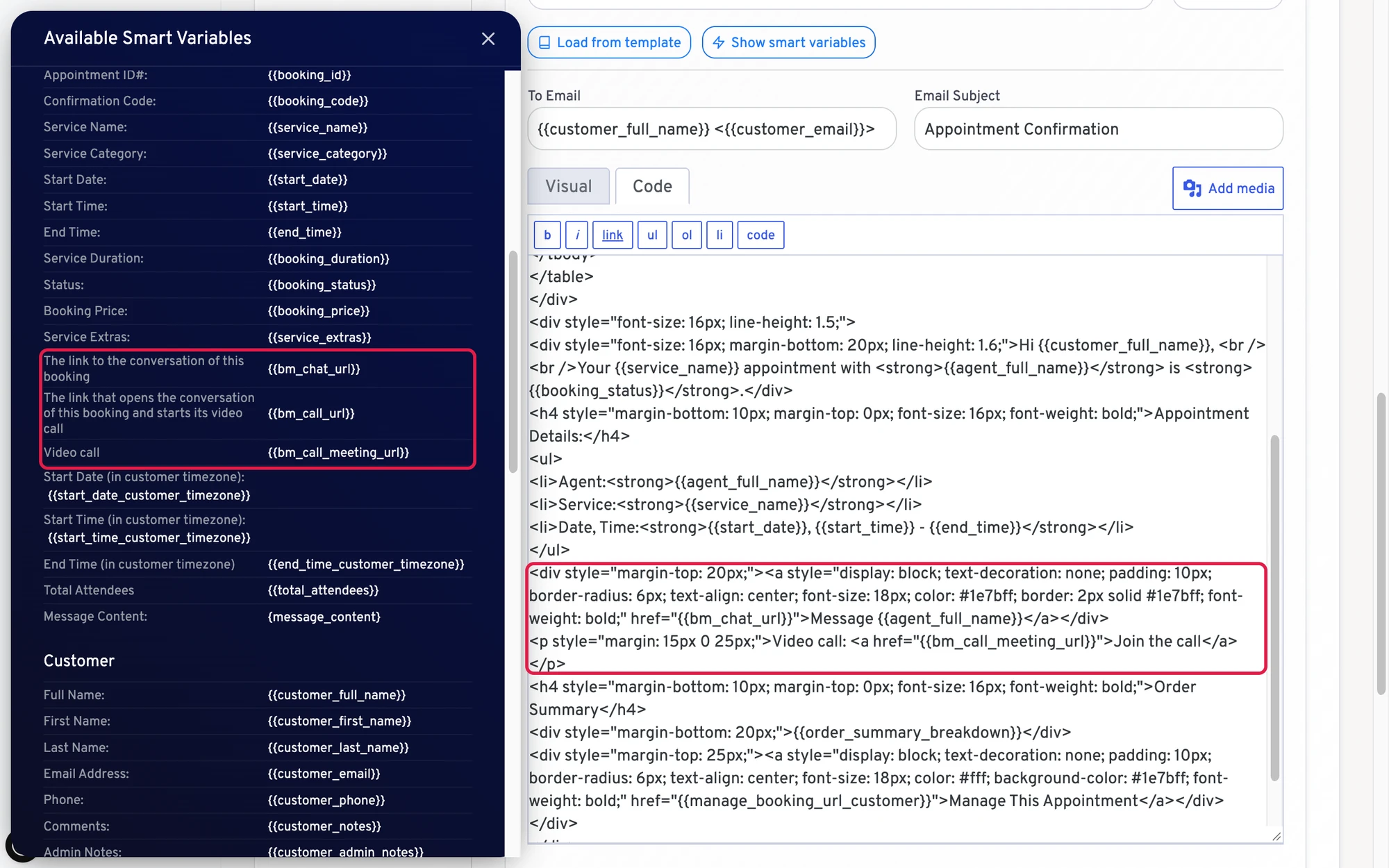
Better Messages adds three variables to the notification templates of LatePoint:
| Variable | What it prints |
|---|---|
{{bm_chat_url}} | The link to the conversation of the booking |
{{bm_call_url}} | A link that opens the conversation and starts its video call, for any booking. Where the site can have no call (no WebSocket licence, or video calls turned off), it prints the conversation link |
{{bm_call_meeting_url}} | The call link of a service that uses Video call as its video meeting, empty for any other service |
Put them in the templates under Automation → Workflows in LatePoint: open a workflow such as New Booking Notification, open its Send Email action and add the variable to its content, for example as the address of a link or a button. Show smart variables lists all three with what they print: The link to the conversation of this booking, The link that opens the conversation of this booking and starts its video call, and Video call, the last one once the meeting system is on. A click on a variable there copies it.

LatePoint sends no email until an email processor is chosen under Settings → Notifications in LatePoint, and its default workflow sends mail only for a new booking.
What the customer receives#
A customer who booked without an account gets signed links. A click signs the browser in as a guest of Better Messages for that email and opens the conversation, which is made at that moment if it is the first click. A customer with a WordPress account gets a plain link, which goes through the login page.
The same template sent to anyone but the customer, such as the agent or the admin, gets the plain link in place of the signed one, so an email to the agent never signs anyone in as the customer.

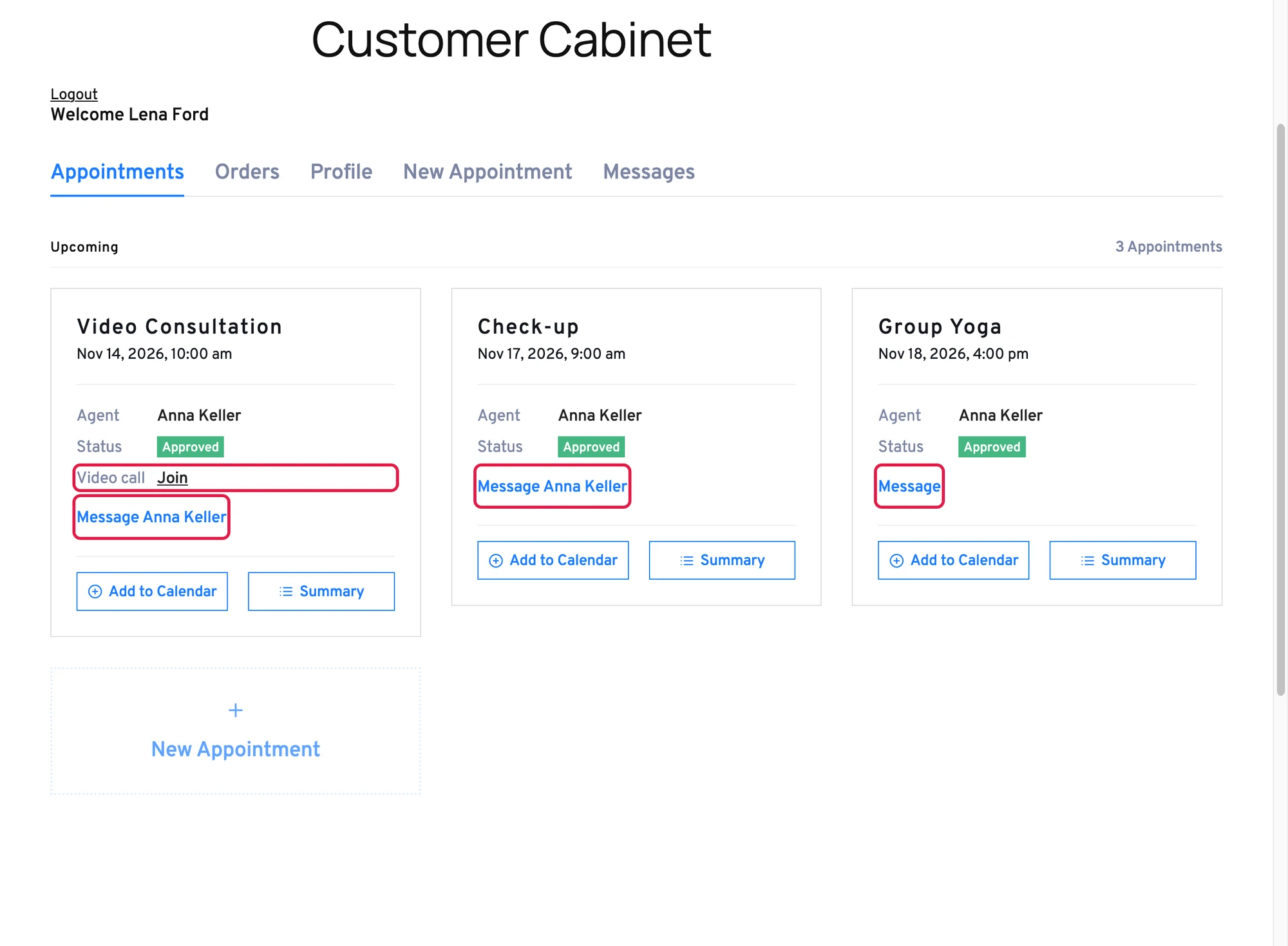
The Message button in the customer cabinet and on booking summaries#
The booking tiles of the LatePoint customer cabinet get a Message button under the agent and status, and a Video call row with Join for a service that uses the call. The button names the agent, as Message Anna Keller, when the agent answers in person, and says Message for a group booking.

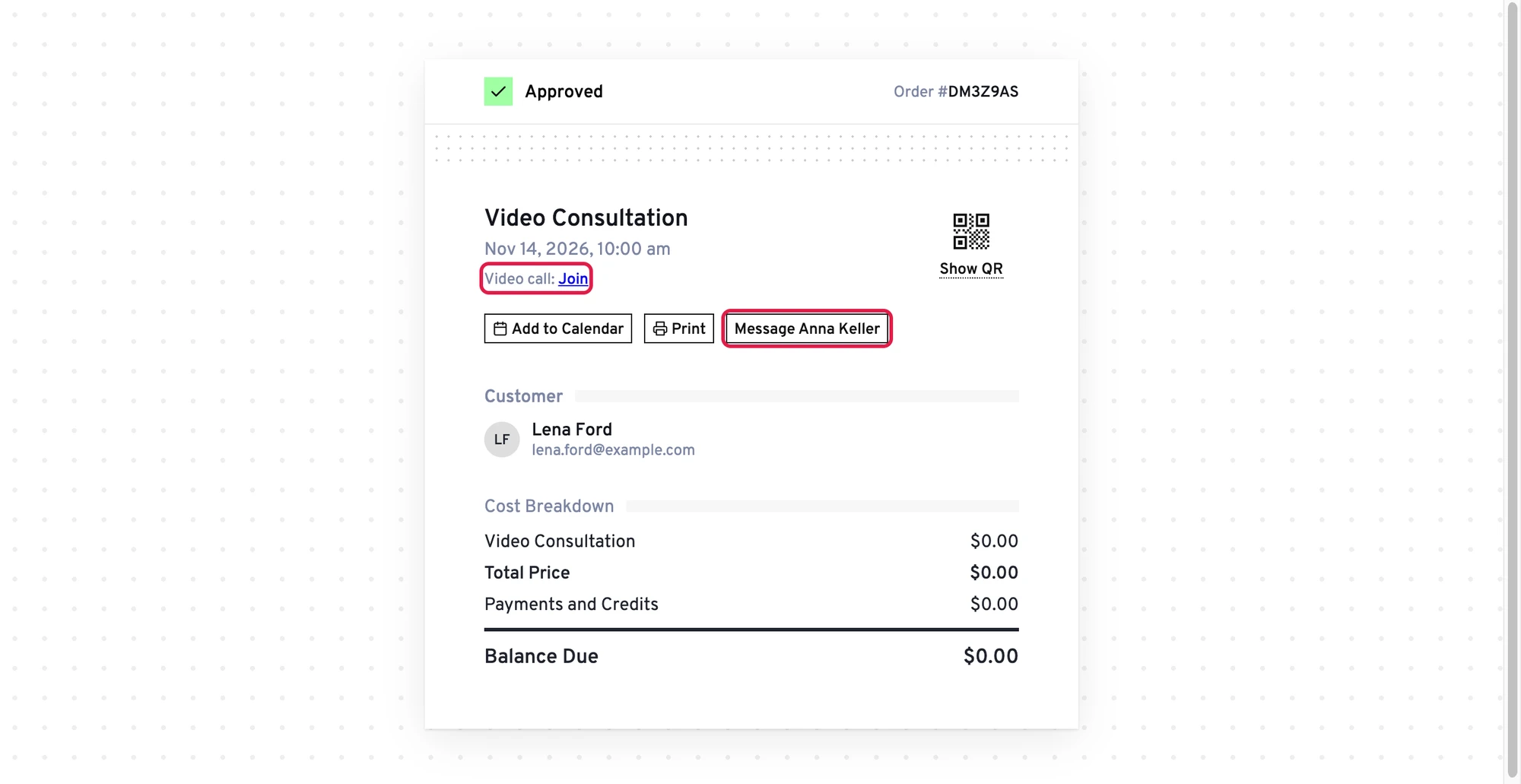
The summaries of a booking get the same button beside Add to Calendar and Print: the confirmation at the end of the booking form and the manage page that the Manage This Appointment link of LatePoint emails opens without a login. The cabinet tile has its own button, so the summary the cabinet opens adds none.

Next to the Messages of LatePoint Pro#
LatePoint Pro has its own messages per booking, the Messages tab of the customer cabinet. Better Messages does not replace it: both are there side by side, and the integration only makes sure a signed link printed into one of its emails stays signed only in an email to that customer.
The conversation#
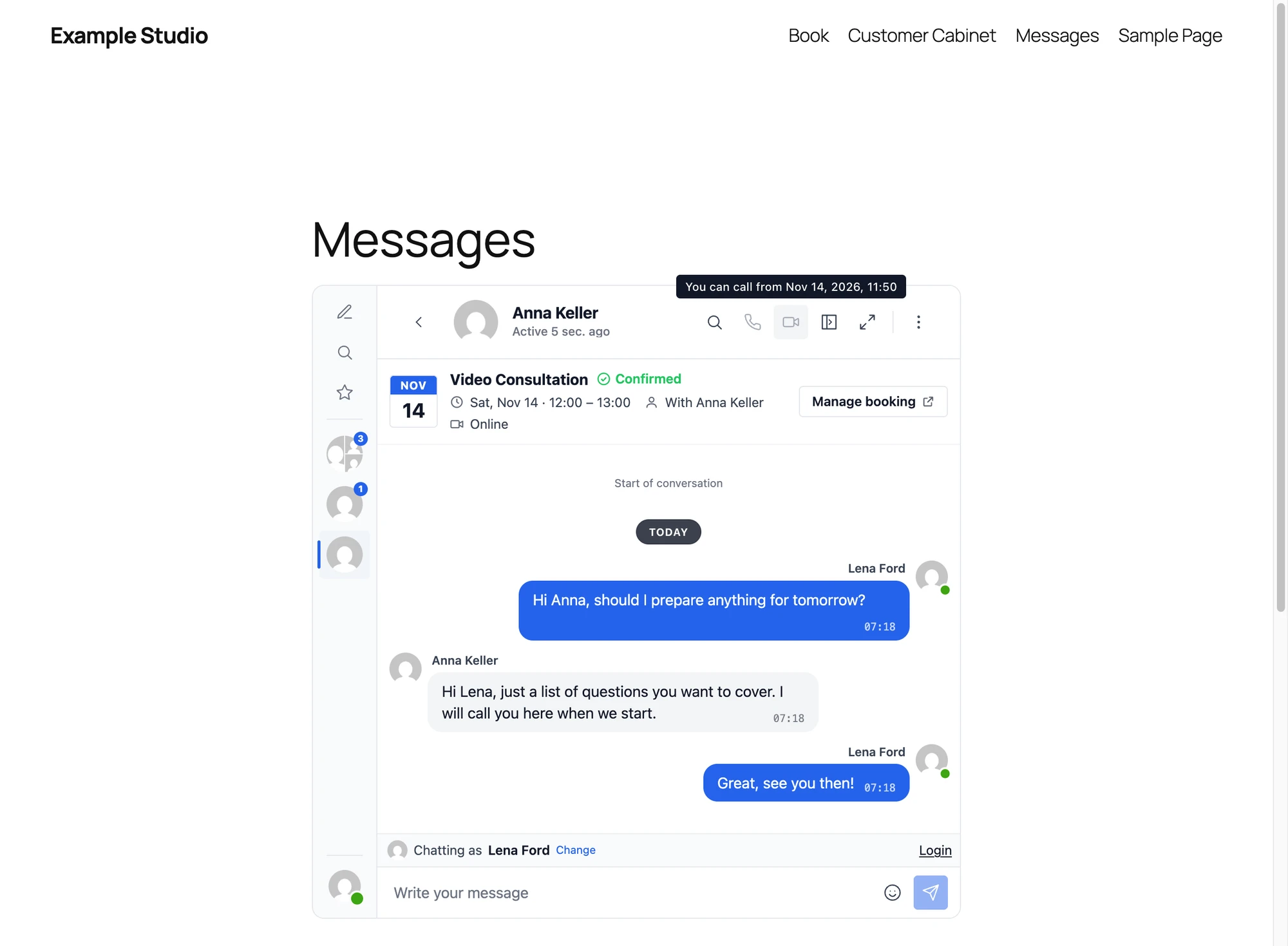
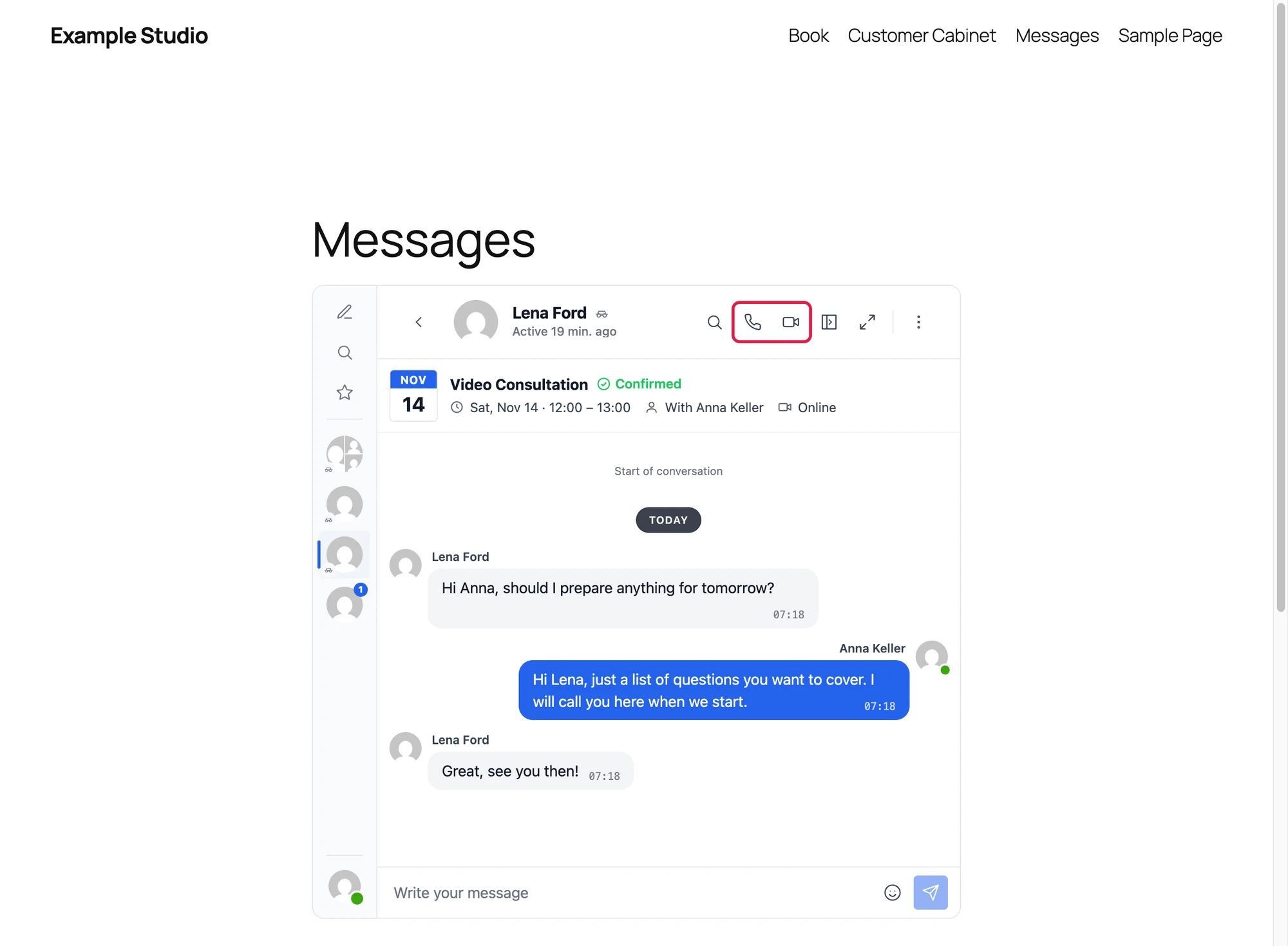
Every booking conversation opens with a card of the booking:
- The day as a calendar leaf, with the month above the day.
- The service and the status beside it, as an icon and a word in its colour: Confirmed with a check, Pending with an hourglass, Cancelled with a red cross, Completed or No show in grey.
- The time from start to end, With and the name of the agent, and Online or the location.
- For a recurring series, how many dates it has, and for a booking of several people, how many places it holds.
- For the customer alone, a Manage booking button that opens the LatePoint customer cabinet.
The card shows the time in the time zone of the reader, so it can differ from the time in the emails and pages of LatePoint, which use the time zone of the site. In the figures below the reader is two hours ahead of the site.
The customer sees the conversation with the agent. A customer who came by a signed link chats as a guest, under the name of the booking.

The agent finds every booking conversation in the Better Messages inbox, with the same card without Manage booking, and can call at any time.

When a booking moves or is cancelled#
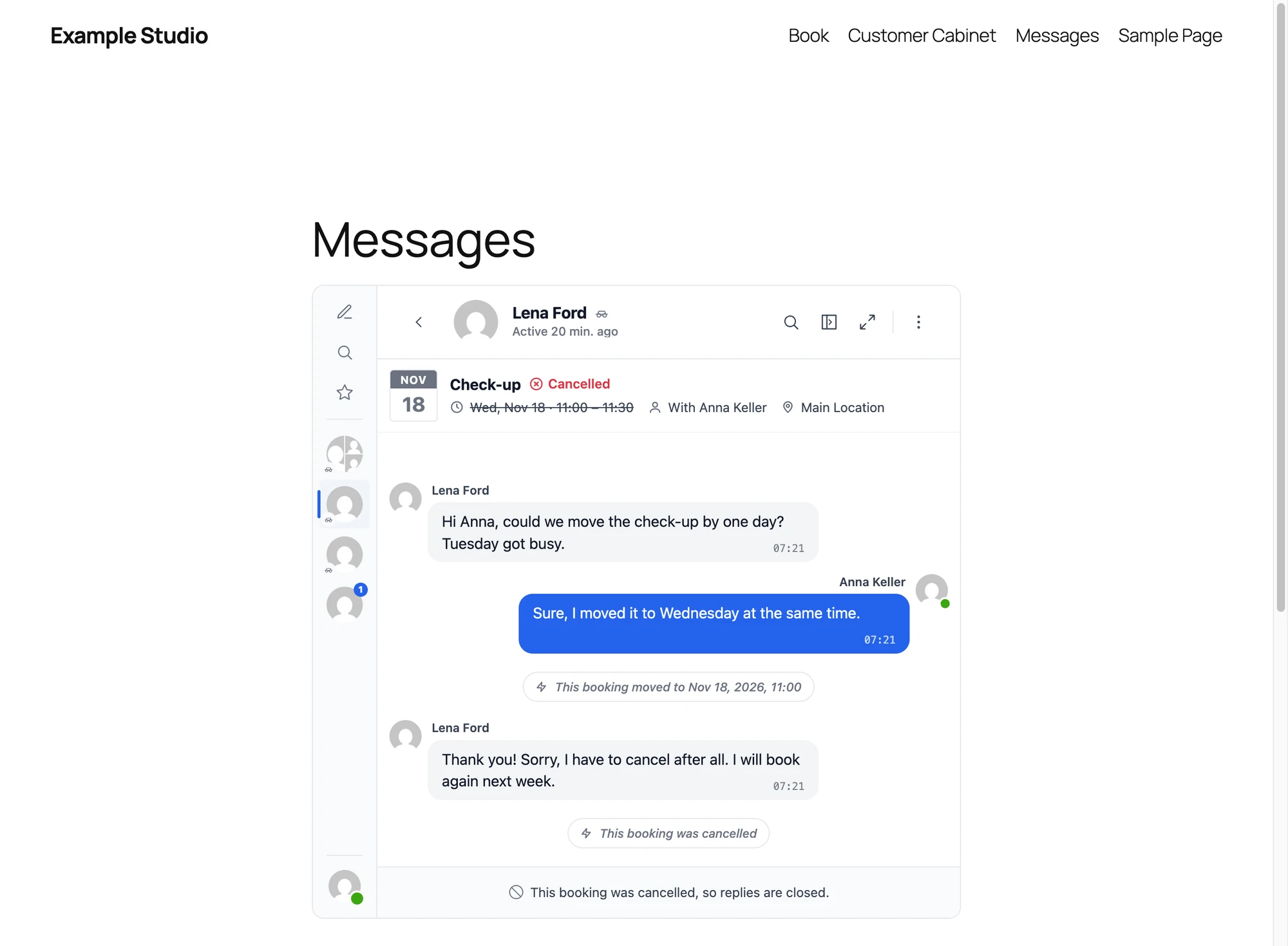
When the booking moves to a new time, the conversation gets a notice with the new time, such as This booking moved to Nov 18, 2026, 11:00. When it is cancelled, it gets This booking was cancelled, the card says Cancelled in red with the time struck through and the calendar leaf greyed, calls are closed, and replies are closed with This booking was cancelled, so replies are closed. The messages stay readable for both sides. A booking that goes from pending to approved gets This booking was approved, and its card turns to Confirmed.
A conversation that is open at that moment changes at once, with no reload: the card, the call buttons and the closed replies.
For a recurring series the notices name the date that changed: The booking of one date moved to the new one, or The booking of that date was cancelled. Approving each date posts nothing.
The notices count as unread messages and reach the members as messages do. They go only into a conversation that exists: a booking nobody has written about stays without one.

Calls around the booking#
In the WebSocket version a booking conversation of two has the audio and video call buttons of Better Messages, with a window for the customer:
- The customer can call from Calls Before the Start minutes before the start (10 by default) until the end of the booking. Outside that window the buttons stay, greyed, and say You can call from with the time in the time zone of the customer, or This booking has ended, so calls are closed. They light up at the minute the window opens, with no reload. The server refuses a call outside the window too.
- The agent, and the support user, can call at any time.
- A cancelled booking has no calls.
The call link of the emails ({{bm_call_url}} and {{bm_call_meeting_url}}) opens the conversation and starts the video call. Opened before the window, it opens the conversation and says why the call cannot start yet.
Video and audio calls must be on under Better Messages → Settings → Calls. When both are off, the Bookings card says so under Calls Before the Start.
Group bookings#
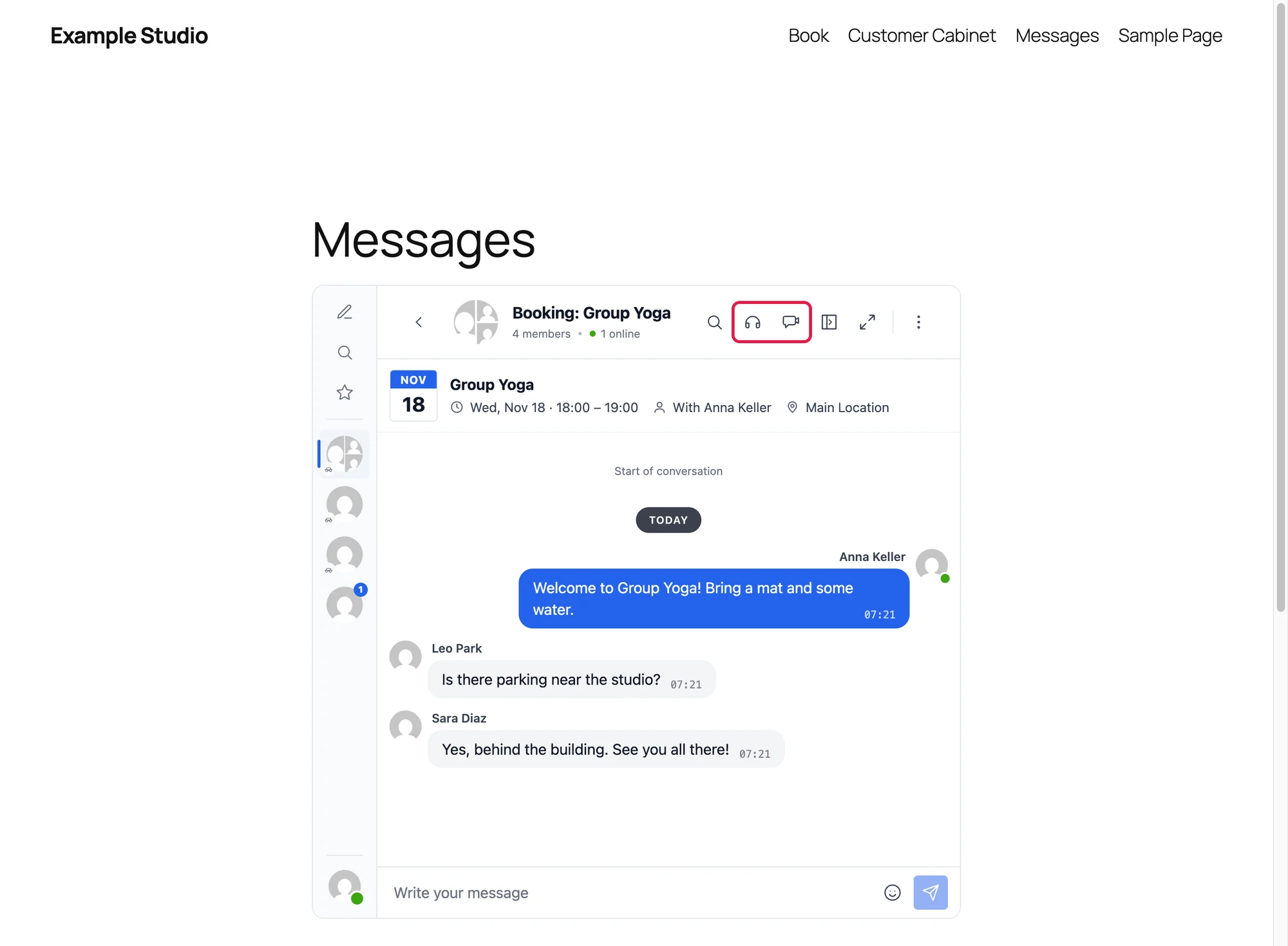
A service whose capacity is more than one customer makes a group slot: the bookings of the same service, agent, location and time share one group conversation, named after the service, with the agent and every customer booked on it. A LatePoint event has one group conversation for its registrations.
- Customers join when they book and leave when they cancel. A customer whose booking moves to another time leaves the old slot and joins the new one.
- A group booking has only its group conversation. A customer who wants to talk with the agent alone writes to them from the messenger.
- With Group Video Calls or Group Audio Calls on, the group conversation has group call buttons. Group calls have no window.
- The card of a group conversation shows no status, as each customer in it has a booking of their own, and no Manage booking button.

Frequently asked questions#
Does it work with the free LatePoint?#
Yes. The conversations, the email variables and the Message button of the customer cabinet work with the free LatePoint. A few things depend on what your LatePoint lets you set: a service capacity above one (for group slots), recurring bookings and Connect to WP User for agents come with LatePoint Pro. The figures on this page were taken with LatePoint and LatePoint Pro.
Do customers need an account?#
No. A customer who books with only an email gets signed links in the booking emails and chats as a guest. The guest chat setting of Better Messages can stay off: the signed link lets in only the customer of that booking. While it is off, such a customer gets the messenger on the Messages page and wherever it is placed with a shortcode, but not the mini widgets, the mini chats or the floating chat button on the other pages. A customer who books with a WordPress account opens the conversation with their account.
Does the agent need a WordPress account?#
It is best to connect each agent to a WordPress user with Connect to WP User on the agent form of LatePoint Pro, so the agent answers in person. An agent without one is stood in for by the Support User, shown under the name of the agent.
Do I need Zoom or Google Meet for online appointments?#
No. With the WebSocket version, Video call is a video meeting system of LatePoint, and the call runs inside the conversation of the booking, in the browser of each side.
When is the conversation made?#
The first time the customer or the agent opens it, from an email link, the Message button or the inbox. Nothing is made for a booking until then.
Does a recurring booking get a conversation per date?#
No. All dates of a recurring series share one conversation. The card shows the next date and the number of dates, and the call window follows the next date.
See also#
- Amelia integration — chats and calls for Amelia appointments and events
- FluentBooking integration — chats and calls for FluentBooking meetings
- Simply Schedule Appointments integration — chats and calls for SSA appointments
- Video calls — how calls work in Better Messages